This blog runs on SubText. I heart SubText. I know there are others out there but for me SubText has met most of my needs. And when it hasn’t I modify it. Which brings me to this post. There was a thread on an email list I belong to about Windows Live Writer (I heart Live Writer too :-)) and categories (adding new categories on the fly). This got me to crack open the source and hunt. Alas, there was no support for this. I’ve been ranting about WordPress API support for SubText on the developer list and I think if I rant one more time it will probably get assigned to me. Please keep in mind that my modifications were solely intended to make Live Writer the best tool for me…these are targeted at Live Writer functionality and may/may not add value to other areas of functionality. So on with the show…
The Slug
One of the features in SubText is the ability to auto generate URLs based on the title of the blog post. Well, I didn’t like that. I usually want my URLs to be a slight derivative of the URL. My workflow, then, has been to post as draft, go to the web interface, change and then enable the syndication. I am sick of doing that. So let’s start with that first. You see in blog terms the end part of your URL in called a “slug.” SubText calls this a ‘friendly url’ and other engines may call it something else. Here I’m going to call it a slug. My colleague Jason Mauer has a custom blog engine he uses where he’s implemented almost every blogging API in his set. I’ve been geekly jealous of his API for some time…now it is time to change that.
I’m not going to go into the philosophical reasons why I want a different URL slug and why I want different ones. We can debate that over a Mt. Dew some time if you’d like.
SubText uses the MetaWeblog API by default. The developers chose to implement the spec of MetaWeblog (as they should have) and thus the slug is not a part of the newPost spec and the Post struct used to identify the structure of a post. So my modification was a few steps. If you are familiar with the latest source (1.9.5b) of SubText, I’ll be referring to line numbers in there. First, I had to modify that Post struct for the MetaWeblogAPI implementation. Now some may shirk that this is a no-no…and I might agree…so if modifying something that isn’t going to conform to a spec that really isn’t full anymore, then move along. I modified about line 63 and added the following:
public string wp_slug;
I actually could have used wp_slug or mt_basename, both of which mean the same thing and both of which are sent to the API by Live Writer…so I just picked one. Now my struct has the information when it passes it along for creation/edit of the post via Live Writer.
The next step was to modify the implementation of the post. In MetaWeblog.cs at about line 234 I added:
if (!string.IsNullOrEmpty(post.wp_slug))
{
    entry.EntryName = post.wp_slug;
}
I also added this to the editPost method to ensure compatibility on edit.
The final step was to modify my wlwmanifest.xml file to announce to Live Writer that I now support this feature. This is done by adding to the <options> node of this manifest:
<supportsSlug>Yes</supportsSlug>
Then do a refresh of the account settings in Live Writer. When you do that, in a new post click the little ‘up’ arrow just underneath the editing area and you should now see a Slug field:
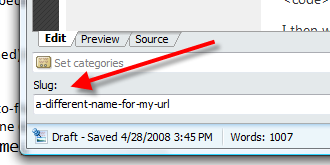
Now I don’t have to post a draft and login to change!
New Categories
The thread actually started with wanting to create new categories during a post. SubText is one of the engines that doesn’t expose this API directly just yet, so some altering had to be done. Here’s what I did. I chose to mirror the WordPress newCategory method to do this.
First I added IWordPressApi.cs to Subtext.Framework.XmlRpc. The complete code within it is:
using System;
using CookComputing.XmlRpc;

namespace Subtext.Framework.XmlRpc
{

    public struct WordpressCategory
    {
        public string name;
    }

    public interface IWordPressApi
    {
        [XmlRpcMethod("wp.newCategory",
            Description = "Adds a new category to the blog engine.")]
        int newCategory(
          string blogid,
          string username,
          string password,
          WordpressCategory category);
    }
}
I then went into MetaWeblog.cs and implemented that interface with:
public int newCategory(string blogid, string username, string password, WordpressCategory category)
{
    LinkCategory newCategory = new LinkCategory();
    newCategory.CategoryType = CategoryType.PostCollection;
    newCategory.Title = category.name;
    newCategory.IsActive = true;
    newCategory.Description = category.name;

    newCategory.Id = Links.CreateLinkCategory(newCategory);

    return newCategory.Id;
}
I chose to ignore the slug/description fields (again, thus ignoring the spec which isn’t ideal) at this time, partly because I was getting errors and partly because I decided that I didn’t need them anyway. I don’t use the description field in categories in SubText, so I just set the description to also be the title. I also had to modify the wlwmanifest.xml file with:
<supportsNewCategories>Yes</supportsNewCategories>
and refresh my Live Writer account profile to pick up the changes. The result is now my category options in Live Writer include an “add” feature:
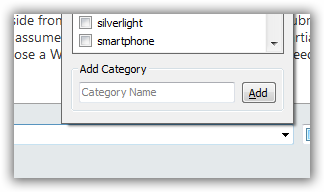
Done with both of those.
Future Posting
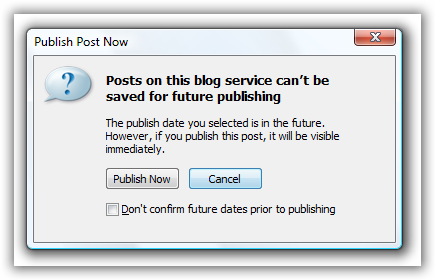
This is something I started to look at and added the information to the MetaWeblog API, but it seems that SubText doesn’t filter out future posts in the UI – or at least my quick scan didn’t reveal it did. I’ve moved on away from this one since I don’t future post right now, but I’ll come back to it in a while. What I did do, however, to prevent me from thinking SubText supported this was modify my wlwmanifest.xml file to include this definition in the options:
<futurePublishDateWarning>Yes</futurePublishDateWarning>
This way at least if the idiot in me *thinks* I can do it, Live Writer will warn me.
So that’s it! These little adjustments make my Live Writer + SubText experience AWESOME. Live Writer truly is one of the best tools Microsoft puts out (aside from Silverlight of course). I’m going to submit these modifications to the SubText team and see what sticks. I assume none will since they are admittedly partial. But I’ve been suggesting on the dev list that SubText expose a WordPress API and I have a feeling I’ll need to start working on that for the team.
Hope this helps some of you!
