If you are doing Silverlight development, you are no doubt slapping in the <object> tag or using the <asp:silverlight> control (if in ASP.NET) to host your Silverlight content/application.  This is all great, but don't forget about deployment!

When I talk about Silverlight I like to relay a story I heard from one of the Silverlight program managers (PM) a while back.  The PM was pretty excited about a feature just completed in Silverlight and one of the samples that had been created.  He went home to show his wife and told her to 'go to 'dub-dub-dub-dot-something-dot-com' (yelling from the other room of course) and to tell him what she thought.  After a long pause of a few minutes he shouted back 'what do you think?'  Her response: 'It's lame.'  He was no doubt offended until he walked up to her machine and on the screen saw this:

Silverlight Install Image

The Problem

You see, 'Get Silverlight' means nothing to your mother-in-law (or wife in this matter).  Technology means nothing to non-geek users.  Content is king.  And to your non-savvy users (and even your savvy ones), leaving this default experience isn't a wise one.  It doesn't convey that there is anything of value by installing something they might not have.  It doesn't even convey what the action is going to be when they 'Get Microsoft Silverlight.'  Leaving this experience unchecked leaves your users in the dark as well as a reputation rank downward in my opinion.

NOTE: This site is likely riddled with these badges as seen above.  I'm claiming exempt status because they are samples :-).

While in Silverlight 1.0 creating a great install experience was possible, Silverlight 2 makes that process so much easier.  In Silverlight 1.0, the use of the silverlight.js file could aid in detection and direction to an alternate experience.  This method is still possible in Silverlight 2, and in fact might be a best practice still.  Most interactive developers using Flash use some method of script creation in instantiating the Flash host.  This is mostly due to the IE EOLAS "click to activate" issue that has been resolved and will remedy in an upcoming IE update.

Some Solutions

So that brings a few methods for instantiating the Silverlight control host.  You can still use a script method to do the check for you and provide alternate content or redirect to something.  You can also still simply include the <object> tag itself.  My favorite is using the simple <object> tag and tricking the HTML.  You see an object tag might look like this:

<object type="application/x-silverlight-2-b1">
    <param name="source" value="ClientBin/CallingServices.xap"/>
    <param name="onerror" value="onSilverlightError" />
    <param name="background" value="white" />
    <div id="no-sl" class="install-badge">Some descriptive information</div>
</object>

Notice the random HTML after all the params?  Browsers will read the HTML like a book (US-English) from top to bottom.  They get to the object tag and can't understand it, so will look at the next part of the DOM.  Param tags...nope don't get it.  Next part.  Oh, a <div> element...yep I understand...begin render.

Within here you can put an image or some element with a CSS class that is absolutely positioned, etc.  Bottom line is you own that experience.  It is now on you, the developer, to ensure that your users aren't just seeing 'Get Silverlight' but are being provided at least some explanation of what they are about to see, why they should install this plugin, etc.

Some Examples

Perhaps you need some inspiration?  Here's some examples from some recent sites...


Silverlight.net Gallery


Zombomatic Game on Miniclip.com


WWE Insider Video


Hard Rock Memorabilia Site


65th Annual Golden Globes


Major League Baseball Video

As you can see, the options are endless from very simple, to heavily branded. 

Testing your deployment experience

So now that you've decided you are going to optimized that "no Silverlight" experience, how do you go about testing it?  Well, here's a simple trick that I employ to do this.  There is no need to uninstall/re-install the runtime on your machine.  In fact, this will likely give you headaches in doing so and waste endless minutes :-).  Here's a simpler way.

In Internet Explorer you have the ability to manage your add-on experience.  To test your "no Silverlight" experience, simply do the following.

To make it easier go to a page with Silverlight content.  You can do this without this step, but it will cost you 2 extra clicks and I'm trying to save you time.

Next, go to Tools...Manage Add-ons...Enable or Disable Add-ons:
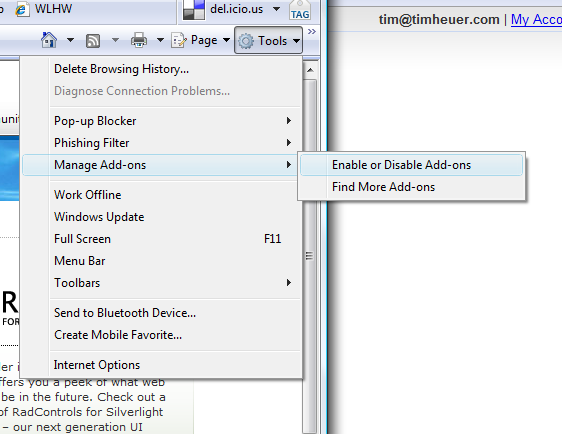
Now, find Microsoft Silverlight in the Enabled section and change the radio button to 'Disable' and click OK. 
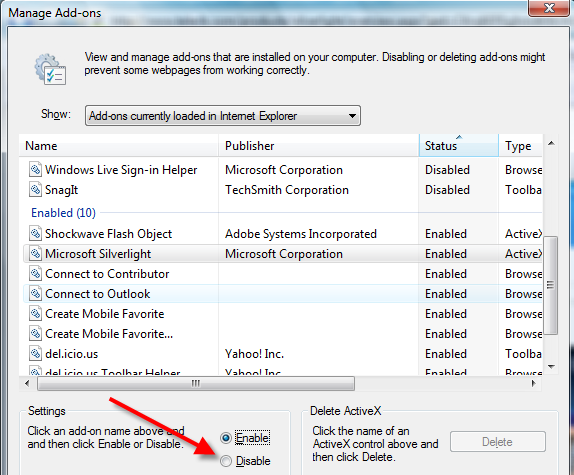
You will be prompted with a message which you can just click OK through.  The page will be refreshed and the Silverlight plug-in no longer enabled.  Now any site you visit will give you the "no Silverlight" experience for you to test your deployment experience.  When you want to re-enable, simply repeat the process and choose 'Enable' and you are back in business.  No messy control panel uninstall/re-install mess.

I'm not a Firefox power user and couldn't find an easy way to do this rapidly without installing another plugin, so if anyone knows the similar method in Firefox, please enlighten me (or Safari for that matter).  I tried searching and found solutions of moving the plugin out of the /plugins folder in Firefox so I'd imagine you could batch script this out.  I really like the ease that Internet Explorer provides in managing my own preferences for each add-in running.  Looks like this gets even better in IE8.  I'm actually surprised it isn't a part of Firefox.

Summary

The bottom line is: don't ignore this experience.  This is your chance to explain that the user is about to see premium content, a better user experience, a fun game, whatever it is you are trying to convey.  I hope this has helped at least some be enlightened on ensuring you make that a work item in your task list and the tip of disabling the add-in is helpful to some. 
One of The Code Trip sponsors, InnerWorkings, has teamed up to have a coding challenge for developers.  This is open to everyone to participate.  The winner gets an annual subscription to InnerWorkings as well as an XBOX 360 game console.

If you aren't familiar with InnerWorkings, consider this a shameless plug.  I really do believe in their product as it is a unique learning experience from what we traditionally have (i.e., lab manuals with step-by-step instructions).  They have a wide catalog of topics including ASP.NET, WCF, WPF, , CSS, etc. for organizations to choose from.  You really need to check them out if you haven't before.

All the details are available on The Code Trip web site recent post.  Head over there for information on InnerWorkings and the information on the contest.

In a previous post, I wrote about some samples of calling various types of services from Silverlight 2.  In the code, I was using constructors in my ASMX and WCF services with specifying a binding type and endpoint address.

It was called out to me that in other demonstrations, people did not use this construct.  While the method I demonstrated works (explicitly specifying the binding and endpoint), in some cases it may not be necessary.  One such case would be if you only have one endpoint and it is basicHttpBinding.

The error in my code/instructions was about changing the binding information in web.config.  The information is correct, however I wasn't clear on when/what you needed to do.  For example, the default information in web.config for the Silverlight project created for you uses wsHttpBinding.  If you add a service reference in your Silverlight project PRIOR to changing that binding information, your generated proxy will require you to specify a binding and endpoint as Silverlight doesn't support wsHttpBinding and it would be trying to use that as a default method.

So the appropriate way is to change the binding type in your web.config FIRST.  Then generate the service reference in your Silverlight application and your proxy code generated will then allow you to new up the service using:

WcfServiceClient wcf = new WcfServiceClient();

for both WCF and ASMX services...which is probably more familiar to most web developers implementing services in their applications.

Again, EITHER way is fine.  Providing no information in the constructor will use the default binding/endpoint information for that service, and if it isn't supported, you'll get a nasty exception.  Whether or not it is best practice to always explicitly call it out in your code is up to you.  I'd argue it is.  In looking at the code above do you know what binding/endpoint is being used at the time of the service call?  No.  You could make some reasonable assumptions (hey, I'm in Silverlight and I know I must use basicHttpBinding), but for maintainability, maybe someone else coming to the code doesn't have the same understanding.

To each his own.  Either way, I hope this clarifies and I've updated my post with the note about this as well.

If you are like me, you probably create a lot of projects in Visual Studio that end up getting thrown away and are intended just to test out a theory you have, double-check yourself when you are going mad because you can't find a bug, testing out something you read on a blog post, whatever.

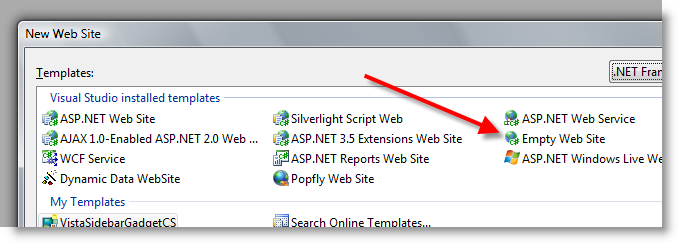
Most of the projects I create are web projects.  I've started to adopt the "_Delete" mechanism to help me identify what I can truly delete in my folders later.  But is not the point here.  One thing that I do when creating web projects is use the Empty Web Site template:

I choose this template because it is the cleanest...it's actually what it says it is: empty.  It allows me to really isolate things as I'm the one adding things in, not the IDE.  So I usually follow that up with a new WebForm to get an ASP.NET page in there.  I write some code then CTRL+F5 it to run.  The first thing I hit is a build error.  Can you guess what it is?

Here's the thing.  When you choose the Empty Web Site template, you literally get nothing...no web.config, no default pages, no references, nada.  Like I said, it is what it is: empty.  But herein lies the problem.  The WebForm item template doesn't know that.  The WebForm item template is shared with all the web template types, which generally would be fine.  Let's do some digging to find out why I get a build error.

The WebForm item template is located in %ProgramFiles%\Microsoft Visual Studio 9.0\Common7\IDE\ItemTemplates\CSharp\Web\1033\WebForm.zip.  This file contains the WebForm.aspx and code beside templates.  If you look at the CodeBeside.cs template within there you will see this line:

$if$ ($targetframeworkversion$ == 3.5)using System.Linq;

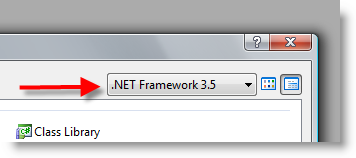
And there is the problem!  When I create a new web site, i'm using the .NET Framework 3.5 setting:

instead of any other target.  It makes sense because I'm doing 3.5 stuff anyway and I don't want to have to change it later.  But the problem is that the WebForm template now thinks that I already have web.config settings for LINQ, a reference, etc. and that is why I can't run...no references to System.Linq assemblies anywhere.

It's quite annoying for me, but I would imagine not most.  In talking with some product team folks, and I concur, people who choose the empty template are usually likely going to know what is up and make whatever changes needed.  Fair enough, but still slightly annoying only because I keep forgetting about it!

So since I find myself removing those using statements a lot, I decided to just change the template.  This, of course, is completely going to get overwritten any update in the future.  But for me, I think it made sense to remove them rather than to assume that I, the developer, will always be using LINQ in my web forms...which I'm not.  I'll choose to add it back in when I need!  So I simply removed the $if$ statements and I'm good to go.  I wish there was a way to say $if$ (3.5 && !empty)using System.Linq, but I'm okay with my minor change for me.

Anyhow, I thought I'd share this useless piece of knowledge as you might have come across it while checking out new development, tinkering with ASP.NET, creating shell web hosts, etc.  Hope it helps.

The MountainWest RubyConf 2008 is upon us just 2 weeks away in Salt Lake City, Utah.  Unfortunately I'm not going to be able to be there given my travel with The Code TripIronRuby, however, was able to be a sponsor of this year's conference as a Gold Sponsor.  This sponsorship is one part that enables video production of the conference for afterwards as well as a few other things.  The organizers have done a great job getting great sponsors to make this happen, and IronRuby is grateful to be a part of that.

One thing that was recently released was the Dynamic Silverlight support in Silverlight 2.  This enables Ruby (via IronRuby) to be the language that you can write Silverlight applications with.  I would have loved to be at MountainWest this year to demonstrate this as I think some Ruby developers doing web programming with Rails would find this interesting.  Essentially writing Ruby on the server and Ruby on the client (not Ruby translated to Javascript, but real Ruby).  That end-to-end language implementation I think might be interesting for some developers.  So in case I'm confusing the issue...IronRuby enables a developer to use Ruby as the scripting language in the browser using Silverlight as that bridge in the browser.  The Dynamic Silverlight site has the bits and John Lam's blog has a 3 part quick tutorial of implementation that you can check out.

I've been clamoring to get some Ruby in my Silverlight for a while and hope to post some samples of that scenario of using IronRuby in Silveright and Ruby on Rails on the server...anyone got a scenario that is common that you may want to see?