i'm very frustrated now.  the title says it all.  let me explain my scenario, tell you how i found out the problem and give you the suggested workaround from apple.

the setup

i have a few phones laying around, and being the gadget geek i am, i do have an iphone that i've been using lately.  my setup consists of syncing my iphone to my pc laptop for contacts/calendering and to my macbook for music/photos/movies/podcasts.  it is a simple setup really, and allows me to keep my work machine for work (i don't have music or anything on my work machine) and my home machine attached to my media storage libraries, etc. 

everything was running smoothly even though it is quite annoying to cable sync -- i wish over-the-air was possible.

my situation

i missed an appointment the other day.  i was on the road and didn't get an alert.  it wasn't a terribly important appointment (meeting a friend for lunch), but still i was embarrassed.  my memory is not that of an elephant and i rely on technology to keep my sane.  when i returned to my laptop i noticed that my appointment was on my calendar, but it wasn't synced to my phone.  weird.  i began investigating.

i did a few tests.  i restored the phone to factory default.  i did a one-way force sync on calendars.  i synced under a new profile.  i re-installed itunes.  i did everything the troubleshooting steps said to do, which by the way included an arrogant statement of basically asking me to uninstall any other add-on that i might have and that the itunes helper should be the only add-on enabledto work.  alas, a few appointments were still not syncing.  and then i looked closer and noticed a trend.

the appointments that were not syncing were meeting requests sent from other people.

i first thought 'holy crap, no meeting requests from other people at all are being synced' but that was not the case.  i could isolate it to meeting requests from other people but it was so sporadic that it was driving me insane.  so i began to research as best i can and then i resorted to calling support...something i did not want to do, but even us techies must admit we need help...and i exhausted all my knowledge.

i called support and was told the wait time was 5 minutes.  after a few minutes i was disconnected.  argh.  immediately my phone rang though and it was apple support apologizing for the disconnect and wanting to continue the case.  very good customer service!

i explained the situation to the agent and he began to search.  he pointed me to a knowledge base article explaining the problem and asked me to read it and if i'd follow the steps while he held on.  after browsing it i immediately saw this was not going to end well for me.

the problem (confirmed)

turns out that itunes/iphone will only sync calendar items that are explicitly of a certain message class (IPM.Appointment).

a message class is basically a template.  there are defaults and then developers who create add-ons can inherit from those templates and provide added functionality.

after following the steps i could see that the two appointments that i was testing with indeed were of type "IPM.Appointment.Location" and that i immediately realized my issue. 
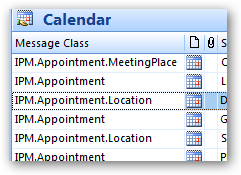
the agent explained that i'd have to manually alter the message class type to get them to sync. 

what?!

he further explained that this was a problem in outlook and i should contact microsoft.  um yeah, i really don't think it is a problem with outlook.  the template is the same.  i then discovered that what is happening here had nothing to do with MY add-ins, but rather the add-ins installed on the meeting organizer.  the ".Location" is indicative that someone has installed the Live Maps add-in for outlook.  it adds value to the appointment template.  but what is happening for me is that when THAT PERSON sends me a meeting request, it uses their template.  i as the end user don't see that of course (unless i follow the proposed apple steps) and thus i'm left baffled.  since i cannot control what someone sending me has on their computer, i, the apple end user am screwed.

i was then pointed to a microsoft knowledge base article explaining how to alter the message class.  okay, so let me get this straight...you want me to change my view in outlook to identify these items, then create a VBScript application to change them?  or better yet, USE A WORD DOC TO CHANGE OUTLOOK ITEMS (shame on microsoft for this one, yes that is actually the recommendation and provided template).  clearly none of this is passing the mother-in-law test.  i'm tech savvy and understand all this, but let us put this into layman situations. 

see jane.  see jane have an appointment.  see it on jane's calendar.  see jane sync.  no appointment.  see jane verify appointment exists on her calendar.  see jane confused why it is not syncing and no errors or warnings presented.

see dick.  see dick ignore that an item is on a calendar and not alert the user that there might be items that didn't sync because their developers are too lazy to figure out it is a base template and they can still get the information.  apple, don't be a dick.

so my workflow now suggested by apple went from: plug in iphone and sync to plug in iphone; sync; scan calendar to see what didn't sync; see items not syncing and verify their message class; change message class using a word doc; re-sync.  holy flippin poo man.  this is ridiculous.  seriously.  people write bad software (microsoft is not immune to this either), but when you see a problem and hear complaints, rectify it please.

the solution

sadly, the process in the word doc actually works well.  i just couldn't see myself using a word doc to do this all the time.  i took a cue from scott hanselman and took the vba code in the word doc and just imported it into an overall outlook macro.  here's what i did.

first:  download the word doc -- as lame as that implementation is, the code is already there for you with a good analyze tool as well.

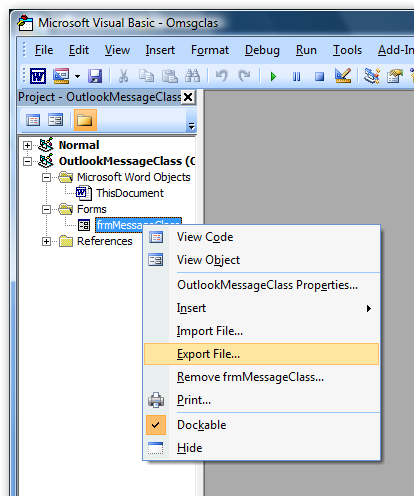
second:  open the doc and get to the visual basic editor (developer tab...if you don't see this you'll have to change your office settings to show the developer tab).  in the editor expand the forms section and choose export to file:
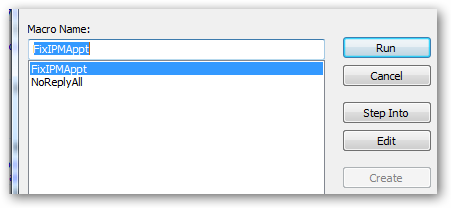
third:  open outlook and go to the tools menu, then choose macros.  create a macro (type a name and click create):
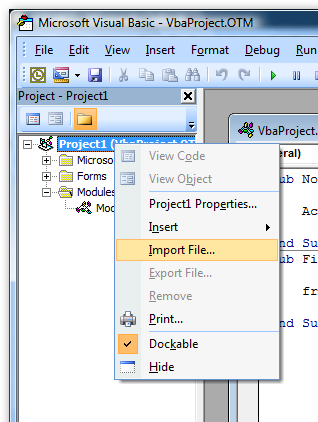
forth:  right click on the project and choose import file...point to the form you exported in step 2 above.  it should import no problems (or at least 'worked on my machine'):
fifth:  in the subroutine for the macro add this code (this assumes you kept the same form name):

frmMessageClass.Show

i implemented the rest by customizing my toolbar and pointing to the macro, so now i have a button on my toolbar that i can run:

and when i run it i get the functionality i need:
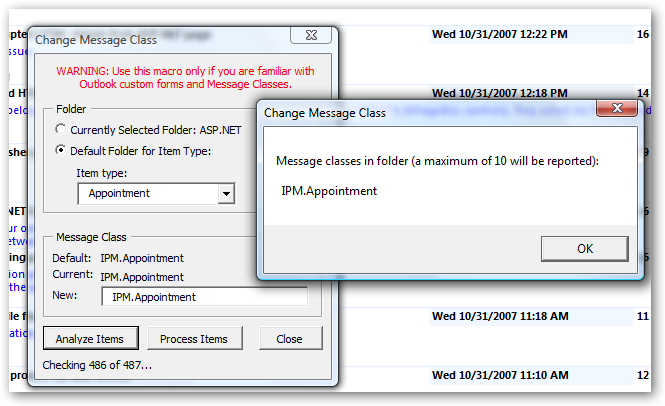
note in the picture above there is an 'analyze' button -- i highly recommend you use this first if you are having this problem.  the result of analyze will show you what is in the dialog to the right of it (i already cleaned mine up so it only shows the good stuff) and if you had any non IPM.Appointment items, they would show here...then you could clean them up.  the screenshot above shows the setting you would want (make sure it says "IPM.Appointment" and not the default of this tool "IPM.Appointment." [note trailing dot] -- i fixed this in my macro code after import and you could too).

when you run the tool it will change things appropriately and you can resync.  if you use this tool you will not need to change your views, etc. as recommended by the apple article.  so if you are running into this problem, make your voice heard.  add your comments to this thread, vote this thread useful and see if we can get support people to listen.  you can also submit a bug report (as i did) to the iphone feedback area.

i'm sure there will be some that argue this isn't a bug.  i'll vehemently disagree...as those arguing that will be geeks that understand the technical situation.  step back and put yourself in an end user shoe's -- you see it on your calendar and it ain't syncing -- and no errors.  i think even the tech would admit that hey, even if it is by design, you should alert the user to what didn't get synced and why.  the solution should be fairly simple.  instead of:

if (messageClass == "IPM.Appointment")

do

if (messageClass.contains("IPM.Appointment") {
  try {
    // sync and ensure elements are there
  }
  catch {
    // log to file to alert user after done
  }
}

c'mon apple, fix this.

my colleague kirk has been writing some articles for the AOL developer network.  his first articles are up and he talks about integrating with the , aol's developer api for video.  kirk does some integration with truveo's ajax api and displays information back in silverlight.

the first two parts are up, and the third is underway, planning on using wcf and managed code with REST services.

go check it out on kirk's site.

one of the things interactive developers sometimes (especially with new technologies like silverlight, flex, etc.) have to worry about is 'what if the end user doesn't have XYZ installed?' -- something that is likely going to be a question when implementing something so new like .

in silverlight, if the user doesn't have the plugin installed, they are presented with a 'get silverlight' badge.  it really doesn't explain much about *what* silverlight is, or what they'd be missing (i.e., interactive, rich content) if they don't install it.  to me, the default badge doesn't pass the mother-in-law factor test.  i first wrote about some ideas when the plugin came out (some of which are not valid anymore given the updated EULA).

well, now the product team has come out with a whitepaper on guidance of optimizing the silverlight install experience.  the whitepaper (some samples included) documents the various install methods (well, okay 2 install methods) and ways about making the experience to the end user be more seamless, namely ensuring the integrity of your site/brand are kept in tact.
one of the really good examples of this that i've seen is the WWE site.  if you don't have the plugin installed, they've done a really good job maintaining the integrity of the WWE brand while at the same time explaining the premium content they are trying to deliver and why you would want to install the plugin for their site.  the whitepaper explains similar guidance, is about 19 pages and like i mentioned: includes samples.  hopefully this will be a good resource to you all.  if you are working on a silverlight application, or extending your website to provide a richer experience, you need to be aware of this.

i hope this becomes a best practice to all!  you can download it here.

with the latest release of the maps.live.com site and virtual earth v6, there are some cool end-user features that you can take advantage of as well.  one of them is the ability to create a virtual tour of your collections (a collection is a group of waypoints you've saved in your profile.

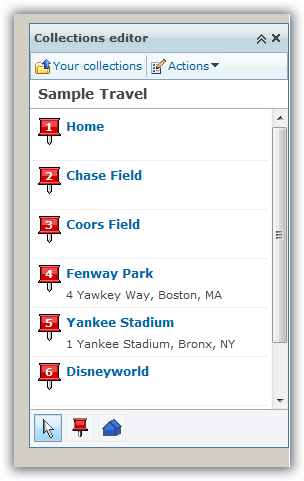
perhaps you have a collection of your favorite vacation spots, or your locations of your organization's offices, or your an individual speaker and want a virtual tour of your stops for some odd reason.  well now you can and there are a few ways to do it.  first, head on over to http://maps.live.com and sign in (not required, but is required to save a collection).  to create a collection, simply search for locations and then you'll have the option to "add to collection" which you would do.  i created a collection of places starting at my house, then to a few baseball stadiums, then to disney and vegas...c'mon, sounds like a great trip!  here's what it looks like:

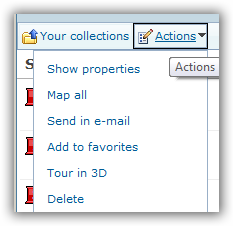
after i have a collection, i have a few options.  from the actions menu (of the collections pane) i can immediately do a tour in 3d:

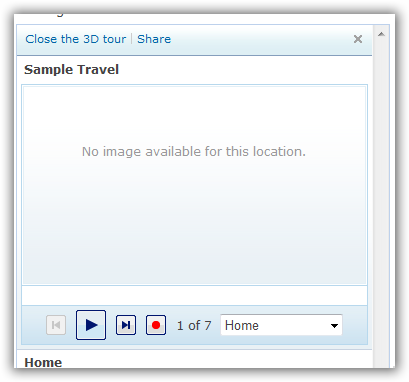
this uses the virtual earth 3d control, which is available as a download (free) for internet explorer and firefox.  when i choose that option, the 3d tour starts and my first point in my collection.  on the left side i now see a tour pane:

had i edited the properties of my waypoints with other metadata like a photo, notes, etc. they would have showed up in this area.  you may also notice the play and record buttons on the bottom of that area.  here's were some of the other sharing comes into play (note: i can click the share button to send someone an email link to the tour as well).  let's say i want a video of this location tour for youtube, soapbox or whatever...simple, use the new record feature to create a windows media video file of the 3d tour.  when you hit record, it starts the tour over.  now the recording takes considerably longer than the normal playback, but that is because it is recording the various frames and encoding at the same time to create the resulting file.

when completed, you'll see that you have a completed file.  you can now post this wherever you'd like.  for example, here's my tour using (note: i've realized you just have to let your machine record...some of mine seemed to have got screwed up by me doing other activities -- and the titles are automatically added based on the waypoint titles):

pretty cool new feature i think provided by virtual earth and the live platform.  go forth and create.

last week i was at a team meeting in a town called bodega bay (near the area where scenes from the birds were filmed).  it is about an hour or so north of san francisco.  a nice little town, but my most enjoyable moment were the louisiana hot oysters i had on the last night...mmm...tasty.  ok, back on track.

i had not thought ahead and accidentally (well at the time purposefully) made my return flight reservations for 06:00 AM from SFO international.  yeah, do the math.  that means i would have had to leave bodega bay, oh at 03:30-ish in the morning to drive to SFO and make it there in plenty of TSA approved time.  yeah, wasn't looking forward to that.  so my comrade anand offered for me to crash at his place the night before in the city.  sweet, i'm in.

about half way through the last day of our meeting, anand emails me an invite with the note "want to geek out tonight in the city" which intrigued me of course.  the invite was for a 'spontaneous drinking event' at a bar in the city.  those that know me, know that i don't drink, but i was still wanting to go see what this event was all about...after all it was the city!  oh yeah, and the event was organized via facebook completely.

House of shields

we rolled in and headed to the house of shields bar in the city (roughly 2nd and market).  it was a nice little bar, but one of those places that you wish could hold a lot more people.  it was a bit narrow, but had that really cool old bar vibe to it.  took me a while to get the bartender over to my side and i'm sure he was extra pissed that i only asked for a glass of water...hey, i still tipped him!  i strolled around a bit and was introduced to a few people.  one of them was terry chay, of lunch 2.0 and cindyb.  terry is a very nice guy with an obvious interest in other people as well as photography.  terry was walking around with a digital camera from leica.  it was unique looking in that it was  digital SLR that was so thin it was amazing.  i got a lesson on who leica was as a company and how this camera operated making use of different mirrors rather than more elements and straight-on lens reflections.  terry was very kind to let me take some shots and mess around with it.

i talked with some more people about a few things and had some great mini-conversations (wasn't there long).  someone came up and asked me about operating system things, etc. and we discussed what we did/didn't like about vista, osx, etc.  it was one of the rare tech conversations going on in that detail.  even the bar owner was walking around and mingling.  he wasn't behind the bar, he was in front of it...getting to talk with his customers, being a part of the action...and pitching some of his own ideas to these young entrepreneurs.

and that is just it.  between every other word being 'facebook' it dawned on me the buzz that is the 'bay area' and the encompassing energy in the tech world that exists.  the bar (occupancy limit 49, attendance 75+) was filled with 20-somethings and lower 30-somethings, all with incredibly high energy, filled with ideas, and stinking of entrepreneurial aromas.  it wasn't about bits and bytes, but rather ideas and connections.  the collision of thoughts and intersects of partnerships.  in the hour or so i was there, i desperately wanted to be a part of that.  sure, there are user groups, but after that user group meeting is over, do the conversations continue with such passion?  the bay area has that passion...everywhere.  c'mon arizona, where is this passion?  where are the new and innovative ideas?

i was thankful to have felt that energy for a while that night...oh and if you live in the bay area...did i mention we are hiring? :-)

thanks also to anand who has a bitchin' pad in the city...ahh to be young and single...