In an email dialog today I saw someone asking how he could use an existing Encoder 2 template for existing media or streaming URIs when you don’t have something to encode.  After a few explanations, he replied that someone should blog this – and I agree :-).

So what did he mean?  Well, when you use Expression Encoder, you are typically going to be encoding media to a format to consume.  Encoder also gives you an additional option in the output settings to generate a media player for that encoded content.  These are all based on templates that I’ve previously written about that are available in the product as well is the source code for you to extend.

But what if you have a media file that doesn’t need encoding or you have a streaming URI and you don’t need to encode anything, but want the player?  To some it might not be so obvious so let me try to walk you through the steps.

You need the player

First you need the player.  The XAP that is, of the template you want to use.  There are essentially two ways of going about getting this:

    1. Getting the MediaPlayerTemplate.xap file from an existing output you already did (that used the same template you want)
    2. Building the XAP using the source of the templates and building it from scratch (requires .NET compiler or Visual Studio)

Obviously if you have the XAP of your desired template, you are ready to proceed.  If you don’t, then you’ll need to proceed to step 2.  Here’s what you’ll do:

Building the Player

First, find the template you want.  These are located in C:\Program Files\Microsoft Expression\Encoder 2\Templates\en (note: if you are on 64-bit or a different language, this path may differ slightly).  Within here you’ll see a list of templates by name.  Find the one you want and within that folder there is a Source directory.  That’s what you want.  I highly recommend actually moving the source files to a different place rather than edit directly in the templates directory.  There is a Visual Studio 2008 solution/project file in there and you can open it up and compile. 

As long as you are in there…

If you don’t need all the features of the template (i.e., Adaptive Streaming, etc) consider reading James Clarke’s post on removing some of those references and still creating the same template, but with reduced functionality.

Once compiled (remember to choose the right configuration - i.e., Release, Debug - for your needs), you’ll have in the Bin directory of that project the MediaPlayerTemplate.xap file you need. 

Passing parameters

So how can you compile the player template without media?  The Encoder 2 Silvelright 2 templates are completely parameter driven.  If you notice in any existing encoded project output (look at the default.html file generated) you’ll see the object tag used to host the player.  It may look something like this:

   1: <object data="data:application/x-silverlight-2," type="application/x-silverlight-2" width="100%" height="100%">
   2:     <param name="source" value="MediaPlayerTemplate.xap"/>
   3:     <param name="onerror" value="onSilverlightError" />
   4:     <param name="initparams" value='autoplay=True,autoload=True,enablecaptions=True,muted=False,stretchmode=0,displaytimecode=False,playlist=&lt;playList><playListItems><playListItem title="Moonlight%201.0%20Install%20on%20OpenSuse" description="Screencast%20of%20Moonlight%20install%20on%20OpenSuse.%20%20Virtual%20image%20provided%20by%20http://susestudio.com." mediaSource="MoonlightInstall.wmv" adaptiveStreaming="False" thumbSource="" frameRate="14.9669006991039" width="800" height="600" ><chapters><chapter  position="9.674" thumbnailSource="MoonlightInstall_9.674.jpg" title="Silverlight%201.0%20Chess%20playback%20from%20Vertigo" /><chapter  position="13.967" thumbnailSource="MoonlightInstall_13.967.jpg" title="Standard%20Silverlight%20installer%20integrates%20with%20Moonlight%20install%20links." /><chapter  position="18.058" thumbnailSource="MoonlightInstall_18.058.jpg" title="Firefox%20first%20nag%20message%20to%20protect%20user%20from%20web%20installs." /><chapter  position="20.784" thumbnailSource="MoonlightInstall_20.784.jpg" title="Second%20Firefox%20nag%20message%20(plugin%20message%20from%20trusted%20sources)" /><chapter  position="24.543" thumbnailSource="MoonlightInstall_24.543.jpg" title="Plugin%20installation%20complete%252C%20Firefox%20restart" /><chapter  position="32.055" thumbnailSource="MoonlightInstall_32.055.jpg" title="Silverlight%201.0%20Chess%20now%20working%20with%20Linux/Moonlight" /><chapter  position="43.801" thumbnailSource="MoonlightInstall_43.801.jpg" title="Video.Show%20from%20Vertigo" /><chapter  position="46.675" thumbnailSource="MoonlightInstall_46.675.jpg" title="Launching%20a%20media%20player%20in%20Moonlight%20for%20first%20time" /><chapter  position="48.334" thumbnailSource="MoonlightInstall_48.334.jpg" title="Microsoft%20Media%20Pack%20(codecs)%20prompt%20for%20install" /><chapter  position="51.249" thumbnailSource="MoonlightInstall_51.249.jpg" title="Media%20Pack%20EULA" /><chapter  position="60.051" thumbnailSource="MoonlightInstall_60.051.jpg" title="Re-launch%20media%20player%20with%20Media%20Pack%20installed" /><chapter  position="71.010" thumbnailSource="MoonlightInstall_71.010.jpg" title="HD%20media%20playback%20via%20Moonlight%20on%20Linux" /><chapter  position="72.490" thumbnailSource="MoonlightInstall_72.490.jpg" title="Fullscreen%20mode" /><chapter  position="76.138" thumbnailSource="MoonlightInstall_76.138.jpg" title="Bubblemark%20application%20on%20Moonlight" /></chapters></playListItem></playListItems></playList>' />            
   5:     
   6:     <a href="http://go2.microsoft.com/fwlink/?LinkID=124807" style="text-decoration: none;">
   7:          <img src="http://go2.microsoft.com/fwlink/?LinkId=108181" alt="Get Microsoft Silverlight" style="border-style: none"/>
   8:     </a>
   9: </object>
  10: <iframe style='visibility:hidden;height:0;width:0;border:0px'></iframe>

Notice the initParams option?  If you aren’t familiar, you can send Silverlight 2 applications parameters using this method.  There’s a video walk-through on using initParams you can view on the Silverlight community site.  The key area here (among the other options) for media URIs is the playlist parameter.  Singling that one out you’ll see the structure looks like this:

   1: <?xml version="1.0" encoding="utf-8" ?>
   2: <playList>
   3:   <playListItems>
   4:     <playListItem title="Moonlight%201.0%20Install%20on%20OpenSuse" description="Screencast%20of%20Moonlight%20install%20on%20OpenSuse.%20%20Virtual%20image%20provided%20by%20http://susestudio.com." mediaSource="MoonlightInstall.wmv" adaptiveStreaming="False" thumbSource="" frameRate="14.9669006991039" width="800" height="600" >
   5:       <chapters>
   6:         <chapter  position="9.674" thumbnailSource="MoonlightInstall_9.674.jpg" title="Silverlight%201.0%20Chess%20playback%20from%20Vertigo" />
   7:         <chapter  position="13.967" thumbnailSource="MoonlightInstall_13.967.jpg" title="Standard%20Silverlight%20installer%20integrates%20with%20Moonlight%20install%20links." />
   8:         <chapter  position="18.058" thumbnailSource="MoonlightInstall_18.058.jpg" title="Firefox%20first%20nag%20message%20to%20protect%20user%20from%20web%20installs." />
   9:         <chapter  position="20.784" thumbnailSource="MoonlightInstall_20.784.jpg" title="Second%20Firefox%20nag%20message%20(plugin%20message%20from%20trusted%20sources)" />
  10:         <chapter  position="24.543" thumbnailSource="MoonlightInstall_24.543.jpg" title="Plugin%20installation%20complete%252C%20Firefox%20restart" />
  11:         <chapter  position="32.055" thumbnailSource="MoonlightInstall_32.055.jpg" title="Silverlight%201.0%20Chess%20now%20working%20with%20Linux/Moonlight" />
  12:         <chapter  position="43.801" thumbnailSource="MoonlightInstall_43.801.jpg" title="Video.Show%20from%20Vertigo" />
  13:         <chapter  position="46.675" thumbnailSource="MoonlightInstall_46.675.jpg" title="Launching%20a%20media%20player%20in%20Moonlight%20for%20first%20time" />
  14:         <chapter  position="48.334" thumbnailSource="MoonlightInstall_48.334.jpg" title="Microsoft%20Media%20Pack%20(codecs)%20prompt%20for%20install" />
  15:         <chapter  position="51.249" thumbnailSource="MoonlightInstall_51.249.jpg" title="Media%20Pack%20EULA" />
  16:         <chapter  position="60.051" thumbnailSource="MoonlightInstall_60.051.jpg" title="Re-launch%20media%20player%20with%20Media%20Pack%20installed" />
  17:         <chapter  position="71.010" thumbnailSource="MoonlightInstall_71.010.jpg" title="HD%20media%20playback%20via%20Moonlight%20on%20Linux" />
  18:         <chapter  position="72.490" thumbnailSource="MoonlightInstall_72.490.jpg" title="Fullscreen%20mode" />
  19:         <chapter  position="76.138" thumbnailSource="MoonlightInstall_76.138.jpg" title="Bubblemark%20application%20on%20Moonlight" />
  20:       </chapters>
  21:     </playListItem>
  22:   </playListItems>
  23: </playList>

This sample above represents a single media file with chapter markers.  The bare minimum for a single media URI would be:

   1: <playList>
   2:   <playListItems>
   3:     <playListItem mediaSource="MoonlightInstall.wmv"></playListItem>
   4:   </playListItems>
   5: </playList>

So if you have a streaming URI (i.e., mms://mysite.com/live-baseball-game.asx) you would use this playlist structure:

   1: <playList>
   2:   <playListItems>
   3:     <playListItem mediaSource="mms://mysite.com/live-baseball-game.asx"></playListItem>
   4:   </playListItems>
   5: </playList>

and then in your HTML page you could have something like this for the full implementation (noting to use the appropriate width/height for your needs):

   1: <object data="data:application/x-silverlight-2," type="application/x-silverlight-2" width="100%" height="100%">
   2:     <param name="source" value="MediaPlayerTemplate.xap"/>
   3:     <param name="onerror" value="onSilverlightError" />
   4:     <param name="initparams" value='autoplay=True,autoload=True,enablecaptions=True,muted=False,stretchmode=0,displaytimecode=False,playlist=&lt;playList><playListItems><playListItem mediaSource="mms://mysite.com/live-baseball-game.asx"></playListItem></playListItems></playList>' />            
   5:     
   6:     <a href="http://go2.microsoft.com/fwlink/?LinkID=124807" style="text-decoration: none;">
   7:          <img src="http://go2.microsoft.com/fwlink/?LinkId=108181" alt="Get Microsoft Silverlight" style="border-style: none"/>
   8:     </a>
   9: </object>
  10: <iframe style='visibility:hidden;height:0;width:0;border:0px'></iframe>

It is important to note that if you know the other parameters like framerate, etc. you should provide as much information you can for the playListItem node, but I’m just noting the bare minimum above.

Can I do this in code?

Yes, if you were using the media player in code you can still use this method in either XAML as noted in a previous post of mine or in code using something like this:

   1: public Page()
   2:         {
   3:             InitializeComponent();
   4:             Loaded += new RoutedEventHandler(Page_Loaded);
   5:         }
   6:  
   7:         void Page_Loaded(object sender, RoutedEventArgs e)
   8:         {
   9:             ExpressionMediaPlayer.MediaPlayer mp = new ExpressionMediaPlayer.MediaPlayer();
  10:             mp.Width = 800;
  11:             mp.Height = 600;
  12:             ExpressionMediaPlayer.PlaylistItem playListItem = new ExpressionMediaPlayer.PlaylistItem();
  13:             playListItem.MediaUrl = new Uri("mms://mysite.com/live-baseball-game.asx");
  14:             mp.Playlist.Add(playListItem);
  15:             LayoutRoot.Children.Add(mp);
  16:         }

I suspect people would not be using the code concept as much but I just wanted to point it out here.

Summary

So having the MediaPlayerTemplate.xap file is really all you need.  Anything else can be sent as parameters either via the object tag, the XAML control or in code.  This enables being able to really re-use the template you desire without having to run an encoder job just to get the template and change the code.

Hope this helps!

I wish to tell you a story.  A while back I purchased a Nokia E71 mobile phone.  It’s one of the latest from Nokia and has been given rave reviews for a smart phone.  I ultimately didn’t like it as it wasn’t for me.  After a few weeks, I listed it on eBay as I’ve done approximately 100 times before with other items around the house.  Now the item sold quickly and sold for roughly USD $490.  I demand in my eBay listings that the buyers use PayPal and that they have a verified PayPal account and a verified PayPal address.  I figure this is the safest route for both parties.

The transaction was completed as it was many times before.  I received the funds in my PayPal account, got the notice, and promptly used the PayPal UPS shipping service to print a label and have the shipping fees deducted from my account.  The process took about < 5 minutes and I was happy…again, as I’ve been many times before…never an issue.  Remember this was a $400+ item and in a category that usually has a lot of fraud (electronics).  This was 29 NOV 2008 when this all happened.  Transaction complete, funds immediately available, shipped, UPS deducted fees…all fine.

Fast forward (but only about a month and a week).

Every month we try to go around our house and look for things we don’t use and either donate them locally or if we think we can sell them, we list them on eBay.  This is a practice I generally recommend.  I sold Dell computer manuals for $25 one time.  Just the manuals that come with your computer (which are worthless mostly)…amazing.  This time around I had a Russian replica submarine clock that I had bought about 11 years ago.  A quick check on eBay showed they were getting bought, so what the heck.  Here was my listing: Russian Submarine Clock Vostok Hammer/Sickle RARE (note: this link might not be available in 60 days).  It’s a clock.  Not even an automatic one, it requires being wound every 4 days or so.  Something substantially less “valuable” than modern day sought-after electronics I’d argue.  Keep this in mind for later reading.

It sold and the buyer paid via PayPal and was a verified buyer and a verified/confirmed address.  Note that both of these are required for seller/buyer protection for PayPal transactions – again, following the guidelines set forth.  I went through my normal process and began printing out the label.  While the screen said this:
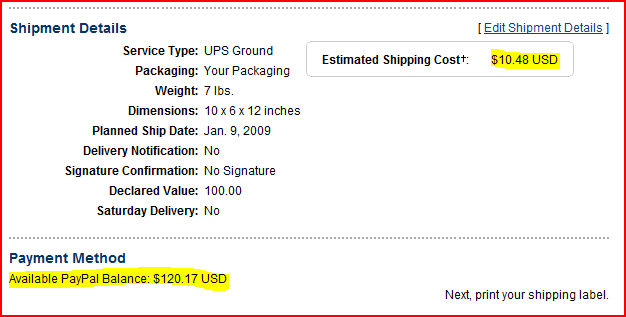
The error message read this:

So I was thinking What gives? and called support.  As I was talking to them I noticed the header of the “details” page of the transaction:
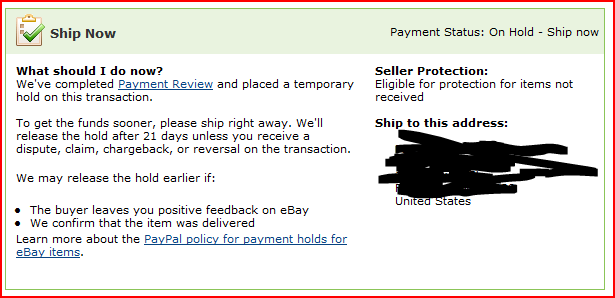
Payment review?!  First time I’ve ever heard of it.  At first I was thinking this was a good thing and PayPal just protected me from fraud.  Then I read the link which details out the reasons why something would be “on hold”:

    • You have been an eBay member for less than 6 months, and you sell an item for more than $100
    • You have an eBay feedback score of less than 100, and you sell an item for more than $100
    • You have a buyer dissatisfaction percentage* greater than 5%
    • You have an average DSR of less than 4.5
    • You have received fewer than 20 Detailed Seller Ratings in the last 12 months
    • You are listing your item in a high-risk category such as gift certificates, video games, cell phones, computers, or consumer electronics.

None of which applied to me.  I was now livid and let the customer service supervisor (I had asked to escalate), Marie 6168, know how unappreciative I was of this and explained that even *if* I fell into one of those buckets why did my November transaction (which fell into the last bucket of electronics) give me no problems and was for an amount significantly greater?  Her answer then moved from explaining that I was “in review” because of one of the above to “it’s random.”  Great.  Warm feelings all around now.  I was also then told that my hand-crank wall clock with no electronics was flagged because it is a high-risk category.  LMAO!

NOTE: I’m curious if the actual flag was because of the word “Russian” in the title.  I’ve had problems with dealing with legitimate commerce with anything Russian related in the past because financial institutions are leery.  Even if this is the case, the buyer and seller followed all rules for verification for all systems (eBay and PayPal) and therefore doesn’t seem like the title of the item should throw a flag!

At this point I’m pretty pissed.  I was told by Marie 6168 that I wasn’t being forced into doing anything and didn’t have to ship the item.  WHAT?!  How is that?  By not shipping the item (or waiting for the hold to be released), the buyer gets screwed and leaves negative feedback and my eBay reputation takes a hit (something very important in eBay land).  I felt like my eBay reputation was being held hostage.

So at this point I’ve been informed:

    • I’ve sold something and the verified buyer has sent funds to the verified seller.
    • The funds have been put on hold and I don’t have access to them.
    • The funds will be released sometime within 21 days
    • That I should ship the item.

That’s right.  PayPal, as the broker of the funds, has received money for an item I sold.  Then they are asking me to go ahead and ship that item to the buyer.  WTF?!  How is this protection for me?  It seems the buyer is the only one protected.  They will ultimately get the goods and if there were any issues with the funds, I’d be out the goods.  How is that protection on my end AT ALL?

It looks like I’m not alone either based on a conversation at Get Satisfaction.  I was not afforded any opportunity to escalate any further beyond Marie 6168 despite my best attempts.  All I could get was an email address I was told to be the executive offices – [email protected].  I hope their reading this.

I feel as a verified/Premier customer of PayPal since 2000 and a customer of eBay since 1998 (with a 100% rating) that some discretion should have been made here and the funds should be available.  This idea of PayPal managing when I get funds based on their rules versus standard commerce is ridiculous.

The problem is that the eBay/PayPal relationship is almost a requirement for online auction commerce.  Where else are you going to go for a world of buyers and a broker, which up until now, helped put a protective wall between the money?  Craigslist?  Sure that’s fine, but I knew that my local market wasn’t big enough for a Russian Sub clock!

PayPal – you currently are on my suck list.  Whatever systems in place that automate this payment holding process need revisiting.  You’ve made a verified/premier/long-term customer who follows the rules very angry. 

Win me back.

UPDATE 1: I shipped the item from my local UPS store.  Cost me $7 more than if I would have used my UPS account tied to my PayPal account.  So this process has cost me additional money in addition to not receiving funds for my item yet.

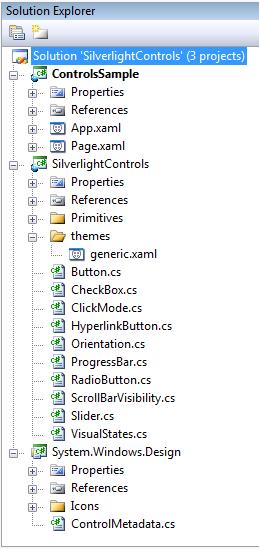
The source code for the Silverlight 2 controls was just published!  This is the source for the controls as shipped in the runtime and the SDK.  When you download the project you’ll see the structure:

Image of source project tree in Visual Studio

The source, released under the Microsoft Public License (Ms-PL), includes the source for the following controls in the runtime:

    • ButtonBase
    • Button
    • HyperlinkButton
    • CheckBox
    • RadioButton
    • ToggleButton
    • RangeBase
    • ProgressBar
    • Slider
    • ScrollBar
    • Thumb

and the following from the SDK (part of the Silverlight Tools for Visual Studio):

    • Calendar
    • DatePicker
    • DataGrid
    • TabControl
    • GridSplitter

Unit tests for the SDK controls have also been included as well!

With the release of this source code as well as having access to the source for the Silverlight Toolkit, you should have some great base implementations to extend and learn from!  Get the code here: Source code for Silverlight 2 controls.

In a recent Twitter conversation I was having with Peter Laudati, it reminded me of another problem I’ve been having with iTunes and wondering why it isn’t working this way. 

First, here’s my setup (and logic):

    • I have one server (Windows Server 2008) at my house that manages my backup, music, photos, etc. (no it is not a Windows Home Server (yet)).
    • I have a public share there with Everyone read/write priveleges called “music” and it is shared out an accessible.
    • In each client computer I have iTunes installed at, I change the Library location to the mapped drive which is pointing to the share indicated above.
    • All is well.
    • Whenever new music is added in a CLIENT machine, it is added to the server (because the library is pointing there) and added to only that local client’s iTunes library – this is the problem Peter and I were discussing, the fact that iTunes doesn’t “monitor” folders to update it’s Library – you have to help it understand by adding.  Royal suck. (FYI, Windows Media Player has been able to monitor folders for about 9 years now.)

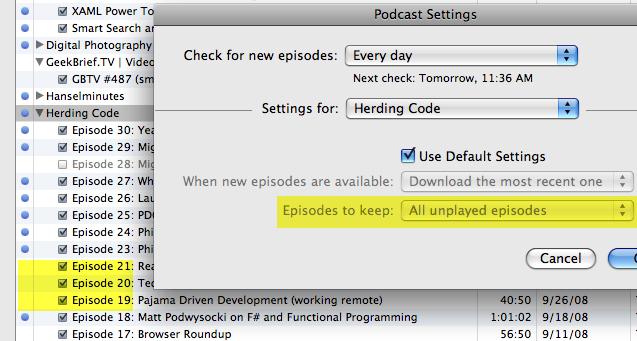
So that’s the setup.  Any activity in iTunes now basically uses this server as the storage…this includes podcast subscriptions.  This is all fine.  Until I want iTunes to actually honor my settings.  Here’s what I’m talking about:

As you can see in this image above, my settings say to keep “all unplayed episodes” but also as you can see, episodes that are played (as indicated by the lack of blue dot) are still there.  I’ve refreshed, I’ve ran the “updated podcast” function on the feed(s), etc.  Nothing…all played episodes are persisted.

So, dear Apple fans/experts/geniuses, why is this?  Is this because my Library is a network share?  Can iTunes not handle the fact that it isn’t stored locally?  I will point out that if I manually delete them via iTunes, it does, in fact, delete – so it isn’t a permission thing.  I’d love to take this to the ‘Genius Bar’ but obviously with a dependency on my network share it won’t be of much help.

If anyone knows the solution to this or the problem with getting iTunes to manually update libraries by monitoring folders, I’m all ears.

Yes, I’m aware that Songbird, and others are out there, but they have yet to appeal to me in their other features.

If you haven’t been aware, there has been a team at Novell working hard to make a version of Silverlight for Linux.  This version, called Moonlight, has been in development since WPF/e it was first shown at the MIX conference (which by the way is happening in March with some really exciting stuff, so be sure to register for MIX09!).  Moonlight hit beta this past December 2008 and the team has already been working on Moonlight 2 which is the Silverlight 2 compatible version.

Right now, Moonlight 1.0 serves as a functional equivalent to the Silverlight 1.0 runtime, which was released a while back.  Moonlight 1.0 will not enable to you to view Silverlight 2 content right now.  If you want to track Moonlight 2 status, you can do so on the Moonlight project page (various links to Moonlight 2 hacking and discussion lists).

One of the things recently accomplished with this partnership was to enable the click-through install experience.  What do I mean by this?  Well most of the Silverlight templates use a single link for the installer.  In the background this maps to a function to detect browser, platform, etc. and deliver the right bits to the user.  In the event of an unsupported combination, this redirected to a page displaying the system requirements for the requested version of Silverlight.  With Moonlight 1.0 out in beta now, that function now detects the platform correctly and redirects the user to the Moonlight 1.0 install instructions.  In a recent survey I did, many of the respondents had requested this.  They didn’t expect that Microsoft would provide the installer, but rather that at a minimum it should redirect to the installer for Moonlight…which it now does. 

NOTE: Moonlight 1.0 is in BETA format.  Please understand that Moonlight is a project from Novell and any progress updates will be provided from them.  Since the product is in beta right now, read their documentation and caveats about any live deployment dependent upon Moonlight support.

Take a look at my experience below – I used an image of OpenSUSE which was built for me by the most awesome SUSE Studio.  I simply have a plain OpenSUSE image (with Mozilla) and connected to my network.  If the latency in the internet in the video seems slow, it is because it is a virtual machine on a laptop using a wireless connection – not exactly ideal conditions :-).  But as you can see even the non-optimized install experience (using the default install badge from Silverlight 1.0) does the redirection accordingly and I was able to get Silverlight content running on my Linux instance.

(you may want to choose the fullscreen option for better scale)
Install Microsoft Silverlight

I would imagine as Moonlight progresses (as well as progresses to v2) that this will even get better.  Our functions map to web handlers that the Novell team control so they have the ability to redirect their installers accordingly.  You can see that there are some nag screens that come up from Firefox (for security on installing web software as well as installing the XPI – these are both Firefox standard dialogs and not associated with Moonlight/Silverlight).

We plan on releasing some guidance samples on creating the best install experience using the Silverlight.js script.  Once we do, I’ll update a post/example to show the fullest experience on all platforms.  For now, I wanted to simply share this.  If the application requests the Silverlight 2 installer, then the handler on our end will still inform the user that Linux isn’t yet a supported platform.

It’s great that the Microsoft and Novell teams were able to partner to ensure some great continuity in experience.  It’s also great that some people have noticed…I found these comments from Joel Kelley on Twitter:

"MS Silverlight installation for FF on Linux is ridiculously painless. I' m impressed.” – Joel Kelly on Twitter

“I didn't finish it, but the installation for MS Silverlight seemed easier on Linux than Flash is. Well played, Mic rosoft. Well played.” on Twitter

I’m sure there are people that won’t like the process as well, but it is nice to see some positive comments for the Novell team.