A few days ago Google announced “event tracking” for their Google Analytics platform.  My account was invited to participate in this initial wave so I decided to take a look.  The main reason of course is because of a keyword in their email they sent to me (emphasis mine):

“Event Tracking allows you to track interactions with Web 2.0 style content such as Flash, AJAX, Silverlight, social networking apps, etc.”

I have the script already running on my site for general analytics so I figured I’d whip up a quick sample to see how it might work with Silverlight.  If you are in to analytics you may also want to check out Michael Scherotter’s webcast with WebTrends on some analytics techniques with Silverlight as well.

There are a bunch of existing techniques you can do today using existing analytics packages and scripts, but it is really nice to see movements toward recognizing unique characteristics of rich Internet application activities and the need for something more granular that represents user behavior rather than just a view.  After all, “paths” for normal web browsing have been available for analytics for a long while…why should RIA have to suffer?  The main reason is that no analytics packages have successfully managed yet to provide enough artificial intelligence to reflect on the behavior within the RIA.  As RIA development becomes more mainstream in applications facing the consumers, it will be increasingly important to understand where/what the user’s are doing to discern better usability changes, etc.

Google calls their feature “event tracking” and enables a function on the existing script to track an event, much like a Windows event log (for those who are familiar with it).  You provide a category and action, then optionally a label and value (where value is an integer value, generally going to be used I assume for counts of actions).  The “action” doesn’t have to actually be an literal action such as “click” but something you can put together.

In my less-than-creative mind I just thought of putting together two category scenarios: media and e-commerce.  My commerce actions would be: Add Item to Cart, Sample Music (i.e. a music store action), Start Checkout, Complete Order…all rolled up in a Commerce category.  My Media category would include Play and Pause tracking.  The signature of the event tracking method in Google is:

   1: _trackEvent(category, action, [label], [value]);

This would be called on your variable given to whatever your _getTracker() call was made with (mine is called pageTracker, using the default from the script).

NOTE: This post assumes you know some of the terminology from Google analytics offering.  If you don’t, you can read about it at their Analytics page.

Since all of this was Javascript calling from Silverlight I’d have to use the HTML bridge capabilities.  You can learn how to call Javascript from Silverlight from here or view a walk-through video on how to do it on the Silverlight community site as well.  I created a simple function on my page that basically wrapped the actual function call.  Honestly I figured it would be here that you may want to do some error handling or any other event-based “stuff” – but for now, it’s pretty much just a wrapper to the same function and looks like this:

   1: <script type="text/javascript">
   2: var pageTracker = _gat._getTracker("PROFILE_CODE_HERE");
   3: pageTracker._initData();
   4: pageTracker._trackPageview();
   5: </script>
   6:  
   7: <script type="text/javascript">
   8:     function trackEvent(category, action, label) {
   9:         pageTracker._trackEvent(category, action, label);
  10:     }
  11: </script>

As you can see, in my sample I wasn’t concerned with the value parameter for now.  Now in my Silverlight application I just created some lame looking XAML that would more generally be spread out throughout a typical application, but just for playing I put it in one place.  Here’s the XAML:

   1: <UserControl x:Class="GAEventTracking.Page"
   2:     xmlns="http://schemas.microsoft.com/winfx/2006/xaml/presentation" 
   3:     xmlns:x="http://schemas.microsoft.com/winfx/2006/xaml" 
   4:     Width="400" Height="600">
   5:     <Grid x:Name="LayoutRoot" Background="White">
   6:         <StackPanel Orientation="Vertical">
   7:             <Button Width="200" Content="Added Item to Cart" x:Name="AddCart" />
   8:             <Button Width="200" Content="Sampled Music File" x:Name="SampleMusic" />
   9:             <Button Width="200" Content="Started Checkout" x:Name="StartCheckout" />
  10:             <Button Width="200" Content="Completed Order" x:Name="CompleteOrder" />
  11:             <MediaElement x:Name="LakeVideo" Width="320" Height="240" 
  12:                           Source="Lake.wmv" AutoPlay="False"/>
  13:             <StackPanel Orientation="Horizontal">
  14:                 <Button Content="Play" x:Name="PlayVideo" />
  15:                 <Button Content="Pause" x:Name="PauseVideo" />
  16:             </StackPanel>
  17:         </StackPanel>
  18:     </Grid>
  19: </UserControl>

On the relevant code I’ve wired up the buttons to the same event handler for simplicity and just looking at the name and content for what to do.  Here’s what that looks like:

   1: public Page()
   2: {
   3:     InitializeComponent();
   4:     AddCart.Click += new RoutedEventHandler(EventButtonClick);
   5:     SampleMusic.Click += new RoutedEventHandler(EventButtonClick);
   6:     StartCheckout.Click += new RoutedEventHandler(EventButtonClick);
   7:     CompleteOrder.Click += new RoutedEventHandler(EventButtonClick);
   8:     PlayVideo.Click += new RoutedEventHandler(PlayVideo_Click);
   9:     PauseVideo.Click += new RoutedEventHandler(PauseVideo_Click);
  10: }
  11:  
  12: void PauseVideo_Click(object sender, RoutedEventArgs e)
  13: {
  14:     LakeVideo.Pause();
  15:     HtmlPage.Window.Invoke("trackEvent", new object[] { "Media", "Pause", "Lake video was paused" });
  16: }
  17:  
  18: void PlayVideo_Click(object sender, RoutedEventArgs e)
  19: {
  20:     LakeVideo.Play();
  21:     HtmlPage.Window.Invoke("trackEvent", new object[] { "Media", "Play", "Lake video was started" });
  22: }
  23:  
  24: void EventButtonClick(object sender, RoutedEventArgs e)
  25: {
  26:     Button btn = sender as Button;
  27:     string actionName = btn.Name;
  28:     string label = btn.Content.ToString();
  29:  
  30:     HtmlPage.Window.Invoke("trackEvent", new object[] { "Commerce", actionName, label });
  31: }

So you can see here at line 30 above is where the relevant code is.  Using the HTML bridge, I can invoke a method on the hosting page and provide the arguments to it.  That’s it!  So what does this look like on the reporting side?

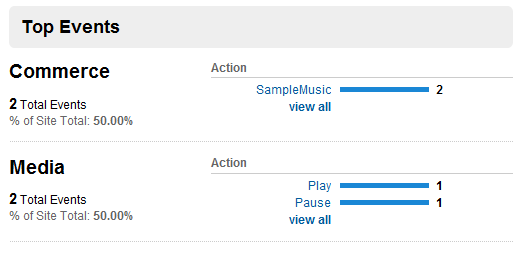
For a summary view of the categories you’ll get some decent information about the action:

But then when you also drill into a specific category, your label information will be viewable:

So that now using methods like this you could track specifically what is going on within your RIA.  As I mentioned, you can do this with existing platforms today with being clever of how you track a “PageView” but it is nice to see a specific implementation for event-driven tracking.  And this isn’t limited to just RIA, you can still (obviously) use this event tracking in your AJAX applications, static pages, whatever.

The Google links demonstrated how to implement this with ActionScript and Flash, but while they mentioned Silverlight, they didn’t provide a relevant sample.  Luckily basically the steps are as easy as outlined here:

    • Include the tracking script
    • Decide what/when/where you want to track within your Silverlight application
    • Use the HTML bridge (Html.Window.Invoke) to call out to the _trackEvent function

Again the relevant code for Silverlight is:

   1: HtmlPage.Window.Invoke("[methodName]", new object[] { "[category]", "[action]", "[label]"});

Where the “[methodName]” is whatever Javascript function you are calling that exists in the hosting page (and matching the proper signature you’ve set up.  As I mentioned I didn’t use the optional value parameter in the event tracking, but had you done that (say you wanted to know how many times a media item had been played) you’d add a value of “1” for example and the reporting would provide aggregate summaries of that action within the category.

Have fun and hope this helps some!

One of the things that we have heard in feedback is the need to surface more end-to-end samples.  While the atomic learning videos/samples are great as are more in-depth tutorials, there is still a desire to see how to package all these things up into a single application.  Seeing from start to finish helps absorb the learning process and see how these atomic things fit together and interoperate.

Today we added the “application corner” to the Silverlight community site.  Yes, I know the name is less than exciting, but hey I’m not a super cool marketing person with unlimited imagination!  The goal here is to provide an area with samples of more full-featured applications that put these different practices in implementation as applications.  No, this will not be an area for a multitude of media-only applications, although I think we will show some more full-featured media solutions as some examples.  This is something that I had talked about before in the forums and had been promising to people for a while and what got some people angry at me.  I could expand on the reasons for delays, but won’t as that doesn’t matter.  What matters to me is the initiative has started.

The goal of the Application Corner is to demonstrate various different types of line-of-business applications and techniques.

NOTE: I hate the term “line of business” – isn’t any application to any organization their line-of-business application?

Here’s my plan over the next short-term.  Ideally your feedback will help iterate the longer term:

    • AdventureOps – yes, people hate sample databases.  I’m not sure why.  They are full of data, have good relationships defined, etc.  I’m going to use AdventureWorks as the base for the first application (and perhaps more) as it has a good base of data and scenarios.  This first iteration of this application will be an attempt to create a Silverlight front-end dashboard for managing certain data (first just the HR system).  We’ll examine integrating with ASP.NET application services (part 1) and then look at techniques we can do today for page navigation and working with data services (part 2)
    • M-V-VM (and other patterns) – seems to be a popular pattern these days and we’ll explore writing an application that uses this pattern in Silverlight and what we can learn from it.  We’ll pull in experts from the community to demonstrate what they’ve done and provide samples.
    • Gaming – not on the gambling sense, but in the casual games sense.  What is a game loop, best practices for animation, etc.
    • Media – we’ve seen the Olympics, we’ve seen the original “Top Banana” site – how were these done, how can we use media in our applications effectively?
    • Continuum – how can you provide some application capabilities for Silverlight and bring them forward to a more full/rich client application?

So that’s the plan.  I know the part 1 of AdventureOps may be old hat to some of you Silverlight pros, but stick with me (and leave feedback).  I look forward to iterating on this section of the site for your benefit.  What do you want to see?

Be sure to subscribe to this blog for updates as the applications get added to the site!

First a word on the “continuum” I keep hearing about for applications.  I’d like to apply it to my digital lifestyle.  You know that vision where you only have one place to keep your music, but can access it anywhere, etc., etc.  I still haven’t hit nirvana like that yet, but for movie watching it’s getting close.

I used to be a customer of Netflix when they first launched.  To be honest, at that time their pricing was singular and I just wasn’t watching enough movies at home to warrant the cost, so I ended my relationship.  Now I have kids, travel a bit, have an XBOX, etc.  For me, Netflix has become more relevant as a matter of convenience…oh and the fact they have a pricing model that totally fits in line with my use.  The thing that is great about Netflix for me now is that they “get it” with regard to how digital and old-school movie rentals can/should occur.  Why? Simple, it’s everywhere for my lifestyle now.  My Netflix account enables me to get DVDs the traditional way (even with Blu-Ray even though I don’t have a player, but nice to know the option is there) as well as digitally.  Recently they changed their Watch Instantly capabilities to use Silverlight.  But that wasn’t all.  With the launch of the XBOX next generation experience, Netflix now has an application for the XBOX.  So now I can get DVDs, watch on my computer(s) and watch on my home theater system.  All with one account, one place, etc.  The only missing piece is a supported/legal way to download to my portable media player (iPod, Zune, etc.).

The one thing that I really like about the instant watch capability is the fact that it remembers where you were.  So if I am traveling and start watching a video but couldn’t finish, when I get home to my XBOX, it starts where I left off.  Nice polish on that feature.  I can still start over if I want, but it is great to see that added value of watching where I left off.  For me, Netflix truly has figured out fast how I want to watch movies and innovates to offer the options for me.

I was showing my family these features and went to a PC in my house to show them the instant watch capabilities as an example.  It just so happened to be a machine that didn’t have Silverlight installed on it yet for some reason.  After logging in to my Netflix account and picking the first movie to demonstrate to them, I was greeted with this images:
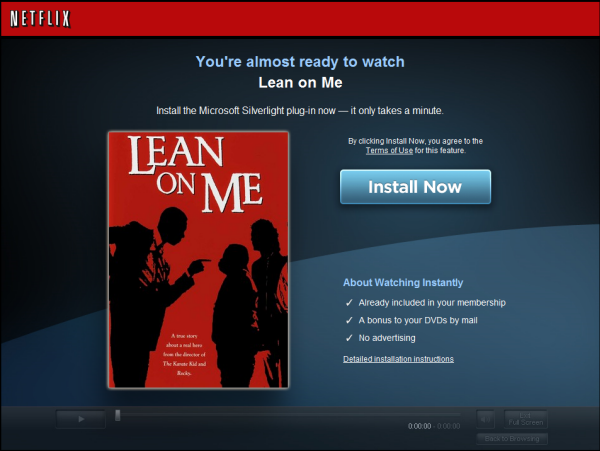
It was a reminder of two things for me: 1) that I didn’t have Silverlight installed and 2) what paying attention to the install experience of your web application features can do to enhance the experience and loyalty of your customers.  You see in reality Netflix could have just left the default Silverlight install experience:

on a blank screen.  For me, I would have known what that meant and still been reminder.  But I’ve ranted about providing a great Silverlight deployment experience, about some easy ways of implementing it and how important it is not to assume and to optimize your rich client experiences for your users.  Netflix nails it and is the best example I’ve seen yet.  Period.  Let’s examine the key areas here (numbering mine):
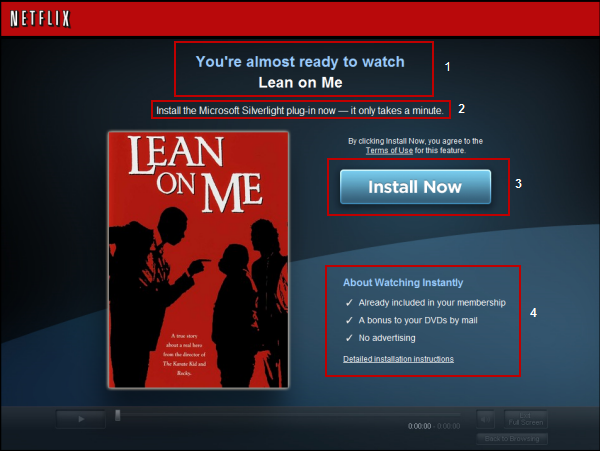
Netflix focused on the main tenants of first impressions with new technology:

Maintain Visual Cues

Netflix keeps the user engaged, not by using the default Silverlight install image, but by maintaining a consistent user experience in the design.  Although the user has chosen to “watch instantly” and they are not there yet, this design helps keep a consistent brand recognition and even shows a player in the background a little bit.  This tells the user that they are still starting along the same action they desired.

Focus on the Content

Content is king.  Content is king.  Nobody will install anything if they don’t believe the content is relevant.  Look at how Netflix uses some personalization in this experience.  In section 1 you can see that they’ve alerted you about the content you chose…they haven’t forgotten about your desire.  They also put the DVD cover as a part of this experience to remind you of the content you wanted to watch.  This is HUGE to the experience.

Reduce Barriers to Entry

Some people might be apprehensive about installing new things.  In section 4 Netflix helps alleviate some concerns by showing the value of the action, and assurance that this is not something that has to do with advertising, etc.  They are providing you with additional information to help you make a decision and help you feel that the process is relative only to the task you requested (watch instantly).

Set Reasonable Expectations

In section 2, the authors of this experience help give some reasonable expectations to the user with “it only takes a minute” instructions.  This gives the user a reasonable expectation of time.  They have a reasonable assumption now that they aren’t downloading the entire movie, or something huge that will take 20 more minutes before they can watch their selected video.

Minimize Decisions

They haven’t given you any other offers here.  No option to create a new account, or sign up for other methods.  You’ve asked to watch instantly and that’s what they are presenting here…the option to do that.  They are making that decision clear in section 3 as well – this is the call to action…no other.

You may also notice the absence of giant Silverlight logos.  To me, this is a good thing.  It is important that you provide some context to your users about what they are installing if it isn’t directly from you though, whether it be from Microsoft, Adobe, wherever.  Here Netflix points out “Install Microsoft Silverlight” which puts in your mind the brand of Microsoft.  This way when the installer shows up it isn’t a surprise it isn’t from Netflix.  Perhaps adding the Silverlight brand/logo in a subtle way wouldn’t be a bad touch here to have some visual recognition and continuity from this screen to the installer.

Summary

Creating these experiences is an important step in managing first impressions.  It isn’t difficult to do either.  We provide some tools and support scripts (Silverlight.js) for you to understand the different scenarios.  Over time as more and more get Silverlight installed this will be less of an issue, but still shouldn’t be ignored.  I’ve seen many Flash sites that use the default “Get Adobe Flash” small icon and wish they would concentrate just as much on the experience as well.

I mentioned that the Silverlight.js file can help aid in detection/installation of Silverlight.  I’m curious your thoughts on it.  If you have a few minutes to spare, I’d love for you to take this very quick survey of your impressions of this technique and using the Silverlight.js script.  No personal information is required.

Bravo to the Netflix team…very well done.  Oh, and the experience isn’t that bad either ;-) -- Seriously though the player and bandwidth/quality detection is great.  Overall Netflix has won me back as a customer for sure!

If you want some great Silverlight information, be sure to subscribe to at least two feeds: Microsoft Silverlight Bloggers and Silverlight community feeds.  I’ve recently just added a bunch of great feeds to both of these including all the members of the Silverlight Toolkit team and some Silverlight MVPs such as John Papa.

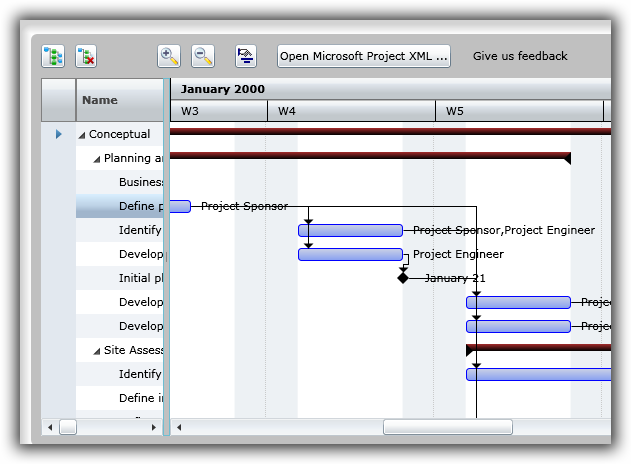
There are also a bunch of resources being added to the Silverlight community site over the next month.  We also added 27 new showcase entries to the Silverlight Showcase on the site.  One in particular that I think is interesting is a project Gantt representation done in Silverlight with complete capabilities for moving the timeline, etc.

This example, created by iLog, demonstrates some creative uses of Silverlight for line of business applications.  Check out the other 27 new showcase entries on the site and subscribe to the feeds to stay up-to-date on what is happening on the Silverlight community.

FeedReader is a web part for Microsoft SharePoint server products (MOSS and WSS).  It’s purpose is to aggregate more than one feed in a single web part.  The built-in XML and RSS web parts for SharePoint only allow one feed by default.  feedreader can support Atom or RSS feeds.  Please report any issues as a Work Item on the project.  Source code is also available on the project site under a very permissive license.

Thanks for using feedreader!


This work is licensed under a Creative Commons Attribution By license.