Advertisement

using c# and vb in the same web project

every once in a while i get asked if you can have both c# and visual basic in the same web site project.  my gut response is always to ask "why would you want to" as i always assume it is a new project, etc.  to me, it simply wouldn't make sense from a new project standpoint, code reviews, coding standards, continuity, project maintenance, etc.

however, people still ask.  to-date i never really tried (and that's been my answer).  i was presented with a usable scenario of why you may need (not want, need) to do this, so i finally tried it.  the answer: yes...kinda...sometimes.

let's assume we have a web site structure like this:
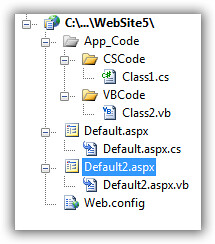
sshot-9

we have the App_Code folder and a .cs and a .vb file in the same projects (separated into sub-folders).  note that the project sees them as folders (yellow folder icon) in the special folder.  each class within there basically has a "hello world" function only, like this in the c# file:

   1:  public string SayHelloCS()
   2:  {
   3:      return "Hello from CS";
   4:  }


and the visual basic file has a similar function emitting "Hello from VB."

now, if you run default.aspx in this structure, this is what you will see:

The files '/WebSite5/App_Code/VBCode/Class2.vb' and '/WebSite5/App_Code/CSCode/Class1.cs' use a different language, which is not allowed since they need to be compiled together.

interesting?  probably not, but it makes sense...so how do we overcome.  we use a configuration option called .  here's what we need to add to our <compilation> node in our web.config:

   1:        <compilation debug="false">
   2:          <codeSubDirectories>
   3:            <add directoryName="VBCode"/>
   4:            <add directoryName="CSCode"/>
   5:          </codeSubDirectories>        
   6:        </compilation>


once we add those codeSubDirectory nodes, let's "look" at what the project structure looks like now:

sshot-10

as you can see the code folders are now "special" in the eyes of visual studio.  now if we browse default.aspx we will see:

Hello world from CS. Hello world from VB

and we're done.  so if you have some legacy code (let's say a provider) that is in visual basic and your new project is c# (and you've already had the long heated debates with your team on why you are choosing a language over the other), you can implement this option of using .

now, you can also have multiple pages that have different code-beside languages and that works in this model.  however, if you are using the web application project model, this will not work.  the multiple code files only works inherently (along with codeSubDirectories) with the web site model.

hope this helps.

  1. 3/8/2007 12:41 PM | # re: using c# and vb in the same web project
    nice... but what if your app_code is subdivided into folders already, and in one of those folders you want both .cs and .vb
  2. 3/8/2007 9:09 PM | # re: using c# and vb in the same web project
    Good question...only directories immediately under the App_Code folder can have this special attribution...another level deep cannot.
  3. 7/11/2007 11:15 AM | # re: using c# and vb in the same web project
    I have found that even in the Web Application Model, you can add a regular folder named App_Code even though it is not an available through the "Add ASP.NET Folder" menu and it will be a "special" folder. You can then create your CSCode sub folder and use the <codeSubDirectories> configuration in the web.config file and the classes will be available when you build your web application project! This is a great way to bring a couple of classes developed in CS to your VB project when you have to.
  4. 9/5/2008 3:37 AM | # re: using c# and vb in the same web project
    Good Article clarifies doubts of many keep it up.....
  5. 9/13/2008 3:56 AM | # re: using c# and vb in the same web project
    No problem using vb and c# in same project. Done it many times in different project for example if i have a control written in vb and want to use it in a c# project it work without any issues and the other way around too. Also done it with class and pages before. Just makes maintenance hard thats all. No real issues if you want to done it.
  6. 9/27/2008 4:33 AM | # re: using c# and vb in the same web project
    Yes Dude it works
    Thanx
  7. 10/28/2008 10:41 AM | # re: using c# and vb in the same web project
    Too bad it no longer works in VS 2008 for new web apps (keeps working with converted VS05 web apps though).
  8. 10/28/2008 2:44 PM | # re: using c# and vb in the same web project
    Bill: Web Application Projects don't use the App_Code folder so this trick wouldn't apply to them.
  9. 2/8/2009 8:24 PM | # re: using c# and vb in the same web project
    It works well when u in a website proj(vs2008).But it doesn't work in vs 2008 web app.
    compiled fail:
    Error 1 A namespace does not directly contain members such as fields or methods D:\Backup\我的文档\Visual Studio 2008\Projects\webAppTest\webAppTest\App_Code\VB\vbClass1.vb 1 1 webAppTest
    Any solutions?
  10. 2/8/2009 11:18 PM | # re: using c# and vb in the same web project
    Does anyone know how to make this work on Visual Studio 2008 Web Application Projects?
  11. 4/18/2009 11:07 AM | # re: using c# and vb in the same web project
    thank sss
  12. 5/10/2009 12:22 PM | # re: using c# and vb in the same web project
    thankss...
  13. 5/20/2009 4:06 AM | # re: using c# and vb in the same web project
    it's nice work
  14. 5/22/2009 5:58 PM | # re: using c# and vb in the same web project
    hallo i wish you verry succes operator
  15. 6/3/2009 2:22 PM | # re: using c# and vb in the same web project
    Yes, but I'm still having trouble getting my {page}.aspx.vb code to see the code in the c# folder.

    The namespace is visible for the VB "Imports", but then the c# methods are not exposed.

    Hmmmm
  16. 6/5/2009 12:59 AM | # re: using c# and vb in the same web project
    Very nice article. Helped a lot.

    Keep cranking!
  17. 6/25/2009 8:19 AM | # re: using c# and vb in the same web project
    Hi mate, I know it works but if I want to call SayHelloCS (c# function) from Class2.vb it doesn't work. Pls see my example below:

    Public Function SayHelloVB() as string
    '--------------------------------------------
    '--- Call Class1.cs(C# Class)->SayHelloCS ---
    '--- from Class2.vb(VB Class)->SayHelloVB ---
    '--------------------------------------------
    dim oClass1 as new Class1()
    Return oClass1.SayHelloCS()
    End Function

    Many thanks,
  18. 6/25/2009 8:33 AM | # re: using c# and vb in the same web project
    I have a problem, to add VB.NET pages in C# Project. I am using .NET 2008 version. We migrated this solution from 2003 version. I am facing the following issues on my solution.

    1) When I am trying to add new page(VB.NET), It is not showing option to select language. By default is taking C# language and creating aspx,aspx.cs and aspx.designer.cs files.
    -- I am doing this, opened new dummy C# solution, I am able to add VB.NET pages, After that I am taking the pages from the solution folder and adding to my solution. -- This way is not correct, Please help me out.
    2) When I am trying to Build my application, it is not showing errors of VB.NET at build time, but at runtime I am able to get those errors when I correct those and try again, I am able to get the functionality.
    -- But this way is not correct, might be some solution properties I missed.

  19. 6/29/2009 5:35 PM | # re: using c# and vb in the same web project
    I am trying to add third party files in my vb project...but it does not add the files as such...and when i try to add new file into my project it does not show me the option to add c# files.

    The only new item i can add is vb files no C# files. Please help

    Thanks in advance
  20. 7/2/2009 7:26 AM | # re: using c# and vb in the same web project
    it's nice work . Thank .
  21. 7/17/2009 2:19 PM | # re: using c# and vb in the same web project
    I am grateful to you for this great content.
  22. 9/1/2009 7:20 PM | # re: using c# and vb in the same web project
    thanx Four you
  23. 9/25/2009 2:49 AM | # re: using c# and vb in the same web project
    Hi,

    This is a great solution that you have written.

    Thanks,
    http://vijaymodi.wordpress.com
  24. 10/17/2009 7:12 AM | # re: using c# and vb in the same web project
    This is a great solution that you have written.
  25. Gravatar
    1/9/2010 8:21 AM | # re: using c# and vb in the same web project
    i will learn c# immediately
  26. Gravatar
    1/9/2010 8:39 AM | # sxe
    Thanks for man..
  27. Gravatar
    1/9/2010 9:06 AM | # re: using c# and vb in the same web project
    Nice article. Thanks...
  28. 1/9/2010 9:13 AM | # re: using c# and vb in the same web project
    Nice post, thanks for
  29. 1/9/2010 9:46 AM | # re: using c# and vb in the same web project
    oooo nice sites. Thanks in advance.......
  30. 1/9/2010 9:47 AM | # re: using c# and vb in the same web project
    Thank you, we happy we made these shares are
  31. 1/9/2010 11:07 AM | # re: using c# and vb in the same web project
    an article number one thansk
  32. 1/11/2010 7:28 AM | # re: using c# and vb in the same web project
    It works.
  33. 1/12/2010 2:54 AM | # re: using c# and vb in the same web project
    it's nice work . Thank .
  34. 1/27/2010 8:52 PM | # re: using c# and vb in the same web project
    thank you for sharing.
  35. 1/28/2010 3:38 AM | # re: using c# and vb in the same web project
    than you
  36. 1/28/2010 3:49 AM | # re: using c# and vb in the same web project
    very good post.
  37. 1/28/2010 4:16 AM | # re: using c# and vb in the same web project
    Thank you good site.
  38. 1/28/2010 5:28 AM | # re: using c# and vb in the same web project
    fda thankyo u
  39. 2/7/2010 8:40 AM | # Paslanmaz merdiven
    Thank you very much for comments. I stainless steel industry
  40. 2/8/2010 11:02 AM | # 
    Thanks, Good Example
  41. 2/8/2010 11:07 AM | # About Comments Order
    I think arrange comments order in descending order(from latest date)

 
Please add 1 and 6 and type the answer here:
First time here? You are looking at the most recent posts. You may also want to check out older archives. Please leave a comment, ask a question and consider subscribing to the latest posts via RSS or email. Thank you for visiting! (hide this)