Comments.

  • Gravatar
    # re: create silverlight 1.0 project in vs 2008


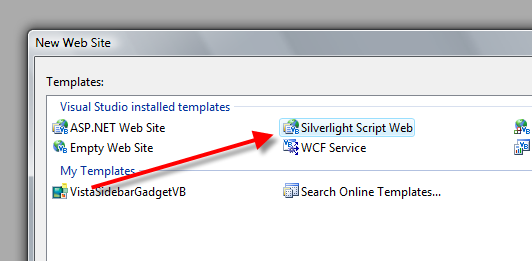
    1.0 Templates never installed (via the SDK) to 2008. I came up with a work around (http://www.adoguy.com/2007/09/02/Installing_Silverlight_1_0_Templates_on_Visual_Studio_2008_Beta_2_(Orcas).aspx) that still works for VS 2008. I happen to prefer the old template. The new Silverlight Script Web template seems to muddy up the HTML file too much for my taste. But to each its own.

    12/19/2007 12:35 PM
  • timheuer said:
    Gravatar
    # re: create silverlight 1.0 project in vs 2008


    shawn: correct, for some reason the SDK doesn't automatically install any templates, but if you install the vs tools you get them as well as if you dig into the sdk, there is the vsi file for another template.

    12/19/2007 12:42 PM
  • lklkl said:
    Gravatar
    # re: create silverlight 1.0 project in vs 2008


    klklk

    12/20/2007 8:21 AM
  • coder said:
    Gravatar
    # re: create silverlight 1.0 project in vs 2008


    Dear Me

    Thank you so much for publishing this, I thought it was me, but no, MS strikes again!

    Thanks matey :)

    2/26/2008 3:06 PM
  • Julia said:
    Gravatar
    # re: create silverlight 1.0 project in vs 2008


    Thanx very much. I was searching for it for almost 15 minutes. I thought I have no templates for 1.0 :(

    5/2/2008 1:21 AM
  • tim said:
    Gravatar
    # re: create silverlight 1.0 project in vs 2008


    Whats up there all you novice designers me im just the same im all new to this silverlight i think its great this is just what i have been looking for.Something that is frustrateing and a challenge ive always wanted to learn web designing...... i also have an important question? to ask...#1.how would i get started from being a novice i do know you have to have a hell of an imagination' and ive got that and #2.can you send me some good pointers so im not so slow at trying to figure all this out it would really be appreciated. signin out tim-dogg.!!!

    5/7/2008 6:29 PM

Your Reply.

  Comment Form  

Fields denoted with a "*" are required.

*Your name:
Subject:
Your blog:
Your email:  (will not be displayed)
*Your message:

 
Please add 2 and 5 and type the answer here: