Advertisement

Foxit PDF Preview Handler

[As featured in LifeHacker -- welcome LifeHacker visitors!]

You’ve likely reached this page as a result of a search or a referral.  This page contains the most current links to download the Foxit PDF Preview Handler for Windows Vista, Office 2007 and Windows XP.

The Foxit PDF Preview Handler is a piece of software written by myself with sponsorship from Foxit Software (providing the license so that we all can enjoy).  Special thanks to Ryan Gregg for help with the Windows XP version.  These preview handlers are a part of Microsoft Windows Vista in the operating system as well as in Outlook 2007.

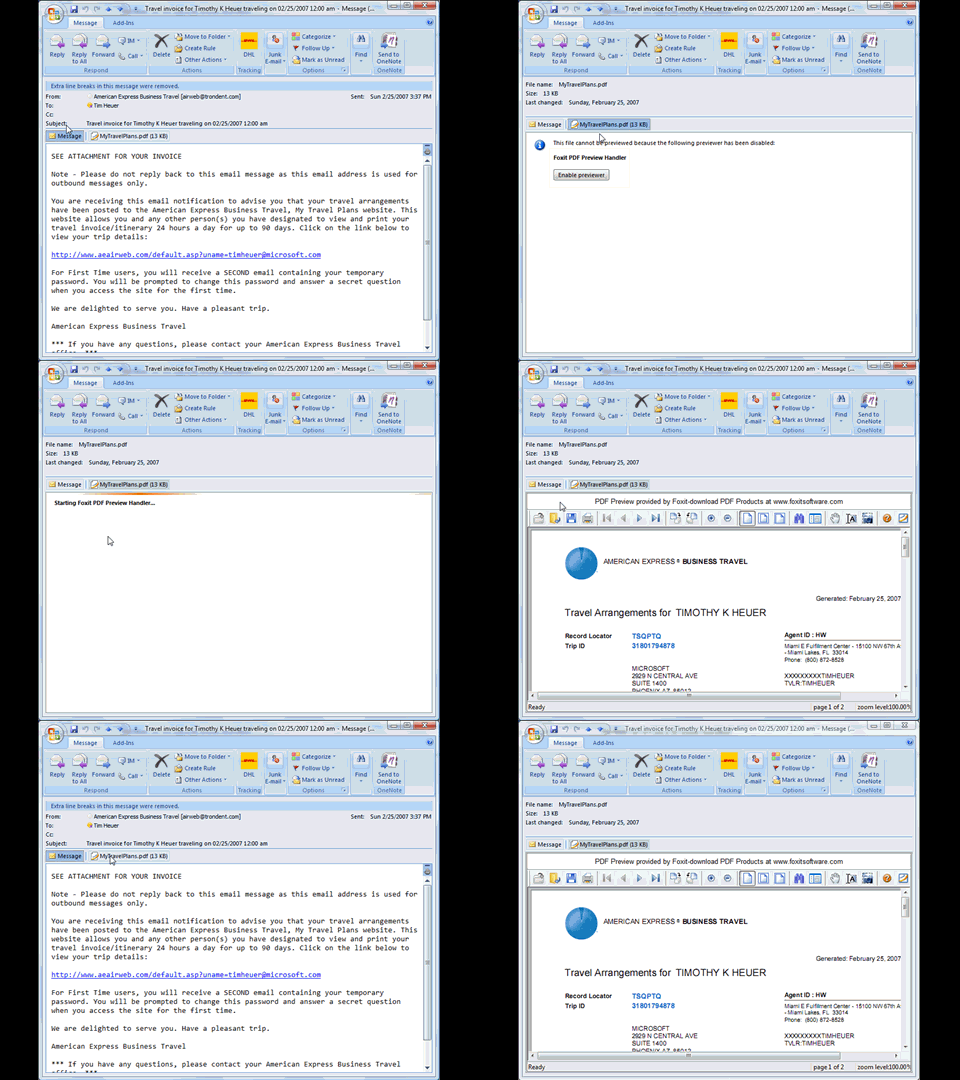
For example, in Outlook 2007, if you receive an attachment that is a PDF you can click it and get a preview of that document right within Outlook without having to open the document in another program.  It is an extremely helpful feature of Outlook that I love and why I wrote this handler for PDFs.  Microsoft did not provide a default one for PDFs as a part of Outlook or Vista.  If you install Adobe Acrobat 8.1+ you will get one as well.  However, I am not a fan of Acrobat Reader as I think it is a slow application for what I use PDFs for – reading only.  For this I prefer Foxit Reader as it is super light-weight and fast.
You can read more about it here.

To download:

This is free software available for you to use.  It is not supported by Foxit Software, but supported by me.  If you find issues, please let me know.

  1. 5/29/2008 6:59 AM | # re: Foxit PDF Preview Handler
    Hi Tim,

    I installed the Foxit PDF Preview Handler running Vista Ultimate x64 German.

    I get the preview in Outlook all right, but shouldn't there also be a preview in the Windows explorer? Still I can't get this to work.

    Du you have any suggestions?

    Regards,

    Robert
  2. 5/29/2008 7:40 AM | # re: Foxit PDF Preview Handler
    @Robert: You have to ensure you have that feature turned on. When viewing folders in Windows Explorer, choose the Organize menu option and there is a sub menu for Layout -- the preview pane option is there.
  3. 5/29/2008 8:53 AM | # re: Foxit PDF Preview Handler
    Tim, thank you.

    Meanwhile, I realized that I have to clearify myself.

    Preview of pdf-files in Windows Explorer works perfectly. But what I'm still missing are those Explorer icons, showing a preview of the first page of a pdf document.

    Do you even have a solution for that?

    Robert
  4. 5/29/2008 8:59 AM | # re: Foxit PDF Preview Handler
    @Robert: Thanks for clarifying. The preview handler model has nothing to do with that functionality. I think if you had a PDF client installed it might generate that but to be honest I don't know what controls that.
  5. 5/29/2008 9:05 AM | # re: Foxit PDF Preview Handler
    Allright, and thanks again. Great program.

    Robert
  6. 7/14/2008 10:13 AM | # re: Foxit PDF Preview Handler
    Hi Tim -

    Thanks for the Foxit PDF Preview Handler; it's just what I was looking for! (I already use Foxit Reader/Creator/Editor, and I avoid the Adobe Reader-and-Acrobat products.)

    In their latest release, Foxit has enabled users to specify that the Bookmark pane should always be hidden. Is it possible to do the same with the preview handler??

    Thanks again for the product.

    - Jeff
  7. 7/24/2008 11:14 AM | # re: Foxit PDF Preview Handler
    Tim
    This is the best thing sense the wheel!

    It allows me to remove some junk software from every one of my machines and it works perfectly.

    I'm in your debt

    Mike
  8. 10/1/2008 10:40 AM | # re: Foxit PDF Preview Handler
    I have win2k3. which version should I install?
  9. 10/1/2008 10:43 AM | # re: Foxit PDF Preview Handler
    bullman: you should install the Windows XP version
  10. 10/11/2008 1:41 AM | # Foxit PDF Preview Handler
    Hello,

    I'm french and i speak a little bit english. I send this mail 'cause i'd like to download Foxit PDF Preview Handler for Windows Vista and i don't know how to do. When i want to download it, i can read this page "www.box.net/index.php" and i can't download. Can you answer to this mail and join it the add-on ?
    My email is : guillaumebossoutrot37@orange.fr
    Thank you for your answer.
    Goodbye
  11. 10/11/2008 9:19 AM | # re: Foxit PDF Preview Handler
    Guillaume: Sorry for the box.net problems, here are some alternate links
    timheuer.com/.../14001.aspx#9409
  12. 11/13/2008 10:46 PM | # re: Foxit PDF Preview Handler
    Hello Tim, delete / removed yesterday Foxit from my Vista based on some problems but last file-software I can't remove which is named Foxit PDF Preview Handler. I always get error code. Is there a chance to get some support from your site.
  13. 11/18/2008 2:41 PM | # re: Foxit PDF Preview Handler
    Hello! I installed the XP version but no preview in Windows Explorer :( I don't have Outlook 2007.

    Can you help me? Thanks in advance.

    Michael
  14. 11/18/2008 2:45 PM | # re: Foxit PDF Preview Handler
    Michael: XP doesn't have a Windows Explorer preview option. That feature is only in Vista. And what I mean by that is the Explorer preview capabilities are only in Vista, it has nothing to do with the PDF previewer.
  15. 11/18/2008 3:34 PM | # re: Foxit PDF Preview Handler
    Sorry! I wrote preview instead of thumbnail view of Windows Explorer :)
  16. 11/18/2008 3:35 PM | # re: Foxit PDF Preview Handler
    Michael: Thumbnail viewing also is not a feature of the preview handler functionality, but rather the operating system. Sorry.
  17. 12/6/2008 10:54 PM | # re: Foxit PDF Preview Handler
    Hello Tim,

    I want to develop a little tool that could replace vista's original txt Preview tool,but I don't know anything about how to embed my program into Explorer.

    What's More. If possible, I want to interact with office's Preview tools.

    Could you give me some materials related? Or some suggestions on how to get them.
    Thank you.

    Regards,
    Zhang Zhe

    mailto:bleastrind@gmail.com
  18. 12/7/2008 2:20 PM | # re: Foxit PDF Preview Handler
    Zhang: Take a look at the Office developer center (msdn.microsoft.com/office) for pointers on how to extend the preview handlers, etc.
  19. 12/7/2008 10:12 PM | # re: Foxit PDF Preview Handler
    Thank you very much.
  20. 1/15/2009 2:54 AM | # re: Foxit PDF Preview Handler
    Nice one. I own Acrobat 7, and refuse to upgrade because Adobe is even more rapacious than Microsoft in its charging policy. (I can get the whole Office suite for less than the price of an Acrobat upgrade.)

    One suggestion, why not add your web address to LicReadme.rtf? I know it is easy to work out, but if you want traffic, the address might help.

    Once again, thanks.
  21. 1/19/2009 10:41 AM | # re: Foxit PDF Preview Handler
    Tim,

    I'm having a problem getting this to work in Windows 7 Beta - 64-bit. I've installed the Foxit PDF Reader, and your Preview Handler for Vista from the link above. Everything installs but I get "This file cannot be previewed because of an error with the following previewer: Foxit PDF Preview Handler" in Outlook 2007. Double clicking the attachment opens it successfully in the Foxit PDF Reader.

    I was previously trying to get this to work in Adobe Reader 9 with the same result. I completely uninstalled it and restarted before trying Foxit.

    Any ideas? Support sites I've seen seem to suggest your previewer works fine in Windows x64, where Adobe doesn't.
  22. 1/19/2009 11:19 AM | # re: Foxit PDF Preview Handler
    GreyBat this was also reported to me this morning by another user. I'm investigating and will report back here any update/fix.
  23. 1/28/2009 6:31 PM | # re: Foxit PDF Preview Handler
    This works beautifully in Vista (both Windows Explorer and Outlook 2007). Thank you so much!
  24. Gravatar
    1/29/2009 3:05 AM | # re: Foxit PDF Preview Handler
    Tim,

    really great! Vista Ultimate 64 + Office 2007 works fine!
    no chance for preview with Adobe Acrobat 9.0 before...

    One question: Ist there a solution for starting always
    directly in the "show hole page" modus?

    Thanks a lot
    Tom

  25. 2/10/2009 7:03 AM | # re: Foxit PDF Preview Handler
    Tim,

    Works great with Vista Ultimate x64 and Outlook 2007.

    However I've moved to Windows 7 Ultimate x64, and is not possible to use the Preview Handler.

    Any ideas?

    Thanks a lot.

    Carlos.
  26. 2/13/2009 9:36 AM | # re: Foxit PDF Preview Handler
    Just a quick note to feedback a little error in the 'FoxitPdfPreviewHandlerSetup_1_1.msi' installer when you try to repair in Vista 64 SP1 it errors not able to find 'FoxitPdfPreviewHandlerSetup.msi'.

    A simple rename of the installer taking out '_1_1' makes it work.

    Thanks for this neat Outlook addon
  27. 2/14/2009 10:25 AM | # re: Foxit PDF Preview Handler
    On a whim (based on XP drivers working in Windows 7 beta) I installed the XP version of the PDF viewer on Windows 7 Beta 64bit and it works fine in Outlook 2007 and in Windows Explorer!
  28. 2/14/2009 10:31 AM | # re: Foxit PDF Preview Handler
    Jeramy this should work yes, but will be inefficient instead of using the built-in mechanism from Vista/Win7. I'm still trying to figure out some reasons why the Vista version isn't working in Win7 though.
  29. 2/14/2009 10:40 AM | # re: Foxit PDF Preview Handler
    Naturally if this is not using the the Native functionality then a Proper version would be great but... in initial use the XP plugin is super snappy (fast) and no crashes so far... naturally I'll report if I encounter any problems.

    Are there any potential problems you can see from using the XP version on 7 beta?
  30. 2/18/2009 8:05 AM | # re: Foxit PDF Preview Handler
    Hi,

    I tried both, Code Preview and Foxit previewer on Win7 64 with Office.2007 but I get message saying that and error occured in the previewer...

    I used the Vista version, seeing as Win 7 and vista have same codebase.
  31. 2/18/2009 8:41 AM | # re: Foxit PDF Preview Handler
    Cobus I've discovered the same behavior with Win7 as well and am investigating with the team.
  32. 2/26/2009 4:03 AM | # Outlook Crash
    The previewer's great, but I do have this problem frequently wherein Outlook 2007 (on Win XP Pro SP2) crashes when I delete an email with a PDF attachment which is currently open for preview in the reading pane. Outlook hangs in this situation and I need to restart it. This happens with some attachments and not others, so maybe there's something in these particular PDF files which is causing this behaviour. Anyway, it would be great if you can find a fix for this!

  33. 2/26/2009 9:00 AM | # re: Foxit PDF Preview Handler
    Niranjan - this is a known issue unfortunately. The preview handler framework basically is opening the file in-memory. The attempts to act on that file while that lock is in place will cause errors...it is a work item that I have not yet fixed.
  34. 2/26/2009 10:03 AM | # Memory and resource leak
    Hi Tim,

    Thanks a lot for this cool project. I really appreciate your managed PreviewHandler for PDF documents.

    Hosting it in a managed application written by myself I am experiencing a significant memory and resource leak. This is caused by the fact that the class PreviewHandler (taken from the framework provided by Microsoft) does neither implement the IDisposable interface nor have a Finalizer.

    If you add the following lines of code this problem should be fixed.

    Thanks,
    Nikas

    public abstract class PreviewHandler : IPreviewHandler, IPreviewHandlerVisuals, IOleWindow, IObjectWithSite, IDisposable // IDisposable added here
    {
    ~PreviewHandler()
    {
    this.Dispose(false);
    }

    public void Dispose()
    {
    this.Dispose(true);
    }

    protected virtual void Dispose(bool disposing)
    {
    if (disposing)
    {
    if (_previewControl != null)
    {
    try { _previewControl.Dispose(); } catch { }
    _previewControl = null;
    }
    if (_frame != null)
    {
    Marshal.FinalReleaseComObject(_frame);
    _frame = null;
    }
    }
    }
  35. 3/10/2009 12:40 AM | # re: Foxit PDF Preview Handler
    This is something I had really missed in Outlook before.
    Did you resolve the Windows 7 issue in the meantime - would be fantastic!!!

    Thanks!
  36. 3/10/2009 8:35 AM | # re: Foxit PDF Preview Handler
    Charles I've got confirmed reports of it working on Windows 7 32-bit, but also have confirmed it does not work on Windows 7 64-bit. I'm trying to work through the issues now, but am also trying to get a release of the product I work on out the door :-). I'll update my blog with details when I have them (subscribe to http://feeds.timheuer.com/timheuer)
  37. 3/10/2009 6:17 PM | # re: Foxit PDF Preview Handler

    Hi Tim

    I've been using you PDF preview handler for quite some time now, and I really appreciate it, great job.

    Just wondering if you've considered creating something similar for Visual Studio Team system. If when you look at a work item with a PDF attachment, you'll have to download the attachment to view it. Having your previewer would be pretty awesome feature.

    Just a thought,

    Soren
  38. 3/17/2009 12:59 AM | # re: Foxit PDF Preview Handler
    Hi. I'm running Windows 7 x64 and the preview handler does not work, as you said. If I can help in any way with debugging, drop me an e-mail, I'd be glad to help.
  39. 3/26/2009 8:14 AM | # re: Foxit PDF Preview Handler
    #
    2/26/2009 4:03 AM | # Outlook Crash
    The previewer's great, but I do have this problem frequently wherein Outlook 2007 (on Win XP Pro SP2) crashes when I delete an email with a PDF attachment which is currently open for preview in the reading pane. Outlook hangs in this situation and I need to restart it. This happens with some attachments and not others, so maybe there's something in these particular PDF files which is causing this behaviour. Anyway, it would be great if you can find a fix for this!

    #
    Gravatar
    timheuer
    2/26/2009 9:00 AM | # re: Foxit PDF Preview Handler
    Niranjan - this is a known issue unfortunately. The preview handler framework basically is opening the file in-memory. The attempts to act on that file while that lock is in place will cause errors...it is a work item that I have not yet fixed.


    Any luck with this issue. Otherwise very happy!
  40. 3/26/2009 9:12 AM | # re: Foxit PDF Preview Handler
    Great!
    Thanks! WIth Vista Business 32bit Italian works great!
    Regards
  41. 3/26/2009 11:15 AM | # re: Foxit PDF Preview Handler
    Bmer -- no fixes for this.
  42. 3/30/2009 1:28 AM | # re: Foxit PDF Preview Handler
    I am using Windows 7 Ultimate 7057 and Foxit PDF Preview Handler doesn't work in windows explorer, either the Vista version or the XP version. So do you have any solution for that?
    Thank you!
    Regards, Victor
  43. 3/30/2009 5:54 AM | # re: Foxit PDF Preview Handler
    Sorry, the problem doesn't exist now and the software works very well now. Thank you!
  44. 3/30/2009 7:30 AM | # re: Foxit PDF Preview Handler
    Victor, if you did an upgrade while the previewer was installed, yes it won't work -- we discovered a bug in Windows7. It's been fixed, but you have to uninstall the previewer and re-install and it will work. This is only with builds 7048 and higher though.
  45. 3/31/2009 2:40 PM | # re: Foxit PDF Preview Handler
    Hello. I had Adobe Acrobat 8 Standard but could not use the PDF preview in Outlook 2007. I downloaded the Foxit Reader and installed it as the default reader. It opens pdf files, but the pdf preview feature in Outlook 2007 still doesn't work. Any suggestions appreciated.
    Rgds,
    Rick
  46. 3/31/2009 3:07 PM | # re: Foxit PDF Preview Handler
    Rick -- Foxit previewer and the Foxit reader are two different software products. Installing Foxit Reader does not give you the previewer -- you'll need to install the previewer from this site.
  47. 4/8/2009 2:18 PM | # re: Foxit PDF Preview Handler
    pretty amazing that this is pretty much the only option out there to preview PDF's, is for sure the most popular and yet even with Foxit's name attached to it there is not a single mention of it on their site...what a supreme lack of judgement on their site - if millions of people are searching for this add-in and can't find it on the site that bears its name, they are most likely pissing off people like myself that think they are only trying to push their other software with moneymaking crap like the ASK toolbar...if this previewer was on their site i'd give them props and look at their other products closer...as it is, i only praise you for your hard work and giving us something Microsoft and Adobe both dropped the ball on...

    jared
  48. 4/8/2009 2:33 PM | # re: Foxit PDF Preview Handler
    Jared -- thanks for the note. This was a collaboration between Foxit and myself. I never asked them for it to be listed at all. And to be fair, Adobe actually has a previewer as well...been included in their installer since Acrobat 8.
  49. 4/8/2009 7:53 PM | # re: Foxit PDF Preview Handler
    Hi! I'm currently testing this handler under Vista x64 and so far so good except for one little thing, the program is unable to preview scanned documents that have underwent OCR text recognition using "searchable image" as PDF output style (tried with Acrobat 9), the reader toolbar shows up fine inside the preview panel but all the pages appear "empty". Current workaround consists of using a different output style in the OCR recognition options, either "searchable image (exact)" or "ClearScan".

    Regards.
  50. 4/8/2009 8:38 PM | # re: Foxit PDF Preview Handler
    Follow up from my previous report: another workaround to the above problem is to convert the document to PDF version 1.3 (Acrobat 4.x) at the expense of increased file size (less efficient image compression algorithm). Consider this as a last resort option in case you have lost the original scanned PDF.
  51. 4/8/2009 9:46 PM | # re: Foxit PDF Preview Handler
    Further follow up: after some more testing, I've found that there's no need to change the OCR recognition output style ("searchable image (exact)" mode doesn't always result in a previewable document anyway) and there's no need to downgrade the PDF file version either.
    The root of the problem (as implied in the previous message) resides in the compression algorithm used for monochrome images. Apparently, the FoxIt preview handler doesn't understand the JBIG2 algorithm available in newer Acrobat versions (starting with 5.x), so as long as you select a different compression scheme such as CCITT Group 4 you're good to go (this option is available in the Advanced->PDF Optimizer menu of Acrobat 9).
  52. 4/9/2009 6:00 AM | # re: Foxit PDF Preview Handler
    Final followup: Well, just noticed that JBIG2 support is available in the form of a "critical add-on" in Foxit Reader, unfortunately I can't figure out a way to implement this feature in your preview handler as they are independent from each other. Is there any possibility to release a new version that does JBIG2 decompression? The add-on in question is available for download here: www.foxitsoftware.com/.../addons.htm#critical
  53. 4/23/2009 8:30 AM | # re: Foxit PDF Preview Handler
    thanks tim,

    works great on vista finally!!! ;-)

    best regards

    Liran
  54. Gravatar
    4/24/2009 2:56 AM | # re: Foxit PDF Preview Handler
    Hi Tim,
    I'm working with Win7 EN build 7077, Outlook 2007 Pro SP1 MSO, Foxit Reader 3.0 Build 1506 and TimHeuer.FoxitPdfPreviewHandler.dll version 1.1.0.1, rev. {50B281AC-C551-43BE-912F-A692C7914F89} (latest download I found). The preview doesn't work in this configuration although in an earlier post you wrote:

    "It's been fixed, but you have to uninstall the previewer and re-install and it will work. This is only with builds 7048 and higher though."

    Regards,
    Don
  55. 4/24/2009 1:45 PM | # re: Foxit PDF Preview Handler
    Don -- where did you get your build of Windows 7? Since the beta (7000) is the only public build, I'm curious.

    Aside from that if you had it on your machine before you installed Win7, it will not work. You need to uninstall/re-install it to register the appropriate settings with Win7. If it isn't working in your Win7 build, I suspect an unsupported build :-).
  56. 5/4/2009 7:36 PM | # re: Foxit PDF Preview Handler
    I have one word: WOW!

    This is an amazing software. I can't imagine someone did not think of this before. It is the piece of software I have encountered in a while.

    Thanks a lot for sharing,
    Berna
  57. 5/12/2009 1:16 AM | # re: Foxit PDF Preview Handler
    Year.... nice. 1 hour later and it worked on my Vista x64 with Adobe Reader 9.1
  58. 5/26/2009 1:19 AM | # re: Foxit PDF Preview Handler
    Nice preview handler. I've got it working on W7 32-bit (RC) now without any problems. I tried Adobe first, but it's too slow and too big. Thanks for this piece of software =)
  59. 6/10/2009 1:10 AM | # re: Foxit PDF Preview Handler
    Hi, thanks very much for the previewer. It is great to have an alternative to Adobe.
    I noticed one comment on the thread where outlook crashes if you try and delete a mail that has an pdf attachment open in the previewer. I have experienced another scenario which causes outlook to crash in a similar way. If you have a pdf open in the previewer and click on calendar, it does the same. Not a huge problem but does mean you have to remember to close the preview before navigating away from the e-mail list.
  60. 6/18/2009 8:33 AM | # re: Foxit PDF Preview Handler
    Works perfectly.
  61. 7/1/2009 8:24 AM | # re: Foxit PDF Preview Handler
    Tim, great Job! My compliments! now up to a real 64bit application :)
  62. Gravatar
    7/1/2009 2:01 PM | # re: Foxit PDF Preview Handler
    Hi,
    I'm trying to understand why I cannot have the same option as with Acrobat Reader that is able to display thumbnail view in Windows Explorer in Windows XP
    What can I do to have the same ability with Foxit Reader ?
    Thanks
  63. 7/1/2009 3:29 PM | # re: Foxit PDF Preview Handler
    Tof - this is a previewer for Outlook 2007/Vista, not a thumbnail viewer, so my software here wouldn't do that. I'm honestly not sure what generates that to be honest. Foxit makes a PDF IFilter that may have something to do with that, but I think it is something a little different.
  64. 7/24/2009 11:18 AM | # re: Foxit PDF Preview Handler
    Tim:

    Could your application be used without outlook and be called from within a window 32 bit exe as a pdf previewer?
  65. 7/26/2009 6:00 PM | # re: Foxit PDF Preview Handler
    Tim -

    Thank you! I recently upgraded to a Vista 64-bit computer and had Adobe Acrobat Pro 9 installed, but if it has a preview handler, it didn't work. I installed your program and it works perfectly. I really needed that preview function for my work, and without you, I wouldn't have it!
  66. 7/29/2009 4:21 PM | # re: Foxit PDF Preview Handler
    I hate to bug you, but for some reason I'm not getting a preview of pdf files in Windows Vista Explorer; however, it works in Outlook. I have the preview pane enabled and can view all other MS Office documents just not pdfs.

    Thanks,
    Gene
  67. 8/3/2009 7:20 AM | # re: Foxit PDF Preview Handler
    Looks like any PDF that is published from AutoCAD that we make doesn't look right thru the viewer. We're trying to find a good viewer that works on windows xp x64 since the Adobe one doesn't seem to work. if you would like me to send you some of these PDF's for debugging purposes let me know and i'll send them right over. other pdf's seem to work fine, it's just the one's from AutoCAD's DWG to PDF writer, all the backgrounds are black, and the lines, and zooming in seems to doulbe the output, looks weird. thanks!
  68. 8/4/2009 7:07 AM | # re: Foxit PDF Preview Handler
    ok, thanks for looking into this Tim, but it looks like it was just a bad graphics card driver, i downgraded to an older one and it fixed all my problems, everything works perfect now!
  69. 8/5/2009 10:30 AM | # re: Foxit PDF Preview Handler
    pdf Preview handler on wIN7 Ultimate RC 64-bit is working fine (sometimes), sometimes showing nothing (Outlook 2007 AND Explorer). I cannot find out why it works sometimes and sometimes not. The pdf-files that are working show up in Outlook and explorer, the others don´t. No clue why. I can send you two examples of files that dont work and some screenshots if you like.
    regards Gerhard
  70. 8/7/2009 7:57 AM | # re: Foxit PDF Preview Handler
    Well all i can say is AWSOME! Installed it on my Vista Business pc and it worked right out of the box and is a HUGE time saver. I just wish i hadn't taken so long to find it!
  71. 8/11/2009 12:27 PM | # re: Foxit PDF Preview Handler
    Hi Tim
    Thanks for this splendid suggestion. It works like a Swiss clock.
  72. 8/14/2009 3:16 PM | # re: Foxit PDF Preview Handler
    Just an absolutely fabulous product! Very well done. What more can I can say? - kudos to all!

    I'm running this under W7-RTM 64-bit with 12GB of RAM - and I must that say that working in the "new & improved" Windows Explorer, along with the foxit pdf preview handler is just a pure outright joy to me! Running Windows is fun again -- and really fast and really stable. My document management work-flow has just improved by leaps and bounds!

    Again, well done! And Thank you for providing this most wonderful product to all of us! Keep up the **great work** and I'm looking forward to further apps.
  73. 8/21/2009 7:33 AM | # re: Foxit PDF Preview Handler
    I am running Windows 7 Enterprise 64-bit, with the Outlook 2010 Technical Preview.

    I cannot get the PDF Previewer to work.
    Any suggestions?
  74. 8/21/2009 7:40 AM | # re: Foxit PDF Preview Handler
    Brian -- 64-bit Outlook has a problem with handlers right now. I've been investigating with the team, but if you are running 64-bit Office preview then it will not work.
  75. 8/23/2009 11:58 AM | # re: Foxit PDF Preview Handler
    Brilliant product. Had just gone through setting up my online archive and realised I lost preview in Win7. My only question though is will you be working on an enhancement to allow version 1.6 PDFs to be previewed. I have some in 1.3 and some in 1.6. If I knew a patch was coming I wouldn't have to start downgrading my 1.6 PDFs. Please????
  76. 8/24/2009 4:10 AM | # re: Foxit PDF Preview Handler
    Hi Tim,
    Great job!
    Why is Microsoft always delivering some half work, like omitting a pdf previewer?
    I now this a rethorical question :-)
    Thanks.
    Marc.
  77. 8/24/2009 6:10 AM | # re: Foxit PDF Preview Handler
    Just try it and it works perfectly on Windows 7 x64 professional final version
    but I didn't try on Outlook 2007...

    Thanks a lot for this fine program!
  78. 8/27/2009 7:41 AM | # re: Foxit PDF Preview Handler
    Hi Tim,
    I use Windows Vista.
    And after installed the software I have tried to run but I still having troubles.
    I have tried to reinstall and to repair it, but still appearing this mesagge in outlook.

    This file cannot be previewed because of an error with the following previewer:
    Foxit PDF Preview Handler
    To open this file in its own program, double-click it.
  79. 9/1/2009 8:23 AM | # re: Foxit PDF Preview Handler
    Great app! Feedback: every time Adobe Reader bugs me to do an update (I'm presently using 9.1.3), your app quits working in Outlook (2007 SP2). If I uninstall the Preview Handler and reinstall it, it starts working again...
  80. 9/1/2009 8:29 AM | # re: Foxit PDF Preview Handler
    Hi Will, thanks for the note. Adobe Reader installs their own previewer, which is why mine stops working. There can only be one previewer associated with a file extension. Unfortunately, there is no warning given to the user and the "last one in" gets the register...it sucks, but that's the way it is.
  81. 9/6/2009 7:48 AM | # re: Foxit PDF Preview Handler
    Extremely useful! It's work for my windows 7 enterprise x64 bit. Thanks for the great app....
  82. 9/9/2009 10:03 AM | # re: Foxit PDF Preview Handler
    Love the previewer!!! but if you are previewing a pdf in one folder and click on a different folder it locks up outlook. Any Ideas? Win XP Pro & Office 2007 Pro.
  83. Gravatar
    9/16/2009 2:43 AM | # re: Foxit PDF Preview Handler
    This previewer is fantastic, cheers for all the hard work!

    It installed and ran seamlessly without errors in Windows 7 RC 64-bit, although I'm yet to try it in the RTM version.
  84. 9/18/2009 10:52 PM | # re: Foxit PDF Preview Handler
    This is great, thanks for the app and this site / discussion. I was using Win 7 RC 32bit and everything was fine. We all know that the preview function disappeared in the 64 bit version. Your foxit preview handler fixed that problem in Outlook / Office 2007 but I still can't get a preview in Windows explorer unless I actually click the file. Is there anyway to get preview thumbnails?
  85. 9/21/2009 10:08 AM | # re: Foxit PDF Preview Handler
    Runs great with Outlook 2007 on WIN7 RTM x64.
    Happend to install the Outlook Technical Preview x64 (not the x86) version on win7 RTM x64.
    "no previewer installed...."
    Wanted you to know it. Some work waits for you I guess!
    Greetings!
    P.S.: the symbols on the desktop never showed the miniatur-pic with pdf on the WIN7 x64. Now they do and I dont know why or what caused this.... Crazy.
    But not all files, only a few of them and when I do a copy-paste on the desktop with the file that shows the miniatur-pic the copy only shows the pdf-symbol.
    I always thought EDV is logical. Not a bit.... Maybe it is the RTM, before it was the RC. Or it is the Office 2010?
  86. 9/21/2009 10:19 AM | # re: Foxit PDF Preview Handler
  87. 10/13/2009 3:10 AM | # re: Foxit PDF Preview Handler
    Outlook 2007 on Vista 64.
    Thank you this is great! I hope you are making some money our of it somehow because it's a tremndous piece of free software.
    Thanks for making it all easier and more productive.
    Now why can't adobe work that out??????
  88. 10/13/2009 11:23 AM | # re: Foxit PDF Preview Handler
    do you support server 2008 terminal servers with outlook 2007 installed? Im running the 64 bit edition and have outlook published. My users want to be able to preview the pdf attachments.
  89. 10/14/2009 8:32 PM | # re: Foxit PDF Preview Handler
    Hello, Tom
    Thanks for providing us such a useful tool!
    I'd like to know if besides Outolook 2007 it also works for previewing attachments in Windows Live Mail?

    Thanks again
  90. 10/15/2009 8:09 AM | # re: Foxit PDF Preview Handler
    Tim,

    I have just started receiving the following error
    "This file cannot be previewed because of an error with the following previewer:PDF Preview Handler for Vista. So I did some searching and found your site. I downloaded the Vista Foxit Previewer. I run Vista 64K and Outlook 2007. After successfully installing foxit PDF Preview Handler, I received the following message when trying to view the PDF fil. This file cannot be previewed because of an error with the following previewer:Foxit PDF Preview Handler". I cannot even get this file to open or save in either Adobe or Foxit. Any suggestions?
  91. 10/15/2009 8:30 AM | # re: Foxit PDF Preview Handler
    Tim,

    It is not the file, because I now cannot open previous PDF files that I have opened numerous times.
  92. 10/16/2009 3:19 PM | # re: Foxit PDF Preview Handler
    Jeremy - I've never tried that but as long as it is installed for all users (i've not really tested per-user installations) it should work.

    Carlos - I do not believe Windows Live Mail uses the same preview mechanism.
  93. 10/26/2009 1:56 AM | # re: Foxit PDF Preview Handler & PDFextension
    Hi Tim,
    I have a related problem: it is impossible for me to associate PDF-files to Foxit, because ".pdf" is not in my Vista list of extensions to be associated with standard programs. As long as I have Adobe Reader installed, the extension is there and can be connected to Foxit, but as soon as I uninstall A.R., the extension is also deleted from the list, and every time I try to open a PDF-file, Vista asks what program I want to open it with. Can you perhaps help me on this item?
  94. 10/26/2009 9:19 AM | # re: Foxit PDF Preview Handler
    Leo -- that is odd. If you reinstall Foxit it should add the associations (it's actually one of the options -- choose custom install to make sure it is selected).
  95. 10/27/2009 7:45 AM | # re: Foxit PDF Preview Handler
    Hi Tim,
    thanks for your quick reply! It appeared to be a question of "sequence": I had to uninstall both programs first (AR & FR) and THEN install Foxit. Now finally I can find the PDF-extension in my Vista-list, and PDF-files are correctly associated to Foxit. Thanxalot for your assistance on this subject! Now I will install & try your own preview handler. I still have a printing problem with FR, but perhaps I will be able to solve that on the fly...
    Leo
  96. 10/31/2009 11:11 AM | # re: Foxit PDF Preview Handler
    Sweet! Just wanted to drop a note of thanks as I just upgraded to Win7 64bit and finding that I couldn't preview PDFs was a major drag. Your plugin works beautifully! You rock! Thank you!
  97. 11/4/2009 2:44 PM | # re: Foxit PDF Preview Handler
    Just wanted to drop a note to say thanks for making this and keeping it free.
  98. 11/6/2009 4:03 PM | # re: Foxit PDF Preview Handler
    Tim,

    Anything new on the issue below, which was discussed here back in February and again in June?

    Thanks for a great product!

    - Brent

    From Niranjan back in February:

    "The previewer's great, but I do have this problem frequently wherein Outlook 2007 (on Win XP Pro SP2) crashes when I delete an email with a PDF attachment which is currently open for preview in the reading pane. Outlook hangs in this situation and I need to restart it."

    Your response:

    "This is a known issue unfortunately. The preview handler framework basically is opening the file in-memory. The attempts to act on that file while that lock is in place will cause errors...it is a work item that I have not yet fixed."
  99. 11/6/2009 4:28 PM | # re: Foxit PDF Preview Handler
    Brent - still a known issue that I'm not fixing in the short term. Since a work-around exists, please just understand the behavior.
  100. 11/8/2009 10:13 AM | # re: Foxit PDF Preview Handler
    Good job Tim: thank you!
  101. Gravatar
    11/8/2009 6:44 PM | # No Uninstall Option in Win7x64
    Hi Tim,

    I can't find any uninstall option in "Uninstall or change a program" screen of Window 7 (x64). I remember I saw it there before. How can I uninstall the Foxit PDF previewer?

    Ben
  102. 11/8/2009 11:48 PM | # re: Foxit PDF Preview Handler
    Ben you can go to the Add/Remove Programs in the Control Panel (Or it might be labeled "Uninstall a Program" in the control panel.
  103. Gravatar
    11/9/2009 7:37 AM | # re: Foxit PDF Preview Handler
    Hi Tim,

    On the list I see all my installed software (e.g., Adobe Creative Suite 4). However there is no software name begins with "Foxit". I also can't find any name with the words "PDF Previewer".

    Ben
  104. 11/9/2009 7:39 AM | # re: Foxit PDF Preview Handler
    Ben -- Sorry I have to ask the question then -- are you sure you have it installed? It shows in Add/Remove as "Foxit PDF Preview Handler" with the publisher of "Tim Heuer"
  105. Gravatar
    11/9/2009 7:07 PM | # re: Foxit PDF Preview Handler
    Hi Tim,

    Yes I installed it some time ago. Later I found it stop working. Then I removed it from the control panel and then reinstalled it. Then it worked for some time. Now I find it stop working again and shows the following message.

    "This file cannot be previewed because of an error with the following previewer:
    PDF Preview Handler for Vista"

    I just plan to remove it and reinstall again.

    Ben
  106. 11/10/2009 4:25 PM | # re: Foxit PDF Preview Handler
    I downloaded and installed Foxit PDF Preview Handler so I could see previews in Windows Explorer (XP) thumbnail view. It doesn't work. What could I have done wrong?

    g
  107. Gravatar
    11/17/2009 11:02 PM | # re: Foxit PDF Preview Handler
    Tim,
    I downloaded the Foxit PDF Preview Handler, but i got a message to say it wouldnt work because there was an error.
    do you know what that would be?
    thanks
    Lyn
  108. 11/18/2009 5:35 AM | # re: Foxit PDF Preview Handler
    Thank you very much; it works great with Windows 7 - Ultimate!
    Congratulations, Tim!
    Do you have any similar ideas too?
    Greets,
    JL
  109. Gravatar
    11/19/2009 12:36 PM | # re: Foxit PDF Preview Handler
    I also can't seem to find the program in my list of installed programs. I'm using Vista 64-bit and Outlook 2007. This is only an issue when my Outlook stops using the program for some reason (usually after Windows crash), but this is rare. After downloading again and repairing it works fine. Overall, the program is great and I'm glad to have it!
  110. 11/21/2009 2:29 AM | # re: Foxit PDF Preview Handler
    Just installed Office2010 Beta german (W7 ultimate 64Bit)and did a "repair" of foxit preview and it runs with Office2010. Great product thanks.
    peter
  111. 12/2/2009 7:28 AM | # re: Foxit PDF Preview Handler
    Just installed it on my win7 32bit laptop and it works perfectly with office2007.
    thanks.
  112. 12/3/2009 2:44 PM | # re: Foxit PDF Preview Handler
    I read Peter's comment above, and I just tried doing a repair of the PDF Preview Handler, but it's still not working for me with the 64-bit version of Outlook 2010 (the public beta), on Windows 7 Ultimate (also 64-bit). I get "This file cannot be previewed because there is no previewer installed for it.". I love this preview handler, and am willing to help troubleshoot it however I can. Please let me know if there's anything I can do to help get it working in Office 2010 / x64. Could it be because I'm not using the 32-bit version of the Office 2010 beta?

    Thanks!
  113. 12/4/2009 3:37 AM | # re: Foxit PDF Preview Handler
    Tim - thank you! Great piece of software. My conf: Vista x32 + Office 2010 Beta. Works perfectly!
  114. Gravatar
    12/15/2009 8:13 AM | # re: Foxit PDF Preview Handler
    Tim - Thanks for developing the previewer. Running it with XP SP3 and Outlook 2007. I am noticing that Outlook tends to lock up when previewing a PDF. Doesn't happen right away but if you leave the preview up for a little while, try to switch messages or folders it will freeze Outlook. Any updates or fixes?
  115. 12/15/2009 8:21 AM | # re: Foxit PDF Preview Handler
    Joe - none for XP version. Frankly, there is a custom process that is on the XP version that is needed even for it to work (email attachment previews are not native to the operating system in XP like they are in Vista/Windows 7). That custom process is optimized as best I can right now, but there are a few quirks.
  116. Gravatar
    12/15/2009 9:17 AM | # re: Foxit PDF Preview Handler
    Will do, thanks for the quick response Tim.
  117. 12/15/2009 1:49 PM | # re: Foxit PDF Preview Handler
    Installed it for Outlook 2010 Beta, worked without even a re-start of Outlook. Fantastic!
  118. 12/17/2009 1:04 PM | # re: Foxit PDF Preview Handler
    Hi, Tim. Thanks again for this!! I've now got a strange issue. On my one machine (Win7Pro-64bit w/Office2010-32bit), it's working perfectly. But on my other machine (Win7Ult-64bit w/Office2010-32bit), I get "This file cannot be previewed because there is no previewer installed for it." This (problem) machine *used* to have the 64-bit version of Office 2010, before I realized that that wasn't going to work with this previewer (nor with WMDC, nor some other things). So, I uninstalled Office 2010 64-bit, installed Office 2010 32-bit, and re-installed the Foxit PDF Preview Handler using the FoxitPdfPreviewHandlerSetup_1_1.msi. No errors or warnings during the installation - it all looks good. In Outlook 2010, I can go to File >> Options >> Trust Center >> Trust Center Settings >> Attachment Handling >> Attachment and Document Previewers, and "Foxit PDF Preview Handler" shows up in the list, and the box is checked. Attachment preview is turned on, and works for other file types (docx, xlsx, etc.). I tried uninstalling and reinstalling the Foxit preview handler, but no change. I even tried doing that from an Administrator Command Prompt, using msiexec /i, but still no change...

    So, everything *looks* perfect, but Outlook 2010 still acts like there's no PDF preview handler loaded...? Apart from uninstall/reinstall/repair, I'm not sure what else to check/try.

    Any help greatly appreciated, and many thanks either way!
  119. 12/17/2009 3:55 PM | # re: Foxit PDF Preview Handler
    YOU ARE THE MAN! What an incredible time saver!!! I'm using it in Windows 7 32 bit. Thank you very much.
  120. 12/19/2009 9:04 AM | # re: Foxit PDF Preview Handler
    Tim,
    Downloaded and installed seamlessly. Works great with my Vista 64-bit & MS Outlook 2007! Thanks!!
  121. Gravatar
    12/28/2009 10:07 AM | # re: Foxit PDF Preview Handler
    Hi there

    Just a note to say thank you for the nice little viewer - I work with lots of PDF files and the preview in explorer is a huge time saver to me!
  122. Gravatar
    12/28/2009 10:25 AM | # re: Foxit PDF Preview Handler
    I use your preview under windows 7 64 bit. This behavior might be of interest
    After Copying fxdecod1.dll to the folder, as instructed, it made the windows explorer preview window work as expected, until a situation arose where when we were opening many files one at time for review purposes and then moving to the next file. After varying number of files the preview would stop working. Closing the explorer window and waiting a short amount of time the preview would again be working when opening a new window, at least for a while. Then close and re-open windows explorer and continue on again. It acts as if an allocation was not refreshing between closing and opening the next an eventually filled up and was unable to produce another preview. Any suggestions
  123. 1/5/2010 5:42 PM | # re: Foxit PDF Preview Handler
    Thanks HEAPS!!@!!!!

    The software is just what I want, although Abode reader can do kind of do the same, but it's just WAAAAAYYYY TOOOO SLOOOOOWWW on my Intel Core 2 Duo E6300 ...

    Many thanks~
  124. 1/8/2010 12:59 PM | # re: Foxit PDF Preview Handler
    Tim,

    I have used the pdfhandler to perfection with Vista and now have Win 7 64. I downloaded version 1 by mistake and installed. Now i have the correct version for Win7 64 but it will not install becasue it requests that i remove version 1 first. No problem to do that except that version 1 will not uninstall from the control panel. I get an error which reads: "Errow 1001. An exception occured while uninstalling. This exception will be ignored and the uninstall will continue. However, the application might not be fully uninstalled after the uninstall is complete. Exception has been thrown by the target of an invocation. Object reference not set to a instance of an object."

    Version one remains in the control and will not be removed. Any thoughts on how I an get verion 1 uninstalled?

    Thanks
  125. 1/11/2010 5:50 PM | # re: Foxit PDF Preview Handler
    +1 cred to you Tim Heuer. Thankyou.

    Installed on Windows 7 Enterprise 64 Bit with Office 2010 Beta 32 Bit.
  126. 1/13/2010 12:57 PM | # Can't uninstall / repair Foxit PDF Preview Handler, error 1001
    Hi Tim,

    I have the same problem like Robert.

    Uninstalling Preview Handler gives error 1001.

    Thanks for any suggestion.
  127. 1/13/2010 1:21 PM | # re: Foxit PDF Preview Handler
    Tobias/Robert can you launch an elevated command prompt (ensure it is administrator) and run: MsiExec.exe /x {6FE22909-D0D6-4111-ABCE-7F8D986C4A2A}
  128. 1/13/2010 2:26 PM | # re: Foxit PDF Preview Handler
    Tim,

    thanks for your fast reply.

    Finally I solved the proble by renaming FoxitPdfPreviewHandlerSetup_1_1 in FoxitPdfPreviewHandlerSetup. After that I was able to repair the PreviewHandler and after that to uninstall it.

    It's a great programm (of course I'm going to install it again). Thank you very much.

  129. 1/14/2010 5:41 PM | # re: Foxit PDF Preview Handler
    Tim,

    Thanks for the idea. I did run msiexec using elevated command prompt and received the same error.

    I have also tried searching thru regedit to for files associated with this viewer to try to find the keys that might be deleted. This did not work either.

    Tobias, can you tell me what you did more specifically? What did your rename the file to? Or do you mean you renamed it to anything other then the current name?

    Thanks to all for your help. And I already miss using this program, cannot wait to get this fixed.
    Robert
  130. 1/18/2010 7:27 AM | # re: Foxit PDF Preview Handler
    Thanks for the versions for XP and Vista. The Vista will be installed on our notebook. Can you please also provide a Win2K-compatible version?

    Since my 3Ghz-PC has only 768MB RAM (hard to find DDR400 modules that do work), it cannot run Vista or Win7. As Windows XP does not install correctly on this machine, I am now back to Windows 2000 (and I love it). Except for the OS I use it with the newest apps avalaible, such as .NET 3.5, DirectX, Opera 10.1, Foxit Reader 3.14 etcetera .
  131. 1/21/2010 5:58 PM | # re: Foxit PDF Preview Handler
    Tim,
    Thank you a million times over for the link and the download. Problem solved. Sort of befuddling that Adobe can't come up with a patch to remedy their own shortcomings communicating with MS.

    Are you on PayPal? I'd like to make a donation.

    Thanks,
    Steve Bachman
  132. 1/23/2010 5:58 PM | # re: Foxit PDF Preview Handler
    Hi Tim.

    I was using your Foxit PDF Preview Handler as well as your Code Preview Handler with Windows 7 64-bit and Office 2007. Both are totally useful and valued products.

    Since I've installed Office 2010 64-bit, I really, really miss the use of your preview handlers. You really don't know how much you like and have come to depend on something until it's not there anymore. :(

    Have you had any success into getting your preview handlers to work with 64-bit Outlook yet?

    Best regards,
    ct
  133. 1/24/2010 12:29 AM | # re: Foxit PDF Preview Handler
    Christopher, I haven't unfortunately. But I have confirmed that Outlook x64 has been fixed to support it :-)
  134. 1/28/2010 12:01 PM | # re: Foxit PDF Preview Handler
    I can't seem to get this handler working in Win7x64 to display thumbnails in Explorer for ANY of my hundreds of PDFs (don't use or need Outlook). I have uninstalled and reinstalled both Foxit Reader 3.1.4 and FoxitPdfPreviewHandlerSetup_1_1.msi a number of times (one without the other and both together), closed and reopened new explorer windows, rebooted the system, and double checked that FoxitPDFHandler is selected for .pdf in Preview Handler Editor. I've also copied fxdecod1.dll to the install folder. The only anomaly I can see is that RevoUnistaller keeps showing FoxitPDFHandler install as being ver 1.0.0, 2.73MB. It uninstalls fine and I keep doing do a fresh install of v1.1...still shows in RevoUnistaller as v1.0.0. I've verified that TimHeuer.FoxitPdfPreviewHandler.dll is v1.1.0.1, 8.5kb dated 07-16-2008, its in the default install folder and that its there is only occurrence of this file on the drive. Still, I've never seen thumbnails in Explorer.

    Any suggestions on what else I might try?
  135. 1/28/2010 4:58 PM | # re: Foxit PDF Preview Handler
    Indi -- my software does not do thumbnails. it is a document previewer, not a thumbnail generator.
  136. 2/1/2010 10:44 AM | # re: Foxit PDF Preview Handler
    I have installed and all is working except for the copy button, it is grayed out. Any ideas?
  137. 2/2/2010 9:45 AM | # re: Foxit PDF Preview Handler
    Hi,

    I just downloaded Foxit recently, hearing it was much better than Adobe. I am a college student who is constantly using pdf files. Well, i just test-drove foxit, and it won't work. the pdf page opens, but then Firefox (my main browser) freezes, then i have to close it. there is no real error message.

    I am using Windows Vista 32-bit. Firefox 3.5.7. I installed/uninstalled Foxit 3.0, and now have installed Foxit 2.3, and made sure it was the default pdf program. It still does not work. Any help?
  138. 2/3/2010 12:31 PM | # re: Foxit PDF Preview Handler
    brilliant! thank yo uver ymuck, very smart plugin!
  139. 2/5/2010 11:00 PM | # re: Foxit PDF Preview Handler
    Thank you Tim!!! Thank you!
  140. 2/8/2010 3:29 PM | # re: Foxit PDF Preview Handler
    Bless You! Works perfect. Didn't even have to restart Outlook, which is rare. Thanks!
  141. 2/9/2010 1:24 AM | # re: Foxit PDF Preview Handler
    Hey Tim, great tool thank you!

    However, I did have trouble installing/uninstalling the latest version - "FoxitPdfPreviewHandlerSetup_1_1"

    Like Tobias/Robert, when uninstalling i got the error "Error 1001. An exception occured while uninstalling..."

    And attempting a Repair I got the "a network error occurred while attempting to read from the file..." error message

    I solved this by guessing what Tobias meant when he said "...renaming FoxitPdfPreviewHandlerSetup_1_1 in FoxitPdfPreviewHandlerSetup..."

    I likewise renamed the file FoxitPdfPreviewHandlerSetup_1_1.msi to FoxitPdfPreviewHandlerSetup.msi and found that both the uninstall and repair processes worked perfectly therafter.

    Just thought you should know.

    Cheers

    Dean

 
Please add 8 and 2 and type the answer here:
First time here? You are looking at the most recent posts. You may also want to check out older archives. Please leave a comment, ask a question and consider subscribing to the latest posts via RSS or email. Thank you for visiting! (hide this)