Download Windows Live Writer June 2008 Preview
| Comments Hot off the press, a new drop of Windows Live Writer was just released. Get it here. This is one of my favorite tools from Microsoft and the update brings a few new changes.
First, I’m happy to report that Flickr4Writer and S3Browser still work fine and require no adjustments. The other thing announced today from the Writer team is an updated SDK. This new SDK includes a new type of plugin which enable plug-in activity for pre- and post-publish events. Some of you following me on Twitter may have noticed something every so often that said “blogging: blah blah” and a link to the post. This is done automatically for me from Writer using a plug-in. It actually is one of the ones included in the updated SDK (along with another example for adding a Digg badget to your post).
Recently there’s been some discussion of people re-aggregating/posting blog content to other sites. Even though I had a Creative Commons license on my blog’s footer, etc, it wasn’t in my content so when someone re-posted my stuff automatically, it wasn’t visible. Using the new Writer SDK, I created a quick little plug-in that would add a notation about the Creative Commons license I was using to every post. Again, automatically now and I don’t have to write anything. I’m making this one available for free/test and you can get it here. These plug-ins are accessed in the same way through the Tools…Options menu in Writer. Here’s the configuration for mine:
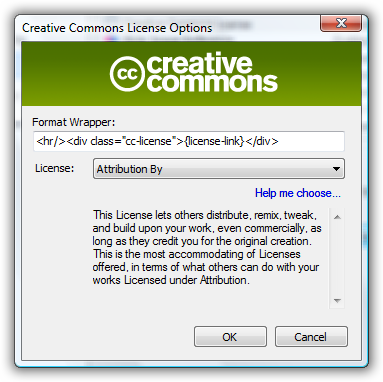
If you click the Preview tab (a new feature in Writer preview – tabs instead of menu options to switch between Edit, Preview, Source), it will show you what it will look like as well. These types of plugins can also be enabled per weblog so if you have more than one weblog defined for Writer, you can choose which one you want these post- and pre-publish event plug-ins to be turned on for.
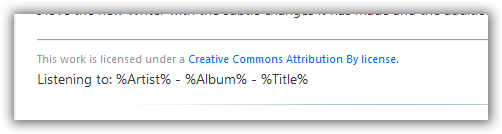
For some existing plugins out there, this is a more natural fit. When I heard about this new model, I joined up with Alexander Groß who wrote the Now Playing plug-in which is awesome and flexible (he’s also involved in a great Graffiti template for user groups). But it seemed a more natural fit to use this model of automatically appending the information instead of having the user remember to click the button to insert the information. I’ve submitted my changes to Alexander and hope they make it into his next build of Now Playing. It looks the same in config and here it is in preview mode in Writer:
I love the new Writer with the subtle changes it has made and the additional plug-in model. Get your update today!
Please enjoy some of these other recent posts...
Comments