Advertisement

A new Silverlight control - TabControl

Silverlight 2 brings a suite of controls for designers and developers to leverage within their applications.  With the Expression tools helping us to be able to skin these controls, also comes some new controls you may not have used yet as well as a new one introduced with the latest release of Silverlight 2.

Introducing TabControl.

UPDATE: Video walk-through is now live.

The TabControl is implemented in the System.Windows.Controls.Extended class library and not in the Silverlight core.  To use it make a reference to the Extended assembly and it will be available to you.  In Expression Blend you’ll see TabControl in the Custom Controls section of the Asset Library:

You’ll notice there is actually a TabControl and TabItem controls…to implement you’ll need them both.  In Blend, you’ll have to drag a TabControl onto the design surface.  Once you have it, double-click on the TabControl in the Objects and Timeline explorer so that it has a yellow ring around it:

Having the yellow border indicates that it is the actively selected element.  Now if you go back to the asset library, change to a TabItem and double-click the TabItem, it will be added as a child of the TabControl.  Do this several times to add as many TabItems you need:
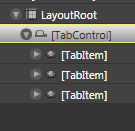
The resulting XAML looks like this:

<ex:TabControl TabStripPlacement="Bottom" VerticalAlignment="Top" 
               Width="231.148" Height="156.611" HorizontalAlignment="Left" 
               x:Name="tabstrip1">
    <ex:TabItem Width="75" Height="20">
    </ex:TabItem>
    <ex:TabItem Width="75" Height="20" Header="Second">
    </ex:TabItem>
    <ex:TabItem Width="75" Height="20" Header="Third">
    </ex:TabItem>
</ex:TabControl>

You’ll notice the “ex” namespace with the TabControl.  Yours may be different and likely “System_Windows_Controls“ if you followed the steps above.  This is added automatically when you drag a control onto the surface from the asset library.  The namespace is actually directed in the root node of the XAML and you can change it to whatever you’d like.

The TabControl has properties you can set on it just like any other control, but one that you might find important would be the TabStripPlacement property.  This enables you to direct where the TabItems (tabs) actually get displayed: Top, Left, Right, or Bottom.  This can be set in XAML and also controlled during runtime using the Dock enumeration.

Each TabItem also has two properties to set content: Header and Content.  Header is where you would put the content for the tab itself and content direct the actual content within the TabItem.  This can be set to literal string values, but they can also be set to other content.  For example, if you want to set the content within the TabItem, you could do something like:

<ex:TabItem Width="75" Height="20" Header="Third">
    <StackPanel Orientation="Vertical">
        <TextBox x:Name="yourname" />
        <Button Content="Click me" Click="Button_Click" />
        <TextBlock x:Name="resulttext" />
    </StackPanel>
</ex:TabItem>

If you wanted to set alternate content as the Header you could likewise do that as well noting the TabItem.Header:

<ex:TabItem Width="75" Height="20">
    <ex:TabItem.Header>
        <Button Content="foo" />
    </ex:TabItem.Header>
    <Button Content="Click Me" Click="Button_Click_1"/>
</ex:TabItem>

Let us all welcome TabControl to the family.  A simple yet probably widely used control is now available for you to think of marvelous uses :-).  Remember, that TabControl (as well as the calendar and date picker controls) is located in the Extended control assembly and not the core.  Here’s an example of a TabControl using some of the methods described above:

For a video demonstration of using TabControl, visit the Silverlight community learning section and stay updated as the video will be there shortly as well as other great videos on using Silverlight 2.

Hope this helps!


This work is licensed under a Creative Commons Attribution By license.

  1. 6/4/2008 4:56 PM | # re: A new Silverlight control - TabControl
    Awesome! :-)
    Lovely surprise to wake up to...
  2. 6/4/2008 6:38 PM | # re: A new Silverlight control - TabControl
    >>For a video demonstration of using TabControl, visit the Silverlight community learning section<<

    Tim, can you be more specific which video and which section?

    BTW, excellent detail blog. TabControls are great for screen real estate!

    ..Ben
  3. 6/4/2008 6:49 PM | # re: A new Silverlight control - TabControl
    @Ben: 'stay updated as the video will be there shortly' -- :-) teaser for a preview. It's essentially a walk through of this post, but sometimes it is nice to see it instead of read it. The site will have an update soon and the video will be up there.
  4. 6/4/2008 7:47 PM | # re: A new Silverlight control - TabControl
    Where does the TabPanel fit into the mix? Noticed it in the screenshot. Looks like some really good stuff to be released soon. Is the TabControl the only new control in SL2 B2?
  5. 6/4/2008 8:59 PM | # re: A new Silverlight control - TabControl
    Hi there,

    Just wondering if the password textbox and combobox/ dropdown list has been introduced in this release?

    Cheers,
    Ricky.
  6. 6/4/2008 9:58 PM | # re: A new Silverlight control - TabControl
    Tim, Thanks for showing the example with both xaml and blend. As like most of us SL and WPF are not our 9to5 jobs yet hence I find that I get to play with these things maybe twice a week so after the kids go to bed the first 30mins is spent remember what I have done before. Just the other night I could not remember how to get blend to show the timeline (dont make fun of me, I had issues) so I was typing storyboards into VS2008 until it clicked. An example like this where it shows both is very helpfull.

    I noticed Jess's blog says that this month he plans to focus on UI stuff can you please do some examples of the data side when the bits come out. I have seen so many examples of 'Reading' data and displaying it in SL but I really want the 'Create', 'Update' and 'Delete' examples.

    Thanks again.

    PS last I posted your wife wasn't the best I hope all that is resolved now, and she is 100%
  7. 6/4/2008 10:00 PM | # re: A new Silverlight control - TabControl
    Isnt there a combobox in silverlight beta2
  8. 6/4/2008 11:28 PM | # re: A new Silverlight control - TabControl
    What about ComboBox control?
    Is there implementation for that?
    I added the extension library as you explained in your article, but still didn't any Combo - just ListBox.
  9. 6/5/2008 12:08 AM | # re: A new Silverlight control - TabControl
    We need comBo box combo box , We need comBo box combo box... We need comBo box combo box.... Vote for combobox combo box, not Hilary Clinton

    :D
  10. 6/5/2008 7:20 AM | # re: A new Silverlight control - TabControl
    You can download a Silverlight ComboBox control at http://labs.componentone.com. The C1.Silverlight assembly includes many commonly used controls such as ComboBox, NumericBox, MaskedTextBox, RichTextBox, PasswordBox, TreeView, etc.

    PS: I hope this doesn't sounds like an ad or anything, it just looks like some people really need a combo ;-)

  11. 6/5/2008 6:46 PM | # re: A new Silverlight control - TabControl
    Who is Hilary Clinton?
  12. 6/6/2008 1:48 AM | # re: A new Silverlight control - TabControl
    i am waiting for broswer box control. it is possible?
    :)
  13. 7/3/2008 4:55 AM | # re: A new Silverlight control - TabControl
    looking for a complete example of a DropdownList control in Silverlight2.2 using databind....any help pls
  14. 8/17/2008 5:29 AM | # re: A new Silverlight control - TabControl
    Really love the Tabcontrol, can't wait to try to put a Listbox inside the Tabitem control :)

    Now i just have to wait for the other goodies in Silverlight final. I wonder what other controls would be included in the final. Scott's said it would have 100+ control? I hope so :)

  15. 10/7/2008 11:15 AM | # re: A new Silverlight control - TabControl
    Hello Tim:

    Excellent blog. I am trying to implement the TabControl, I have different TabItems and I wanted to change it programmatically. I can not get any focus on any other tabitem control unless the user expecifically clicks on it.

    Do you have any idea how to do this?

    Thanks in Advanced,

    Pablo.
  16. 10/18/2008 6:53 PM | # re: A new Silverlight control - TabControl
    Hi, in the video, the guy make a new reference and add a new dll file, the thing is I was searching this file in my computer but I can't find it, I don't know if I installed something wrong? or if I need to install something else. I search the System.Windows.Controls.Estended,dll in the C:\Program Files (x86)\Microsoft SDKs\Silverlight\v2.0\Libraries\Client folder. I hope you can help me and tell em what I do wrong or hoy I can fix this issue, you are my last chance! Thanks

    Im Running in

    Windows Vista Home Premium x64
    Visual Studio 2008 Professional Edition
    Silverlight Tools for Visual Studio 2008 SP1
    Microsoft Expression Blend 2 Service Pack 1

    it's the first time I installed all the components. I hope you can help me.

  17. 10/18/2008 7:25 PM | # re: A new Silverlight control - TabControl
    Mario: The TabControl has moved to System.Windows.Controls.dll after beta 2. So if you are running the release tools of Silverlight and have the SDK installed, you can find it there!
  18. 10/21/2008 5:10 AM | # re: A new Silverlight control - TabControl
    Hi there,

    In silverlight at run time, how do you add an image to Tabitem ?

    Prabodh
  19. 10/21/2008 10:29 AM | # re: A new Silverlight control - TabControl
    Prabodh: You can create the Image and add it to the TabItem content tree as a child control.
  20. 10/22/2008 12:00 AM | # re: A new Silverlight control - TabControl
    hi nice article i wanted to know how can style be applied to a tab control in SL2? When i apply the style the Initialize Component gives error
  21. 10/22/2008 8:03 AM | # re: A new Silverlight control - TabControl
    ammena: Can you give me more information? I'm not sure I understand the steps you are doing to implement the TabControl. You should need to add a reference to the System.Windows.Controls.dll in the SDK, then add the XAML declaration and then add the control to your XAML (or in code). Alternatively you should be able to drag/drop the control in your XAML in Visual Studio (not the design view) and it should do this for you.
  22. 10/23/2008 2:06 AM | # re: A new Silverlight control - TabControl
    How can I navigate between tabs in TabControl with a button of "Next" "Previous" "First" and "Last" ?

    I saw it does not exist the TabCount (System.Windows.Forms) in Silverlight?
  23. 12/2/2008 3:17 PM | # re: A new Silverlight control - TabControl
    floreta: you should be able to iterate through the TabItem collection
  24. 12/26/2008 9:35 PM | # re: A new Silverlight control - TabControl
    Hi Tim,

    Great blog and video. Very well detailed!

    After reading your article, the first thing that popped to mind was to display another usercontrol inside each tab? Do you have any pointers on how to do this?

    I've done something similar in the past where when I click on a button in my navigation menu, I simply call something like this:

    Menu rootVisual = (Menu)Application.Current.RootVisual;
    rootVisual.ContentPage.Children.Clear();
    rootVisual.ContentPage.Children.Add(new Blog());
  25. 12/26/2008 9:38 PM | # re: A new Silverlight control - TabControl
    Sorry, I stupidly pressed enter, and it commited my question before I actually finished it.

    So looking at the code above, is there some similar way where I can loaded up another silverlight usercontrol/page when a tab is clicked inside the tab?

    Any help would be greatly appreciated.

    Also on another topic, I read in the blog above that a lot of controls are to be released with Silverlight? Is this for real or just a rumour? If true, when will these be released?

    Thanks. Thierry
  26. 12/26/2008 9:50 PM | # re: A new Silverlight control - TabControl
    Hi again Tim,

    Sorry for posting a third time, but I figured it out, so I thought I'd post the solution for other to see.

    I basically put a canvas in every tabitem and then simply access the relevant canvas where I clear it and add a specific usercontrol/page in it programmatically when the tab is clicked. The code itself looks like this:

    private void TabItem_MouseLeftButtonUp(object sender, MouseButtonEventArgs e)
    {
    TabItem myTabItem = (TabItem) sender;
    Canvas myCanvas = (Canvas)myTabItem.Content;
    myCanvas.Children.Clear();
    myCanvas.Children.Add(new Page1());
    myTabItem.Content = myCanvas;
    }

    The coin only fell once I actually posted my question! Doohh! Anyway, I hope it will be of some help to others.

    Cheers.

    T.
  27. 2/24/2009 11:05 AM | # A new Silverlight control - TabControl
    Hi Tim,
    Well done,is there a way you can iterate through all controls in each tabitem and save them at once.Thanks.
  28. 2/24/2009 8:28 PM | # re: A new Silverlight control - TabControl
    Iterate through the elements in a TabItem? You can use VisualTreeHelper to walk the tree.
  29. 2/28/2009 3:07 AM | # re: A new Silverlight control - TabControl
    I have two tabitems and some contrls in each tab item. but when I'm iterating through VisualTreeHelper, it is iterating through one tab item only???
  30. 3/15/2009 10:36 PM | # re: A new Silverlight control - TabControl
    hi,
    We have created number of tabs. Now I need to display the tabs in a scroll bar on top as it is there in IE feature.I mean I need to diaplay only 6 tabs.and the other remain to sit in scroll.
    Plz.. give ur suggestion how to implement it.
  31. 4/20/2009 4:16 AM | # re: A new Silverlight control - TabControl
    Hi, I am trying to build a tablcontrol but I got problem with tab control style, it is keep error when I debugging it, but the code was only 3 lines and cant see anything wrong, could you give me some suggestion or solution? thanks
  32. 4/20/2009 2:41 PM | # re: A new Silverlight control - TabControl
    June -- you'll have to give me a little more to go on to help :-)
  33. 4/22/2009 4:01 AM | # re: A new Silverlight control - TabControl
    Hi Tim, I fixed it, the error because of I still have eventhandle in xaml file. But I have another question: is there any different appreence , feature or design for tab control. Because I wanna my website do not look like a website, so I wanna have some special tab control. But so far, I can only add background for tab control, do you know any other option? Looking forward to your reply, thanks.
  34. 6/22/2009 10:21 AM | # re: A new Silverlight control - TabControl
    Hello Tim,
    I wonder how to create a tabitem in run time and make it the visible one.
    Thanks
  35. 7/26/2009 9:58 PM | # re: A new Silverlight control - TabControl
    i need to add tab control inside a tab item,
    How can i add that,
    its not working for me
  36. 9/18/2009 12:55 PM | # re: A new Silverlight control - TabControl
    Am I correct that you cannot bind to this tabcontrol even though it looks like it?
    I wanted to bind an IEnumerable<MyObject> and populate each tab with data in MyObject, but it doesn't seem like ItemTemplate works at all. Not sure what the ItemsSource is useful for, except showing a bunch of tabs with no real content.
  37. 9/22/2009 8:18 AM | # re: A new Silverlight control - TabControl
    Hi
    i want to create a menu for my web site like the one used in the following url by microsoft
    http://www.microsoft.com/downloads/en/default.aspx
    in "Downloads A-Z"
    can you instruct me how to accomplish this
  38. 9/22/2009 9:46 AM | # re: A new Silverlight control - TabControl
    zubair - take a look at some of the commercial controls that you might be able to style: http://tinyurl.com/slcontrols
  39. 9/25/2009 2:11 AM | # zune software 4.0 written in silverlight?
    is the zune software 4.0 written in silverlight?
    can u provide tutorial on how it was done?
    tnx

 
Please add 2 and 2 and type the answer here:
First time here? You are looking at the most recent posts. You may also want to check out older archives. Please leave a comment, ask a question and consider subscribing to the latest posts via RSS or email. Thank you for visiting! (hide this)