Advertisement

Honoring your user’s culture settings with Silverlight

One thing that I’m just as guilty as probably most of some of my peers is creating US-centric applications.  Forgetting to think globally for your users is something that I think happens too often.  We operate in our US-centric worlds and forget that sometimes even the simplest things can make a difference.

Take for instance, honoring your user’s culture settings (region/locale/whatever you want to call it).  Even if you have a US-based application for a US-company, how do you know that a user might not be of French origin and still perhaps like to view their operating system information in French settings, so they change their culture.

Luckily in some areas this is simple to do, and for Silverlight applications you can let the platform do some of the work for you.  I’ll take a simple example of currency settings.  A colleague of mine was asking about currency formatting in his Silverlight application with regard to data binding.  He sent me a note asking why his formatter didn’t work.  He asked me why:

   1: ConverterParameter={0:$##.00}

As it turns out, it was just something missing in his implementing of a custom converter in his application.  But I let him know that he should really use {0:c} and let the platform do the work.  Let’s look at a simple example of an employee and their salary.  If we data bind this information to a DataGrid using the above formatter here is what we might get:
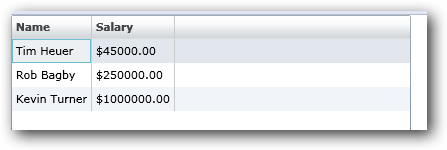
Makes sense right, looks fine.  Now let’s change the regional settings on my machine to French (France):

Hmm…what happened here.  Well the problem is we forced the format.  Let’s change the format parameter to {0:c} and keep French as our settings and see:
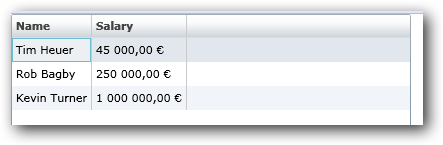
Ah, now that makes sense.  You see we can let our platform do the work and Silverlight is aware of how to use culture settings to honor currency, dates, etc. – here’s the default Calendar with French settings:

Now ideally in our sample with salaries above a literal visual translation probably isn’t accurate (by that I mean USD $1 is not the same as 1 Euro right now in translation.  We could add some custom logic though and get this output based on culture settings:
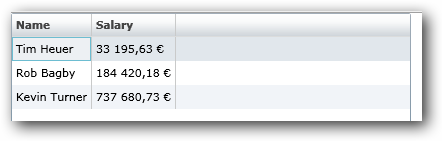
So be mindful of your applications and look for ways you can reliably and meaningfully add value to your global end users.  Don’t force a format unless you absolutely have to.


This work is licensed under a Creative Commons Attribution By license.

  1. 10/15/2008 4:39 PM | # re: Honoring your user’s culture settings with Silverlight
    Your advice sounds VERY dangerous unless he is more worried about l10n than i18n... And even with i18n he should be storing the base currency, not using culture to change the display of ANYTHING apart from spacing of digits. A euro is not the same as a pound, which is not the same as a US Dollar, which is not the same as an AU dollar. You just gave anyone viewing your website from europe a 30% raise!

    This is the type of thing could easily lead to a lawsuit if you had a website listing (example) house prices. You log in from the US and see that a house is going for $300,000, but then you'd have to wonder about a false advertising lawsuit when your offer was laughed at because it was really 300,000 euros...
  2. 10/15/2008 5:14 PM | # re: Honoring your user’s culture settings with Silverlight
    BBQNinja: You must not have read my statement about the fact that salary display not being the best example. In the last part of the example I point out that for currency it will not be a 1 to 1 conversion and in fact show the example of adding logic to the converter to do the literal conversion as an example, multiplying the USD rate based on the exchange. Perhaps I could have started with a better example, but I do note what you are talking about.
  3. 10/15/2008 5:21 PM | # re: Honoring your user’s culture settings with Silverlight
    Unfortunately, in Silverlight CultureInfo.GetCultureInfo is not public. This means you can't dynamically change the current culture or get any information about a culture other than the current one.

    I use this in my WPF application to change the culture on the fly based on the users' selection of available languages at the beginning of my application. I then change all the strings in the application based on the language. I don't yet have to use it for any culture specific formatting, so in Silverlight I can hack my way around it.

    I can't wait until Silverlight provides support for loading custom resource dictionaries at runtime, as I store the strings in a resource dictionary which are loaded at runtime based on the user's language.

    ...Stefan
  4. 10/15/2008 5:26 PM | # re: Honoring your user’s culture settings with Silverlight
    Stefan: True, you can't change a culture, but what I'm talking about more is *observing* the culture, which you can get and ensure that when you format a date for example, that you do so using culture information rather than US-centric views. For example, what date is this 11/10/2008? I think you understand my point -- but just wanted to clarify that I wasn't referring to CHANGING culture informtion, but rather DISPLAYING culture-settings information.
  5. 10/15/2008 5:28 PM | # re: Honoring your user’s culture settings with Silverlight
    Yes, I understand what you're saying. Just hoping my points will get through to the Silverlight development team somehow :-)
  6. 10/15/2008 5:37 PM | # re: Honoring your user’s culture settings with Silverlight
    Hi Tim. While it's nice to render dates, times, etc. according to a user's settings, I'm assuming that user input of values, dates, etc. follow suit and are converted to their appropriate internal values.

    Now here's a little twist: we find that there are times we have employees using foreign machines to connect to the server through a browser, but want to use settings configured at the server based on their user login instead of having the client side automatically handle it using the client machine settings.

    What do you think is the best way to handle this scenario?

    Cheers.
  7. 10/15/2008 10:15 PM | # re: Honoring your user’s culture settings with Silverlight
    JFalcon: Wow, that's a fun one. I will be the first to admit that I'm no localization expert but I'm trying to learn some best ways to do things. There is nothing stopping you I suppose from setting a Culture setting based on a user login, but you'd have to make sure that each time you need to do something formatting-wise that you apply that setting.

    -th
  8. 10/16/2008 5:02 AM | # re: Honoring your user’s culture settings with Silverlight
    hello tim, i really want to use culture but the problem is once we change the culture it does not affect automatically ... have to delete user control object and create it back. Any solution?
  9. 10/16/2008 6:48 PM | # re: Honoring your user’s culture settings with Silverlight
    when will other languages of Silverlight 2 Tools for vs2008 be released?
  10. 10/16/2008 7:29 PM | # re: Honoring your user’s culture settings with Silverlight
    could you be more specific about "Very shortly", like "1 week" or "2 weeks"? really urgent to put it into real productivity.
  11. 10/16/2008 7:44 PM | # re: Honoring your user’s culture settings with Silverlight
    "Within 3 weeks is the plan but we are trying to be more aggressive."

    thanks for your quick response, really anticipating for quicker delivery.
  12. 10/16/2008 11:59 PM | # re: Honoring your user’s culture settings with Silverlight
    off-the-topic:

    how to bind multiple fields?

    for example, normally we can do like this:

    Content="{Binding OneField}"

    but I want to make it like this:

    Content="{Binding OneField}, {Binding SencdonField} {Binding ThirdField}"
  13. 10/17/2008 12:11 AM | # re: Honoring your user’s culture settings with Silverlight
    off-the-topic:

    there is not multiline support for textbox, is it there in 2.o rtm?
  14. 10/17/2008 7:05 AM | # re: Honoring your user’s culture settings with Silverlight
    unruled: in TextBox set AcceptsReturn=True
  15. 10/17/2008 7:25 PM | # re: Honoring your user’s culture settings with Silverlight
    hi, very surprised, the Chinese Simplified version was out yesterday...
  16. 10/17/2008 8:59 PM | # datagrid bug in 2.0 rtm?
    Hi, in 2 rtm, setting the ItemsSource more than one time will cause the datagrid not to display any data. bug?
  17. 10/31/2008 10:41 AM | # re: Honoring your user’s culture settings with Silverlight
    Nice job trying to disguise your salary in Euros.

 
Please add 4 and 5 and type the answer here:
First time here? You are looking at the most recent posts. You may also want to check out older archives. Please leave a comment, ask a question and consider subscribing to the latest posts via RSS or email. Thank you for visiting! (hide this)