Advertisement

Silverlight 2 Watermarked TextBox Control

In the early days of Silverlight 2, one of the included controls was the WatermarkedTextBox.  In Beta 2 the control was removed from the runtime for among other things, WPF compatibility.  The control source code was made available for people to look at as it was referenced in a few projects, namely ScottGu’s Digg sample application.  There was hinting about future plans but nothing concrete. 

Now that Silverlight 2 is released, the control is not there :-).  I’ve gotten enough requests about it that I wanted to provide some action for you.  First, let me say that there are no concrete plans for WatermarkedTextBox at this time that I have to share.  I’m not saying there isn’t plans, but just that none at a point to make any worthwhile announcements.  Perhaps something like this would show up in the Silverlight Toolkit, but at this time no plans have been defined.

Again, as I’ve received enough requests, I’ve modified the source code for WatermarkedTextBox for Silverlight 2 release and am making it available for you to consume.  The code has been updated for use in Silverlight 2 and also updated to reflect the default styling of the released controls (namely to match TextBox).

If you aren’t familiar with the concept, it’s basically a TextBox with a value you can set for some helper text if the value is not set.  Typically you use this when you want to provide “prompt” text for some input, as an example here:
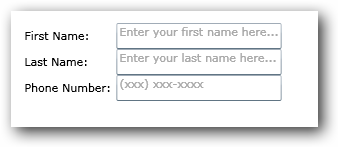
As you can see the TextBox provides a '”faded” default text that isn’t the TextBox.Text property of the control, but rather the Watermark property of this control.  Once data is entered in the control, the watermark goes away.  As long as data is input the watermark isn’t displayed…if the value is empty, the watermark displays.  Simple enough.

The XAML for the above looks like this:

   1: <UserControl x:Class="WatermarkTester.Page"
   2:     xmlns="http://schemas.microsoft.com/winfx/2006/xaml/presentation" 
   3:     xmlns:x="http://schemas.microsoft.com/winfx/2006/xaml"
   4:     xmlns:local="clr-namespace:Microsoft.Windows.Controls;assembly=Microsoft.Windows.Controls.WatermarkedTextBox"
   5:     Height="300" Width="600" xmlns:vsm="clr-namespace:System.Windows;assembly=System.Windows">
   6:     <Grid x:Name="LayoutRoot" Background="White">
   7:         <StackPanel Orientation="Vertical">
   8:             <Grid Margin="15">
   9:                 <Grid.RowDefinitions>
  10:                     <RowDefinition Height="Auto" />
  11:                     <RowDefinition Height="Auto" />
  12:                     <RowDefinition Height="Auto" />
  13:                     <RowDefinition Height="Auto" />
  14:                 </Grid.RowDefinitions>
  15:                 <Grid.ColumnDefinitions>
  16:                     <ColumnDefinition Width="Auto" />
  17:                     <ColumnDefinition Width="Auto" />
  18:                 </Grid.ColumnDefinitions>
  19:                 <TextBlock Text="First Name:" Margin="5" Grid.Column="0" Grid.Row="0" />
  20:                 <local:WatermarkedTextBox Grid.Column="1" Grid.Row="0" Watermark="Enter your first name here..."/>
  21:                 <TextBlock Text="Last Name:" Margin="5" Grid.Column="0" Grid.Row="1" />
  22:                 <local:WatermarkedTextBox Grid.Column="1" Grid.Row="1" Watermark="Enter your last name here..." />
  23:                 <TextBlock Text="Phone Number:" Margin="5" Grid.Column="0" Grid.Row="2" />
  24:                 <local:WatermarkedTextBox Grid.Column="1" Grid.Row="2" Watermark="(xxx) xxx-xxxx" />
  25:             </Grid>
  26:         </StackPanel>
  27:     </Grid>
  28: </UserControl>

Note the xmlns:local declaration in the user control which references the binary.

The control is also Blend compatible if you want to change the style/control template so if you wanted to change the Watermark color or something like that you could easily do that with Blend:
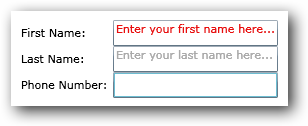
So if you’ve been looking for this control, here you go.  You can download the bits here:

The source is available as Ms-Pl.  Hope this helps!


This work is licensed under a Creative Commons Attribution By license.

  1. Gravatar
    10/22/2008 8:26 AM | # re: Silverlight 2 Watermarked TextBox Control
    l
  2. 10/22/2008 9:47 AM | # re: Silverlight 2 Watermarked TextBox Control
    Thanks Tim - this is really helpful. Both from the standpoint of getting the control back out there, but also on good practices for control creation.
  3. 10/22/2008 4:52 PM | # re: Silverlight 2 Watermarked TextBox Control
    Hi Tim,

    For those of us that might not posess the know-how : How does one use the code in their C# SL2 projects?
  4. 10/22/2008 4:59 PM | # re: Silverlight 2 Watermarked TextBox Control
    Maciek: Good point, we should probably put up a quick how-to on that. The steps that I follow are:

    1 - Add a reference to the assembly in Visual Studio (or Blend).
    2 - In the XAML above look at the xmlns:local declaration -- you'll want to add that
    3 - Then anywhere you want to use it you would use local:WatermarkedTextBox as your element name

    In Visual Studio you could also add this to your toolbox for drag/drop capabilities and it would add the xmlns declaration for you.
  5. 10/22/2008 8:28 PM | # re: Silverlight 2 Watermarked TextBox Control
    Nice job, Tim! Thank you!
  6. 10/23/2008 1:24 AM | # re: Silverlight 2 Watermarked TextBox Control
    nice one! thanks
  7. 10/23/2008 2:27 AM | # re: Silverlight 2 Watermarked TextBox Control
    Thanks for the reply Tim,

    I was examining the code and it occured to me that having a quick "how to make a watermarked textbox" tutorial would be pretty cool. I understand the xaml/c# stuff but there's some things that I've not seen yet. For instance, what's the purpose of the resource file ?
  8. 10/23/2008 5:15 AM | # re: Silverlight 2 Watermarked TextBox Control
    Tim, any plans on a WatermarkedPasswordBox? Would be really useful to be paired with a WatermarkedTextbox in a login.
  9. 10/23/2008 7:42 AM | # re: Silverlight 2 Watermarked TextBox Control
    Maciek: The resource file simply holds some default text right now.

    Santiago: It would have been easy to change the inheritence, but unfortunately PasswordBox is sealed (not sure why), but maybe I can put something together.
  10. 10/23/2008 1:32 PM | # re: Silverlight 2 Watermarked TextBox Control
    Thank you, Tim! Works the way it was advertised :)) Your blog is on my list of daily checks.
  11. 10/24/2008 10:08 AM | # re: Silverlight 2 Watermarked TextBox Control
    Just a thought. . .
    I've been reading alot on the WatermarkedTextBox missing from Beta2 and it occured to me that every attempt to rectify the situation has been to add a reference to create the control. I'm not sure why anyone would go to these great lengths and sownload, or write, the code and then have to reference in every project they wish to use this control in. A much simpler silution for me was to change the Forground color to grey and then add a GotFocus event to erase the text. This is a simpler and easier method for me. Just a thought, I like to keep things simple. Although, creating a control is great practice if you desire something alot different than what's available. I just don't think it's necessary in this instance
  12. 10/24/2008 11:04 AM | # re: Silverlight 2 Watermarked TextBox Control
    James: True, but some people just want controls and not have to worry about writing any more code to maintain. Ideally in future versions of Silverlight, TextBox will just have a Watermark property itself...this is merely a stop gap for those who asked for it.
  13. 10/27/2008 6:33 PM | # re: Silverlight 2 Watermarked TextBox Control
    off-the-topic:

    hi, I remembered that there are several skins shipped with silverlight, like the red and black, but I could not find the tutorial anymore. Any idea where is it?
  14. 10/28/2008 2:45 PM | # re: Silverlight 2 Watermarked TextBox Control
    unruled: No skins shipped with Silverlight. Check out timheuer.com/.../...with-charting-databinding.aspx for info on the new Silverlight Toolkit which ships with 6 themes.
  15. 11/6/2008 6:11 AM | # re: Silverlight 2 Watermarked TextBox Control
    Hi

    This was really helpful.
    Thanks
  16. 11/11/2008 2:06 PM | # re: Silverlight 2 Watermarked TextBox Control
    Excuse my naivety... Can you point me towards a resource on how to modify the watermark style? I see you changed it's color via Blend in the article, but I see no other watermark specific properties. I'm interested in changing the watermark padding to match the text padding I'm using (notice how the watermark is near the top of the textbox in your example).

    Thanks for the code.
  17. 11/11/2008 2:08 PM | # re: Silverlight 2 Watermarked TextBox Control
    David: Take a look at the default control template in the generic.xaml. You could also use Blend to just create a style for this as well and style the ContentPresenter control that is a part of this WatermarkedTextBox.
  18. 11/12/2008 7:49 AM | # re: Silverlight 2 Watermarked TextBox Control
    Thanks Tim! Obviously there are a few gaps in my Silverlight knowledge and this helps tremendously. Appreciate it.
  19. 12/2/2008 3:17 AM | # re: Silverlight 2 Watermarked TextBox Control
    Hi
    this was really helpfull,
    thanks.
  20. Gravatar
    1/12/2009 8:36 AM | # re: Silverlight 2 Watermarked TextBox Control
    Hi Tim, this is a very useful control that I've added this to a number of projects. It would be handy to have as part of a larger library such as SilverlightContrib or Blacklight. Is there any chance that it could ever be put in one of those libraries? Thank you again for making it available.
  21. 1/12/2009 1:41 PM | # re: Silverlight 2 Watermarked TextBox Control
    Thanks Rob, I haven't submitted it to the SilverlightContrib project only because I suspect that eventually Watermark will be a property on TextBox. But I'll see if the guys want to pick it up.
  22. 2/24/2009 7:16 PM | # re: Silverlight 2 Watermarked TextBox Control
    Thank you Tim,
    Maybe there could be a link included with ScottGu’s Digg sample application as it might help someone to not spend a few hours trying to figure out what is wrong.
  23. 2/28/2009 3:43 AM | # re: Silverlight 2 Watermarked TextBox Control
    Thanks for providing this - saved me the time of trying to implement one myself.
  24. 3/4/2009 4:15 PM | # re: Silverlight 2 Watermarked TextBox Control
    Thanks Tim for this great control! It can make any application much more intuitive.

    For those interested, if you want to change the default style to show the watermark in the exact same place as the text, simply change the following and rebuild:

    File: themes\generic.xaml
    Line: 103
    Change: Margin="0,-2,0,0"
    Into: Margin="1,1,0,0"
  25. 4/24/2009 12:10 PM | # re: Silverlight 2 Watermarked TextBox Control
    Tim,

    Thanks so much for this info and for making the control available to us. I've been playing with this and with the source.

    I'd like to change the behavior slightly and am having difficulty. Right now, the state changes to an unwatermarked state and the watermrk disappears any time the textbox has focus. I'd like to modify the behavior so that as long as the text property is empty, the watermark will be visible, regardless of whether the control has focus or not. Can you direct me as to what I'll need to do to accomplish this?

    Thanks in advance
  26. 4/25/2009 3:34 PM | # re: Silverlight 2 Watermarked TextBox Control
    Steve - that's the default behavior, if there is no value it displays the watermark text you provide.
  27. 5/13/2009 2:02 AM | # re: Silverlight 2 Watermarked TextBox Control
    Thank you very much. Very nice helper!=) Was implementing this behaviour myself in the .cs file, but this is way nicer!=)
  28. 5/14/2009 4:47 AM | # re: Silverlight 2 Watermarked TextBox Control
    Hello,

    is there a quick way to check if a WatermarkedTextBox has a real input text? Should I check if the Text of the element is null or something?

    Thank you again!
  29. 5/14/2009 4:49 AM | # re: Silverlight 2 Watermarked TextBox Control
    Forget my previous comment. I just compared the Text property with "". =) It works!
  30. 6/5/2009 9:07 AM | # re: Silverlight 2 Watermarked TextBox Control
    I tried the watermarkedtextbox, and my application threw an exception during "InitializeComponent();". version issue?
  31. 6/19/2009 1:20 AM | # re: Silverlight 2 Watermarked TextBox Control
    Hello, how can i add the watermarked textbox control in my silverlight app??

    Thanks
  32. 6/23/2009 10:11 PM | # re: Silverlight 2 Watermarked TextBox Control
    Thanks Tim, I was also trying to follow that tutorial, but got stuck on that part with the watermark. Somehow after about forty minutes of trying to this code to work I was finally able to do it.
  33. 7/6/2009 7:16 AM | # re: Silverlight 2 Watermarked TextBox Control
    I'd like to add my thanks as well. This is a feature long available in XCode, nice to see it in Silverlight!
  34. 7/8/2009 8:36 AM | # re: Silverlight 2 Watermarked TextBox Control
    Many thanks Tim! :)
  35. 8/18/2009 2:03 PM | # re: Silverlight 2 Watermarked TextBox Control
    shuld I be referencing the Binary version?
  36. 8/18/2009 2:25 PM | # re: Silverlight 2 Watermarked TextBox Control
    Patrick, yes you can build it yourself using the code provided, but in your Silverlight app it is easiest to reference the binary.
  37. 8/18/2009 4:50 PM | # re: Silverlight 2 Watermarked TextBox Control
    I reference it in the bin folder of my web project and added the code and I still get the following error:AG_E_PARSER_BAD_TYPE [Line: 20 Position: 114]. I'm new to silverlight and so I'm sure I'm doing something wrong or not doing something I should. Here is the code I added:
    <UserControl x:Class="WaterMark.Page"
    xmlns="schemas.microsoft.com/.../presentation"
    xmlns:x="http://schemas.microsoft.com/winfx/2006/xaml"
    xmlns:local="clr-namespace:Microsoft.Windows.Controls;assembly=Microsoft.Windows.Controls.WatermarkedTextBox"
    Height="300" Width="600" xmlns:vsm="clr-namespace:System.Windows;assembly=System.Windows">
    <Grid x:Name="LayoutRoot" Background="White">
    <StackPanel Orientation="Vertical">
    <Grid Margin="15">
    <Grid.RowDefinitions>
    <RowDefinition Height="Auto" />
    <RowDefinition Height="Auto" />
    <RowDefinition Height="Auto" />
    <RowDefinition Height="Auto" />
    </Grid.RowDefinitions>
    <Grid.ColumnDefinitions>
    <ColumnDefinition Width="Auto" />
    <ColumnDefinition Width="Auto" />
    </Grid.ColumnDefinitions>
    <TextBlock Text="First Name:" Margin="5" Grid.Column="0" Grid.Row="0" />
    <local:WatermarkedTextBox Grid.Column="1" Grid.Row="0" Watermark="Enter your first name here..."/>
    <TextBlock Text="Last Name:" Margin="5" Grid.Column="0" Grid.Row="1" />
    <local:WatermarkedTextBox Grid.Column="1" Grid.Row="1" Watermark="Enter your last name here..." />
    <TextBlock Text="Phone Number:" Margin="5" Grid.Column="0" Grid.Row="2" />
    <local:WatermarkedTextBox Grid.Column="1" Grid.Row="2" Watermark="(xxx) xxx-xxxx" />
    </Grid>
    </StackPanel>
    </Grid>
    </UserControl>


    Thanks for your help
    patrick
  38. 8/18/2009 4:53 PM | # re: Silverlight 2 Watermarked TextBox Control
    Patrick send me your project and I'll take a look timheuer at microsoft dot com.
  39. 8/18/2009 5:06 PM | # re: Silverlight 2 Watermarked TextBox Control
    Sure I'll get it ready to send now.
  40. 8/18/2009 5:10 PM | # re: Silverlight 2 Watermarked TextBox Control
    Patrick -- I just reread your post. You need to reference it in your *Silverlight* project. It does no good in your web project :-).
  41. 8/18/2009 5:36 PM | # re: Silverlight 2 Watermarked TextBox Control
    OK Sorry I'm primarily a Database Developer, so I'm very Comfortable with SQL and C# etc... But new for front end and I like the Silverlight so I'm on a learning curve. But so far I'm enjoying it.Question: So when I extract the Binary Dll where should I put it before I reference it in Silverlight?

    Thanks for be patient
    patrick
  42. 8/18/2009 5:37 PM | # re: Silverlight 2 Watermarked TextBox Control
    Patrick you can put it anywhere. When you add the reference and compile, it will be packaged with your XAP (Silverlight application package) and copied to your web site.
  43. 8/18/2009 5:44 PM | # re: Silverlight 2 Watermarked TextBox Control
    Thanks for the info I'll give it a try.
  44. 8/18/2009 5:59 PM | # re: Silverlight 2 Watermarked TextBox Control
    Oh My Gosh it Work! :). This is cool stuff, Just doig totorials, but have some Idea's for Interactive Data Dictionary for SQL Server
  45. 8/18/2009 6:03 PM | # re: Silverlight 2 Watermarked TextBox Control
    Hey Thanks Tim, I keep this page in my Favorites
  46. 8/25/2009 7:00 AM | # re: Silverlight 2 Watermarked TextBox Control
    I'm completely new to Silverlight. I spent half a day trying to figure out how to fix Scott's tutorial, even tried using a TextBlock without success, until I came upon your blog. I am using Silverlight 3 (missed Silverlight 1 and 2), and it worked fine.
  47. 9/23/2009 2:16 PM | # re: Silverlight 2 Watermarked TextBox Control
    This is what Tim says:

    Tim,

    "Thanks so much for this info and for making the control available to us. I've been playing with this and with the source.

    I'd like to change the behavior slightly and am having difficulty. Right now, the state changes to an unwatermarked state and the watermrk disappears any time the textbox has focus. I'd like to modify the behavior so that as long as the text property is empty, the watermark will be visible, regardless of whether the control has focus or not. Can you direct me as to what I'll need to do to accomplish this?"

    I can confirm this is the default behavior unlike what Tim says (that it's the default behavior). I am having trouble modifying it too.

    When I click into the textbox I don't want the watermark to go away until I start typing. This current example does not do that. Any ideas?
  48. 9/23/2009 2:39 PM | # re: Silverlight 2 Watermarked TextBox Control
    Brian -- It does not, that's correct -- you'd have to fiddle with the VisualStates and the sequence at which they would be initiated (perhaps looking at OnTextChanged to determine when there is actual Text there) to keep the watermarked state.
  49. 10/6/2009 8:15 AM | # re: Silverlight 2 Watermarked TextBox Control
    This water Mark doesn't work with DateForm.DateField in RIA.
    The problem is that the validation error detail doesn't show up and the control is not red around when validate fails.

    Any idea?
  50. 11/8/2009 4:50 AM | # re: Silverlight 2 Watermarked TextBox Control
    I have upgraded this source code into Silverlight 3.0.. it is working fine.. Why it is not added regular toolbox?
  51. 11/8/2009 5:21 AM | # re: Silverlight 2 Watermarked TextBox Control
    Sivakumar - do you mean the Toolkit? Technically it's already in there -- DateTimePickerTextBox (same code)
  52. 11/10/2009 2:21 PM | # re: Silverlight 2 Watermarked TextBox Control
    I've been using WatermarkedTextBox and it works. Now I am trying to do the data validation as shown in the Silverlight Toolkit in Data Input > Validation
    silverlight.net/.../default.html
    by using WatermarkedTextBox instead of standard Textbox and it does work. Below are the result. Any help will be greatly appreciated.

    Data validation works for the lines below and a red box error message shown on the right hand side of the textbox:

    <TextBox Grid.Row="1" Grid.Column="0" x:Name="PrimaryBeneficiaryTextBox" Text="{Binding PrimaryBeneficiary, Mode=TwoWay, ValidatesOnExceptions=True, NotifyOnValidationError=True}" Style="{StaticResource TextBoxStyle}" />
    <dataInput:DescriptionViewer x:Name="PrimaryBeneficiaryDV" Grid.Row="1" Grid.Column="1" Margin="4" Target="{Binding ElementName=PrimaryBeneficiaryTextBox}" />


    Data validation DOES NOT work for the lines below and NO error message shown on the right hand side of the WatermarkedTextBox :

    <local:WatermarkedTextBox Grid.Row="1" Grid.Column="0" Watermark="Primary Beneficiary" x:Name="PrimaryBeneficiaryTextBox" Text="{Binding PrimaryBeneficiary, Mode=TwoWay, ValidatesOnExceptions=True, NotifyOnValidationError=True}" Style="{StaticResource TextBoxStyle}" />
    <dataInput:DescriptionViewer x:Name="PrimaryBeneficiaryDV" Grid.Row="1" Grid.Column="1" Margin="4" Target="{Binding ElementName=PrimaryBeneficiaryTextBox}" />

  53. 11/10/2009 4:20 PM | # re: Silverlight 2 Watermarked TextBox Control
    Vincent -- I did not update the code for data validation rendering -- that's definitely something I need to do!
  54. 11/11/2009 7:43 AM | # re: Silverlight 2 Watermarked TextBox Control
    Thanks Tim. Great to hear that and certainly looking forward to it.
  55. 12/3/2009 12:35 AM | # re: Silverlight 2 Watermarked TextBox Control
    Hi Tim,

    Thanks for sharing this stuff - it looks like a lot of work. I really appreciate it - this, and all your other posts. They have helped me immensely whilst trying to find my footing with Silverlight.
  56. 12/17/2009 8:59 AM | # re: Silverlight 2 Watermarked TextBox Control
    Hi Tim.

    Thanks for the great work!
    I'm also trying to use validation with the Watermark control.
    It seems I should be able to add it to my own style but I'm not realy sure where to start. Seems I should be able to steal the ValidationStates from TextBox but it's a little beyond me at the moment (g)

    Any advice..

    Pat NH USA..
  57. 12/17/2009 9:09 AM | # re: Silverlight 2 Watermarked TextBox Control
    Pat -- use a tool like Expression Blend to really help change things visually.
  58. 2/3/2010 1:25 AM | # re: Silverlight 2 Watermarked TextBox Control
    Hi Tim,

    I really like the watermark textbox, I'm using it in Silverlight 3 but it does not make use of the validation framework. It does not display the error message and the circled textbox.
  59. 2/19/2010 6:12 AM | # re: Silverlight 2 Watermarked TextBox Control
    weeeeeeeeeeeeeeeeeeeeeeeeDDDDDDDDDDDDDDDDDDD
  60. 2/25/2010 4:26 AM | # re: Silverlight 2 Watermarked TextBox Control
    hi, thanks for this post.actually i want to do the same means,to change the color of "watermark" property of watermark textbox.plz tell me is this any property of watermark to change the color ? or on which event of watermark i can change this..
    Thanks.

 
Please add 8 and 3 and type the answer here:
First time here? You are looking at the most recent posts. You may also want to check out older archives. Please leave a comment, ask a question and consider subscribing to the latest posts via RSS or email. Thank you for visiting! (hide this)