Advertisement

Why won’t iTunes behave?

In a recent Twitter conversation I was having with Peter Laudati, it reminded me of another problem I’ve been having with iTunes and wondering why it isn’t working this way. 

First, here’s my setup (and logic):

    • I have one server (Windows Server 2008) at my house that manages my backup, music, photos, etc. (no it is not a Windows Home Server (yet)).
    • I have a public share there with Everyone read/write priveleges called “music” and it is shared out an accessible.
    • In each client computer I have iTunes installed at, I change the Library location to the mapped drive which is pointing to the share indicated above.
    • All is well.
    • Whenever new music is added in a CLIENT machine, it is added to the server (because the library is pointing there) and added to only that local client’s iTunes library – this is the problem Peter and I were discussing, the fact that iTunes doesn’t “monitor” folders to update it’s Library – you have to help it understand by adding.  Royal suck. (FYI, Windows Media Player has been able to monitor folders for about 9 years now.)

So that’s the setup.  Any activity in iTunes now basically uses this server as the storage…this includes podcast subscriptions.  This is all fine.  Until I want iTunes to actually honor my settings.  Here’s what I’m talking about:
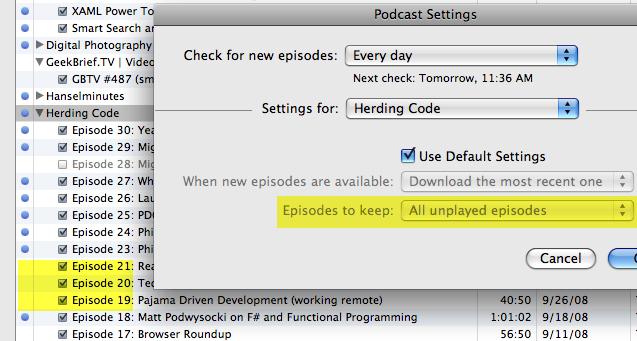
As you can see in this image above, my settings say to keep “all unplayed episodes” but also as you can see, episodes that are played (as indicated by the lack of blue dot) are still there.  I’ve refreshed, I’ve ran the “updated podcast” function on the feed(s), etc.  Nothing…all played episodes are persisted.

So, dear Apple fans/experts/geniuses, why is this?  Is this because my Library is a network share?  Can iTunes not handle the fact that it isn’t stored locally?  I will point out that if I manually delete them via iTunes, it does, in fact, delete – so it isn’t a permission thing.  I’d love to take this to the ‘Genius Bar’ but obviously with a dependency on my network share it won’t be of much help.

If anyone knows the solution to this or the problem with getting iTunes to manually update libraries by monitoring folders, I’m all ears.

Yes, I’m aware that Songbird, and others are out there, but they have yet to appeal to me in their other features.


This work is licensed under a Creative Commons Attribution By license.

  1. 1/7/2009 2:06 PM | # re: Why won’t iTunes behave?
    I have similar experience on a single machine with local disk storage. They eventually get removed, but not as soon as I've listened. I just assumed it was because it "thought" I might not have listened to the whole episode yet (stopped before the end of the track, etc.), but that's only a guess.
  2. 1/7/2009 2:09 PM | # re: Why won’t iTunes behave?
    That's interesting Scott because I thought that as well (not fully listened too) but in fact these are. And even if not, how can *I* define what 'listened to' means. If I end with 1 second left, it seems odd that iTunes would consider that not fully listened to.
  3. 1/7/2009 2:39 PM | # re: Why won’t iTunes behave?
    I believe it's one of those "genius" features in iTunes which recognizes awesome podcasts which should never be deleted. It's just preventing users from making terrible mistakes.
  4. 1/7/2009 4:43 PM | # re: Why won’t iTunes behave?
    Hi,
    I find alot that is not quite right with the monitoring of folders etc as well on Windows. I would assume that you have a windows only environment since you did mention Windows Server 2008 etc. I think your problem goes back to itunes being a secondary port from the original mac versions. I have always done all my itunes activity from my mac instead of my vista machine because of problems like this. I do not believe that ITunes dev for Windows is a priority for Apple at all-- it is as much an afterthought as Office used to be for the Mac version for Microsoft. Not saying anything against either company, but each does have their core businesses and for Apple, they really want you to buy a mac to house your itunes collection, which is exactly what I got suckered into :). So, back to your question, I know that a similar environment does exist on my IMac and works great but does not on Itunes on Vista.

    So, if you really want it to work with folder monitoring etc, you will have to buy a mac and run Itunes on Leopard :)

    --Michele

  5. 1/7/2009 5:17 PM | # re: Why won’t iTunes behave?
    Hi Michele -- actually my iTunes app (as indicated in the screenshot) *is* on a Mac.
  6. Gravatar
    1/7/2009 7:39 PM | # re: Why won’t iTunes behave?
    Check your CPU usage the next time iTunes is downloading something - especially if it is more than one item.

    It takes a pretty bad network programmer to use up CPU like that on my 1Mb/s cable modem connection!
  7. 1/8/2009 2:04 AM | # re: Why won’t iTunes behave?
    Hi Tim,

    Given that iTunes provides access to the "largest music retailer in the world" it's Library management features generally are a shame. Not only does it not watch folders it also has many subtle issues when it comes to duplicate or missing files.

    I've got a similar setup however I do sync iTunes files via Dropbox (www.getdropbox.com). While the syncing works just fine iTunes just does not recognize new files without me manually handling new files.

    I worked around this really annoying issue by adding the ENTIRE Library again from time to time. iTunes figures out to just add files that where not there the last time. While this still is pretty painful, it's currently the only way I know it works.

  8. 1/8/2009 2:12 AM | # re: Why won’t iTunes behave?
    Hi Tim,

    Given that iTunes provides access to the "largest music retailer in the world" it's Library management features generally are a shame. Not only does it not watch folders it also has many subtle issues when it comes to duplicate or missing files.

    I've got a similar setup however I do sync iTunes files via Dropbox (www.getdropbox.com). While the syncing works just fine iTunes just does not recognize new files without me manually handling new files.

    I worked around this really annoying issue by adding the ENTIRE Library again from time to time. iTunes figures out to just add files that where not there the last time. While this still is pretty painful, it's currently the only way I know it works.

  9. 1/8/2009 3:26 AM | # re: Why won’t iTunes behave?
    I sometimes have that 'played podcasts are not removed' issue too - and I'm on a local disk storage (like Scott). Haven't tracked down why, it hasn't bothered me enough. But now that you mention it I may have to investigate... :)

    Although I don't have a direct solution for your 'shared music' issue, I can suggest a workaround; try using Firefly (http://www.fireflymediaserver.org/) to complement iTunes. Firefly runs on a server and indexes your music, appearing to any iTunes (technically any DAAP-capable) client as a shared music collection. You can then use iTunes to just play the music. Much nicer having your music shared out from a central location.

  10. 1/8/2009 4:13 AM | # re: Why won’t iTunes behave?
    I have the same issue. I've never seen iTunes delete a podcast in the 6 months I've been using it. And having to rescan the folder every time I add an album is just annoying.
  11. 1/8/2009 4:18 AM | # re: Why won’t iTunes behave?
    I have the same issue. I've never seen iTunes delete a podcast in the 6 months I've been using it. And having to rescan the folder every time I add an album is just annoying.
  12. 1/8/2009 11:18 AM | # re: Why won’t iTunes behave?
    I have found if I manually download the podcasts when I am behind, I have to do a Select All and choose Allow Auto Delete. Once I do that, it then clears the old podcasts next time I do a Refresh. But if you manually Get them or choose Get All, you have to Select All and tell it to auto delete them. Is that the issue you are seeing?
  13. 1/19/2009 1:19 PM | # re: Why won’t iTunes behave?
    My iTunes is working fine... And what JD Wade said about the manual downloads goes for me too.

    I've noticed two things: the episode has to be completly listened to and the deletion occurs whenever I sync my iPhone.

    I don't know if the has anything to do with it, but my computer is on with iTunes running 24x7.

 
Please add 2 and 1 and type the answer here:
First time here? You are looking at the most recent posts. You may also want to check out older archives. Please leave a comment, ask a question and consider subscribing to the latest posts via RSS or email. Thank you for visiting! (hide this)