Advertisement

Get yourself a Windows Home Server

After reading James’ story just now, I’m so glad that a Windows Home Server is a new addition to my home.  It’s funny…about 4 years ago I think I had 6 active machines in my house.  Now we’re down to my work laptop, my MacBook, my wife’s laptop and a new desktop for my wife’s photography and graphics stuff.  Okay, I guess that’s not down much, but they all aren’t “active” that much anymore.

Back then I had no backup strategy.  In fact, I’ve still got a laptop drive that clicks that I’m destined to get the data off of!  I’ve heard so much about Home Server though and James’ story isn’t the first.  Over the past 4 months I think I’ve heard about 10 similar stories.  Hardware went bad and within a few hours it was as if nothing happened.  I almost pulled the trigger on a Home Server last month, but was hinted to wait.  I read all the reviews about previous HP models and how people thought they were great but the first thing they did was upgrade drive and memory.
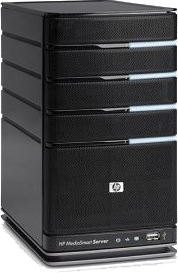
HP EX487 imageThis month HP release the EX487 Home Server.  This is a 64-bit machine with 1.5TB of storage and 2GB RAM.  It basically sits idle with subtle blue lights until tragedy may strike.  And even if it doesn’t strike, it’s now serving an extremely important role!  My experience this first week has been great.  The setup was amazingly simple sans one issue.  I use OpenDNS at home and had to use manual host file modifications to find my server on some of my machines…not a big issue.  Other than that it was literally plug it in, connect to the LAN and configure (which was basically to give it a name). 

On each machine I wanted connected I installed the agent software and it immediately started backing up.  Oh, and my MacBook?  Yeah, that too!  Home Server can serve as a Time Machine drive for your Mac…it’s awesome.  Now all my machines are just automatically backed up without thinking of it!  I also moved all my media (MP3, Video, Pictures) to that server for safety and the EX487 can stream music and your iTunes library if desired (yes even DRM music they claim).  The one other feature I liked about it was automatic integration with Amazon S3 storage.  I know JungleDisk has a plugin for Home Server as well, but the new models come with this feature installed.  So I have reliable local backup and can push my critical data to Amazon S3 for “offsite” storage in the event of catastrophe (did I mention my neighbors house burned down 2 weeks ago?).
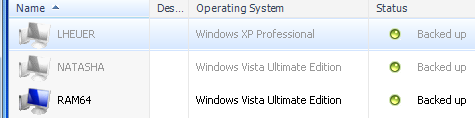
Machines backup list

The initial backups took a lot longer than expected (especially the MacBook), but I don’t have gigabit ethernet at home and I did one over wireless.  After they completed though, now everyday it just gathers anything new and puts it in the vault.  I love it…no thinking for me.  You can even configure wake-on-LAN to start a backup if your machine supports it.  So far I can’t find anything I don’t like about it at all.  And all the stories I’ve heard make me want to try to break something just so I can restore it.  Actually, one thing it can be used for is disk imaging – create your “paved” machine and save that backup off permanently…I’m going to be doing that soon with Windows 7.

There are two new models and from my shopping I felt Amazon had the best deal (both as price/shipping and as a reputable retailer).  The HP EX485 sells for less but is also less space (750GB).  That’s about the only difference.  I figured the incremental cost for double the space was worth it.  In hindsight it may not have been considering you can get a 1TB drive for about $100 now (I added one of those as well for a total of 2.5TB storage).  Either way the HP EX485 or the HP EX487 would be a great choice.  Plug it in, configure it, forget about it.  So far I concur with others that this will be a worthwhile investment for the home!


This work is licensed under a Creative Commons Attribution By license.

  1. 2/21/2009 3:57 AM | # re: Get yourself a Windows Home Server
    I built my own Windows Home Server machine from an older P4 tower last year, and I have been very happy with it. Has saved my bacon a couple of times when I needed to restore my media center PC, and the full-machine backup provides a degree of peach of mind that's great to have.

    Only part that I still need to figure out is offsite backup. There are a number of add-ins for WHS that work with cloud storage offerings. I just haven't had the time to decide which to use.

    Big +1 for WHS.
  2. 2/21/2009 7:52 AM | # re: Get yourself a Windows Home Server
    Perhaps I'm just cheap... but I figured $4.99 for Mozy home for offsite backup and I'm golden ;).
  3. 2/21/2009 7:54 AM | # re: Get yourself a Windows Home Server
    Ok - really, HP server scales better when you have more than couple machines you need backed up. Nevermind... :)
  4. 2/21/2009 9:13 AM | # re: Get yourself a Windows Home Server
    I have considered building one of these with Linux running on ancient (and/or low-power-grabbing) hardware--what machine requirements are needed to run the "Microsoft" version of this solution?

    Also, I got your tweets regarding iTunes this week and your frustration with it--were said tweets related to this project? If so, how did you finally get iTunes to work well with this sort of setup (I realize iTunes allows for 5 computers to be authorized per account).

    Finally (off topic)-thanks for the direction re: updating Silverlight this week!
  5. 2/21/2009 11:47 AM | # re: Get yourself a Windows Home Server
    Duthie - can you share the specs you used to build one for Jon? As for offsite backup -- check out JungleDisk -- they have an actual Home Server plugin for those who don't have the latest version.

    Mark -- you're not cheap. I actually use Mozy too (free version for 5GB). But Home Server provides more than file backup -- full system backup in moments.

    Jon -- my iTunes whoas were something unrelated. What Home Server does is stream your library as a shared library -- so in iTunes it shows up as a shared library -- not helpful for synching, etc. but nice to have a streaming media server when you need it! It also streams to XBOX, Windows Media Player and I presume (haven't tried) AppleTV, etc.
  6. 2/21/2009 12:15 PM | # re: Get yourself a Windows Home Server
    Back when this was under development, I tried to get the home server folks to add some DC style user management, content filtering, and parental controls. I was looking for what you have today, plus a gateway to the internet so I could prevent my children from surfing to sites they have no business being at.

    I didn't convince them to add the features and ended up using ISA Server. But maybe some day we'll have a home server that serves more roles.
  7. 2/21/2009 6:02 PM | # re: Get yourself a Windows Home Server
    The specs for my Home Server are:

    Dell PowerEdge 420SC
    2.8ghz P4 Hyperthreaded
    2GB RAM
    500GB HD (probably need to add a new drive soon, as I've only got about 50GB left on the data drive)

    It's not 100% silent, but still pretty quiet, and the price was right. :-)
  8. 2/21/2009 6:04 PM | # re: Get yourself a Windows Home Server
    One correction...it's a PowerEdge 400SC, not 420. Nice box...bought two of them back when I had my own business, and the other one is still serving as my wife's primary desktop machine.
  9. 2/22/2009 8:10 AM | # re: Get yourself a Windows Home Server
    Last week we got our first HP ex485 WHS unit. We had it on back order for a few months and were very pleased to get one of the first units that our distributor received in stock. Over those same waiting months, we also accumulated four (4) Seagate 7200.11, 1.5 TB hard drives (the ones with the corrected firmware), and wanted to see what that new unit would do with a gross of 6.0 TB of drive storage. We were pleased to see that the OEM hard drive in the new ex485 was, in fact, a Seagate 7200.11 drive (750 GB), so we figured the 1.5 TB drives would work. We were correct in that assumption.

    Initially we replaced only the original OEM drive with a 1.5 TB drive and restored the entire WHS system with the restore CD-ROM that was provided with the ex485 unit. The restore went flawlessly and completely installed all the HP WHS software, just as it had come from the factory. Once we initialized the ex485 and got it functioning correctly (which was a very easy task), we sequentially added each additional hard drive to the array, until all four drive bays were humming along with 1.5 TB of storage in each slot.

    That was a week ago, and the ex485 hasn't skipped a beat since then. The HP tweaks to the original WHS software suite are also quite nice and very useful. I must honestly say that it will be hard to beat this new ex485 with a home built WHS unit (and I've built many of those during the past year). I'm damn impressed with this little shiny black box, and its awesome storage capacity of 6.0 TB. Try one, you'll love it!

    Best regards to everyone. Ima DingBat

  10. 2/22/2009 2:32 PM | # re: Get yourself a Windows Home Server
    Just received my EX487 Thursday. Had to wait a month to receive it as it was on backorder. I put aside all day yesterday to set it up, but only needed 30 minutes, and that was becuase I had to wait for it to download some updates. I have spent the remainder of my time moving media and documents from all over my networked computers to my new primary storage device - it isn't just for backups you know! With so much space available I have duplication turned on for all but the least important files. Very happy with the purchase - which I got from Best Buy.
  11. 2/25/2009 8:40 AM | # re: Get yourself a Windows Home Server
    A work MacBook running OSX in hands of a Microsofty? Nice :)

    I had to do the same thing and convince my boss that I needed to "test" our silverlight with OSX, then I have my Macbook and extremely happy with it.
    I have seem more and more windows developers jumping to the Mac to do their work, even linux developers are doing the same thing, I wonder why!
  12. 2/26/2009 9:46 AM | # re: Get yourself a Windows Home Server
    Does this server allow concurrent users share one common "shared" picture library?

    If it does, it will be a extremely useful for our school's yearbook team to concurrently work on one common library via iMACs and Vista machines.

    Appreciate a response... Thanks,
  13. 2/26/2009 10:13 AM | # re: Get yourself a Windows Home Server
    Shary effectively it becomes a shared network drive...so it would have the same rules there.
  14. 2/26/2009 11:49 AM | # re: Get yourself a Windows Home Server
    I would interpret that as "Yes". Thanks!
  15. 3/5/2009 11:22 AM | # re: Get yourself a Windows Home Server
    I've been using WHS for about a year and love it. I was using a home server based on Ubuntu before then but found it hard to manage and less flexible with storage options (I love the WHS storage pool).

    However, WHS has some issues. Sometimes I get phantom "volume is failing messages" which are magically fixed with reboots. I also had an incident recently in which I couldn't restore the majority of my backups and yet WHS didn't report that anything was wrong. MS claims this was fixed in a February 2009 update (http://support.microsoft.com/kb/961030). The WHS forums are filled with weird issues like these.

    My WHS build is custom built with a Celeron 430 (1.8 GHz), 1.25 GB RAM, 2 x 1 TB WD Green, 2 x 0.5 TB WD regular. I love the WD green drives, they are quiet and run cool.

    Looking forward to the WHS Live Mesh plug-in (blogs.technet.com/.../...nology-demonstration.aspx) but it isn't out yet.
  16. 8/21/2009 5:16 PM | # re: Get yourself a Windows Home Server
    You might also want to check out http://www.keepvault.com for an online backup alternative to Jungle Disk. It worked out cheaper for me.

 
Please add 7 and 8 and type the answer here:
First time here? You are looking at the most recent posts. You may also want to check out older archives. Please leave a comment, ask a question and consider subscribing to the latest posts via RSS or email. Thank you for visiting! (hide this)