Advertisement

Silverlight Smooth Streaming: UX Simulator

I’m sure you’ve heard of the IIS7 Smooth Streaming information and perhaps even experienced it if you watched some of the NBC Olympics streams last year or the Presidential Inauguration this past January.  It’s a great experience for online media being able to seamlessly deliver quality media online without constant buffering when latency occurs in networks you don’t control, such as your customers’ ISP accounts.

You may have wanted to try out this experience yourself to see exactly what it does and how it works…as well as to simulate bad/good bandwidth.  Well, you can.  Here’s what you do:

  1. Ensure you have an IIS7 environment
  2. Download and install the Web Platform Installer which is an easy way to pick the package and have it (and any dependencies) installed for you
  3. Download the sample content (Big Buck Bunny – an digital cartoon rendered in various bitrates to simulate the experience).
  4. Download the UX Simulator player starter kit (this is the player shown below to simulate the experience)

Once you have all that installed and working, the sample content also installs a UX Simulator application which is a Silverlight application that uses one of the Expression Encoder player templates and also adds some nice features to simulate latent/changing network bandwidth speeds. 

NOTE: If you don’t have access to a server and want to try out this simulator yourself you can visit http://www.iis.net/media to see it live.

Here’s a screenshot of my session running.  The graph below shows what bitrate is being delivered.  Notice the marks where I indicate where I was seeking the media.  It drops down to that the user doesn’t get the dreaded buffering pause, but still continues immediately and then scales back to the highest quality media it can deliver.  The slider on the top right allow you to simulate a drop/increase in available bandwidth:
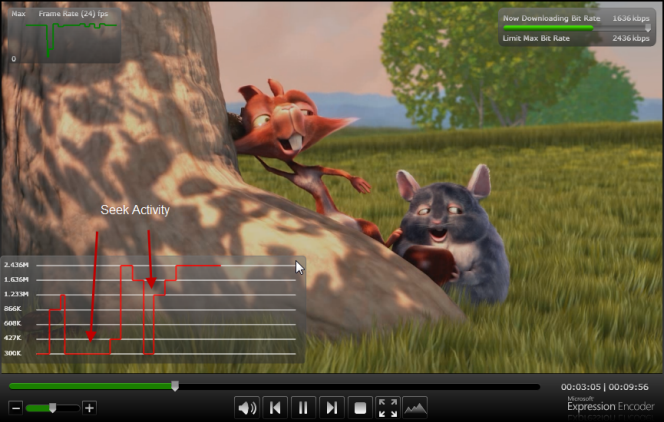
Smooth Streaming UX Simulator

Try this out if you are interested.  It’s a very high quality sample content, but you can also try out the UX Simulator on your own content if you use Expression Encoder and choose the adaptive profile to generate the Smooth Streaming files.  Watching the content via this simulator is a very cool experience to see it happen as it really does seamlessly change bitrates without impact to the user and without using a new stream.


This work is licensed under a Creative Commons Attribution By license.

  1. 3/18/2009 4:37 AM | # re: Silverlight Smooth Streaming: UX Simulator
    Is there a hosted version anywhere? Seems a little much to have to set up a full webdev stack just to see a demo.
  2. 3/18/2009 6:27 AM | # re: Silverlight Smooth Streaming: UX Simulator
    Check http://www.smoothhd.com/ for web demo
  3. 3/21/2009 10:27 AM | # re: Silverlight Smooth Streaming: UX Simulator
    Tim, I assume this is like "dual-threshold buffering" where when the buffer is full you set the buffer high and when it is low or out you set the buffer to a low value. With that said, is all of this handled on the server-side for you? If so, HOT!
  4. 3/21/2009 12:50 PM | # re: Silverlight Smooth Streaming: UX Simulator
    Hey John -- this is truly HOT. Especially when you have the highest quality content, it really is visible to see (the bunny video is really good). The gory details of the architecture are here: alexzambelli.com/.../smooth-streaming-architecture, but it isn't like other similar attempts at this concept of MBR streaming. Historically when this is done other solutions see that they can deliver a higher quality stream and *switch* the stream. This is not how smooth streaming works as it is a constant stream and higher/lower fragments are brought in by the requestor. It's some voodo for sure, but the end result really is a great customer experience for the viewer.
  5. 3/21/2009 3:27 PM | # re: Silverlight Smooth Streaming: UX Simulator
    That post is intense with data. lol. I skimmed and it looks like you can use the SMIL (great it is a smil) to select a stream then the server handles bandwidth management by sending the proper fragements at an adjusted size according to available bandwidth. That's HOT!

    So, all of this works from inside IIS7? I'm going to have to play with it when I get a sec.
  6. 3/21/2009 4:20 PM | # re: Silverlight Smooth Streaming: UX Simulator
    Yes, this all works within IIS7 (with the media pack add-on -- which is free). It's wicked simple.
  7. 3/27/2009 5:50 AM | # re: Silverlight Smooth Streaming: UX Simulator
    Does the IIS 7 smooth streaming work with any h264 file or only files transcoded through expression? It is currently my understanding that I can only use smooth streaming with files encoded through expression if this is the case is there way to just insert the needed data (i don't know what this is) into an existing h264 mpeg4 instead having to retranscode it?
  8. Gravatar
    3/28/2009 4:45 AM | # re: Silverlight Smooth Streaming: UX Simulator
    Where can I get the source code for the UX Simulator?
  9. 5/4/2009 4:29 AM | # re: Silverlight Smooth Streaming: UX Simulator
    It would be great if we could have a look at the source code for this sample.

  10. 5/4/2009 7:06 AM | # re: Silverlight Smooth Streaming: UX Simulator
    Fernando they are looking into doing that.
  11. 6/12/2009 4:25 PM | # re: Silverlight Smooth Streaming: UX Simulator
    Hello,
    can please you tell me from where i get get source code for UX Simulator.I purchsed the expression encoder . But i have backglass and some other templets but not UXSimulator. I want to customise the UX simulator according to my requirement. Please Help
  12. 7/8/2009 8:57 PM | # re: Silverlight Smooth Streaming: UX Simulator
    Hi Tim,

    Since I was reall interested in smooth streaming, I spent the last couple of days upgrading our server to Windows 2008 and configuring IIS 7 for smooth streaming, then I followed the instructions to install Big_Buck_Bunny video, and configuring the client to stream that video. When I tried to run it first time, it just hung there with no display. After using Fiddler I figured that I should add the .ism and .ismc to the mime files, choosing text/xml as the mimetype. The problem now is I can see the .ism file being downloaded but immediately I get and AG_E_NETWORK_ERROR, though I know just using .mpg file works fine, when modifying the player to disable adaptive streaming. By the way, the video I encoded using expression encoder behaves the same way.
    The Client issues no requests to the server after the .ism file is downloaded from the server, prompting me to compare the .ism file downloaded from SmoothHD to the one downloaded from our server, it seems like the content of the Manifest from SmoothHD is more similar to the .ismc file.
    I can give you a link to the server that shows the problem if you have the time to help me out.
    Any suggestions would be much appreciated.
    Thank you.
  13. 8/24/2009 5:11 PM | # re: Silverlight Smooth Streaming: UX Simulator
    Hello Tim,

    Can you suggest me any location from where I can get some sample contents for Expression Encoder 3 Template.

    Thanks in Advance , Akshay
  14. 8/25/2009 8:10 AM | # re: Silverlight Smooth Streaming: UX Simulator
    Akshay - the source for the Expression Encoder templates is installed with the product. Look in the templates folder and you'll see a folder called 'Source' with each template.
  15. 8/25/2009 3:04 PM | # re: Silverlight Smooth Streaming: UX Simulator
    Is there a way to adapt the UX Simulator to play different content? I would like to test content that we have encoded.
  16. 8/25/2009 3:28 PM | # re: Silverlight Smooth Streaming: UX Simulator
    Rod -- the simulator template is now included in the Expression Encoder 3 bits.
  17. 8/26/2009 8:01 AM | # re: Silverlight Smooth Streaming: UX Simulator
    I just purchased yesterday and I see several templates just not any that are simulators???
  18. 8/26/2009 8:12 AM | # re: Silverlight Smooth Streaming: UX Simulator
    Rod - if you bought the full Expression Encoder 3, the template is the one labeled 'Smooth Streaming Graphing Player'
  19. 8/31/2009 11:44 AM | # re: Silverlight Smooth Streaming: UX Simulator
    Do you know of any hosting providers with IIS7 and Media Services installed? (Looking for a place that can host smooth streaming video content) Thanks!
  20. 8/31/2009 12:11 PM | # re: Silverlight Smooth Streaming: UX Simulator
    Allen - great question I've been trying to find out as well -- will post when I have an answer!
  21. 9/1/2009 5:15 PM | # re: Silverlight Smooth Streaming: UX Simulator
    Just uploaded Encoder 3 and with the defult template it shows the graph with not only red and green but also yellow and blue. What does the yellow and blue on the graph show? Sample is here: silverlight.sailrite.com/.../default.html
    Thanks,
    Eric
  22. 9/2/2009 11:02 AM | # re: Silverlight Smooth Streaming: UX Simulator
    Hi Eric...
    Green = frame-rate
    Red – now playing bitrate
    Blue – now downloading bitrate
    Orange – measured bandwidth
  23. 10/26/2009 5:54 PM | # re: Silverlight Smooth Streaming: UX Simulator
    Hi Tim,

    I am using Expression Encoder 3 and wpf to encode a file using using c#. I am able to encode a file when a user uploads a video and it stores it to a local directory. Can you tell me how to publish the encoded video directly to a playlist for smooth streaming (programatically in c#) rather than to a local file. Can you show me some links or examples.
  24. 12/18/2009 1:49 PM | # re: Silverlight Smooth Streaming: UX Simulator
    Hi, Do anyone know of any hosting providers with IIS7 and Media Services installed?

 
Please add 2 and 1 and type the answer here:
First time here? You are looking at the most recent posts. You may also want to check out older archives. Please leave a comment, ask a question and consider subscribing to the latest posts via RSS or email. Thank you for visiting! (hide this)