Advertisement

Refactoring Silverlight ChildWindow for a non-modal use

UPDATE: FloatableWindow is now on CodePlex for easier community contributions and management of latest source and builds.  FloatableWindow CodePlex Project.  If you like this idea VOTE FOR IT in the Silverlight Toolkit!

I’ve seen a few comments/requests incoming lately that people like the ChildWindow control in the Silverlight 3 SDK.  This is a great control that creates a modal dialog for you.  When you use it, it disables your root layout application and shows the dialog you provide:
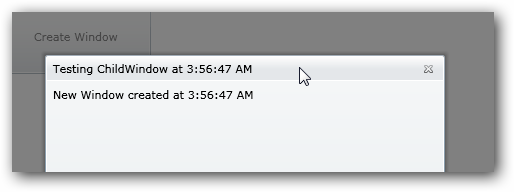
ChildWindow example

This is great for those true modal needs.  It responds to normal windows DialogResult type responses if you have buttons, etc. – great for error dialogs, logins, etc.  The request I’ve been seeing is for the same functionality, but in a ‘normal’ ChildWindow.

But I’ve been seeing requests that it should act more like the normal Window object in .NET, which has an option for showing a window as a ‘dialog’ (modal) versus a normal one.  Well, since the source code is available under Ms-PL license at the Silverlight Toolkit project, I decided to play around and refactor a bit.  If you look at the base class implementation of Window, the API shows two methods: Show and ShowDialog.  This is what I wanted to emulate.  I changed the ChildWindow to FloatableWindow only because I couldn’t think of a better name and it represented a desired behavior.  In ChildWindow, the default behavior is a modal dialog and there are a few key areas that drive this behavior.   There is a template part called Overlay that is responsible for the faded-out background of your app when the ChildWindow is shown.  The other modal semantics are driven by looking at the RootLayout of the parent creating the ChildWindow and changing its properties (IsEnabled=False).  Basically I just spelunked these areas and did some changing.

I implemented a property IsModal (_modal for the private accessor) that would be set in my new show methods, which I refactored to Show, ShowDialog and ShowWindow (internal).  ShowWindow would accept a boolean whether it was to be a modal or not, setting the private accessor.  The calls checking for disabling RootLayout, UpdateOverlaySize, ChangeVisualState and some of the focus event handling (as in a non-modal you may have multiple and you want each to be able to have focus).  After doing this I could create non-modal windows easily:

   1: FloatableWindow fw = new FloatableWindow();
   2: fw.Title = "Testing FloatableWindow";
   3: fw.Height = 200;
   4: fw.Width = 200;
   5: fw.Content = "Created at " + DateTime.Now.ToLongTimeString();
   6:  
   7: fw.Show(); //for non-modal
   8: fw.ShowDialog(); //for modal dialog

And I could create multiple:
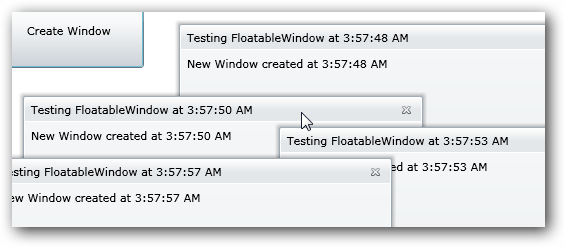
FloatableWindow

All the other functions of the ChildWindow are there so there wasn’t a lot of work to do.  I kept the template parts, etc. so it is customizable in tools like Expression Blend.  There are a few things that I still need to do:

  • Better enable a default start position for the FloatableWindow
  • On focus events, if there are multiple windows, make sure that the selected window gets brought to the front of the layout when being used (NOTE: the logic for this is working actually, but ZIndex doesn’t appear to be able to be set on Popup, which I’m talking with the team about)
  • Whatever other bugs I may have caused by my assumptions :-)

But it was an experiment at least and seems to work so far.  Here’s the code: FloatableWindow_1.1.zip.  The archive file includes the code I used as well as Visual Studio item templates (C# and Visual Basic) to mirror the same functionality of Add New Item where you can add a new ChildWindow to your project as a user control. 

FloatableWindow Item Templates

Let me know what you think.  Hope this helps!


This work is licensed under a Creative Commons Attribution By license.

  1. 5/10/2009 3:48 PM | # re: Refactoring Silverlight ChildWindow for a non-modal use
    This will turn out to be very useful, perhaps it can be extended to be dockable also?
  2. 5/10/2009 5:57 PM | # re: Refactoring Silverlight ChildWindow for a non-modal use
    Great work Tim! Keep it up, it rocks.
  3. 5/11/2009 7:07 AM | # re: Refactoring Silverlight ChildWindow for a non-modal use
    Great post as usual Tim. Just as follow-up to Steve's query - any chance of these being extended to mirror the WPF Adorner Layer in SL??
  4. 5/11/2009 11:45 AM | # re: Refactoring Silverlight ChildWindow for a non-modal use
    Tim-

    the problem of all user generated content is the quality. In your (excellent content) post i miss the "is only for Silverlight 3". My opinion is write in blogs, documents and code about working technology and less science fiction. There is so much non working code in web, cause of some beta, pre version and other crap that i need more time to figure out if that code snippet is for the righr platform.
    Not against you and your content. Only the remark to think about the users.
    In this case i thought, what class? never heard, looked in docu, opend sdk dll's with reflector and finally parsed your code.
  5. 5/11/2009 2:26 PM | # re: Refactoring Silverlight ChildWindow for a non-modal use
    Tim, definitely extremely useful, but to make it really useful it would be great if the "team" would add it to the final release of SL3!!! I see this feature as part of the default control, not just a "refactored", "bloged" feature. It's not nice at all to carry "refactored" features all over the places ... maintenance frustrates everyone already nowadays :)
  6. 5/11/2009 2:39 PM | # Membership, Role and Profile using Silverlight RIA Service
    Is it possible to write an article showing how to hook up the ASP.NEt membership and Roles using the new .Net Ria Services and silverlight 3?
    i read almost every article possible about authentication in silverlight 3 but none of them provide enough steps from end-to-end.

    Thanks so much.
    Rachida
  7. 5/11/2009 4:25 PM | # re: Refactoring Silverlight ChildWindow for a non-modal use
    This is a very cool post.

    I agree with Florin Neamtu that it should be added to the final release of SL3. I was disappointed by the fact that this feature is not in SL3 beta. We look forward to having more winforms like features in SL3.

    I have considered implementing this feature using the vector light pop up control (vectorlight.net/.../...ementing_user_controls.aspx), but this approach is better.
  8. 5/11/2009 8:18 PM | # re: Refactoring Silverlight ChildWindow for a non-modal use
    Hannes -- great point, I should clarify rather than assume!

    Florin/Anu -- we're definitely looking at this for future versions. There is one bug fix dependency (Popup and ZIndex).

    Rachida -- I have a specially flagged follow-up for you when I can breathe from traveling :-)
  9. 5/12/2009 4:14 AM | # Membership, Role and Profile using Silverlight RIA Service
    Thanks for your response.
    Rachida
  10. 5/16/2009 7:34 PM | # re: Refactoring Silverlight ChildWindow for a non-modal use
    If I put this floating window in side a popup control(Popup.Child = FloatingWindow;) and open the popup(Popup.IsOpen = true;) Then when I click on OK button, Cancel Button, Close Icon on the top right, no response anymore.
    I want to put this floating window inside a popup and then use the top right Close icon(X) to close this floating window, how to solve this issue?
  11. 5/24/2009 1:41 PM | # re: Refactoring Silverlight ChildWindow for a non-modal use
    Silvergoonie -- not sure on the plans for that.

    KentZhu - interesting...the ChildWindow itself is Popup so it is likely running into some limiatations of nested Popups.
  12. 5/28/2009 3:57 PM | # re: Refactoring Silverlight ChildWindow for a non-modal use
    Tim,

    I filed a suggestion on connect (connect.microsoft.com/.../ViewFeedback.aspx) that the Show method of ChildWindow become ShowDialog. This would allow more compatibility with WPF and a class like what you've described to be integrated in the future into ChildWindow without the need to change existing code.

    ...Stefan
  13. 6/3/2009 1:07 PM | # re: Refactoring Silverlight ChildWindow for a non-modal use
    I am getting an error "value does not fall within range" in the ShowWindow method when the code reaches the line "this.ChildWindowPopup.Child = this;"
  14. 6/3/2009 2:10 PM | # re: Refactoring Silverlight ChildWindow for a non-modal use
    Nat -- you'll have to give me more information -- feel free to send me your sample project.
  15. 6/4/2009 8:57 AM | # re: Refactoring Silverlight ChildWindow for a non-modal use
    Tim, I am getting an error in the xaml file generated by selecting the
    FloatableWindow template upon adding new item to my silverlight 3.0 project. The error is on this line of code:
    xmlns:controls="clr-namespace:System.Windows.Controls;assembly=FloatableWindow"

    It says that the assembly FloatableWindow is not in System.Windows.Controls.


    I removed System.Windows.Controls from my reference file and then added it back again thinking maybe my System.Windows.Controls was not the correct version. Two versions to System.Windows.Controls is available and I did select the one for Silverlight 3.0.

    I attended you and Scott's talk on May 26th. Next time I will say Hi!

    Dean McIntire
  16. 6/4/2009 8:59 AM | # re: Refactoring Silverlight ChildWindow for a non-modal use
    Hi Dean, you also have to add the FloatableWindow assembly to your project.
  17. 6/13/2009 5:28 AM | # re: Refactoring Silverlight ChildWindow for a non-modal use
    Dean

    I managed to get the ZIndex working... Heres a crude sample

    Private Sub MainPage_Loaded(ByVal sender As Object, ByVal e As System.Windows.RoutedEventArgs) Handles Me.Loaded
    Dim wm As New WindowManager
    Dim a As New FloatableWindow
    a.Title = "A"
    a.Width = 200
    a.Height = 200
    Me.LayoutRoot.Children.Add(a)
    AddHandler a.MouseLeftButtonDown, AddressOf mouseDowa
    Dim b As New FloatableWindow
    b.Title = "B"
    b.Width = 200
    b.Height = 200
    Me.LayoutRoot.Children.Add(b)
    AddHandler b.MouseLeftButtonDown, AddressOf mouseDowb
    End Sub

    Private a As Integer
    Private Sub mouseDowa(ByVal sender As Object, ByVal e As EventArgs)
    Canvas.SetZIndex(CType(sender, FloatableWindow), a)
    a += 1
    End Sub
    Private b As Integer
    Private Sub mouseDowb(ByVal sender As Object, ByVal e As EventArgs)
    Canvas.SetZIndex(CType(sender, FloatableWindow), b)
    b += 1
    End Sub

    Cheers

    Michael Hadjigeorgiou
  18. 6/14/2009 10:50 PM | # re: Refactoring Silverlight ChildWindow for a non-modal use
    I adapted some elements from the ChildWindow into my own WPF control, I don't know if this applies to Silverlight, but here's some snippets of how I handle ZIndex in my WPF control (dragArea is my draggable area, in Silverlight this can be the static root element):

    private int topZindex;
    private int dragElementZIndex;

    private void DragHitElement_MouseLeftButtonDown(object sender, MouseButtonEventArgs e)
    {
    dragElementZIndex = Panel.GetZIndex(DragElement);
    if (dragElementZIndex == 0)
    {
    dragElementZIndex = 1;
    }

    topZindex = dragElementZIndex;
    GetTopZindex(0, DragAreaElement);
    Console.WriteLine(topZindex.ToString());

    Panel.SetZIndex(DragElement, topZindex);

    }

    private void GetTopZindex(int depth, DependencyObject obj)
    {
    int currentZIndex = 0;
    int count = VisualTreeHelper.GetChildrenCount(obj);

    var child = obj as FrameworkElement;

    if (child != null)
    {
    currentZIndex = Panel.GetZIndex(child);

    if (currentZIndex > topZindex)
    {
    topZindex = currentZIndex + 1;
    }

    if (dragElementZIndex == topZindex &&
    currentZIndex == topZindex &&
    child != DragElement
    )
    {
    topZindex++;
    }
    }

    for (int i = 0; i < count; i++)
    {
    GetTopZindex(depth + 1, VisualTreeHelper.GetChild(obj, i));
    }
    }
  19. 6/14/2009 11:43 PM | # re: Refactoring Silverlight ChildWindow for a non-modal use
    Ack, found a bug, here's the refactored version (this only grows the ZIndex if its already not the highest within an area):

    private void DragHitElement_MouseLeftButtonDown(object sender, MouseButtonEventArgs e)
    {
    GetTopZindex();
    Console.WriteLine(topZindex);
    Panel.SetZIndex(DragElement, topZindex);
    }

    private int topZindex;
    private int dragElementZIndex;

    private void GetTopZindex()
    {
    dragElementZIndex = Panel.GetZIndex(DragElement);

    topZindex = dragElementZIndex;
    TraverseTreeForTopZindex(0, DragAreaElement);
    }

    private void TraverseTreeForTopZindex(int depth, DependencyObject obj)
    {
    int currentZIndex = 0;
    int count = VisualTreeHelper.GetChildrenCount(obj);

    var child = obj as FrameworkElement;

    if (child != null)
    {
    currentZIndex = Panel.GetZIndex(child);

    if (currentZIndex >= topZindex
    &&
    child != DragElement
    )
    {
    topZindex = currentZIndex + 1;
    }
    }

    for (int i = 0; i < count; i++)
    {
    TraverseTreeForTopZindex(depth + 1, VisualTreeHelper.GetChild(obj, i));
    }
    }
  20. 6/15/2009 8:42 AM | # re: Refactoring Silverlight ChildWindow for a non-modal use
    Michael - interesting approach as you bypass the Show dialogs. While it works (and bypasses the Popup API), it also prevents closing the window using the X.
  21. 6/15/2009 8:44 AM | # re: Refactoring Silverlight ChildWindow for a non-modal use
    Joe - this is interesting and I'll have to take a look. One of the key differences in this issue is that in Silverlight, ZIndex in Popup is not honored :-( -- I believe in WPF it is though.
  22. 6/15/2009 4:22 PM | # re: Refactoring Silverlight ChildWindow for a non-modal use
    Yes I also noticed it disables the X.. I have a fix that solves that problem.
    To be honest.. I've inherited the FloatableWindow and "Fixed it up".. Loving it even though it is preety basic. Send u a copy.. One day.
  23. 7/7/2009 12:51 AM | # re: Refactoring Silverlight ChildWindow for a non-modal use
    Hi Tim,
    I've been trying to get a "true" modal window in that my procedural code does not continue when I call the .Show method but waits for me to close the window, which in this case I believe it does not... Is there a way to show a child window in SL3 with similar functioanlity to form.ShowDialog in Win Forms?

    Great post BTW, and a very usefull blog...
  24. Gravatar
    8/11/2009 8:12 PM | # re: Refactoring Silverlight ChildWindow for a non-modal use
    Hi, probably a stupid newbie question:
    I get the following error after running the template installer; what else do I have to do to use this user template? Where would I find the assembly? Where did the installer put it? For future reference, would there be a way I should already know this? Are all templates put in the same place?
    Error:
    The type or namespace name 'FloatableWindow' could not be found (are you missing a using directive or an assembly reference?)

    This will be a really useful feature when I can get it to work.
    Thanks.
  25. 8/11/2009 8:48 PM | # re: Refactoring Silverlight ChildWindow for a non-modal use
    Lar -- not a stupid question. The template is just a helper...it will not, unfortunately add the reference for you. You need to add a reference to the assembly as well then it will work.
  26. 8/17/2009 6:17 AM | # re: Refactoring Silverlight ChildWindow for a non-modal use
    Tim, I'm tring to dynmaically create several windows and place them on the page....

    List<FloatableWindow> fl = new List<FloatableWindow>();
    fl.Add(GetWindow("one"));
    fl.Add(GetWindow("two"));
    fl.Add(GetWindow("three"));
    BindControls(cds);

    Bind Controls lays out the windows side by side using defined width / heights...
    similar to

    public void BindControls(List<FloatableWindow> wins)
    {
    foreach (var fw in wins)
    {

    fw.Width = cd.Width;
    fw.Height = cd.Height;
    Canvas.SetTop(fw, cd.Y);
    Canvas.SetLeft(w, cd.X);
    SilverlightDesktopLayoutRoot.Children.Add(fw);
    }
    }
    Whats really annoying for me is the windows display side by side but when I sert the top e.g. Canvas.SetTop(fw, cd.Y); it apprears not to be using the root canvas.... Any ideas?

    Actually let me post on the codeplx site


  27. 8/28/2009 5:08 AM | # re: Refactoring Silverlight ChildWindow for a non-modal use
    very useful article

    but on using the floatable window and resizing the title of the window is displayed as 2x1.8 something like that. how to get the correct title.
  28. 8/28/2009 6:56 AM | # re: Refactoring Silverlight ChildWindow for a non-modal use
    renuga - you are running it in DEBUG compilation. You can recompile in release mode or remove the if DEBUG statements as well.
  29. 9/9/2009 4:45 AM | # re: Refactoring Silverlight ChildWindow for a non-modal use
    HI,
    Good concept..... one query......

    I need to develop some functionality like shown in the following link :

    www.divelements.co.uk/.../livedemofullscreen.htm


    I want to develop floating window and dockable window in my project... how can I achieve it ? As I need the same in silverlight 3.
    Please help;


    Arpit Gupta
    Pune,INDIA
  30. 9/9/2009 9:52 AM | # re: Refactoring Silverlight ChildWindow for a non-modal use
    The docking is possible, and ads complexity. In this regard I'd wonder why you wouldn't just buy the control?
  31. 9/22/2009 12:50 AM | # re: Refactoring Silverlight ChildWindow for a non-modal use
    Hi Tim,

    I have an issue - Can we somehow remove the "x" Button in the header of the child window?
    Because my requirement - does not require that header at all which comprises of "title" and "close-x".

    Your help will be really greatful.

    Arpit Gupta
    Pune,INDIA
  32. 9/22/2009 8:54 AM | # re: Refactoring Silverlight ChildWindow for a non-modal use
    Arpit - sure, you can do anything you want...you have the code!
  33. 9/24/2009 7:54 AM | # re: Refactoring Silverlight ChildWindow for a non-modal use
    Hello Tim!

    Can I give a "cover" pra ChildWindow this? I drew a template in Expression Blend and I wish this was standard issue in my Child.
  34. 10/18/2009 5:58 PM | # re: Refactoring Silverlight ChildWindow for a non-modal use
    Hello Tim,
    I cannot show the window. I do can show the dialog window, but when I use the Show() method nothing happens.
    Any ideas?
  35. 10/20/2009 9:20 PM | # re: Refactoring Silverlight ChildWindow for a non-modal use
    I have found the problem - the FloatableWindow.dll works incorrectly.
    To get things done I have had to download the source code and use the FloatableWindow project instead of the dll.

    Regards,
    Dmytro
  36. 10/21/2009 1:25 AM | # re: Refactoring Silverlight ChildWindow for a non-modal use
    Dmytro - what do you mean the DLL works incorrectly...it's based on the same code. You need to set the ParentLayoutRoot before calling Show
  37. 10/21/2009 8:57 AM | # re: Refactoring Silverlight ChildWindow for a non-modal use
    Ok.
    Thank you!
  38. 10/28/2009 7:13 PM | # re: Refactoring Silverlight ChildWindow for a non-modal use
    I have a question - FloatableWindow.dll has no ParentLayoutRoot property, but it works without the property. is it necessarily? Thanks
  39. 10/28/2009 10:08 PM | # re: Refactoring Silverlight ChildWindow for a non-modal use
    davidfu - you may be using an old binary -- grab the latest source code and recompile.
  40. 10/29/2009 1:12 AM | # 
    timheuer:I see,Thanks.I have voted
  41. 11/25/2009 2:15 PM | # re: Refactoring Silverlight ChildWindow for a non-modal use
    Tim - great control!
    Quick question - Do the close() and open() methods need to be called to close and open the control, or is it alright to just change the State from Open to Closed?
    I'm playing with SL3's behaviors and have realized it is really easy to open/close the window without even using code, just xaml - by using a toggle button to trigger a GoToStateAction and setting the FloatableWindow to the appropriate state.
  42. 11/25/2009 3:16 PM | # re: Refactoring Silverlight ChildWindow for a non-modal use
    TimE -- i can't recall offhand, but I think I'm attaching to specific event handlers. If you trigger a GotoState element, you may have to fire the close event too to trigger the close (or change the code :-))
  43. 1/28/2010 8:46 AM | # re: Refactoring Silverlight ChildWindow for a non-modal use
    Hi Tim: this control is just what I needed... But, It thows the following Exception once closed the control.

    Object reference not set to an instance of an object in System.Windows.Controls.FloatableWindow.<Close>b__0(Object s, EventArgs args)
    en System.Windows.CoreInvokeHandler.InvokeEventHandler(Int32 typeIndex, Delegate handlerDelegate, Object sender, Object args)
    in MS.Internal.JoltHelper.FireEvent(IntPtr unmanagedObj, IntPtr unmanagedObjArgs, Int32 argsTypeIndex, String eventName)

    Im not trying to access any information on the Closed EventHandler neither.
    First I created a control by using the FloatableWindow template, And then i just created the Window on CodeBehind. But stills the same issue...

    Im running v3.0.40624.4 Release of the dll on SL v3.0.50106.0 in a C# project w/RiaServices

    Thanks

 
Please add 8 and 6 and type the answer here:
First time here? You are looking at the most recent posts. You may also want to check out older archives. Please leave a comment, ask a question and consider subscribing to the latest posts via RSS or email. Thank you for visiting! (hide this)