Advertisement

My move to free HDTV – over the air HD

About twice a year my wife freaks out (well, my terms not hers) about money, material things, life, etc.  It’s a good freak out actually…and it is what has kept me grounded more in life than my past habits (you know, when you felt you *had* to have everything).  I’ve learned to not care about things that aren’t worth the trouble.  Her balance in my life really has made a good impact in things worldly.

Back to the freak out :-) …

We’re constantly looking for ways to save money.  At times it is because we have to (or should) and others it is because we are wanting to put those resources elsewhere.  The latest has been with TV cable.  I like watching TV.  It’s a break from reality and just lets me escape real world for a few hours a week.  But the truth be told, nobody in my house really cares about it.  Each month we pay roughly USD $80 for cable service.  This includes HD service and an HD DVR.  Honestly when I evaluate my watching, I really only watch major network shows (I’m not a sports guy) and re-runs of Law and Order.  I LOVE HD and hate watching anything else.  When I came to this realization though, I finally acquiesced and said we should cancel our cable.  We were paying $80 for basically 9 channels…it was ridiculous how our provider (Cox) prices.  I wish I could cafeteria shop what I wanted, but they aren’t there yet.  I didn’t care about reducing my fee (which they offered) and I wasn’t interested in DirecTV or other satellite offerings.  If I was going to cancel, it was going to be completely.

So there.  I’ve committed.  We’re cancelling.  But I still want TV occaisionally.  We’ll get movies through Netflix and I’ll explore Hulu via PlayON perhaps.  But there may be times where I just want to setup TiVo for The Office and watch it at leisure.  I decided I’ll explore doing the over-the-air HD.  I sent out a Twitter note about it and got some great feedback.  I didn’t find anything online that showed someone in my situation in a step-by-step thought and execution process though.  That leads me here.  This is my adventure…to rid myself of cable and keep standard broadcast and FREE over-the-air HD channels.  Here we go.  Hopefully this helps someone else as well.

The Home Setup

My home has 3 primary TVs:

  • Bedroom – old 27” tube-based TV.
  • Living Room – 42” LCD which currently only displays in yellow tints because one of the blue lamps busted and we decided screw it, we don’t watch enough TV and the kids won’t notice.
  • Basement – 60” LCD – the ‘main’ unit.  My sanctuary.  Where the HD takes place.

We also use TiVo:

  • Bedroom is hooked up to a TiVo Series 2 DVR which has been customized with a 500GB storage drive.
  • Living Room is hooked up to a Toshiba TiVo/DVD player (effectively a Series 2)
  • Basement uses the cable provider’s HD DVR which will be going away.

Basement is also where the XBOX 360 is hooked up and Netflix is watched as well as most DVD viewing.

Our home is fairly modern (5 years old) and so has structured wiring built in.  I have an access panel where all central wiring goes:
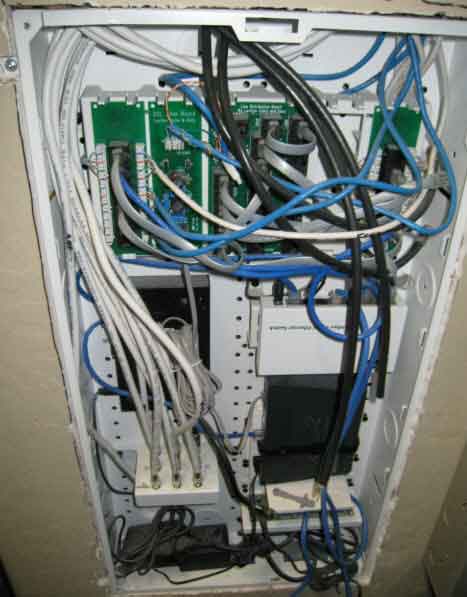
Home wiring panel

You can see that the intertubes come in through here as well as my cable is routed to one place and then distributed via the splitter.  I refer to this area of my home as my NOC.

The Goal

The primary goal is to get major network HD broadcast into the home (ABC, NBC, CBS, Fox, local).  The secondary goal here is to not disrupt any workflow or viewing behavior (other than some channels we no longer get which we’ll supplement with Netflix Instant Watch for the kids shows).  Now I know Basement will suffer because the HD DVR will be going away…we’ll get to that when we can, but this is the goal.

We also want to use the existing infrastructure of the home with minimal (if any) purchases or re-tooling/wiring of anything.

These, my friends, are the goals…plain and simple.

Initial Research

My quest started on a Thursday.  I obviously knew I was going to need an antenna.  Part one was finding out which one would be best and what I’d need.  The NOC has a cable that is there that is labeled ‘antenna’ so I can only hope when I search for the other end it may be in my attic or perhaps out on my roof…I start thinking good thoughts.

My initial Twitter post yielded some great information (much of which also showed up in search engines, but it is good to validate against trusted resources and ‘real’ people).  The best piece of starting information was one web site that seems to be pointed everywhere as a definitive source of digital signal information.  That site is AntennaWeb.  It was recommended to start here to map out where you live in relation to the current digital signals.  Their database of information would identify which stations would be available and recommend an antenna type for you.  It tells you the areas, the compass headings, their channel number, etc.  It even gives you a map of your address and where the best place to point your antenna to for the channels you want best:
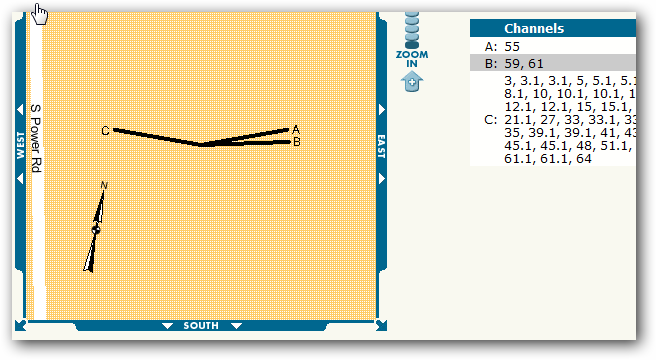
AntennaWeb Map

The rating it also provides is to help you choose which antenna you should look for.  In my case, it was clear that I should shop for a “yellow” rated one:
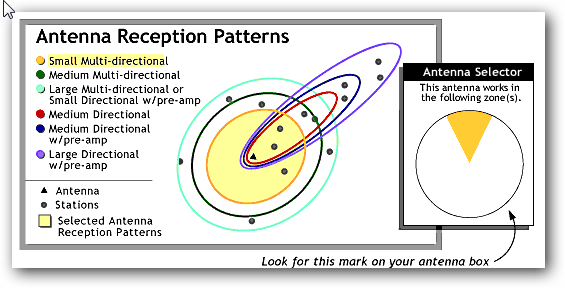
AntennaWeb Reception Rating

Since most online places I quickly scanned didn’t put this rating on it, I figured this was going to result in a trip to the store.  Several people recommended the Philips MANT940 (Walmart for <$40).  The reviews looked great on this unit so I decided to check it out.  Hal Hostetler (a Microsoft MVP who also happens to work for a local broadcaster) gave me a ring and helped me understand some things as well.  His hopeful thoughts meant I should be well on my way.  The reviews are good on this unit and for the cost, I decide to take a gamble.

The Wiring

Luckily as I mentioned, my home is already wired for an antenna and in fact it did go up to the attic so I was all set.  I put the power booster in the NOC and crawled up the attic and put the antenna in there.  All systems go…so I thought.

Problems Arise

Now remember my goal is not to change a thing in the workflow.  My first pass was to re-setup my TiVo unit attached to Living Room.  I started the process and then TiVo asks me if I have a digital-to-analog converter box ready.  Argh.  I was hoping in my idiocy that my thinking was wrong.  Alas, I wasn’t.  Some quick searches confirm from TiVo that Series 2 and Toshiba/Humax DVD units require a converter box.  Even worse was the PDF describing that the infrared controller from the TiVo would need to be busted out to control the converter box.

NOTE: I generally am the type of guy that researches things step-by-step unfortunately.  My searches for “tivo hdtv antenna” didn’t yield much, but a search for “tivo converter box” brought me the information I should have found earlier.  Suck.  My fault in my eagerness to start connecting things.

Well, now I’m at an impasse.  I consult my TiVo trusted advisors and they inform me that I have 2 choices: use converter box or get a TiVo HD unit.  Okay, here’s where my mind starts thinking and this time at least I stop and do some calculations before buying anything else :-).

Deciding on Options

With my 3 TV’s I was looking at 3 more purchases.  Now considering that let’s say a converter box was about $50 (I know there are the coupons but I wasn’t eligible to get one this late now), let’s start breaking some things down.  I could buy 3 of them ($150) and hook them up, but then i’d be using lame IR connections on my 2 TiVo Series 2 units.  This was not desirable.  I didn’t want to add components to my setup.  I wanted to remain the same.  At this point, I realize this will no longer be possible.

So for my Living Room (the TV that is broken anyway) I try to just connect the antenna feed direct to the TV (after all it was ‘HDTV ready’).  This doesn’t allow me to use TiVo at all anymore on this TV and my ‘lifetime’ service is wasted on this unit until/unless I get cable again. 

Bedroom is an older TV and will require a converter box.  This sucks because it makes the Bedroom TV setup more complex then it needs to be.  I’ve not resolved yet on what I’m going to do for this situation.

Basement is the key here.  I mean, I got a large TV for HD viewing.  Clearly I’m in a dilemma.  I love TiVo and had considered getting the TiVo HD before for this unit and ditching the cable provider’s DVR.  Now the cost of a low-end TiVo HD is about $300 and then you still have to pay for the TiVo guide service for either $13/month or $400 for ‘lifetime’ – and no, they won’t transfer my existing unit service anymore.  My other dilemma for Basement is that it is hooked up to an entertainment system receiver, so ideally I do want something that can have component hookups.  Most of the converter boxes I saw did not, but TiVo HD does.  This is important because if I decide the antenna-only route, this impacts Basement and the entertainment setup.

So if I go that route, I’ve not eliminated a bill from my home (I’m lowering it to $13 from $80 I suppose), and also adding a large chunk down to even get that started (equivalent of 3 months of HD cable).  This is not sounding good to me.

My goal of not changing anything was not looking like it was going to happen.  I really didn’t want to invest more in hardware or substantially in services either…I’m trying to eliminate, not change slightly. 

My solution and learning

I sit back and realize I don’t watch television enough anymore to really go the extra mile here.  I didn’t want to change anything.  Having to invest more to keep that goal isn’t desirable.  Having to change the way I watch TV (i.e., I relied on TiVo because I never watched anything live) was probably not going to work out.

So, no TV for me.  I might try to see how the antenna-only solution goes for a while since it was $40 and I could give it a try for a bit.  But in the end…we wanted to eliminate costs, not swap them out even for a short term.  And at this point in our lives, we can say that TV isn’t important enough to stretch it out.  It looks like I’ll be spending more time on Hulu, etc.

The solution is possible though as I learned.  The challenge for me was that I already had an investment in older DVR technology.  If you are in the same situation, keep that in mind.  If you don’t use DVRs or that is something you can easily give up, then this situation could really work.  I got about 22 channels (some random) of digital antenna broadcast that would probably be fine for most casual network broadcast viewers.  If you’ve been in this situation and have better solutions, let me know!  Oh well, we’ll see what happens at the Heuer household, but at this point, it was a fun little 2 day experiment that made me realize immediately what was going to change.


This work is licensed under a Creative Commons Attribution By license.

  1. 6/5/2009 11:47 PM | # re: My move to free HDTV – over the air HD
    Have you considered adding a Media Center PC? If you're doing OTA HD, then you just need a reasonable PC with 1 or 2 HD tuners. If you have an existing machine that you could repurpose (or dual-purpose), the tuners will cost significantly less than the TiVO HD, and you'll also get (effectively) unlimited storage capacity, as well as the ability to pipe recorded content to multiple tvs via extenders (such as the XBOX 360).
  2. 6/5/2009 11:49 PM | # re: My move to free HDTV – over the air HD
    Hey G - I have considered it, but I don't want to put a "PC" anywhere where my current TV's are. It would solve my Basement problem as the XBOX is already there. It's still a possibility, but would represent still some investment, which, while it might be fun, doesn't follow the family goal.
  3. 6/6/2009 12:01 AM | # re: My move to free HDTV – over the air HD
    The family goal should be for you to purchase a real NOC with an OC-12 connection and just become a media hub for the Phoenix sprawl :)

    I buy most of my shows after the season is over, and watch them in bulk. I just started watching Prison Break a few weeks ago. I am on Episode 11 in Season 2 now. I did the math and it is actually cheaper to just buy the good shows on DVD than to own cable.

    You could ALSO commit treason and set up a Linux box with Myth TV. It is dead simple, I am sure if you go to your local area's Linux Users Group they would be happy to help you set-up Ubuntu on an old PC w/ a HD TV Tuner card (make sure it is Linux compatible though). Myth TV also has features Media Center doesn't, like commercial detection automatic fast forward.
  4. 6/6/2009 12:05 AM | # re: My move to free HDTV – over the air HD
    I tried MythTV once and thought it sucked to be honest. I use eyeTV on my mac and it's okay, and of course Media Center is available. The thought of using my PC as my HDTV tuner/dvr though is just not in line with my current setup. Using something like Hulu/playon is more conducive to the current environment.

    That being said, we're thinking ridding ourselves of TV might be a good thing. Netflix has also started stocking TV show seasons as well, so if there is something we really want, I suppose we can find it somewhere...just not live.
  5. 6/6/2009 12:26 AM | # re: My move to free HDTV – over the air HD
    I've used all three, Myth TV, Media Center and TiVo... they all have pros and cons. I like the Media Center remote, above all else. The TiVo remote is death by a thousand cuts. Myth TV is basically make your own remote. :)

    Never heard of eyeTV...

    About the only show on TV you can't get online for free legally is American Idol (or similar reality TV shows where people get voted off).

    BTW, have you watched Chuck?
  6. 6/6/2009 12:31 AM | # re: My move to free HDTV – over the air HD
    Also, when did you last try MythTV?
  7. 6/6/2009 1:39 AM | # re: My move to free HDTV – over the air HD
    I will write up a blog post on the stuff I've been doing, as I ditched pay-for TV in January and don't miss it at all despite having my antenna plans thwarted by a signal-swallowing hill. Hulu/PlayOn and my 360 are part of the equation, but something else worth noting is your local cable company most likely is rebroadcasting over-the-air (OTA) channels through your cable connection if you have one. If you have broadband Internet from a cable company, you can split the wire and get the digital channels with a clear QAM tuner, which many newer HDTVs have built-in. (The cable company has to send at least a basic cable signal over the line to have the data flow, whether you pay for it or not.) The only channel I don't get that I'd like to is HBO (True Blood!), but to get everything else in HD for $0/month I can't complain. :)
  8. 6/6/2009 4:00 AM | # re: My move to free HDTV – over the air HD
    Have you considered satellite? The basic HD/DVR combos usually go for about $45/month. Another trick I've used is to flip-flop. New customers usually get the first year at a substantial discount. After 18 months, you're out of contract and you can go to the other (Dish/DirecTV) service and get their new customer discount. Dish even has a 9.95/month basic access package in some areas.
  9. 6/6/2009 4:58 AM | # re: My move to free HDTV – over the air HD
    Do you pay for Tivo service or just have the units?
  10. 6/6/2009 5:00 AM | # re: My move to free HDTV – over the air HD
    blargh that didnt come out right at all. Too early on saturday.

    If you dont pay for Tivo service can you use simple recording on the units?
  11. 6/6/2009 8:26 AM | # re: My move to free HDTV – over the air HD
    If you can make it work, I also recommend the Home Theater PC (Media Center) option. I have been using it to get free HD for over 2 years now and have never paid a cent for cable or Tivo services. Not only can you view recorded content on extenders (as mentioned) but you can use WebGuide to view conent on any PC (as well as remotely control most aspects of the HTPC)
  12. 6/6/2009 8:50 AM | # re: My move to free HDTV – over the air HD
    I suggest Media Center + extenders + a SiliconDust network-based tuner. I've been running this for years and have never had cable. It works flawlessly.

    Drop the TiVo, it is inferior. MediaCenter is faster/richer. The SiliconDust tuner is easy to install, just drop it on your network. I velcro'd mine into a structured cable box similar to yours.
  13. 6/6/2009 7:04 PM | # re: My move to free HDTV – over the air HD
    Would love to see if you find a good solution here. The only TV we watch right now is on-demand (which netflix could handle if we got that, and we only see that very rarely) and kids shows on Noggin / Disney / Sprout. That last combo is where we'd feel the pain.

    Would love to ditch the cable bill, though. $90 a month for kids shows is a bit much.
  14. Gravatar
    6/8/2009 7:17 AM | # re: My move to free HDTV – over the air HD
    I absolutely recommend Media Center. I have a SilverStone case in the cabinet underneath my TV and get OTA HD. OTA is MUCH higher quality than cable (cable compresses the signal). We still have Dish for ESPN/CNN but I'd like to get rid of it. Best yet, we stream Netflix using Silverlight over the PC directly to our TV screen. (You've heard of Silverlight, Tim...right?)

  15. 6/8/2009 7:49 AM | # re: My move to free HDTV – over the air HD
    Your big mistake was locking yourself into the Tivos. You're saving $80 a month so put that towards either some Media Server PCs, or some MythTV pcs. Granted that will change your viewing experience, but it would be more flexible for you in the long run. MythTV has the ability to setup a heavy duty backend system that is hidden away and then put some small frontend computers at the tv. The setup process for KnoppMyth is extremely straight forward if you research your hardware.
  16. 6/8/2009 12:25 PM | # re: My move to free HDTV – over the air HD
    I know you mentioned you don't want to add a PC to your stuff.. But if you end up going that route check out this very cool tool (Boxee) http://boxee.tv/

  17. 6/10/2009 9:01 AM | # re: My move to free HDTV – over the air HD
    Since when do they have basements in Arizona???
  18. 6/10/2009 7:31 PM | # re: My move to free HDTV – over the air HD
    With regard to antennaes,

    the key is to get one that is based on fractal technology, with repeating geometries that capture the signal multiple times and put the signal together... as opposed to old school antennaes that just catch "one big signal". this newer design is the same antennae science used in the iphone

    www.amazon.com/.../B000EHYG9K/

    is rock solid

    they also have a DB2 and DB8... the DB8 just came way down in price, from 120 to a little over 80.

    we used to have a huge unidirectional old style antennae, without repeating geometries, and it HAD to be hung at the highest point on the roof... in the winter during Massachusetts snow storms, the reception would get knocked out, especially late at night when all the good shows were on...

    ...with this new antennae, the DB4, we put it inside the attic and it gets far superior reception. we basically never have any problems... and we pair it with Windows Media Center. We're about to add an analog converter now that the signals are switching over, this way we can record two shows at once in HDTV.
  19. Gravatar
    6/10/2009 9:35 PM | # re: My move to free HDTV – over the air HD
    Tim:

    I also have overpriced COX and thought it was going to be a drag not haveing my half dozen channels to waste my life on. The reality is that I've never been happier! I don't miss it at all, and since then I bought a Fender Stratocaster effects box and amp, and have been playing it for hours each night. I started working out and running every night. I just returned some new shorts I bought a month ago with the tags still on them because they were too big. I'm newly single and have even met a few new really nice girls lately, as well. I still subscribe to the basic channels for about $12 just in case some big news happens. Trust me! In a month you'll be so happy how you've re-applieed that idiot box time to so much more worthy pursuits. For example, go check out some of the plethora of great guitar videos on YouTube. Rock on...

    Ken in FWB, FL
  20. 6/12/2009 1:47 PM | # re: My move to free HDTV – over the air HD
    Nice article. TiVo's pushing their message about free over-the-air signals with a YouTube video: http://www.youtube.com/watch?v=65wdXjKsgQc
  21. 6/12/2009 2:24 PM | # re: My move to free HDTV – over the air HD
    Cassandra - interesting. They are pushing "free hdtv" with the purchase of their most expensive product that also has a monthly fee :-)
  22. 6/14/2009 11:50 AM | # re: My move to free HDTV – over the air HD
    I'm in a very similar boat here. I have an HD TV, and a Toshiba Tivo/DVD. I decided to get a converter box and hook it to my tivo (using the IR Blaster cable that come with the TIVO).

    The picture through the converter sucks. But I can still watch regular tv sans Tivo because I split the antena connection to the Tivo and the TV.

    But now the Tivo serves new purposes. It is the DVD player. It is also backup for when nothing good is on (again, the picture stinks, but it is better than nothing), and I can use it to see what is coming up (the Guide button).

    This will work for me until the middle of football season (sports are what HD was made for). So I'm saving up to make a Media Center PC with using either a Hauppage card or an ATI all in Wonder for recording.
  23. 6/14/2009 3:46 PM | # re: My move to free HDTV – over the air HD
    I also just ended a TiVo 2 subscription that I had for 6 years. I'm on cable at the moment, so the digital switch wasn't an issue but the look of TiVo 2 on an HD LCD tv was.

    Since you already have an XBox, you can check out PlayOn - a $30 app that runs on a PC in the background to allow the XBox to stream Hulu and some other sites. There is a free trial, and it's worked quite well for us. Many of the show I would TiVo are on Hulu already. It supports Netflix as well, not needed for a 360 but I have a classic Xbox modded with XBMC and PlayOn works with XBMC as well.
  24. 6/15/2009 2:20 AM | # re: My move to free HDTV – over the air HD
    I had a similar problem - I used a Slingbox Catcher to forward the TV signal over the network - works well if you already have a Slignbox...
  25. 6/15/2009 2:06 PM | # re: My move to free HDTV – over the air HD
    Is there a way to get ESPN with a SiliconDust solution? I could care less about everything else, just want my sports and locals? I am confused on what to do?
  26. 6/29/2009 6:13 AM | # re: My move to free HDTV – over the air HD
    iyi bir kabin için güzel bir firma lazım Tam bu özelliktede BEymod vardir D:
  27. 6/29/2009 2:37 PM | # re: My move to free HDTV – over the air HD
    I'm glad I stumbled across your blog. My husband and I are in the same place as you. With young kids, we don't watch enough TV to justify paying cable or satellite prices. We are still watching TV the old-fashioned way (antenna) but are enjoying a new HDTV. Since the digital switch, however, we don't receive all local channels. Do you think we need to upgrade our antenna? We received all local channels before the switch. I know you're not an expert, but I thought I'd ask!! Thanks!
  28. 6/29/2009 4:52 PM | # re: My move to free HDTV – over the air HD
    AnnJ -- thanks for finding the site about switching to over-the-air HDTV! Make sure you have a UHF antenna and check antennaweb.org for the correct directional positioning. I've had a few of my channels go 'missing' so far and it's because I've not put the antenna in the optimized location just yet. Once you do, you should be able to receive whomever is broadcasting in digital signal. I actually get Tucson's stations clearer than Phoenix ones!
  29. 7/2/2009 9:17 AM | # re: My move to free HDTV – over the air HD
    So there. I’ve committed. We’re cancelling. But I still want TV occaisionally. We’ll get movies through Netflix and I’ll explore Hulu via PlayON perhaps. But there may be times where I just want to setup TiVo for The Office and watch it at leisure. I decided I’ll explore doing the over-the-air HD. I sent out a Twitter note about it and got some great feedback. I didn’t find anything online that showed someone in my situation in a step-by-step thought and execution process though. That leads me here. This is my adventure…to rid myself of cable and keep standard broadcast and FREE over-the-air HD channels. Here we go. Hopefully this helps someone else as well.
  30. 7/3/2009 2:39 AM | # re: My move to free HDTV – over the air HD
    If you buy a digital HD television with a QAM tuner, you should not need an antenna at all. Your cable company must carry all local stations in analog and digital (HD) if they broadcast a digital signal. And they must carry it through their &quot;basic&quot; cable service. Hook up your cable directly to the TV if you have a QAM tuner built in (do not go through the cable box). You should be able to find your local stations in HD if they are tranmitting. I have helped several people do this, and we get CBS, ABC, NBC, PBS and usually FOX in HD with not antenna and for only the price of basic cable.
  31. 7/7/2009 9:11 AM | # re: My move to free HDTV – over the air HD
    I'm thinking of cancelling my hd dvr receiver (in the basement) through cable and just keeping a standard box (upstairs living room), buying a hd tivo to replace my dvr and then just hooking up to the coax cable outlet. I've tried connecting my hd tv to coax directly and it receives channels no problem (it has a digital receiver built in).

    Can anyone see any problems with this?
  32. 8/3/2009 12:39 PM | # re: My move to free HDTV – over the air HD
    You should check out the Magnavox DVR that Walmart carries, model number H2160MW9, previously available under the Philips brand as the 3455H, which I have. I believe it was designed and manufactured by Funai. No fees, just OTA DVR. 160 GB HDD and has a DVD burner built in, for $247. The philips version has a few drawbacks, like you can't burn to a DVD while you are recording, captions can't be recorded, and there are no search capabilities for your recroded programs. The Magnavox version solved the captions issue, but not sure about the rest.

    www.walmart.com/.../product.do?product_id=10104532
  33. 8/16/2009 4:59 PM | # re: My move to free HDTV – over the air HD
    Not all HDTV OTA signals are UHF so if you are using a UHF antenna such as the DB4 or 8 mentioned above you may be missing stations in the VHF range. Although the DB4 states that it will receive VHF its highest gain is in the UHF frequencies. This technology has been around for years.
    I do not have cable, satellite, tivo because I refuse to pay the high subscription prices. I'm still waiting for an OTA HD DVR that will also play in HD.
  34. 8/26/2009 6:32 AM | # re: My move to free HDTV – over the air HD
    For Glenn - does the Magnavox DVR that you mentioned record in HD - so that when I go to play it back it will be in HD? I do not have HD cable, but get the HD local stations through my TV QAM tuner like is stated in a couple of responses earlier. Does the Magnavox DVR have a QAM tuner that would get the HD stations from cable?
  35. 11/19/2009 10:15 PM | # re: My move to free HDTV – over the air HD
    My friend had cable hooked up, disconnected the service and still receives the local HD channels. Try it out you might just save the cost of an antenna.
  36. 11/20/2009 8:50 PM | # DVR from a PC
    Can someone help me out? There are a lot of convoluted posts out there and yours seems to make a lot of sense!

    I just want to use a PC to create a dedicated PC/DVR for home theater use, not for just on the computer screen.

    1) I simply want to plug in my Comcast box and record my HD shows. Can I do that with say one of the Hauppauge Tv/HVR tuner cards or is that a Windows Media Center function?
    2) Will recorded files be of home theater quality or are they just for the small screen on my computer?
    3) What handles the DVR functions (skip and pause live TV, etc.)--is that a function of Windows Media Center or the card?
    4) Do you know if the remotes handle the skip/pause functions?
    5) Can the setup on one of these cards change the channels on the Comcast box to record when needed, or is that a WMC function?

    Thanks!
  37. 1/10/2010 10:03 PM | # dtvpal hd dvr (echostar)
    So no one mentioned the HD DVR from dtvpal.com? Started as an Echostar model when they were developing it in 2008 and it is actually a Dish Network product. Originally it was sold right from the dtvpal website for $250 and now it only sells through Sears Online and they raised the price to $300. Has 2 tuners for over the air TV and records a fair amount of either HD or Standard OTA signals. No monthly fee - strictly for OTA use, but the look of it is just like a Dish Network product. I still don't see a comparable product to compete with it, which is probably why Sears took over the marketing and raised the price. I wish there was something else out there to compete so prices could go down.
  38. 2/3/2010 7:00 AM | # re: My move to free HDTV – over the air HD
    I wish Moxi did OTA HD. That would solve my problem, no subscription sort of pricey but I think it has the best interface.
  39. 2/28/2010 12:35 PM | # re: My move to free HDTV – over the air HD
    I am going to get rid of cable myself. I am going with a dual over the air tuner. There are two models I am looking at. Both are dish models. They are VIP 722K and VIP 222K. If you get one with the OTA module you can get HD on one TV and standard analog on another. I have one HD TV on the main floor and two standard def TVs on 2nd floor and basement. I bought my HD TV before tuners were standard so I need the tuner. The benefit of one of these is I can watch TV upstairs on my analog TV using the second RF remote so I dont need a separate converter box on that TV. I will just need one for the TV in the basement. I am then going to go with a box like Popbox or Boxee Box when they come out in the next month or so. You could go with something like Western Digital HD. Second phase of all this is upgraded wireless dual channel and gigabit and hook up a server directly. I am thinking with raid 1. Then I can save movies to my server or anyting on TV as well and watch when I want. I have a laptop that will serve as a go between for this. Dont need anything special. I have smaller kids so I can find their favorite cartoons and save them for whenever they want to watch them. The receiver will cost me about $200. I think I can get the VIP222K on e-bay for under. The VIP 722K will go for closer to $300. Since they care DVRs you can save some content here as well so you have flexibility. Anyone out there have an opinion on this set up?
  40. 3/9/2010 11:30 AM | # re: My move to free HDTV – over the air HD
    Hey everyone, just thought I'd add my 2 cents, for what they're worth. My wife & I decided in January that we were tired of paying TWC $80.00 a month for the few stations we watched also. What we ended up doing was buying 2 OTA antennas from Best Buy - 2 SONY models at only $40.00 ($37.00 I think) a piece. With these antennas we get all the major networks plus a few extras (ABC, NBC, CBS, Fox, UPN & The CW). We've been subscribed to Netflix for years & frequently watch DVDs of programs that aren't available or even on the air anymore (Monk inparticular). We also decided to sell her older Mac G4 put $200.00 with it & purchased a Mac Mini that we've hooked up to our HDTV, utilizing the Macs built in wireless connected to our router downstairs in the basement ! - probably the best investment I've ever made. The thing is the size of 2 PB & J sandwiches on top of each other & is a multimedia powerhouse. Utilizing Netflix, Hulu, TV.com & a host of other websites, we now can watch just about anything we want, just maybe not the same day it airs, but that's not a big concern. Our Mac mini replaced the DVD player, as it's got a slot loading DVD-RW built in, digital video out, & digital audio out. Using iTunes as out audio hub, we've removed the 61 CD changer also - just pull up iTunes, import your mp3s or play CDs directly & you can go for hours. We spent a few extra bucks & purchased a wireless keyboard & mouse & now my wife gets to use her Mac, surf the web, etc... on a 42" HDTV - she's loving it. We ditched our "land line" from Verizon because we both have cell phones, & between that & the cable bill, we're saving $1920.00 a year. yeah we had to buy the Mac mini - but that, the 2 antennas & a couple of optical cables were pretty much all we needed & we receive OTA channels in HD & like stated before, utilize sites like Hulu to watch current shows in HD, & even watch older episodes of MTM, Lou Grant, Barney Miller & all the old shows we love (showing my age a little). If you're not a tech savvy person (which I certainly am) - go to your local electronics store or Best Buy & look over your options & ask some salespeople or some "geek" friends of yours, you'll be happy you did. I have a smile on my face every day knowing I'm not giving TWC $80.00 a month for a handful of channels that we watched - mkost of which can be watched online somewhere, if you look. Oh yeah, & to the guy who's playing his Fender Strat more - I hear ya' man, I've been playing lead guitar for 33 years, have several guitars & find that I play more now as well, it's a great feeling !!

    ... Hope this helps someone out there ...Jammin' Jeff...
  41. 3/11/2010 11:25 PM | # re: My move to free HDTV – over the air HD
    Many computer manufacturers are making small footprint PCs to be specifically used as home theater PCs. You can get a well equipped Dell Zino or Studio Hybrid for about $350 (don't forget to use Bing Cashback or a get a discount by using the online shopping link that is offered from your credit card company's site), and they are only 8x8x4. You can also an Asus that is even smaller. Your monitor or TV must have an HDMI or VGA connection. We used the old-fashioned aerial that was already on our house from the previous owner; just re-used the coaxial cable that was connected to the Dish antenna, or you can get an indoor antenna for about $20. To record over-the-air programs, you can get a USB TV tuner to use with the PC. I have seen them for as little as $30. So, if you were paying $80 per month for cable, you can recoup your costs in 5 months, and not have to worry about mean Mr. (cable) Bill again.

 
Please add 1 and 1 and type the answer here:
First time here? You are looking at the most recent posts. You may also want to check out older archives. Please leave a comment, ask a question and consider subscribing to the latest posts via RSS or email. Thank you for visiting! (hide this)