Grouping data in a Silverlight DataGrid
- | Posted in
- silverlight
- datagrid
- grouping
- pagedcollectionview
- sorting
- groupdescriptor
I previously wrote about DataGrid grouping using the declarative model of adding GroupDescriptors. Unfortunately that feature (the declarative part) never made it to the release of Silverlight 3. It was pointed out to me that I should update that post and it has been on my //TODO list for a while. Here’s an update…
First, I’m still using a sample data class of Person as my test data:
1: using System.Collections.Generic;
2: 3: namespace DataGridGroupingUpdated
4: { 5: public class Person
6: { 7: public string FirstName { get; set; }
8: public string LastName { get; set; }
9: public string Gender { get; set; }
10: public string AgeGroup { get; set; }
11: } 12: 13: public class People
14: { 15: public static List<Person> GetPeople()
16: { 17: List<Person> peeps = new List<Person>();
18: peeps.Add(new Person() { FirstName = "Tim", LastName = "Heuer", Gender = "M", AgeGroup = "Adult" });
19: peeps.Add(new Person() { FirstName = "Lisa", LastName = "Heuer", Gender = "F", AgeGroup = "Adult" });
20: peeps.Add(new Person() { FirstName = "Zoe", LastName = "Heuer", Gender = "F", AgeGroup = "Kid" });
21: peeps.Add(new Person() { FirstName = "Zane", LastName = "Heuer", Gender = "M", AgeGroup = "Kid" });
22: return peeps;
23: } 24: } 25: } Then my XAML is a simple DataGrid (make sure to add assembly references to your project to System.Windows.Controls.Data):
1: <UserControl x:Class="DataGridGroupingUpdated.MainPage"
2: xmlns="http://schemas.microsoft.com/winfx/2006/xaml/presentation"
3: xmlns:x="http://schemas.microsoft.com/winfx/2006/xaml"
4: xmlns:d="http://schemas.microsoft.com/expression/blend/2008" xmlns:mc="http://schemas.openxmlformats.org/markup-compatibility/2006"
5: xmlns:datacontrols="clr-namespace:System.Windows.Controls;assembly=System.Windows.Controls.Data"
6: mc:Ignorable="d" d:DesignWidth="640" d:DesignHeight="480">
7: <Grid x:Name="LayoutRoot">
8: <StackPanel>
9: <StackPanel Orientation="Horizontal">
10: <TextBlock Text="Group:" Margin="0,0,10,0" />
11: <ComboBox x:Name="GroupNames" SelectionChanged="GroupNames_SelectionChanged">
12: <ComboBox.Items>
13: <ComboBoxItem Content="AgeGroup" IsSelected="True" />
14: <ComboBoxItem Content="Gender" />
15: </ComboBox.Items>
16: </ComboBox>
17: </StackPanel>
18: <datacontrols:DataGrid x:Name="PeopleList" />
19: </StackPanel>
20: </Grid>
21: </UserControl>
Notice the xmlns:datacontrols declaration at the top.
Now since we can’t do the grouping declaratively as in my previous sample with Silverlight 3 beta, here’s how we could do it. In Silverlight 3 you have access to PagedCollectionView (add a reference to System.Windows.Data to get it). This is a view that enables you to add sort and group descriptors. In my initial loading code I instantiate a new PagedCollectionView passing in my List<Person> as the enumerable type. I then set a default grouping on it.
1: PagedCollectionView pcv = null;
2: 3: public MainPage()
4: { 5: InitializeComponent(); 6: Loaded += new RoutedEventHandler(MainPage_Loaded);
7: } 8: 9: void MainPage_Loaded(object sender, RoutedEventArgs e)
10: { 11: pcv = new PagedCollectionView(People.GetPeople());
12: pcv.GroupDescriptions.Add(new PropertyGroupDescription("AgeGroup"));
13: 14: PeopleList.ItemsSource = pcv; 15: } Then I can wire up a quick and dirty (just for demonstration purposes) ComboBox to show changing the grouping (or perhaps adding another one if you’d like):
1: private void GroupNames_SelectionChanged(object sender, SelectionChangedEventArgs e)
2: { 3: if (pcv != null)
4: { 5: // comment this next line out to see
6: // adding additional groupings.
7: pcv.GroupDescriptions.Clear(); 8: ComboBoxItem itm = (ComboBoxItem)GroupNames.SelectedItem; 9: pcv.GroupDescriptions.Add(new PropertyGroupDescription(itm.Content.ToString()));
10: } 11: } You see we are just changing the PagedCollectionView and not the DataGrid. The binding that exists between them already understands what to do – so we just have to change the data source, not the control displaying the source. Put them all together and the running application shows the grouping:
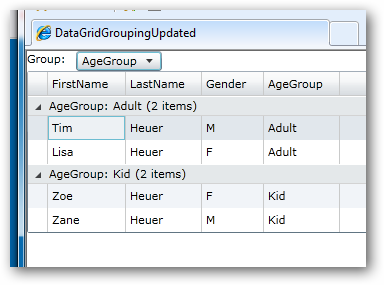
Hopefully this helps clarify the change from SL3 beta and apologies for the delay in updating what is a common sample request. Who knows, maybe in future versions the declarative model will come back :-). Here’s the code for the above if you’d like to see it: DataGridGroupingUpdated.zip
Please enjoy some of these other recent posts...