×

First time here?

You are looking at the most recent posts. You may also want to check out older archives. Please leave a comment, ask a question and consider subscribing to the latest posts via RSS or email. Thank you for visiting!

I use Seesmic for my social media stuff (Twitter, Facebook, etc.).  Recently they created the Seesmic Desktop Platform which enables software developers to enhance, change or extend their Seesmic Desktop application.  This platform is built upon Silverlight 4 and is quite simple to extend.  To learn more about the Seesmic Desktop Platform, view the developer wiki.

I’ve created some plugins for my use and post them here to share with you.  Use them as you’d like, they imply no warranties :-).  For installation of the XAP files, see the developer wiki above.  In the future I’ll provide easy installers for these (or I think Seesmic may enable easier consumption as well).  Here are the ones I have:

How to develop plugins for Seesmic Desktop 2

Interested in developing plugins?  You can start by installing my helpful Visual Studio Seesmic Templates and then visit http://devwiki.seesmic.com for details on how to write plugins!

How to Install plugins for Seesmic Desktop 2

While I firmly believe this process will improve, here is the simply way to install these (or other plugins) for Seesmic Desktop 2.  It’s as simple as copy/paste.

  • Windows: "My Documents\Seesmic\Seesmic Desktop 2\Plugins" (or Documents if you are on Windows 7)
  • Mac: "$HOME\Documents\Seesmic\Seesmic Desktop 2\Plugins"

Translate Plugin

This attaches a Translate this item action menu to any timeline item.  It takes the contents of the timeline item and attempts to translate it to the user’s chosen machine language using Microsoft Translator.
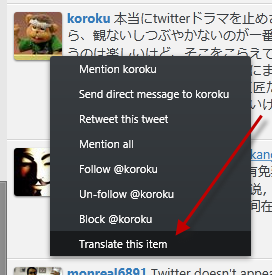
Seesmic Translate Plugin

This will also allow you to translate text from your current language to a supported language BEFORE you post the message to the service like Facebook, Twitter, whatever.

Seesmic Translate Plugin

Download: TimHeuer.Seesmic.Translate.xap (06-SEP-2010)

Foursquare Venue Plugin

This looks in your timeline items for Foursquare URLs and attaches an adorner for you to be able to expand the Foursquare short URL format into the details of the venue and see them presented in the timeline view.

Seesmic Foursquare Plugin

Download: TimHeuer.Seesmic.Foursquare.VenueFilter.xap (06-SEP-2010)

Image Previewer Plugin for Twitpic, yFrog, Twitgoo, Flickr, Instagram and Tweetphoto

This looks in your timeline items for Twitpic, yFrog, Instagram or Tweetphoto URLs and attaches a preview of the image with a link to the direct image again (per the terms of the APIs).

Seesmic Picture Previewer

Download: TimHeuer.Seesmic.PicturePreviewer.xap (06-SEP-2010)

Migre.me URL Shortener

Per a user suggestion on the desktop platform plugins forum, I created this Migre.me URL shortener add-in.  These are perhaps the easiest to create.  No screenshot but it adds the Migre.me option to the URL shortening toolbar.

Download: TimHeuer.Seesmic.Migre.xap (06-SEP-2010)

Twitlonger

While not a service that I frequent, it is handy to have.  Twitlonger was developed to shrink longer messages to the standard Twitter 140-character limit and provide a link to the full text.  This plugin puts a button Shorten with Twitlonger in the posting area and shrinks the content for you automatically.

Download: TimHeuer.Seesmic.Twitlonger.xap (06-SEP-2010)

img.ly Image Posting Provider

This plugin lets you choose the http://img.ly service to post and host your images in your messages.  Use this in conjunction with my Image Previewer plugin to get posting *and* previewing of images from img.ly!

Download: TimHeuer.Seesmic.ImglyProvider.xap (21-SEP-2010)

Goo.gl URL Shortener

Enable Google as your URL shortening service within Seesmic Desktop.  No screenshot but it adds the goo.gl option to the URL shortening toolbar.

Download: TimHeuer.Seesmic.Googl.xap (11-JAN-2011)

UberFilter

Sick of seeing all the Foursquare, Gowalla or Paper.li postings flood your feed? Install this plugin to choose what to filter out (none by default). After installing, view the settings section of this plugin to choose what noise to turn off. Version 1 is limited to Foursquare, Gowalla and Paper.li but next version will add more known noise and allow for custom filters. Updates will come automatic after installing this one.

Download: TimHeuer.Seesmic.UberFilter.xap (16-JAN-2011)


This work is licensed under a Creative Commons Attribution By license.


4/20/2010 9:42 AM | # re: Seesmic Desktop Platform Plugins
imfloflo -- this is fixed now (was a bug in SDP's styling they are using) -- all good now, grab the version from 20-Apr or newer.
4/21/2010 5:27 PM | # re: Seesmic Desktop Platform Plugins
Kyle/Garrido -- I plan on sharing source at some point as I stabilize on them.
Gravatar
4/22/2010 11:11 PM | # re: Seesmic Desktop Platform Plugins
Great Picture Previewer.
If possible, can I operate it manually.
4/23/2010 10:34 AM | # re: Seesmic Desktop Platform Plugins
Great Job! :)

But, erm..
Could you develop a Plugin which is able to star/favorite Tweets? That would be very nice! :)

Greetings from Germany :)
4/23/2010 10:59 AM | # re: Seesmic Desktop Platform Plugins
Epilein - I believe this will be a part of the core Twitter plugin from Seesmic when updated.
4/25/2010 1:02 AM | # re: Seesmic Desktop Platform Plugins
m unable to install the .XAP file
Pls help me
4/25/2010 3:40 PM | # re: Seesmic Desktop Platform Plugins
nikhilesh - if on Windows it will be in Add/Remove Programs. On Mac, just delete the app.
5/13/2010 7:30 AM | # re: Seesmic Desktop Platform Plugins
Any progress on RSS column plugin?
Not rushing, just wondering.
5/13/2010 10:26 AM | # re: Seesmic Desktop Platform Plugins
Joobleblob -- working on it...just not enough time :-)
5/16/2010 6:07 AM | # re: Seesmic Desktop Platform Plugins
Hello, escuse me but i dont understand how to install a plugin for seesmic desktop...
5/16/2010 2:07 PM | # re: Seesmic Desktop Platform Plugins
Psaiko - for the developer preview you have to copy them yourself to the appropriate directory per http://devwiki.seesmic.com/SDP-SDK-0_6_0_732

# Windows: "My Documents\Seesmic\Seesmic Desktop 2\Plugins"
# Mac: "$HOME\Documents\Seesmic\Seesmic Desktop 2\Plugins"
5/18/2010 8:11 AM | # re: Seesmic Desktop Platform Plugins
How will trust work for plugin architecture?

I assume all plugins I place in my Seemic plugins directory will run in elevated trust, or can your silverlight app run these plugins in a sandbox? Not sure if I want a plugin to have the abiliy to reay my documents folded.

Are there plans in the launch of the service for Seesmic to add code signing and/or enfoce code signing for plugins either via the developer or Seesmic?
5/18/2010 8:19 AM | # re: Seesmic Desktop Platform Plugins
Marti -- these are excellent questions that should be sent to Seesmic via the developer list (http://devwiki.seesmic.com has information on how to sign up).
6/7/2010 7:43 AM | # re: Seesmic Desktop Platform Plugins
Vitor -- what is your local language/culture settings though. If it is set to pt-BR already, then it won't have anything to translate. The plugin looks to translate text into whatever the user's current culture UI settings are.
8/18/2010 8:49 AM | # re: Seesmic Desktop Platform Plugins
FourSquare plugin not really useful since it does not allow me to use seesmic to send updates to foursquare. I am very disappointed with seesmic desktop 2 when I compare it to tweetdeck beta. Seesmic lacks many features I consider basic such as hiding or "deleting" tweets I have marked as read.
Gravatar
9/8/2010 2:01 AM | # Twitlonger Plugin
Twitlonger plugin doesnt seem to work :(
12/3/2010 4:28 PM | # re: Seesmic Desktop Platform Plugins
Great job,

I'd just like to know if you'll provide a part of the source code, like the Timeline Item Processor class for example, cause I'll be interested in seeing how it works (in fact I'm trying to make one but I don't understand everything).
thx

sorry for my english I'm French :s
12/14/2010 7:13 PM | # re: Seesmic Desktop Platform Plugins
Just downloaded Seesmic! This is great. But Tim is there a reason the translate plug-in doesn't seem to be working for me? I have a Mac.
2/24/2011 10:19 PM | # re: Seesmic Desktop Platform Plugins
The site is informative and contains useful content for visitors. Got good jobs as well. I'll bookmark this site for future viewing. Thanks for sharing.
discount electronics | home business
3/12/2011 2:28 AM | # re: Seesmic Desktop Platform Plugins
i'm running seesmic desktop on windows 7 64bit korean edition. but, when i try to translate some foreign language tweets (eg, japanese) , translator plugin only translates them to english. i want tweets to be translated to korean. any idea?
4/11/2011 11:51 AM | # re: Seesmic Desktop Platform Plugins
yeah , the plugins for real very nice - we love it too - when you got time, tipp: Sexanzeigen
Gravatar
4/12/2011 4:01 PM | # re: Seesmic Desktop Platform Plugins
There is nothing more annoying that TweetLong. Plenty of advertisement, bad looking, hard to read, broken css....Shame
Gravatar
6/22/2011 6:31 PM | # re: Seesmic Desktop Platform Plugins
why doesnt it have tans PH?
8/4/2011 12:25 PM | # re: Seesmic Desktop Platform Plugins
Tim, are you still maintaining these at all? Foursquare shut off the v1 API, so you might want to update that plugin or remove it as it no longer works in its current incarnation.
8/17/2011 9:39 PM | # re:
I used to be more than happy to seek out this internet-site.I wanted to thanks in your time for this glorious read!! I positively enjoying each little bit of it and I have you bookmarked to check out new stuff you weblog post.
================================
testking \ mcitp \ mcts \ mcdba \ mcdst \ microsoft certification \ windows 7 \ mcp \
2/29/2012 9:06 PM | # re: Seesmic Desktop Platform Plugins
Hello,I love reading through your blog, I wanted to leave a little comment to support you and wish you a good continuation. Wishing you the best of luck for all your blogging efforts.handbags//


Please add 6 and 6 and type the answer here:

All postings/content on this blog are provided "AS IS" with no warranties, and confer no rights. All entries in this blog are my opinion and don't necessarily reflect the opinion of my employer or sponsors. The content on this site is licensed under a Creative Commons Attribution By license.