Advertisement

New Silverlight 4 Themes available–get the raw bits

NOW OFFICIALLY RELEASED: DOWNLOAD HERE

A while back I posted a sneak peek preview of 3 new themes that we were working on for Silverlight 4 applications.  Our team wanted to do more than just the overall base theme and provide the themes for the core, SDK and some Silverlight Toolkit controls as well.  In addition, there was a lot of internal chatter about how cool these new themes were and a lot of teams wanting to adopt them as default, including WCF RIA Services.

While we finalize a better distribution plan for these templates (and some may show up as defaults soon), I wanted to provide a raw drop of the sample project we use to display the themes.  These projects have the Silverlight ResourceDictionary files for the themes and a few pages showing samples.  These are raw theme project files.  And without further adieu, I present the bits for you:

Grayscale Theme

This theme is a clean implementation that initially has a ‘greenscale’ approach to it, but modifying the brushes even slightly will give you some great color pallettes to work with.
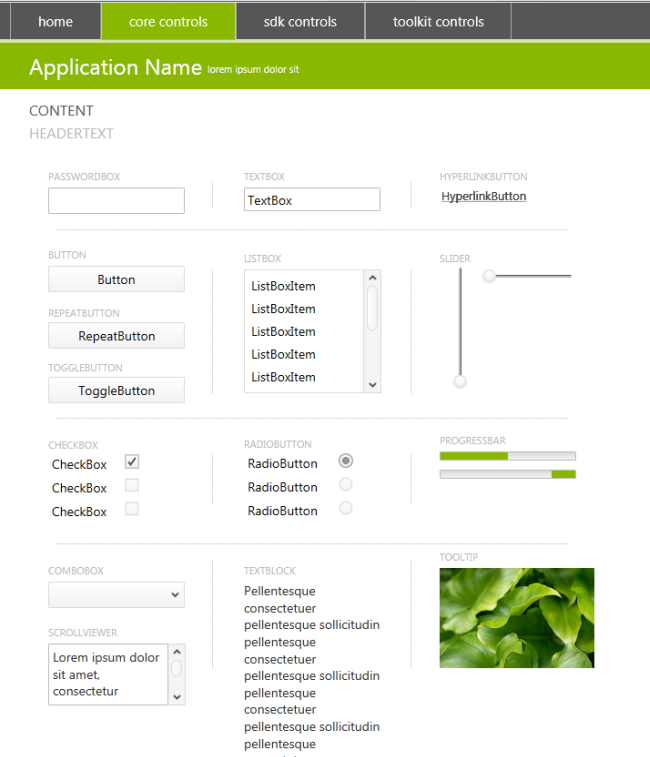
Silverlight 4 Theme - Grayscale

Honestly, initially this one didn’t pop for me as much, but the fit-n-finish added here is really making me like this structure.  And the ability to change a single brush and have it replicate through other areas makes this clean template highly customizable.

Windows Theme

Want a theme for your application to look a bit more native?  Here’s a starter place for you. 
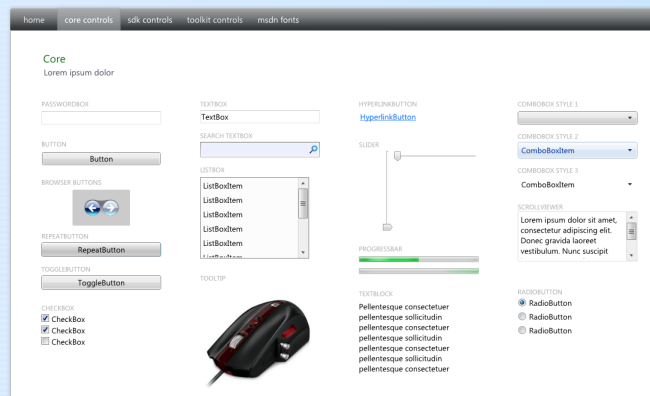
Silverlight 4 Theme - Windows

Cosmopolitan Theme (formerly Metro)

And finally the most popular requested, we’re calling Cosmopolitan.  This one has features that resemble the Zune and Windows Phone design language aspects of it in a modern, clean UI form.
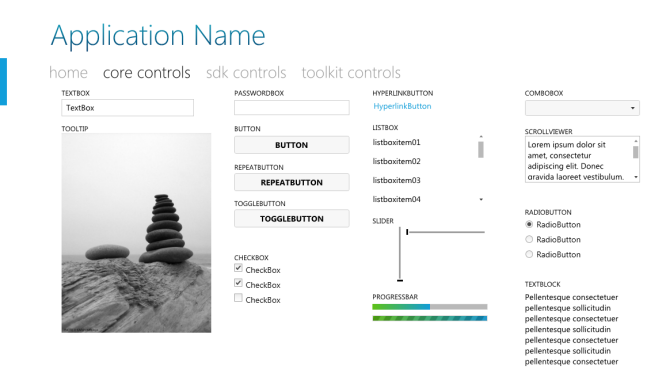
Silverlight 4 Theme - Cosmopolitan

This theme also has a ToUpper and ToLower behavior files that you can apply to your XAML for text formatting.

How these raw projects are structured

As I mentioned, these are raw project structures…ripped from the designer’s desktop, zipped and presented here.  There may be dependencies that you don’t have and will need (i.e., Toolkit, etc.).  There may be residual test files in there.  Deal with it :-).  But at the basics the core themes are all structured as ResourceDictionary files in the Assets folder:
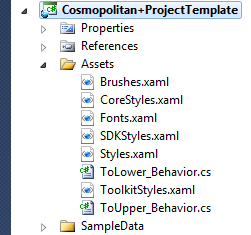
Theme project structure

As you can see in here the files should be relatively self-explanatory.   We tried to make it so that you can pick and choose what you’d like from them (as well as learn how to segment out these types of dictionary files).

In each project you will also see the themes represented in showing: core controls, sdk controls and toolkit controls.  Please make sure to appreciate all of them.  I didn’t post screenshots of all here.

The future deployment of these themes/templates

The idea is that we’ll clean these up in a more distributable manner.  We’ll likely create VSIX files (Visual Studio extension installers) so that you could then say File…New Silverlight Cosmopolitan Application and have these already in there.  This also allows us to put them in the Visual Studio Gallery where you can search/download directly to Visual Studio.  We also will likely put the resources on the Expression Gallery for download.  And as I mentioned before, it’s possible that future iterations of things like WCF RIA Services and such might use them as default.  You tell me: what is the best distribution method?  How would you expect to download/install/use these?

Summary

I love these new themes.  I think our design team did a great job here.  Tsitsi and Corrina are awesome and put a lot of work into refining these.  By the feedback that I’ve been getting in email and blog comments, these are exactly the type of things that you’ve been wanting.  Mostly from developers I’m hearing the thank you for helping me since I have no design skills!  This is great feedback that our team loves to hear.  I hope you find these valuable.

These raw project templates here are essentially the Silverlight Navigation Application template modified.  We’ll have the biz app ones a while later, but these should get you started.

What are you waiting for?  Download them now: http://drop.io/sltemplates

Hope this helps!


This work is licensed under a Creative Commons Attribution By license.

  1. 5/3/2010 10:44 AM | # re: New Silverlight 4 Themes available–get the raw bits
    Tim. u rock! thanks a lot. one question though. where is the DataGrid themes?
  2. 5/3/2010 11:00 AM | # re: New Silverlight 4 Themes available–get the raw bits
    DataGrid themes are on the SDK Controls tabs view of the project.
  3. 5/3/2010 11:01 AM | # re: New Silverlight 4 Themes available–get the raw bits
    Excellent, those look great! Do you know, Tim, if there are similar templates available for WPF? Or do you think these might be usable from WPF (or at least easily adapted)?
  4. 5/3/2010 11:04 AM | # re: New Silverlight 4 Themes available–get the raw bits
    Brian -- no similar ones for WPF that I know of, but the isolation of these brushes/resources should help make them easy to adapt in most cases.
  5. Gravatar
    5/3/2010 11:22 AM | # re: New Silverlight 4 Themes available–get the raw bits
    Thank you Tim, and the rest of the team that worked on them :)
  6. 5/3/2010 11:38 AM | # re: New Silverlight 4 Themes available–get the raw bits
    thanks tim. found it finally. There was a following compilation error:

    "Error 8 Could not load the assembly file:///C:\sks\studies\Silverlight\Beta 4 Apps\Theme\Windows7Controls+Template\Windows7Controls+Template\Bin\Debug\System.Observable.dll. This assembly may have been downloaded from the Web. If an assembly has been downloaded from the Web, it is flagged by Windows as being a Web file, even if it resides on the local computer."

    Resolved it by removing all System.Windows.Control.*.dll (s) and re-added them.
  7. 5/3/2010 12:06 PM | # re: New Silverlight 4 Themes available–get the raw bits
    Nice, very nice. Thanks to the team for such outstanding support for the community.

    Any chance of knocking around the WPF team to get this level of support (and perhaps a nice port of these themes to WPF as well). (Sorry, I really prefer WPF to Silverlight).
  8. 5/3/2010 12:32 PM | # re: New Silverlight 4 Themes available–get the raw bits
    Will these themes work with the apps built on the existing business application template? I am guessing this would require deleting all the style bindings in an existing application, am i right?
  9. 5/3/2010 1:05 PM | # re: New Silverlight 4 Themes available–get the raw bits
    Tim, very very nice. Thanks for such outstanding support for the community.
    Good job,
    Rachida
  10. 5/3/2010 1:14 PM | # re: New Silverlight 4 Themes available–get the raw bits
    Robert -- most of these styles could be used in WPF.

    Mithun - not directly. We'll have biz app template support coming soon within a few weeks.
  11. 5/3/2010 1:25 PM | # re: New Silverlight 4 Themes available–get the raw bits
    These are beautiful. This is the kind of polish that will make developers, users, management, etc. say "Silverlight apps just look good, I want to switch to that technology."
  12. 5/3/2010 1:31 PM | # re: New Silverlight 4 Themes available–get the raw bits
    Hey Tim, these are great, I hope to see more coming. As for distribution model, I'd like to see them come from either the Web Platform Installer or the VS Gallery. Silverlight already have too many separate downloads as it is :-). As for usage, it would be very cool to just create a Silverlight App or Silverlight Business application and then have the option to use any installed theme or the default (it could be a dropdown with a preview)
  13. 5/3/2010 6:27 PM | # re: New Silverlight 4 Themes available–get the raw bits
    Thanks for the bits. Hopefully, we will see these supported in new release of WPF Toolkit in the future..... Hopefully:)
  14. 5/4/2010 7:39 AM | # re: New Silverlight 4 Themes available–get the raw bits
    Hi Tim - great templates!
    For those of us (me!) who want to use these with the Biz App template sooner...
    You said "not directly" to using them - could you provide a quick list of manual tweaks we need to make to get it working before you deliver the biz app compatible versions?
    It would be really useful for a customer demo I'm doing soon...
    Thx.
  15. 5/4/2010 8:27 AM | # re: New Silverlight 4 Themes available–get the raw bits
    Jason -- I don't have the list unfortunately. You could simply try to replace the Styles.xaml dictionary and start tweaking from there.
  16. 5/4/2010 8:50 AM | # re: New Silverlight 4 Themes available–get the raw bits
    Hi Tim.
    Tried to replace Styles.xaml and add the missing styles from an existing bus app template. All got very broken ("Catastrophic Error" no less...!)
    Think I'll wait for the official release of the bus app versions. Thx again.

  17. 5/4/2010 11:38 PM | # re: New Silverlight 4 Themes available–get the raw bits
    I added a control to the home page, and the animation in it moves slower than it does stand alone.

    Anybody know why this would happen?
  18. 5/5/2010 2:03 AM | # re: New Silverlight 4 Themes available–get the raw bits
    That's very cool stuff, you guys have done excelent work, thank you for sharing it. Looking forward to its future development.
  19. 5/5/2010 3:42 AM | # re: New Silverlight 4 Themes available–get the raw bits
    Grayscale Theme updated with Cosmopolitan Theme brushes !!! updated image #Silverlight #themes http://twitpic.com/1l7zhb
  20. 5/5/2010 3:41 PM | # re: New Silverlight 4 Themes available–get the raw bits
    I found out what was causing my animation to move slowly, and my DataGrid to scroll slower, but I don't know why.

    I removed the Border around the navigation frame, and everything worked fine. I don't know why the Border would cause that, but removing it produced dramatically better results.
  21. 5/5/2010 3:45 PM | # re: New Silverlight 4 Themes available–get the raw bits
    Fallon - thanks for the report -- the border used a DropShadow right? I think I know why.
  22. 5/6/2010 10:02 AM | # re: New Silverlight 4 Themes available–get the raw bits
    Thank, it works wonderful!
    I have integrated the Windows theme in a SL Business Application but the login status bar is not managed by the theme, looking ugly and overwritten the title.

    Do you know if there plans to support the login styles? I think that the Business template is very common.

    Thank you
  23. 5/6/2010 12:33 PM | # re: New Silverlight 4 Themes available–get the raw bits
    Tim, that's correct. The offending style in Styles.xaml is shown below, and it does have the drop shadow.

    <Style x:Key="ContentBorderStyle" TargetType="Border">
    <Setter Property="Background" Value="{StaticResource WhiteColorBrush}"/>
    <Setter Property="BorderBrush" Value="{StaticResource PageBorderBrush}"/>
    <Setter Property="BorderThickness" Value="1"/>
    <Setter Property="Margin" Value="10"/>
    <Setter Property="VerticalAlignment" Value="Stretch"/>
    <Setter Property="HorizontalAlignment" Value="Stretch"/>

    <Setter Property="Effect">
    <Setter.Value>
    <DropShadowEffect BlurRadius="10" Opacity="0.25" ShadowDepth="0"/>
    </Setter.Value>
    </Setter>
    </Style>
  24. 5/8/2010 2:01 PM | # re: New Silverlight 4 Themes available–get the raw bits
    Guys... I am begining with silverlight
    I've downloaded Silverlight 4 with Ria Service..
    How can I use this template and add my Sql Server database as Data Source?
    Thanks, Amazing template.. Good Job!
  25. 5/10/2010 4:10 PM | # re: New Silverlight 4 Themes available–get the raw bits
    Love the themes. Will the team be releasing any themes to be used with Windows Phone apps?
  26. 5/12/2010 4:52 AM | # Regarding Datagrid Edit Template

    In Datagrid, One column is having Editing Template with popup control in it.
    so if we double click on that cell it will show a textbox as popup, this was doing good in Silverlight 3, The same is not working in Silverlight 4 can u help me in resolving this issue.
  27. 5/12/2010 11:01 PM | # re: New Silverlight 4 Themes available–get the raw bits
    I don't have VS 2010 yet. But I renamed ShinyRed and copied everything into it and it seems to be working nicely. (The xaml in the Assets folder is laid out really nice and commented well too - which made it easy.)

    One question: Shiny Red uses generic.xaml and I'm not sure what to use for <Setter Property="Background">. For now I used the stuff in <LinearGradientBrush x:Key="TextBoxBorderBrush".

    What should I use?
  28. Gravatar
    5/13/2010 9:30 PM | # re: New Silverlight 4 Themes available–get the raw bits
    Beautiful! Thanks for the great work. As you said the team's finalizing the distribution plan, any rough timeframe when this is going out?
  29. 5/31/2010 3:32 AM | # How I want my themes to be?
    Hi Tim, Great job! this was sure needed to be able to bind a visual representation to a behavior and uncouple it completely.
    I think that new app based in a theme is wrong. A theme should be enabled to be easily changed and I should be able to apply a theme in a coupled way (pasting it on the assets folder and adding all the references) or better, in an uncopled and easier way: I'd like a dll with the .theme extension like cosmopolitan.theme.dll and this to be a brand new project that I could link to any project I want and change it on the go (dynamically) as for example I'd like my app to have a personalized look for each client, for example.

    I would be making easier the theming, I'd be enabling the possibility of setting up a marketplace for unique pieces of code that would be always be extensible and overridable at the client's side (the app that uses a theme) and also it would be Encapsulated and easy to add-remove without any trouble.

    I'd make VS2010 able to install themes based on technology (SL, WPF) and when I create a new app I'd like to choose which Template I'd like to relate to a concrete project type.

    Best,
    Jose Luis Latorre
  30. 6/4/2010 1:22 PM | # re: New Silverlight 4 Themes available–get the raw bits
    Tim, when using the Grayscale theme, the DataGrid disappears when wrapped in a BusyIndicator with IsBusy = true. To save you some time, the issue lies somewhere within one of the DataGrid's styles (not the BusyIndicator style). Haven't been able to find it yet, but haven't put much time into it either...

    Thanks!
  31. 6/14/2010 2:29 PM | # re: New Silverlight 4 Themes available–get the raw bits
    When I try to download the cosmopolitan theme, I get the following:
    The file # has reached its download limit. Files in non-premium drops can only be downloaded 1000 times, both to prevent abuse and because at very high download rates our service becomes prohibitively expensive. If you need to download this file, ask the drop's administrator to remove this download limit by upgrading this drop, either through drop.io manager or a one-time upgrade.
  32. 6/15/2010 3:56 AM | # re: New Silverlight 4 Themes available–get the raw bits
    Hi Tim, could you upload the cosmopolitan theme again? Would really appreciate it.
  33. 6/15/2010 4:01 AM | # re: New Silverlight 4 Themes available–get the raw bits
    Henna/Thomas/All -- see the updated post for the download link: timheuer.com/.../...efreshed-for-ria-services.aspx
  34. 7/1/2010 8:30 AM | # re: New Silverlight 4 Themes available–get the raw bits
    Tim,

    After applying the cosmopolitan them to my Business app, the CPU usage is very high after login. Removing the theme solves the problem. Have you come across this before?

    I've enabled show redraw, and it's the navigation frame that is getting redrawn on every frame.

    This makes it unuseable.

    Cheers
  35. 7/1/2010 11:32 PM | # re: New Silverlight 4 Themes available–get the raw bits
    Hi Tim, could you upload the cosmopolitan theme again - the 1000 limit reached again :-(
  36. 7/23/2010 2:33 PM | # re: New Silverlight 4 Themes available–get the raw bits
    Mark: remove the dropshadow effect and see if that changes things to the better.
  37. 7/31/2010 9:00 AM | # re: New Silverlight 4 Themes available–get the raw bits
    Tim, could you upload the cosmopolitan theme again? Please :)
  38. 8/2/2010 5:18 AM | # re: New Silverlight 4 Themes available–get the raw bits
    Tim could you please put up the link to metropolitan theme again,I think the link has reached its maximum download capacity
  39. 8/2/2010 7:50 AM | # re: New Silverlight 4 Themes available–get the raw bits
    Varun - see the link above? they have been released. Get bits here: http://go.microsoft.com/fwlink/?LinkId=192411
  40. 8/11/2010 2:12 PM | # re: New Silverlight 4 Themes available–get the raw bits
    I really do enjoy the Cosmopolitan theme, though there is one bug with the ToUpper and ToLower behaviors. If you are binding the content on elements that have a style applied with the behavior, the binding will stop working. It won't update after the first time it's set. Thanks!

 
Please add 7 and 8 and type the answer here:
First time here? You are looking at the most recent posts. You may also want to check out older archives. Please leave a comment, ask a question and consider subscribing to the latest posts via RSS or email. Thank you for visiting! (hide this)