when vista came out, clearly one of the biggest pain points to end users was user account control (UAC).  this is the feature that requires authorization to run certain applications which would require elevated privileges...most notable being installations.  osx, of course, has had this feature for a while.  osx requires the user to authorize elevated changes like changing account information or other system settings, as well as installations.  osx differs slightly in that once you authorize in certain areas (like sys prefs) it remains 'unlocked' until you lock it again explicitly or other actions do.

another thing that vista (and actually xp sp2) introduced was protecting users from downloaded files.  if you downloaded a file and then tried to use/execute it, vista would prompt you that you downloaded the file and should be cautious, etc.  a good feature IMO.  after prepping my clean pave of leopard i downloaded a few of my apps and when launching one saw this:

looks like leopard implemented a similar feature.  it is good to see security taking a priority in updates to operating systems.  sometimes they are annoyances (i actually think this one is in vista and in leopard), but i get it, to the 'lay user' software developers have an obligation to do their best to protect the system, user and networks while at the same time balancing that with proper user experience.  i've seen other leopard security improvements as well that catch up to some of the introduced features in vista...good to see it taking a front seat, or at least i think so.

well, it's been over 12 hours since leopard was available to the masses and the early reviews seem to be in.

yawn.

i just got my discs and will be updating my machines soon to see (i'm going to try to update one and clean install the other).  but i'm reading the reviews and they aren't promising.

dave winer says the upgrade process went fine, but he seems left with wondering what did he upgrade too? he says:

Net-net, my first impression of Leopard is that it isn't a big deal one way or the other.

interesting.  i thought this was supposed to be apple's biggest os ever.  i'm sure to some it will be.  when i look at the 'over 300 features' i laugh a bit.  since when do we call fixes and critical updates features that count toward a benefit to upgrade?  i see some key updates in leopard.  spaces, time machine, some UI glitz (transparencies and new dock features), etc.  but are those core enough to make it that much better?  ichat backgrounds...do those improve your daily experience with leopard?

and what is with the blue screen of death on leopard?!?!? i thought that was trademarked by microsoft?  i love the comment that at least steve jobs could have picked a different shade of azure or someting ;-) -- if more of these BSOD reports come in, wikipedia will have to change the definition of BSOD!

i'm doing a little wayne's world flashbacking in my head about all the vista reviews of how the UI improvements were crap if that is all that was included in vista.  flip3d, yawn, etc., etc. -- so there is some of that happening with leopard.  maybe the geniuses of user design/experience should have been more public with their beta to get feedback?

matt neuburg has a write-up that caught my eye as rather than just pointing out general statements he articulates on some of the key 'features' and what he sees the problems are.  i think his points are valid and does make me wonder about the user experience design elements that went into some of the things he's pointing out.

it also gets me wondering about what i just paid for.  did i just pay for a service pack?  sure, spaces and some things are new, but are those incremental improvements?  when i look at the 300 improvements i seem to see some service pack-y things rather than features:

    • Descriptive Error Messages
    • Dashboard -- are these new improvements or just new widgets?
    • Improved full-screen interface
    • Video quality improvements
    • improved iCal interface (not a new version, just 'improved')

you get where i'm going with this.  it somewhat bothers me as a msft employee a bit that leopard (OSX - 10.5) is considered a 'new operating system' when really it is an incremental improvement over tiger (10.4).  really, i think i just paid for a service pack.  apple has always said that microsoft took 5 years to update their operating system, but at the same time has considered 'dot' releases to OSX as major upgrades.  by that definition, what is XP, XP SP1, XP SP2, etc. -- those are 'dot' releases providing improvements and incremental updates.  c'mon apple, fess up that leopard is a service pack with some glitz.  it's okay to admit it, people will still by it.

i'm starting my upgrade/install now and will see how it goes.  i'm jaded by some reviews already but they seem to hit features that i use, so if i'm negatively affected, i'll be upset.  what is funny is that leopard seems to enable the ability to go back to different modes, but it involves terminal commands.  at least windows gives users UI options to toggle to their preferred settings.

another fair review from macworld themselves states "...in reality the changes are a mixed bag"

okay, if you don't know justin-josef angel, that is a shame, the dude is smart.  he's an mvp for microsoft and has been active in the silverlight community now, trying to really start the community thinking different on extending silverlight.  lately he's done just that.

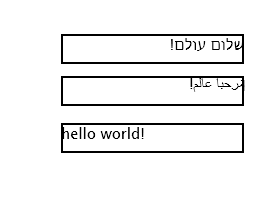
anyone who has ever had to develop a global application knows the challenges of ensuring localization.  it is perhaps one of my weakest spots as a developer and i'm sure a lot of others as well.  since justin-josef speaks arabic and hebrew he wanted to tackle this problem...rtl language display in .  thus enter the Silverlight Arabic and Hebrew languages support project (SAAHLSP; just kidding the acronym is mine, but there is a job for justin in microsoft product naming in his future).

Rendering Comparison

Normal Silverlight

Silverlight Hebrew and Arabic Support

RTL (Right-to-Left): Not Supported
Align-to-right: Not Supported
RTL: Supported
Alight-to-Right: Supported


way to go!  this project really shows the power of having the .net framework when silverlight 1.1 comes to light and the extensibility you can add to this platform, empowering the developer to makes these extensions.

the project has several learning points to it if you are interested...

great work!

looks like mozilla labs is cooking up something to bring web apps to the desktop.  their latest project, prism, aims to:

bridge the divide in the user experience between web applications and desktop apps and to explore new usability models as the line between traditional desktop and new web applications continues to blur

hmm..so at the surface without being able to get my hands on it, it looks like some type of desktop sandbox wrapper around a web application?  most likely relying on a web rendering platform to exist on the desktop already (i'm sure they are obviously depending on mozilla/gecko)?  wow, welcome back 1996.

what? you don't remember IE4?  the feature that was implemented in IE4 called HTML Application ()?  i do.  i implemented it several times.  sure, you may mock me now, but for the DHTML days of young, HTA (when IE would be your restriction) was the shiznit for some customers.  looking at it now, we scoff at such an idea.

it is funny because someone even commented on the prism labs project with the same thought (no response yet when i last checked as of this writing).  well, i'm not sure about it, and based on the 190+ comments neither are others.  of course, those will forget the HTA attempt at such a thing, and since microsoft isn't implementing it, it will be super cool and people will flock to it when released...maybe.

wait, bringing web apps to the desktop...when you look at one of their UX Goals, you'll see they aim to 'integrate web applications into the user's desktop experience' -- hey mozilla, consider it done...IT'S CALLED YOUR OWN BROWSER.

some news on the windows live platform front...now you can link your passport live id accounts!  i like a lot of the windows live services, but one that i've struggled with is live id.  not the concept, but rather the implementation.  it is getting incrementally better day by day and this one change in particular made me happy.

when passport first came out, most got one.  when messenger came out, you used your passport.  then you could create a passport/live id with your own email account (didn't have to be hotmail.com), then there were some changes and you might have had to migrate yours...etc.  you can see where i'm going here -- i have roughly 4 live id accounts.

then you have your corporation, like mine :-) -- sometimes they require registrations from a live id ending in @mycorpdomain.com -- that frustrates me, but oh well.  i basically have two primary live id accounts i use and when i login/out of sites because i may have created sites under one account, etc. -- i would have to lose major context of what i was doing...not anymore!

here's what you do to link your various live id accounts...

1) go to http://account.live.com and login with your preferred live id

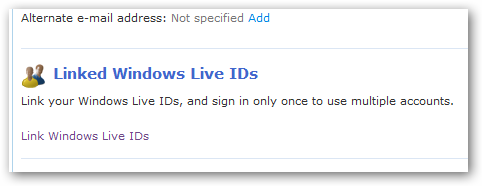
after you login you'll see the summary page and on it you should see the "Linked Windows Live IDs" section:

2) click on the 'Manage Linked IDs' and you should see:

3) click on the 'Link an existing Windows Live ID' and you'll be asked to confirm your logged in live id password, and then you'll be able to add another Windows Live ID account:

4) once completed you'll see that your accounts are now linked:

great, so now what? well when you go to a live id-enabled site you'll be able to switch identities immediately on that site without having to logout/login to a different windows live id...you'll be instantly changed on the same site...that is awesome.

so go link your most used windows live ids!  thanks windows live team!