what?! you don't know what facebook is? haven't you heard all the cool kids are doing it so you should totally jump on it with complete disregard to whether or not there is any benefit to you at all. then just accept every single friend request and you can have yet another disparate network of your own! (i'm actually experimenting with adding random friends to see if people accept them the way myspace grew -- friends in myspace seem to almost be a chest-pounding reputation/currency thing.)
seriously, though if you haven't heard about it, it is worth a read. is it myspace all over? well, some have pondered. facebook grew up on college campuses and is gaining popularity with the 'adults' of the world. a myspace for the linkedin crowd might be a good analogy...i don't know, maybe it isn't. either way, it is growing in popularity and gaining share over myspace. i've been lingering on it and like a lot of what they have. is it different than myspace? i have no idea...myspace to me isn't built for me -- i get blinded whenever i visit a myspace page, so i just don't look.
one thing facebook has done is create a developer ecosystem to their offering. this enables geeks and organizations to better infiltrate the facebook network and provide 'stuff' for the subscribers. arguably, most facebook users are consumers of these services rather than dev geeks like me (and possibly you), so it remains to be seen the usefullness of some of these applications being written for facebook. there are some leaders: twitter integration, map of vacations, photo albums, etc., and then the obscure ones like red bull roshambull games, etc.
facebook has apis. developers like apis. the visual studio express team partnered with facebook to create some .net wrappers for the facebook apis and put it on codeplex as the facebooktoolkit. this enables microsoft developers to rapidly develop facebook applications for the client, web, popfly, whatever. i took a look at them and created a few apps to hack around with.
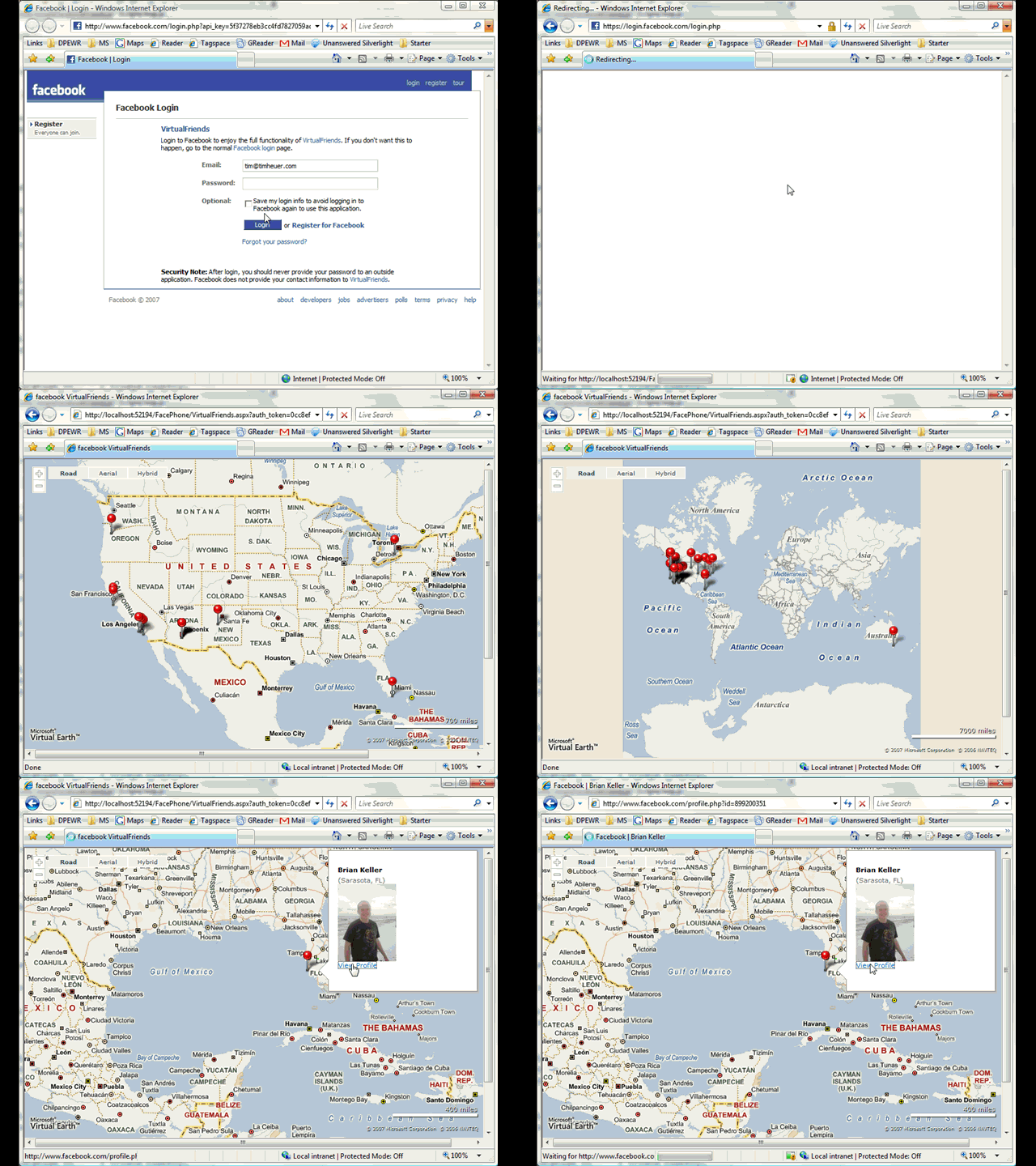
my first one was to take a look at mapping my friends on a virtual map. now this time i did search around and notice that there were already about 10 'map my friends' applications out there and most work well. i decided just as an experiment to myself that i'd play around with this concept still and use virtual earth instead (sadly, all the examples used google maps). after using the toolkit to easily get my friends, i then geocoded their locations and displayed on a map. i accomplished this actually using ASP.NET AJAX to asynchronously get the friends list and then apply them to the virtual earth map. you can see the application in action here:

i decided not to upload it to facebook as i already mentioned there are about 10 already up there...who needs another one.
the other thing i wanted to do was wrap my head around some of the outcomes of the iPhoneDevCamp recently. i figured i'd take a look at webkit/safari and see what i could come up with. there already is a mobile facebook application, but i thought i'd look at making the iphone version of this and see what i came up with.
SIDENOTE: as i was asking someone to test this out for me on an actual iphone, they did point out that someone created a facebook app for iphone...calling it iFace. i took a look at had some trouble using it (namely because i didn't have an iphone) but also it seemed to link to the mobile app that already existed? maybe i'll have to try on the iphone itself.
i think what is most interesting is all this talk about the 'full web' experience on the iphone. if that is the case, then why the need for all the iphone-specific apps (i.e., http://iphone.yourfavoritesite.com)? well, to me it solidifies that the 'full web' experience on a mobile device still isn't the best and for the best experience you still adapt your design when you know what your target devices are. i don't think there is anything wrong with that concept. heck, that's why facebook has a mobile site!
perhaps one of the greatest things that came out of iphonedevcamp was someone looking at keeping the user's UI consistent with other areas of the iphone. joe hewitt created the "iUI" framework, which is basically a javascript file and a css file that models/emulates some of the iphone interface. great work joe. i think apps that maintain consistency with the everyday operations may be perhaps the most successful. so i took the iUI framework to my facebook concept. i didn't really dive into the iUI framework too deep, but did notice the output didn't render appropriately in Safari2, Firefox, or IE, but did great on Safari3. i found this interesting and will have to take more time to examine if there are some safari3 specific things that apple is introducing and possibly breaking compat with standards or even their own past browsers. nonetheless, i had safari3 to test, so away i went.
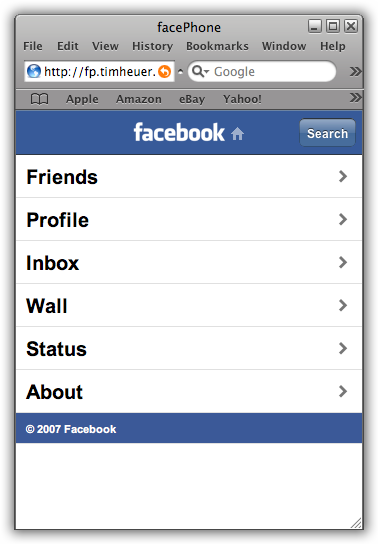
learning the capabilities of the facebook api wasn't difficult, it is relatively well documented and the facebook toolkit aided me in development (note: there are other toolkits for facebook as well for PHP, Java, Ruby, etc.). my goal was to emulate my home page in facebook when you login. i noticed that the API didn't have everything i needed wanted, but i'm progressing along anyway. i figured the key features would be the friend list (and recent status), the inbox notifications, your wall, and a way to update your status. using the iUI i came up with this (i call it facePhone):
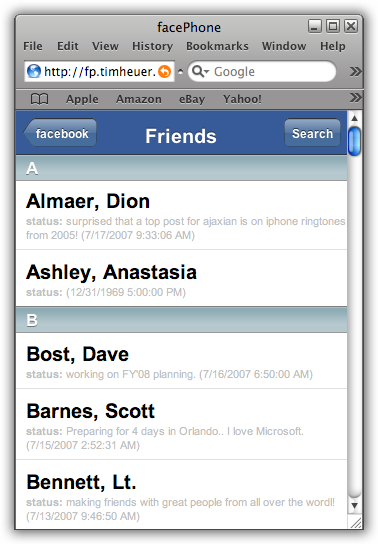
ooh, very iphoney :-). i chose to help keep brand integrity with facebook and not use the iphone (and iUI) default lighter blue chrome, but instead use the 'facebook blue' colors. i had to modify some images, but it didn't take long. when you click on the friends link you'll get the wipe effect that is common to the iphone and then view a list of your friends by alpha (last name) and their most recent status update:
once you move along the home screen you'll notice the iUI features take over. the title changes based on the css elements and then a back button appears to go back to the home area (the one labeled facebook). you could finger gesture up/down to scroll your friends here.
i went into an apple store to test this in an actual iphone...not sure if it is my crappy code :-) or a demo unit, but the browser seemed really, really slow...
the other areas are similar in concept/design. the search/status options will open up text boxes to submit information (still debugging this), but you get the picture. yes there are still some issues like alpha sorting within the listing of names, etc. one thing i had to do as well for the login was use the full login experience (since i didn't have an iphone i couldn't use the mobile app on safari3), so deal with it :-).
now was it necessary for another mobile app for facebook? maybe not. but i'm just trying to broaden my knowledge of things. facebook is growing and their openness to providing developer support is great. it will be interesting to see what useful apps might arise for facebook.
 just came across this little project from the makers of camtasia, techsmith. they call their project jing. it's essentially a 'let me take a video/snapshot of what i'm doing and instantly share it with you' tool. sure we have us nerdos who know how to do these things already with alt+prtsc, winsnap, snagit, camtasia, etc. but could this be a tool for the rest of us (or even for the alphas). it's simple, fast and does exactly what it says it does. check out the screencast on their blog for a quick demonstration (love the background music).