after hosting a developer installfest in phoenix and watching people go through the upgrade process (some easier than others...some very painful), i decided to give it a whirl.  I'm a bit of an operating system snob, that is to say that i'd never upgrade...i just don't believe in that -- operating systems represent the slate to me, and it should be clean.

so here i go...here's the specs:

  • Dell Dimension 4400
  • Pentium 4, 1.7 GHz
  • 1GB RAM
  • 40GB HDD

Start time: 21:00

could not get the dvd to work...but i couldn't get any dvd to work...argh..something jacked with my dvd drive on winxp.  okay, i fiddled with it enough and am going to try to use an ISO mount of vista.

21:40: real start time: 21:40
21:46: vista upgrade informed me that nero 6 needs to be uninstalled...okay, uninstalling
note: i have a bunch of other random stuff on here: quickbooks, quicken, a random ancestry program, photoshop cs, windvd, avg antirivus, acrobat reader, vnc, alltunes, etc.
21:48: upgrade starting again -- it asked me to enter the pid key again -- kinda frustrating -- i already entered the long key...would have been nice to been saved.  process started...windows says "your upgrade may take several hours to complete"
22:09: Gathering files (41%)...
22:19: Restarting... (this will be interesting since i used an ISO mount -- curious if Vista setup copied all necessary files it needed)
22:21: Reboot success -- and back into the Vista setup!
22:23: Expanding files (21%) - at the installfest, most machines seemed to be consistent on hanging out here at the 21% mark for a while
22:48: Installing features and updates completed
22:52: Rebooted..."Please wait a moment while Windows prepares to start for the first time..."
22:57: Completing upgrade...
23:24: Completing upgrade (36%)...
23:44: Completing upgrade (53%)...
23:49: Automatic reboot
23:52: Completing upgrade (64%)...

i've got a car appointment in the morning...heading to bed now.  not sure if my tracking will be accurate anymore as i need to hit the sack...so as it stands, i'm not at a vista desktop yet, and it's been 2hrs, 12 minutes.

00:38: well, my daughter just woke up screaming so i thought i'd take a look.  boom, vista desktop.

so in total (and maybe actually a bit shorter), it looks like my upgrade took about 3 hours.  i'm not sure what is optimal (i have never upgraded an OS before myself to even have a benchmark of if the WinXP upgrade was the same or what), but it definitely took shorter than some of the experiences at the installfest.  i don't think my machine is anything to write home about either when you look at the specs.  regardless of the time, all programs worked and all settings remained in tact, including the remote desktop settings (which i use for this machine because it doesn't have a monitor).

i can't say that i'll be doing a ton of upgrades still, but at least it makes me feel a little bit better about the upgrade process.  i know that others at the installfest had less-than-positive experiences, but again, i'm not really sure what the benchmark for time is (note: the installfest participants also were asked to run an analysis tool that took some time on their machines -- but not part of the normal consumer upgrade process).  i consider my home machine pretty mainstream (dell, etc.) and i *may* consider upgrading my mother-in-law's computer if i'm brave.  my brother-in-law has already agreed to take the plunge.

a while back i posted about my feelings about gmail and the report spam feature.  well, i decided to give them the benefit of the doubt.  rather than complain i thought i'd submit a support ticket about the issue and see what they say.

here is what i submitted:

Problem: i consistently get russian spam and despite EVERY time i click report spam on them, they keep coming in...isn't gmail intelligent enough to recognize a pattern and see that my russian email should be flagged as spam?  can't i put a setting to say 'anything non-english is spam for me'

here was their first response:

Providing you with a spam-free inbox is very important to us, so we're continuously working to improve our filtering system. To help with this process, we ask that you report any unsolicited messages you receive in your inbox. To do so, check the box next to the unwanted mail and click 'Report Spam.' If you decide an email is spam after it has been opened, simply click 'Report Spam' along the top of the message.

um yeah, okay, *please* tell me this is an automated response, because if it isn't, then i'm more frustrated.  READ THE FRIGGIN PROBLEM IDIOTS!  i already told you i was using the 'report spam' feature!

my response:

kind of a stock answer -- i have been reporting spam...that's my point. every russian email i get i report as spam -- shouldn't gmail wake up and smell the coffee that it is a pattern i want to repeat and automatically start marking my spam?

and the final response from them:

To help us investigate your situation, please send us the full headers from the most recent message(s) affected by this issue.

yeah, okay, enough with that...i've already wasted enough cycles on them.  why is customer support/service so unsupportive?  seriously.  take a moment to read the issues and intelligently respond.  let's just not use automated scripts and waste each others' time!

and another thing...(this goes to all mobile search operators)...

if i'm on my mobile device, and go to your search engine -- AND YOU KNOW I'M ON MY MOBILE DEVICE, then don't show me regular search results.  here's what i mean.  i'm driving in to work today and needed the number of my dealership to take my car in for service.  (why don't i call 411?  because i pay for internet on my phone and don't feel like paying the $1.50 411 charges.)  i go to google.com first (yeah, i know, why not msft...wait).  it knows i'm on a mobile device and adapts the ui.  i type in my dealership.  it shows me normal results to web pages.  what was i looking for?  well, the number.  they should change it and adapt and make it default to include a clickable link to phone listings that match as well -- that's what i needed...not to navigate through a normal web site on my little pda screen!

so why not msft?  well, i tried it.  i went to mobile.live.com and basically had the same experience.  it was only until i went to the local mobile live.com experience did i get exactly what i needed.  it showed me "local" results first with a "Call" link to the number...then normal web results.  why isn't that the default view?  no idea.  it should be.  mobile means mobile...make the anticipated experience the default one!

last friday, we hosted a vista/office installfest in phoenix.  people were invited to bring their machines and upgrade to the latest build of windows vista.  it was an experiment to say the least.  i have to admit, the upgrade experience left me with some questions.  there are many factors involved and as dumb as it sounds, just today i started thinking that it could have been partly the dvd media.  a lot of the issues were due to the time it took to upgrade.  i wonder if better media would have helped.

but i digress...

the one cool thing we had there setup as a fallback was the new windows deployment services (an update to remote installation services).  i've never been a deployment wizard or really ever had to think about it.  we use it here at work to image machines.  boot from the network and choose your desired operating system.

well for the installfest we used the new version, which uses WinPE and the WIM file format.  it's pretty sweet setup.  here's what the admin console on the server looked like after we put in the vista dvd and pointed to the install.wim image built into the vista dvd:

wdssetup

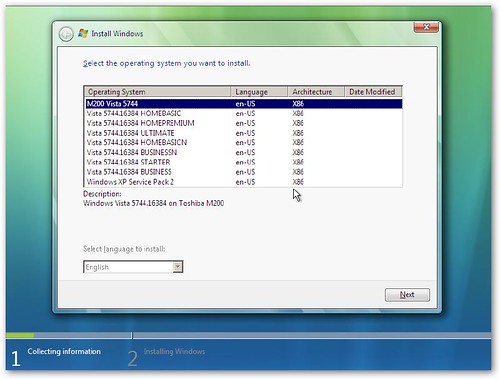
it read the other WIM files and instantly put them in as install images for the deployment server.  in fact, that is how vista works.  basically all "versions" are on the dvd and it uses WinPE to deploy the correct image.  pretty slick.  after you boot from the network, you'll get to choose what you want:

wdsboot

choose your operating system of choice and go.  you'll notice in the above images there are some labeled "M200 Vista 5744" and "Windows XP Service Pack 2."  those are custom images that i created.  the cool thing about wds and winpe (which i'm sure is probably been around for a while) is the concept of capture images.  you basically can create a different "boot" image for the deployment server and choose to capture an existing system volume.  that's how those other ones got there...it captured my machine images and uploaded the resulting WIM into the deployment server.  one thing i did find out was that the capture image concept did not work using a VPC image as the reference machine.

so what happens if you have a machine that doesn't boot to network in the bios?  well, then you probably aren't going to be deploying vista ;-).  but seriously, the other thing supported is the creation of a discovery image, which is basically a WDS client within a WinPE image.  Or you can use a PXE boot floppy (there are a few floating on the internet).  it's pretty slick.

so what's the big deal?  well, for me and rebuilding to later builds of vista it really doesn't help yet because i'd have to build new builds of a WIM.  but once released, this will be sweet.  i can build my desired vista developer machine with my tweaks, capture the image and upload.  need to rebuild your machine?  done...not need to mount iso images, double-click installers, etc. -- boot to network and choose "super-cool-dev-setup" and go.

i'm not a fan of bloatware...i don't think anyone is.  when you install something, you expect it to be exactly what you want.  aol recently got nailed for having their latest software install a bunch of other software without the user's knowledge.

two chronic violators i think for bloatware: acrobat reader and quicktime.  acrobat reader: to me that means a reader.  so why is it 20MB?  compare to which is 3.7MB (which is about 2MB more than the previous version even) and does the same thing (reads PDFs, search, etc.).  yeah, yeah, acrobat reader can do a few other things, but enough to warrant 6x the size and how many people really use (or even know about those features).  quicktime? don't even get me started.  a "plugin" that installs a startup task, system tray icon, etc.

while doing a recent installfest for vista, we were talking about antivirus solutions.  etrust provides free licenses for microsoft users, but vista recommended trend micro pc-cilling for vista.  etrust: 7MB; pc-cilling: 80MB.  wow, what's with the huge delta in difference?  it was interesting to note that.  avg free edition: 14MB.  it's just curious that there is such a wide variety of sizes in vendors when to the average consumer "they do the same thing"

anyhow, just an observation.  as a developer, i know there are many things that could contribute to ending size, but when i look at the features of foxit reader vs. acrobat reader -- that one baffles me.

i'm not really sure what the goal is here, but it looks like is in partnership with windows vista...my kind of humor, maybe not yours...

my favorite part "is it veesta or vista?"

check out www.clearification.com