Well now that the iPhone 3G (and actually more specifically the 2.0 software) are out, I promised myself I’d take another look, especially given that the claims of “for the Enterprise” were there (which really meant ‘we added ActiveSync’). I had been holding on to some gift cards to subsidize this gadget investigation and so alas, I am testing the iPhone 3G for my use.
Now because the device itself isn’t really much different (physically the changes are subtle) I’m not really commenting on the “iPhone” itself but rather on the claims of what 2.0 software brought to the device. The 3G and GPS are additive value, and I’ll comment on them a little bit. The physical device is still great looking, feels good in your hand and has a bright display…but still has some shortcomings I think as well.
For me the claim of “ready for the Enterprise” should mean a lot more than ‘we've technically implemented the spec for ActiveSync.’ Given Apple’s track record with user experience design, I was surprised to see some really lacking implementations coming from an environment where I live in Exchange ActiveSync (EAS) and have experienced that integration since it was available on the Windows Mobile platform…which in this instance is the bar. No, I’m not saying Windows Mobile is the bar…I’m saying the EAS integration is the bar. How it operates, how the user interacts with it as a part of their usual desktop experience as well. So here goes my feedback. Remember, this is feedback regarding the ‘ready for the Enterprise’ claims.
I’ve already admitted in the past I hate the term ‘Enterprise’ but Apple seems to be defining it here as anyone who wants to use Exchange. I think that is a wrong definition by a long shot. Lots of people use Exchange – it’s why they added support for it! That being said, my brain definition of ‘Enterprise’ is a large corporation. I’m using my current usage of my digital lifestyle (personal and work) in that definition.
My feedback based on my experience (note: firmware version 2.0 5A347).
Multiple Calendar/EAS profiles
I’ve seen this complaint several times in the blogging circles. People want to be able to sync multiple Exchange accounts or combine with EAS and MobileMe, etc. I must admit that it doesn’t appeal to me. I have one address book. While I can see people wanting to do that, I can see how it wouldn’t be ideally supported. The device seems to have single contact stores (calendar, contacts, etc.) – so adding two accounts would seemingly blend these together. Admittedly I haven’t looked into this because it is a feature that I don’t care about…so if I’m wrong and it does support it, forgive me.
Large Contact Store
I have currently 1,172 contacts in my address book. Notice I did not say friends. These don’t represent every Twitter follower, Facebook friend, etc. These are valid contacts that I want to retain in my personal and business life. Networking is key in my industry and I make sure that I maintain relationships over time. People may say there is no way you can manage that many contacts and would be true…I don’t ping these people daily, but keep contact information for people I’ve met of value over time – it has paid off tremendously to do this. But enough about that…
iPhone sucks at handing large contact stores. I suspect that a hard-core sales person ‘in the Enterprise’ has many more contacts than I do. When I switch to the contacts application (or when using Contacts in To/From type fields) the software is painfully slow. In the contact screen, it comes up and then when I click the search field there is a noticeable delay before that is enabled. Then as I type it starts to filter….slowly. This has to improve in my opinion. For me the #2 functionality of my device (phone function being 1) is contacts. This feels almost unusable to me.
The Exchange directory feature is also hidden. In Windows Mobile when you search and nothing is found, you get an immediate option to check the ‘company directory’ which is the Exchange global address list. iPhone buries that in 3 more gestures away…it is not an integrated experience within the default contacts and is behind the Group icon on the device…then you pick the Directories section.

This area needs improvement. Windows Mobile has a superior experience here in both performance of large contact stores and GAL integration.
Meeting Invitations/Appointments
This one is an odd one as I’ve experienced two different things and it hasn’t been consistent in my testing (even though the meeting requests are coming from the same place). With that said, this was one area that I felt took a lot to get used to as it does not exhibit the same behavior as Windows Mobile. In WinMo, when you receive a meeting request it is the same as in the Outlook desktop experience. You get it in your inbox, open it up, accept/maybe/decline with an option immediately for inline comments as well. iPhone does it a little different. First, you get a popup notice (this can be turned off) for your ‘Invitation’ (that is what iPhone calls them):
If you click view, it takes you to the Calendar application under the Invitations section:
And once you click on the new invite (as denoted with a blue dot), you see the meeting request with the option of accepting/etc.
The problem is where is the option to provide feedback/comments on why I might decline? The screenshot above implies that it isn’t there and gives you no indication that you can scroll down…but when you do:
Not very intuitive and not the same experience of a typical Exchange user who is used to taking action and adding comments at the time.
The other thing that was odd for me was that if you ignored or didn’t see the popup, you’d have a much different experience in getting your appointment. Take a look at the screenshots below.
On the home screen when you receive an invite you get a new notice on the calendar icon. Hmm…that doesn’t imply ‘new meeting request’ to me as an Exchange user…it implied I have one item today. When you click on the calendar application you go to your calendar view and if you look at the second screenshot you’ll see the lower right corner what appears to be an inbox? Clicking on that takes you to the Invitations screen (pictured previously). So to me, it was an odd workflow, especially given that I didn’t have an email in my inbox with the meeting request! I thought that was odd. My future testing, however, showed the emails starting to show up (third screenshot above). It is pretty much what you’d expect and when clicking on the appointment link takes you to the Invitations screen (again, pictured previously above).
UPDATE: New Meeting Requests
What?! When I create a new calendar item I cannot invite people? Shame. Shame.
So for me, the process coming from a world of EAS and the Outlook desktop experience was different. I can’t say this is bad yet, but if I miss a meeting request because it isn’t in my inbox, I’ll be pissed. No vote on this one yet…the experience is ‘different’ for now.
No EAS Feedback
WinMo has an explicit icon to go to ActiveSync. Here you can see your settings, but more importantly view any issues that may have occurred with the last sync. This could include conflicts, EAS status messages, connectivity issues, etc. I see none of that in iPhone. It gives me no feedback of if everything is operating okay or not. Am I just to assume it is? Here’s the config screen I expected to see it in:
Location Services
Seems to be the most popular thing to build iPhone applications off of! As a side note I think the UrbanSpoon application is the best. It is a great innovation to the age old question “what are we doing for dinner?” That said, every app seems to want to take advantage of GPS. Here’s the problem – GPS is a battery suck. So for me I turned it off immediately which you can do easily. When I then go to Maps (which uses Google maps), I am presented with this when I choose the Locate Me feature (lower left corner icon button):
If I choose Don’t Allow the feature goes away. What?! What happened to even my fake GPS with Google maps? It doesn’t seem like it is an option anymore…it’s either real or none. Clicking ok on here turns on your GPS radio as well, so start the battery suck. This is odd to me and I think a loss for Google maps. Sure real GPS is great, but I would expect that it fallback on the tower triangulation that was an acceptable option for most…espeically those in dense areas where GPS line-of-sight might be troubled, but signal triangulation might be easier to attain.
On a side note, developers should do exactly what UrbanSpoon does – gives me the option to use my current location and if I choose Don’t Allow then it falls back to still let me manually select and still use the application…well done.
Battery Life
Wow, noticeable battery life drain on this device compared to the previous incarnation. I mean, really bad. I’ve got GPS/WiFi turned off and have tuned my mail settings accordingly. My battery was dead after first day. Yikes. This is failure ‘for the Enterprise’ given how mobile employees are. I’m making sure my car adapter works and never leaving home without the wall cable. I really hope this improves for their sake. My WinMo device is a BlackJack II (which also has GPS turned off) and I get at least 2 days on a full charge with 3G activity and push email. I know people complain about the BJII as well, but in comparison I think WinMo devices have fine tuned for the most part the battery usage that EAS and always-on push email uses.
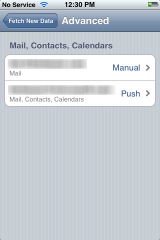
I don’t think the configuration options for the email/push are incredibly intuitive. In fact when i configured my IMAP account, it automatically set it for Fetch rather than manual (this seemed to be a change from the previous software in my experience). I noticed there was an Advanced button that would allow me to change the per-email account settings:
This enabled me to say Manual for this account and Push for the other. This option is under the “Fetch” section of the Settings applet. I recommend fine tuning these to your needs, maybe even turning off push all together for optimal battery life if you get a lot of mail.
16GB and no document storage
Seriously. 16GB and still no option to save documents? Now I am not a heavy document user on my WinMo device either but I do like the ability to save documents to the device (whatever ‘documents’ means to you) when I need to. I know iPhone can be used for USB storage, but my WinMo device can respond to the inquiry of ‘Hey, can you email me that spec?’ To which i can Save As…to my SD card and transfer later if needed…or transfer via ActiveSync via Bluetooth…neither of which iPhone can do. WinMo clearly wins here for this feature that I think people use a bit in the Enterprise.
Home Screen Customization
Where is the home screen customization? One great thing about all ‘for the Enterprise’ devices (WinMo and Blackberry) is they provide Today style home screens. Date/Time, # emails, # appointments, next appointment, etc. The iPhone home screen gives me # of emails (but doesn’t tell me which accounts those numbers exist in…WinMo does) but tells me nothing about my day until I click a few times. This should be a customizable feature that iPhone should enable. Even in the locked screen state I’d love to see my message counts and next appointment. This is a common use for me in my business life. I’m not even sure their SDK would allow such overriding of the icon display home page UI?
Pin Unlock
Most larger corporations would implement the EAS feature of policies and require a device pin lock. This is fine. What sucks is that when pin lock is enabled, you essentially have to double-unlock. Slide to unlock, then enter pin. Sigh…that sucks. I’m not sure that can be improved as the pin lock feature is tied to a timeout and I do like my device preventing me from using features when in my pocket. Maybe if you have a pin, then the Auto lock settings are used. Either way I think it should be one or the other…not both.
The Developer Story
Much has been said about AppStore and how wonderful it is. I agree, the iTunes experience is pretty seemless. Having one place to acquire apps is nice. I think this is one area where WinMo really hasn’t nailed although there are exponentially larger amount of applications for WinMo available, it is not an integrated experience to get them. Handango comes close, but I believe this is one area where the carrier customization of the devices bites WinMo in the end in my opinion…nobody chooses to include Handango in their distribution.
Aside from distribution, the developer story sucks a little for me. Sure the tools are free…for emulation only. Want to deploy to your iPhone? $100. Now, I don’t think that’s such a bad price actually. My problem is that it limits you to a device. It is hard to tell from the terms (I haven’t signed up fully) whether you can deploy an app to multiple devices (it notes Registered Device IDs). If not, this is epic fail for me. How do you get your app out there for people to beta test and give you feedback? Will AppStore allow beta versions since that is the only mainstream distribution channel? This seems like a developer shortcoming to me. I love the WinMo experience of being able to write something, debug in emulation, change and deploy to my device, or write an installer that I can email to my friends who can receive it over the air, save to their device and install. I’d really like to know the equivalent process here for iPhone development.
Ready?
In the end, I’m not convinced all the kinks are worked out for really declaring the badge ‘ready for the Enterprise’ valid. Simply adding one feature to your software hasn’t made it that ready. I guess ‘the Enterprise’ will eventually tell Apple what needs to be done. For me, as an enterprise user, as an EAS user…it isn’t complete. It needs some fine tuning in certain areas for sure.
UPDATE: See Exchange features broken/missing/weird, help us build the wiki: iPhone Exchange Issues
How did you take those screenshots?
I have a friend that runs a blog called On a Mac that you should subscribe to if you are a mac user. He clued me in to how to take screenshots on iPhone using a new feature in the 2.0 software.
Related Posts:
- "If you're a business user, then we feel the answer is no, it's not worth it." Speaking on a business user purchasing an iPhone 3G Source: ars technica

 One of the top manufacturers of iPod/phone integration kits,