As a follow-up to my Silverlight For WordPress plugin, I have just deployed Mark Heath’s Silverlight Audio Player as a WordPress plugin.  Thanks to Mark for changing his license to Ms-PL so that I could make this happen.  If you are a WordPress user and want to use Silverlight for audio playback, you use some WordPress macro language (in this case slaudio) and put it in.  The rendered output is like this:

Silverlight Audio Player for WordPress (collapsed)

And when you click the play button it expands:

Silverlight Audio Player for WordPress (expanded)

Again, most of the actual Silverlight work is Mark’s, so be sure to head on over to his project to thank him or if you find issues in the Silverlight player.  I’ll update the plugin whenever a new version of the player is released.

NOTE: A lot of people ask me if I’m running WordPress on this blog because of these plugins.  The answer is no.  I run the most awesome Subtext framework here.  I do have a few other sites that I use WordPress on.

To install in WordPress, simply search for the plugin in your admin dashboard under ‘silverlight’ and you will find it listed as Silverlight Audio Player for WordPress.  I’ve tested it on 2.8.5 but should work back to 2.2.x.

Hope this helps!

Previously I made note of things about the release of Visual Studio 2010 beta 2 with regard to Silverlight development.  I’ve gotten a few questions about if people should start using it for Silverlight development.  Perhaps I can help provide you with the best information I can to make that decision…so here it goes.

Go-live support

Visual Studio 2010 and .NET Framework 4 both have “go-live” support as indicated in the license terms (which are available on the VS2010 download).  If you have never bothered yourself with previous go-live products at Microsoft you may not understand what that means.

In short, “go-live” means we grant permission for you to use the product (in this case tools and framework) in a production environment.  It also means that it is a supported product at that point as well.  For Visual Studio, if you plan on using Visual Studio 2010 for go-live use, email [email protected] so you will be sure to get access to that support.  You should also read the go-live license terms clearly and back-up your project data before upgrading.  More information about go-live support can be found at Jeff Beehler’s blog post.

As with any software, pre-release or not, you should be aware of caveats and gotchas.  I’ve found a few that you should be a ware of and am listing them below.

Installer errors if you have Silverlight RTW (40624) on your machine

If you are a developer and have already downloaded Silverlight 3 when it released, you probably have installed the Silverlight Tools for Visual Studio 2008 already.  Now, if you never updated your tools to the later GDR (service packs) release, then you will encounter an error when installing VS2010 beta 2.  This is because the most recent Silverlight 3 release (3.040818) SDK does not install on top of the initial release (3.040624) SDK.  We know this and this should be remedied by VS2010 official release.

In the short-term, you need to perform a manual step to accommodate.  You can do one of two things:

  • Upgrade your Silverlight Tools for Visual Studio 2008 to the latest SDK and developer runtime.
  • Uninstall the Silverlight 3 SDK and developer runtime.

The second is probably the easiest if you’ve already downloaded the Visual Studio 2010 beta 2 bits.  Simply go to the Add/Remove Control Panel applet in Windows and remove the listings of Microsoft Silverlight 3 and Microsoft Silverlight 3 SDK.  Then run the Visual Studio 2010 beta 2 installer.

What about Expression Blend?

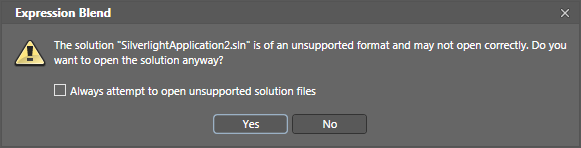
Here is one thing that will be a gotcha.  If you choose the Edit in Expression Blend action while in VS2010, and have Blend 3 installed, you will see that Blend will start but with this message:

Blend Warning 1

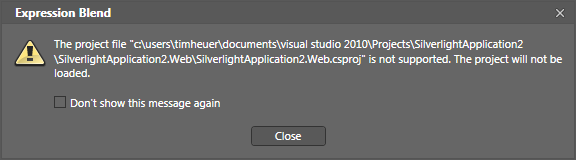
Despite what the message says, when you decide to go ahead and open the unsupported project file you will be greeted with:

Blend Warning 2

So there would be your first major caveat.  Your VS2010 project files wouldn’t be able to be opened by Expression Blend 3.  Now, I say this with caution because I’ve had some BASIC projects that have, and others that have not.  Essentially it isn’t ‘supported’ but this will be one of those areas where your mileage may vary.  This may cause you some slight discomfort when needing to tweak visual states or animations, among other things you may use Blend for (resource design, etc.).

Can it co-exist with Visual Studio 2008?

Yes, Visual Studio 2010 beta 2 can be installed side-by-side with Visual Studio 2008 SP1.  This is how I’m running it now and they isolate well.

What about my VS2008 Silverlight project files?

If you open an existing VS2008 Silverlight project/solution, VS2010 will prompt you to upgrade the project file.  Note that when you do so, VS2008 can no longer access that project file.  So this means that you can’t have VS2008 and VS2010 working on the same project/solution files for your Silverlight projects.

This can be a bit of a snag in larger team developments where you have eager developers to want to get started on VS2010, but some still using VS2008 on the same project.  Take caution here.  You can try some of the same methods used in VS2005/2008 days in creating separate project/solution files for the products, but it’s a risky move if the project properties aren’t right.

So what about Silverlight 2 development?

You mean Sivlerlight ‘classic’? :-)  Visual Studio 2010 does not support Silverlight 2 development.  Yes I know in a previous post I showed multi-targeting with Silverlight 2 and 3.  As it stands now though SL2 will not be a target for VS2010 development.

At this point any Silverlight 2 installed client should have been upgraded to Silverlight 3 if they were enabled for auto-update.  Silverlight 3 provides so many more improvements over Silverlight 2 that you should really encourage moving even existing applications to the latest runtime to take advantage of some features.

So can I use it for Silverlight 3 development then?

Works on my machine logoGiven the above known’s (and in general, the known issues with VS2010 beta 2 which are documented in the readme), yes you can use VS2010 beta 2 for Silverlight 3 development.  As noted in my previous post, .NET RIA Services is not yet supported in VS2010).  Again, the above issues might prevent you in your particular project, but I can say that VS2010 works well with Silverlight 3 development. 
Of course your mileage may vary depending on the types of projects, dependencies, frameworks, etc.  But I can confidently say “works on my machine.” :-)

Hope this helps.

One of the cool things I came across the in the October 2009 Silverlight Toolkit release was the addition of drag-n-drop targets for some of the core controls.  Now I know you are thinking great, another drag-n-drop useless control?!? and you’d be wrong.  I’m talking about things that make it easy to do do things like moving items from one list box to another, without writing code, but with it actually doing what you expect.

Let’s take the simplest example here: ListBox and moving items from one to another.  Using Expression Blend I’ve set up my XAML to be like this:

   1: <StackPanel Orientation="Horizontal" Margin="10">
   2:     <ListBox Width="200" Height="500" x:Name="FromBox" DisplayMemberPath="FullName"/>
   3:     <ListBox Width="200" Height="500" x:Name="ToBox" DisplayMemberPath="FullName"/>
   4: </StackPanel>

Behind the scenes I have a simple class which returns an ObservableCollection<Person> and binds the results to my FromBox.  Here’s the full simple class:

   1: using System.Collections.ObjectModel;
   2:  
   3: namespace SilverlightApplication105
   4: {
   5:     public class People
   6:     {
   7:         public static ObservableCollection<Person> GetListOfPeople()
   8:         {
   9:             ObservableCollection<Person> ppl = new ObservableCollection<Person>();
  10:             for (int i = 0; i < 15; i++)
  11:             {
  12:                 Person p = new Person() { Firstname = "First " + i.ToString(), Lastname = "Last " + i.ToString() };
  13:                 ppl.Add(p);
  14:             }
  15:             return ppl;
  16:         }
  17:     }
  18:  
  19:     public class Person
  20:     {
  21:         public string Firstname { get; set; }
  22:         public string Lastname { get; set; }
  23:         public string FullName
  24:         {
  25:             get
  26:             {
  27:                 return string.Concat(Firstname, " ", Lastname);
  28:             }
  29:         }
  30:     }
  31: }

And the code for my MainPage.xaml.cs:

   1: using System.Windows;
   2: using System.Windows.Controls;
   3:  
   4: namespace SilverlightApplication105
   5: {
   6:     public partial class MainPage : UserControl
   7:     {
   8:         public MainPage()
   9:         {
  10:             InitializeComponent();
  11:             Loaded += new RoutedEventHandler(MainPage_Loaded);
  12:         }
  13:  
  14:         void MainPage_Loaded(object sender, RoutedEventArgs e)
  15:         {
  16:             FromBox.ItemsSource = People.GetListOfPeople();
  17:         }
  18:     }
  19: }

Now I want to be able to drag an item from my FromBox to my ToBox.  I could do this in code, managing my index and moving things around, etc.  Or I can use something new from the toolkit!  Adding a reference in my Silverlight application to System.Windows.Controls.Toolkit, I then add two namespace declaration in my MainPage.xaml – here’s what the full XAML looks like now:

   1: <UserControl x:Class="SilverlightApplication105.MainPage"
   2:     xmlns="http://schemas.microsoft.com/winfx/2006/xaml/presentation" 
   3:     xmlns:x="http://schemas.microsoft.com/winfx/2006/xaml"
   4:     xmlns:d="http://schemas.microsoft.com/expression/blend/2008" xmlns:mc="http://schemas.openxmlformats.org/markup-compatibility/2006" 
   5:     mc:Ignorable="d" d:DesignWidth="640" d:DesignHeight="480"
   6:     xmlns:toolkit="clr-namespace:System.Windows.Controls;assembly=System.Windows.Controls.Toolkit"
   7:     xmlns:mswindows="clr-namespace:Microsoft.Windows;assembly=System.Windows.Controls.Toolkit">
   8:     <Grid x:Name="LayoutRoot">
   9:         <StackPanel Orientation="Horizontal" Margin="10">
  10:             <ListBox Width="200" Height="500" x:Name="FromBox" DisplayMemberPath="FullName"/>
  11:             <ListBox Width="200" Height="500" x:Name="ToBox" DisplayMemberPath="FullName"/>
  12:         </StackPanel>
  13:     </Grid>
  14: </UserControl>

Notice the xmlns:toolkit and xmlns:mswindows in the declarations.  Now I simply wrap the ListBox controls inside a ListBoxDropTarget control:

   1: <StackPanel Orientation="Horizontal" Margin="10">
   2:     <toolkit:ListBoxDragDropTarget mswindows:DragDrop.AllowDrop="True">
   3:         <ListBox Width="200" Height="500" x:Name="FromBox" DisplayMemberPath="FullName"/>
   4:     </toolkit:ListBoxDragDropTarget>
   5:     <toolkit:ListBoxDragDropTarget mswindows:DragDrop.AllowDrop="True">
   6:         <ListBox Width="200" Height="500" x:Name="ToBox" DisplayMemberPath="FullName"/>
   7:     </toolkit:ListBoxDragDropTarget>
   8: </StackPanel>

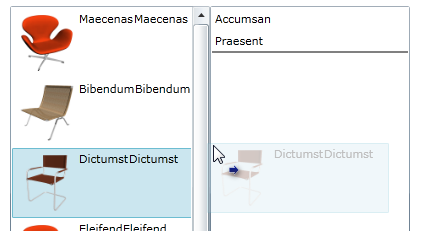
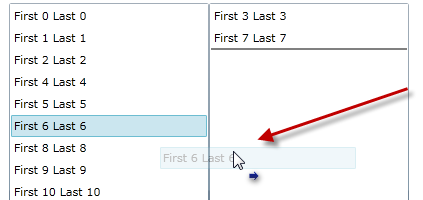
And when I run the application I get drag-n-drop item functionality from one list to the other, complete with a semi-opaque decorator as I drag the item:

ListBoxDragDropTarget image sample

Cool.  As I drag one item, it moves to the other.  But this can do more.  What if I just wanted to re-order items within a single ListBox?  This can do it as well…after all the ListBox can be both a drag *and* drop target.  However this ListBoxDragDropTarget doesn’t work with virtualized panels (which the ListBox uses by default.  So to do this you’d have to alter your ListBox ItemsPanelTemplate to include a regular StackPanel like so:

   1: <toolkit:ListBoxDragDropTarget mswindows:DragDrop.AllowDrop="True">
   2:     <ListBox Width="200" Height="500" x:Name="FromBox" DisplayMemberPath="FullName">
   3:         <ListBox.ItemsPanel>
   4:             <ItemsPanelTemplate>
   5:                 <StackPanel/>
   6:             </ItemsPanelTemplate>
   7:         </ListBox.ItemsPanel>
   8:     </ListBox>
   9: </toolkit:ListBoxDragDropTarget>

And then you’d be able to reorder using the drag/drop behavior of your mouse:

reorder sample image

Very cool.  What’s great about this is that while I’m using simple text, you can use whatever DataTemplate you may have in your ListBox and the same functionality works…even if I added an image to my Person class and added that to the template, the functionality still works and looks great for the user:

complex template sample image

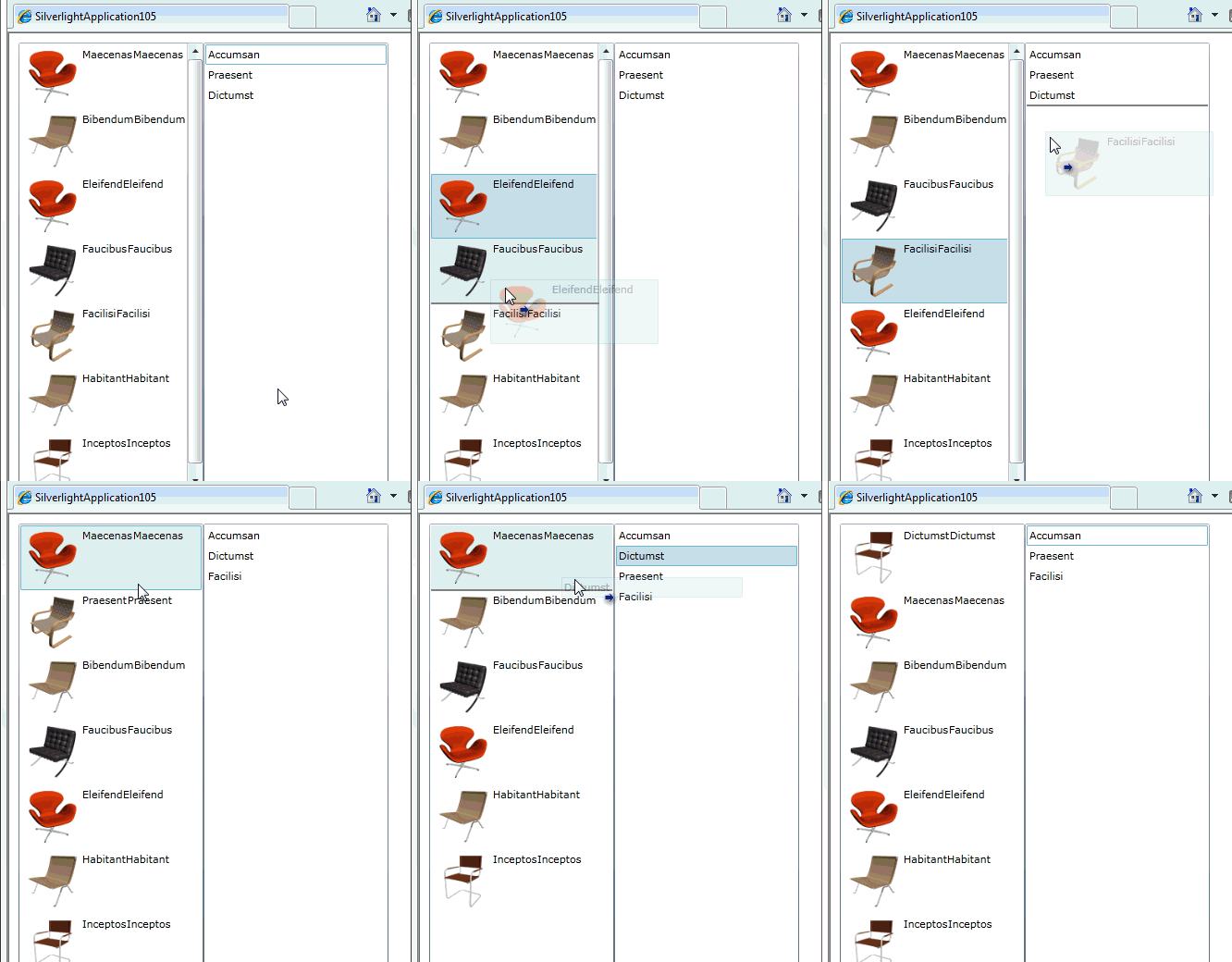
As you can see the template follows the drop.  And the drop target location doesn’t have to match the same data template!  I can have my binding in the FromBox be a complex data template, but in the ToBox only choose to bind to a single property of the class.  Nice.  Here’s an animated view of this working or click here for a live sample:

This isn’t just for ListBox elements either.  Here are the other implementations:

  • ListBoxDragDropTarget
  • TreeViewDragDropTarget
  • DataGridDragDropTarget
  • DataPointSeriesDragDropTarget

Check out Jafar’s post for some samples on the other implementations to see how helpful they can be.

So what do you think?  Good?  Hope this helps some of your scenarios with ease.  Go Toolkit!

UPDATE: Download my project I used above here.


This work is licensed under a Creative Commons Attribution By license.

Since we appear to be in another revolution on user interface (UI) design and user experience (UX), I’ve seen a lot of people, companies, sites refer to the designer-developer workflow, including Microsoft.  Heck we’re building tools around it for Silverlight and WPF development!  One thing I see too often though is the conversation being diminished to UI only. 

I’ve heard conversations between developers saying things like yeah, now we just need a designer to make things look pretty or we take what the designer made pretty and put functionality behind it.

I have a plea for my developer brethren: please stop using the word pretty and diminishing the role a designer plays in defining UI/UX.

To me when I hear this I cringe for two reasons.  First, while I’m not a designer, I consider myself to have a strong appreciation for design and know that it isn’t easy to execute on a design for everyone.  Second I know many talented people in the design world who understand much more about how UI affects end user productivity and emotion more than just ‘making it pretty.’  So please stop, it’s insulting to the trade I think.

Imagine if you heard a conversation of designers…

Designer A: Sweet design man, I love how you anticipate the user’s next interaction and use the typography to really identify that action.
Designer B: Yeah, it took a lot of research and usability observations, but I think we got it right.  I hope the developers can finish this up so we can get it in the user’s hands.
Designer A: Totally, I’m sure they’ll finish the macros soon, I think it’s all wizard based anyway.
Designer B: Yep, I mean, I’ve created an Access application before, how hard can it be.

Yeah, see what I mean?  If you are insulted by hearing someone talking about the development craft reduced to macros and Access, then you should realize you’re doing the same thing.  Design is a craft just like software development and there are patterns and meaning to things that designers do, both in interactive design and print design.  It isn’t just about picking the right template.  Sure, palettes and animations are a part of the design, but their intent in the final design usually isn’t without thought.  Reducing a designer’s craft down to a simple “pretty” isn’t cool…at all.  And I’ve been guilty of it. 

If you want to work with a designer, then do it, but don’t hand them your finished product and ask them to make it pretty.  Make them a part of the process and have them help identify the right UI/UX for the application.  I realize it isn’t easy and sometimes isn’t possible to always have a designer, but when you have that need, just make sure you respect the trade or don’t be surprised if you get this book in the mail.  Take a moment and learn what makes good design.  For a start, watch Robby’s session from MIX08: Design Fundamentals for Developers.

I’ve got it off my chest…and I leave you with this:

Cheers.


This work is licensed under a Creative Commons Attribution By license.

Today (19 Oct 2009) the Visual Studio team released the second beta for Visual Studio 2010 to the public.  This is a significant milestone for the team and a huge improvement over the previous beta in my opinion as a user.  As a developer, you can find out how/when you can download Visual Studio 2010 and .NET Framework 4 beta 2 from here.

After installing the tools, one thing you may notice right away is a different look of branding of Visual Studio going forward for now.  Gone is the beloved multi-colored infinity looking thing (that’s what I call it at least) and enter the updated logo.

Visual Studio 2010 brand logo

I’d encourage you to download it when you can (MSDN Subscribers can do that today, general availability on Wednesday, 21 Oct) and start playing around with it.

What’s new for Silverlight developers in VS2010?

Well, the good news is no more work around hacks to get Visual Studio 2010 working with Silverlight development!  So what happens now when you install.  Here’s my experience from a clean machine (no existing SDKs, nor any version of Visual Studio as well).

After install of Visual Studio 2010 I have this for Silverlight development:

  • Visual Web Developer
  • Silverlight 3 SDK
  • Silverlight 3 Tools (build 40818, the latest)

A few things missing here:

See below to get the October 2009 release of the Silverlight Toolkit to get all that goodness and support for VS2010.  Remember the installer for the toolkit also gives you the option to deploy the source (which you still have to unzip) which is EXTREMELY helpful in understanding how controls work in general as well as extending the controls to fit your own needs.

For .NET RIA Services, we don’t yet have a supported build for Visual Studio 2010 Beta 2.  More information on this will be coming so make sure to subscribe to my feed here for updates and watch the forums.  I’m seeing if I can work on publishing a potential work around for RIA Services users and will post an update here if I can.  UPDATE: View information about RIA Services roadmap and VS2010 from the team here.

After installing VS2010 though, you can start developing your Silverlight applications and use the editable designer surface as well.  Expression Blend will still be your friend for Visual State Manager editing and animation recording, in my opinion.

Making the designer have some better performance

For beta 2, there is a registry entry you can add (we did say it was beta right ;-)) to make the WPF/Silverlight designer perform better. 

NOTE: Editing your registry can be dangerous if you aren’t familiar with it.  It can cause wars, harm children and hurt your machine.  You’ve been warned.

To enable this, perform these steps with all instances of Visual Studio shut down:

  1. Open regedit.exe using admin permissions (on vista/win7)
  2. Navigate to HKLM\Software\Microsoft\VisualStudio\10.0 key
  3. Right-click and add a new Key named “ClrHost”
  4. In the new key, right-click and create a new DWORD32 with the name of StartupFlags
  5. Set the value of StartupFlags to 5
  6. Close regedit and use Visual Studio as you normally would

I’ve also made a reg file to make this easier.  You can download this file: Dev10DesignerFix.renametoreg and rename it to .reg and double-click it to get this entry.  I chose to force you to rename to .reg so you know what you are doing :-).  This is a step that will not be necessary in the final release version.

Silverlight Toolkit October 2009 Release

Additionally today, the Silverlight Toolkit published the October 2009 release of the bits.  Primarily this was for support of Visual Studio 2010 integration, but also includes drag-drop support for key controls as well as some charting and other API improvements/fixes.  You can read the full details of the release of the toolkit here and download the latest build.

Hopefully you all have a chance to start working with Visual Studio 2010.  I am looking forward to using the new IDE and features to help me be more productive!