Here are my current Silverlight book recommendations…

Get Microsoft Silverlight

In my previous post on moving to free HDTV, I had talked about my desire to change our home television “stuff” in an effort to remove basically a bill that we weren’t taking advantage of at all.  Part of the irony in this whole exploration was that by the time I figured out a solution, the whole digital-TV-signal-broadcast-rule-thing was going to happen.  Luckily, I received some good advice and product suggestions.

If you read the previous post you’ll notice that I acquired a Philips MANT940 antenna from Walmart.  $38 investment not bad.  I crawled up into my attic space and put it in a non-optimized location…and it worked anyway.  I tested it on the only HD tuner I had in the house at the time, my WinTV 950 adapter for my eyeTV software on my Mac.  It worked great.

HD HomeRun Product ImageMy problem was still that my TiVo units were going to be a loss and I didn’t want to fiddle with IR blasting anyway.  Then someone recommend I take a look at the HD HomeRun unit from SiliconDust.  I got a few emails from people who had it.  I had some Amazon credit and they had a good price, so I went for it.  I figured if it sucked, just return it.  The concept of the HD HomeRun is that it is a digital tuner with two inputs and delivers the signal over your LAN.  This was the most intriguing to me.  I had a lot of suggestions of Media Center PC.  I love Media Center PC, but didn’t like the thought of having a ‘computer’ in my living room or basement near a TV.  It doesn’t feel right (and I didn’t have coax wired to where my Media Center box was anyway).  But HomeRun would allow me to deliver it over the LAN, so my existing box could pick it up as a tuner.

The HD HomeRun arrived.  I opened it and plugged it in.  One cable to the network - not gigabit :-( - and the other was the new antenna I acquired.  I went to my Media Center PC and ran the HD HomeRun setup software provided.  It scanned for a tuner and didn’t find one.  Crap!  I thought I was going to be screwed.  I did some searching and noticed that I wasn’t alone with the "Discovery Error 4001” message I was receiving.  It seemed like an incredibly known issue, which is weird why they are shipping units with the issue.  I logged a support ticket with my device ID (required) and they sent me a little executable to run.  I ran it and it suddenly was discovered in the scan.  Weird.  No explanation of what the issue was.  I didn’t necessarily care, and moved on.

The HD HomeRun config is pretty intuitive and you select the tuner input, the type (antenna) and then what type of application will be accessing it (Media Center).  It scans, finds the channels and done.  It comes with guide software as well, but seems a little pointless as Media Center has all that built in as well.

The Media Center found the unit as a tuner and went through the normal process.  Quick and painless.  A walk down to the basement to the XBOX 360 and turned on to watch free HDTV via my new HD HomeRun.  Awesome.  Thanks for the recommendation for that unit!

The second thing I wanted to do was use my Mac and eyeTV on the same unit.  Didn’t work.  I should clarify that I probably had a bad assumption.  It found and configured the HomeRun as the tuner, but I couldn’t watch any stations as long as another machine was using the tuner.  Suck, but I understand I suppose.

I’m very pleased so far with the HD HomeRun solution and get to play around with Media Center now.

Question: Media Center gurus, how can I search for a program to record a series?  I could only find the ability to record a series if I find it in the guide.  I’m looking for the TiVo like functionality of searching for programs by title.

I’m going to hook up another Media Center Extender in my living room to see how that works out.  I see some MCE’s come with DVD players so that would be cool and I might try that. 

The HD HomeRun also has a QAM tuner as well.  The cable companies are required by law to send the digital signals of local broadcast channels over QAM without a customer paying for equipment.  I look forward to trying this feature.  The cable companies aren’t required to send the HD signal though, so you may not get the HD quality.

If you already have a Media Center PC (Vista) and an XBOX, I’d recommend looking at the HD HomeRun if you are looking to rid yourself of cable as I am and only care about over-the-air HD channels.  It’s been fun to investigate and learn. 

Dear Cox, please cancel.  Thanks.

Today, we posted on the .NET RIA Services forum an updated roadmap for the timing and thoughts around the product offering. 

What is .NET RIA Services?

Microsoft .NET RIA Services simplifies the traditional n-tier application pattern by bringing together the ASP.NET and Silverlight platforms. The RIA Services provides a pattern to write application logic that runs on the mid-tier and controls access to data for queries, changes and custom operations. It also provides end-to-end support for common tasks such as data validation, authentication and roles by integrating with Silverlight components on the client and ASP.NET on the mid-tier.

Here is the current thoughts around the offering…

July 2009: Updated CTP

We will have an updated build of RIA Services in CTP form.  This is still considered a preview.  The current thinking is that we’ll remove any production (go-live) restrictions, but it will be a ‘use at your own risk’ product, not the typical official “go live” support license.  This is based on feedback our users are asking for.  We want to continue to evolve the product based on feedback, but also heard loudly that people want to use it now.

This build will have the goal of getting most significant breaking changes out there and remedied.  We’ll also update better shared code, extensibility and code-gen features.  This will also bring a first pass at better integration with ADO.NET Data Services.

PDC 2009: Beta

The obvious continued bug fixes based on what we know as well as customer feedback submitted via the .NET RIA Services forum.  The list of feature enhancements at this build stage is still being determined but some things being considered include better presentation model support and deeper hierarchy support.

This stage will also aim to bring support for VS2010 and .NET 4 and move to ADO.NET Data Services as the underlying protocol.  This builds on the path being taken for the July 2009 CTP.

First part of 2010: RTW

At this stage we’d polish up the product/tooling and prepare for the version 1 release.  Localization, stress, additional security analysis, perf…all these things happen between the beta and RTW.  We’ll also keep in line with current product changes if they occur (i.e., Visual Studio/Silverlight).

These are the current plans.  At each stage we will be keeping up with the associated Silverlight builds as they are available.

Seeking feedback

Right now, the RTW is targeted for VS2010 and .NET 4 as the primary tool/framework story.  We would love feedback on this (essentially, how important is .NET 3.5 SP1/VS2008 support).  We’re also asking that based on your work with .NET RIA Services that you provide feedback of key scenarios that are essential for you in a v1 release.  What do you think of alignment with ADO.NET Data Services?  What about ASP.NET MVC, etc?

Please use the .NET RIA Services forum to give your feedback.  The team there is very active and listening.  It is the best place to communicate with the RIA Services team.

About twice a year my wife freaks out (well, my terms not hers) about money, material things, life, etc.  It’s a good freak out actually…and it is what has kept me grounded more in life than my past habits (you know, when you felt you *had* to have everything).  I’ve learned to not care about things that aren’t worth the trouble.  Her balance in my life really has made a good impact in things worldly.

Back to the freak out :-) …

We’re constantly looking for ways to save money.  At times it is because we have to (or should) and others it is because we are wanting to put those resources elsewhere.  The latest has been with TV cable.  I like watching TV.  It’s a break from reality and just lets me escape real world for a few hours a week.  But the truth be told, nobody in my house really cares about it.  Each month we pay roughly USD $80 for cable service.  This includes HD service and an HD DVR.  Honestly when I evaluate my watching, I really only watch major network shows (I’m not a sports guy) and re-runs of Law and Order.  I LOVE HD and hate watching anything else.  When I came to this realization though, I finally acquiesced and said we should cancel our cable.  We were paying $80 for basically 9 channels…it was ridiculous how our provider (Cox) prices.  I wish I could cafeteria shop what I wanted, but they aren’t there yet.  I didn’t care about reducing my fee (which they offered) and I wasn’t interested in DirecTV or other satellite offerings.  If I was going to cancel, it was going to be completely.

So there.  I’ve committed.  We’re cancelling.  But I still want TV occaisionally.  We’ll get movies through Netflix and I’ll explore Hulu via PlayON perhaps.  But there may be times where I just want to setup TiVo for The Office and watch it at leisure.  I decided I’ll explore doing the over-the-air HD.  I sent out a Twitter note about it and got some great feedback.  I didn’t find anything online that showed someone in my situation in a step-by-step thought and execution process though.  That leads me here.  This is my adventure…to rid myself of cable and keep standard broadcast and FREE over-the-air HD channels.  Here we go.  Hopefully this helps someone else as well.

The Home Setup

My home has 3 primary TVs:

  • Bedroom – old 27” tube-based TV.
  • Living Room – 42” LCD which currently only displays in yellow tints because one of the blue lamps busted and we decided screw it, we don’t watch enough TV and the kids won’t notice.
  • Basement – 60” LCD – the ‘main’ unit.  My sanctuary.  Where the HD takes place.

We also use TiVo:

  • Bedroom is hooked up to a TiVo Series 2 DVR which has been customized with a 500GB storage drive.
  • Living Room is hooked up to a Toshiba TiVo/DVD player (effectively a Series 2)
  • Basement uses the cable provider’s HD DVR which will be going away.

Basement is also where the XBOX 360 is hooked up and Netflix is watched as well as most DVD viewing.

Our home is fairly modern (5 years old) and so has structured wiring built in.  I have an access panel where all central wiring goes:
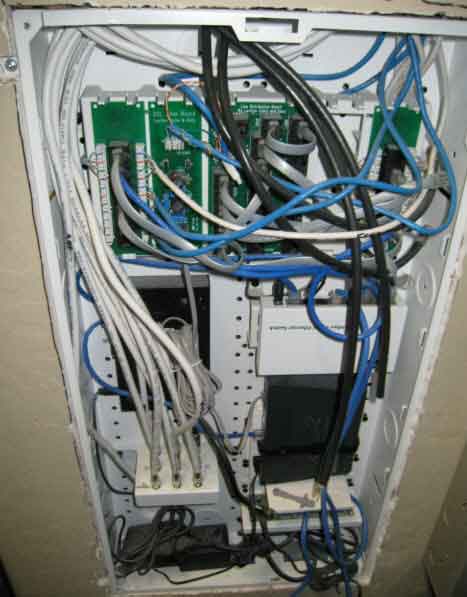
Home wiring panel

You can see that the intertubes come in through here as well as my cable is routed to one place and then distributed via the splitter.  I refer to this area of my home as my NOC.

The Goal

The primary goal is to get major network HD broadcast into the home (ABC, NBC, CBS, Fox, local).  The secondary goal here is to not disrupt any workflow or viewing behavior (other than some channels we no longer get which we’ll supplement with Netflix Instant Watch for the kids shows).  Now I know Basement will suffer because the HD DVR will be going away…we’ll get to that when we can, but this is the goal.

We also want to use the existing infrastructure of the home with minimal (if any) purchases or re-tooling/wiring of anything.

These, my friends, are the goals…plain and simple.

Initial Research

My quest started on a Thursday.  I obviously knew I was going to need an antenna.  Part one was finding out which one would be best and what I’d need.  The NOC has a cable that is there that is labeled ‘antenna’ so I can only hope when I search for the other end it may be in my attic or perhaps out on my roof…I start thinking good thoughts.

My initial Twitter post yielded some great information (much of which also showed up in search engines, but it is good to validate against trusted resources and ‘real’ people).  The best piece of starting information was one web site that seems to be pointed everywhere as a definitive source of digital signal information.  That site is AntennaWeb.  It was recommended to start here to map out where you live in relation to the current digital signals.  Their database of information would identify which stations would be available and recommend an antenna type for you.  It tells you the areas, the compass headings, their channel number, etc.  It even gives you a map of your address and where the best place to point your antenna to for the channels you want best:
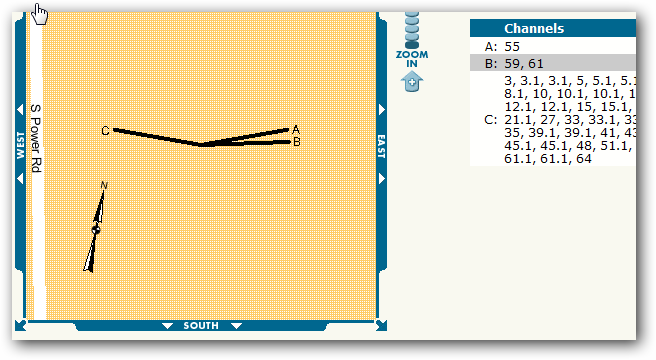
AntennaWeb Map

The rating it also provides is to help you choose which antenna you should look for.  In my case, it was clear that I should shop for a “yellow” rated one:
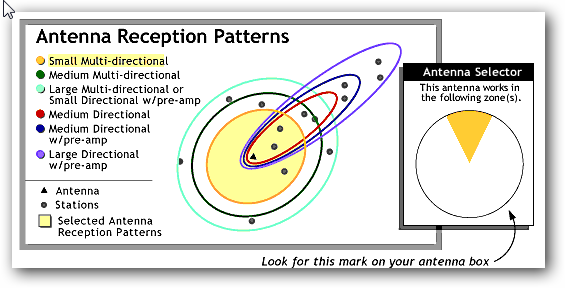
AntennaWeb Reception Rating

Since most online places I quickly scanned didn’t put this rating on it, I figured this was going to result in a trip to the store.  Several people recommended the Philips MANT940 (Walmart for <$40).  The reviews looked great on this unit so I decided to check it out.  Hal Hostetler (a Microsoft MVP who also happens to work for a local broadcaster) gave me a ring and helped me understand some things as well.  His hopeful thoughts meant I should be well on my way.  The reviews are good on this unit and for the cost, I decide to take a gamble.

The Wiring

Luckily as I mentioned, my home is already wired for an antenna and in fact it did go up to the attic so I was all set.  I put the power booster in the NOC and crawled up the attic and put the antenna in there.  All systems go…so I thought.

Problems Arise

Now remember my goal is not to change a thing in the workflow.  My first pass was to re-setup my TiVo unit attached to Living Room.  I started the process and then TiVo asks me if I have a digital-to-analog converter box ready.  Argh.  I was hoping in my idiocy that my thinking was wrong.  Alas, I wasn’t.  Some quick searches confirm from TiVo that Series 2 and Toshiba/Humax DVD units require a converter box.  Even worse was the PDF describing that the infrared controller from the TiVo would need to be busted out to control the converter box.

NOTE: I generally am the type of guy that researches things step-by-step unfortunately.  My searches for “tivo hdtv antenna” didn’t yield much, but a search for “tivo converter box” brought me the information I should have found earlier.  Suck.  My fault in my eagerness to start connecting things.

Well, now I’m at an impasse.  I consult my TiVo trusted advisors and they inform me that I have 2 choices: use converter box or get a TiVo HD unit.  Okay, here’s where my mind starts thinking and this time at least I stop and do some calculations before buying anything else :-).

Deciding on Options

With my 3 TV’s I was looking at 3 more purchases.  Now considering that let’s say a converter box was about $50 (I know there are the coupons but I wasn’t eligible to get one this late now), let’s start breaking some things down.  I could buy 3 of them ($150) and hook them up, but then i’d be using lame IR connections on my 2 TiVo Series 2 units.  This was not desirable.  I didn’t want to add components to my setup.  I wanted to remain the same.  At this point, I realize this will no longer be possible.

So for my Living Room (the TV that is broken anyway) I try to just connect the antenna feed direct to the TV (after all it was ‘HDTV ready’).  This doesn’t allow me to use TiVo at all anymore on this TV and my ‘lifetime’ service is wasted on this unit until/unless I get cable again. 

Bedroom is an older TV and will require a converter box.  This sucks because it makes the Bedroom TV setup more complex then it needs to be.  I’ve not resolved yet on what I’m going to do for this situation.

Basement is the key here.  I mean, I got a large TV for HD viewing.  Clearly I’m in a dilemma.  I love TiVo and had considered getting the TiVo HD before for this unit and ditching the cable provider’s DVR.  Now the cost of a low-end TiVo HD is about $300 and then you still have to pay for the TiVo guide service for either $13/month or $400 for ‘lifetime’ – and no, they won’t transfer my existing unit service anymore.  My other dilemma for Basement is that it is hooked up to an entertainment system receiver, so ideally I do want something that can have component hookups.  Most of the converter boxes I saw did not, but TiVo HD does.  This is important because if I decide the antenna-only route, this impacts Basement and the entertainment setup.

So if I go that route, I’ve not eliminated a bill from my home (I’m lowering it to $13 from $80 I suppose), and also adding a large chunk down to even get that started (equivalent of 3 months of HD cable).  This is not sounding good to me.

My goal of not changing anything was not looking like it was going to happen.  I really didn’t want to invest more in hardware or substantially in services either…I’m trying to eliminate, not change slightly. 

My solution and learning

I sit back and realize I don’t watch television enough anymore to really go the extra mile here.  I didn’t want to change anything.  Having to invest more to keep that goal isn’t desirable.  Having to change the way I watch TV (i.e., I relied on TiVo because I never watched anything live) was probably not going to work out.

So, no TV for me.  I might try to see how the antenna-only solution goes for a while since it was $40 and I could give it a try for a bit.  But in the end…we wanted to eliminate costs, not swap them out even for a short term.  And at this point in our lives, we can say that TV isn’t important enough to stretch it out.  It looks like I’ll be spending more time on Hulu, etc.

The solution is possible though as I learned.  The challenge for me was that I already had an investment in older DVR technology.  If you are in the same situation, keep that in mind.  If you don’t use DVRs or that is something you can easily give up, then this situation could really work.  I got about 22 channels (some random) of digital antenna broadcast that would probably be fine for most casual network broadcast viewers.  If you’ve been in this situation and have better solutions, let me know!  Oh well, we’ll see what happens at the Heuer household, but at this point, it was a fun little 2 day experiment that made me realize immediately what was going to change.

One of the goals of new versions of Silverlight is to be be backward compatible with previous versions.  We make this a priority goal so that people can keep their previous applications deployed while not worrying that people with newer Silverlight will have a broken experience.

Silverlight 3 has been out in beta form since March 2009 and hopefully if you are a Silverlight developer you’ve had a chance to work with the new features and tools.  If you have existing Silverlight 2 applications that are deployed, I wanted to draw your attention to some action items if you haven’t done them already.

Call to action: Test your Silverlight 2 applications for compatibility!

What does this mean?  Well, we want your existing applications to be successful and want to ensure their compatible.  Here’s you’re call to action:

  • Keep your Silverlight 2 applications deployed.
  • Set up some test “user” machines to browse to those applications.  Install either the Windows or Mac runtime of SL3 beta respectively (ideally both if you have access to both operating systems)
  • On the test machines start browsing and working with your Silverlight 2 applications…test your normal scenarios
  • If you find issues, report them immediately to the forums with repro steps and as much detail as you can.  Might I suggest making the topic SL2Compat: <your issue> so as an example: SL2Compat: my app stopped calling web services.

As I mentioned, our goal is backward compatibility, so hopefully your applications will be unaffected.  As you might expect there will be breaking changes among Silverlight 3 beta to release as well as some fixes in Silverlight 3 that we’ve found needed to be fixed.  How will these fixes potentially affect your applications?  Hopefully very little due to quirks mode.

A word on quirks mode

The Silverlight team wanted to fix some things in Silverlight 2 in the new version of the runtime, Silverlight 3.  However by fixing some of these things it was possible to change behavior of existing Silverlight 2 applications.  In order to get around this, we made these potentially problematic changes “quirk mode changes.”  A quirk mode change is one that the Silverlight 3 runtime will not enforce if the runtime detects that the application being run was designed for Silverlight 2.

The runtime detects which target version by the RuntimeVersion attribute in the application’s AppManifest.xml file.  If you’ve never modified it, that’s fine.  The Silverlight build tools automatically append the correct runtime version into this file at compile time.  So if you are working with Silverlight 2 release tools, the attribute is 2.0.31005.0.  If you work with Silverlight 3 tools, it will be the Silverlight 3 version number.  The bottom line here is that your Silverlight 2 compiled apps will still run under Silverlight 3 without modification – quirks mode happens automatically.

What happens at Silverlight 3 release?

Nothing.  If your Silverlight 2 applications work under the SL3 runtime, which they should, then you are fine.  You may want to take advantage of the many new features of Silverlight 3.  At the time when you do this, you will be working in Silverlight 3 and anything that may have been fixed from Silverlight 2 will now be affected (see quirks mode diagram above). 

When you do update your Silverlight application to use version 3 and redeploy the XAP, make sure that you also update your deployment mechanism (i.e., the <object> tag or the Javascript method to create the Silverlight object).  You’ll want to ensure you update the new minRuntimeVersion attribute to the Silverlight 3 ones to ensure the end-user has the correct version.

If you have a Silverlight 2 application, we encourage you to ensure you’ve done your compat testing.  If you find issues, report them in the forums, not here.

Hope this helps!  Onward to Silverlight 3!