We’ve just released an update to our Silverlight Enterprise Deployment guidance/whitepaper.  While a lot of the information from the first version of the guidance (targeted at Silverlight 1.0), we made some minor adjustments outlining the specifics for the updated Silverlight installer and documented some of the command-switches and their behaviors. 

The guidance covers:

  • Using Windows Software Update Services (WSUS)
  • Group policy
  • Microsoft System Center Configuration Manager (SCCM)
  • Manual install options
  • Maintaining and detecting version

It’s a great guidance document to keep in your toolkit if you are in charge of deployment in your organization or want a better way to manage mass deployments of Silverlight across the organization.  You can download the Silverlight Enterprise Deployment whitepaper from the Silverlight community site.

UPDATE: FloatableWindow is now on CodePlex for easier community contributions and management of latest source and builds.  FloatableWindow CodePlex Project.  If you like this idea VOTE FOR IT in the Silverlight Toolkit!

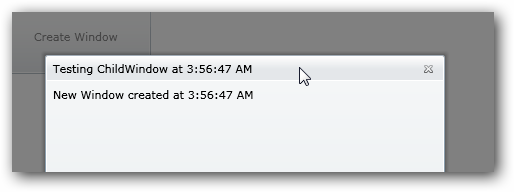
I’ve seen a few comments/requests incoming lately that people like the ChildWindow control in the Silverlight 3 SDK.  This is a great control that creates a modal dialog for you.  When you use it, it disables your root layout application and shows the dialog you provide:

ChildWindow example

This is great for those true modal needs.  It responds to normal windows DialogResult type responses if you have buttons, etc. – great for error dialogs, logins, etc.  The request I’ve been seeing is for the same functionality, but in a ‘normal’ ChildWindow.

But I’ve been seeing requests that it should act more like the normal Window object in .NET, which has an option for showing a window as a ‘dialog’ (modal) versus a normal one.  Well, since the source code is available under Ms-PL license at the Silverlight Toolkit project, I decided to play around and refactor a bit.  If you look at the base class implementation of Window, the API shows two methods: Show and ShowDialog.  This is what I wanted to emulate.  I changed the ChildWindow to FloatableWindow only because I couldn’t think of a better name and it represented a desired behavior.  In ChildWindow, the default behavior is a modal dialog and there are a few key areas that drive this behavior.   There is a template part called Overlay that is responsible for the faded-out background of your app when the ChildWindow is shown.  The other modal semantics are driven by looking at the RootLayout of the parent creating the ChildWindow and changing its properties (IsEnabled=False).  Basically I just spelunked these areas and did some changing.

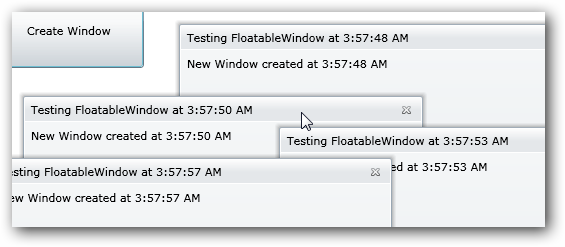
I implemented a property IsModal (_modal for the private accessor) that would be set in my new show methods, which I refactored to Show, ShowDialog and ShowWindow (internal).  ShowWindow would accept a boolean whether it was to be a modal or not, setting the private accessor.  The calls checking for disabling RootLayout, UpdateOverlaySize, ChangeVisualState and some of the focus event handling (as in a non-modal you may have multiple and you want each to be able to have focus).  After doing this I could create non-modal windows easily:

   1: FloatableWindow fw = new FloatableWindow();
   2: fw.Title = "Testing FloatableWindow";
   3: fw.Height = 200;
   4: fw.Width = 200;
   5: fw.Content = "Created at " + DateTime.Now.ToLongTimeString();
   6:  
   7: fw.Show(); //for non-modal
   8: fw.ShowDialog(); //for modal dialog

And I could create multiple:

FloatableWindow

All the other functions of the ChildWindow are there so there wasn’t a lot of work to do.  I kept the template parts, etc. so it is customizable in tools like Expression Blend.  There are a few things that I still need to do:

  • Better enable a default start position for the FloatableWindow
  • On focus events, if there are multiple windows, make sure that the selected window gets brought to the front of the layout when being used (NOTE: the logic for this is working actually, but ZIndex doesn’t appear to be able to be set on Popup, which I’m talking with the team about)
  • Whatever other bugs I may have caused by my assumptions :-)

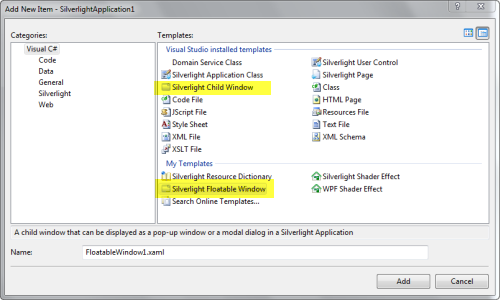
But it was an experiment at least and seems to work so far.  Here’s the code: FloatableWindow_1.1.zip.  The archive file includes the code I used as well as Visual Studio item templates (C# and Visual Basic) to mirror the same functionality of Add New Item where you can add a new ChildWindow to your project as a user control. 

FloatableWindow Item Templates

Let me know what you think.  Hope this helps!

Isn’t RSS great!?  Today I saw something wonderful pop in the feed from Jeff Prosise.  One of the problems with the ‘contest wheel’ app that Arturo and I did, was the CircularPanel we were using really at the time was only built for demo purposes.  There were issues in the spacing when different data items were bound to it.

This morning, Jeff released some code for a RadialPanel (same concept).  It’s wonderful.  I just swapped it out for the contest app quickly and got it working.  I’ve updated the code:

  • Replaced panel with Jeff’s code
  • Added an audio toggle button (after debugging, the music was getting annoying :-))
  • Fixed some highlighting
  • Configured for out-of-browser

Issues if anyone wants to fix :-) -- some highlighting off on selected item because of timer math conflicts as well as just general sizing of the app (configured for full 1024x768 right now without browser toolbars, hence the OOB app).

Anyhow, you can visit the app here (and install offline).  Again, it’s just a fun little app that was written in < 1 hour for fun.

Thanks Jeff for the RadialPanel code!

Public service announcement – if you don’t use my Foxit PDF Previewer, please move along…there is nothing to see here :-).

When Windows 7 Beta came out (build 7000), there was indeed a confirmed issue where the Foxit PDF Previewer would not work at all on 64-bit versions.  There were no install warnings, it just wouldn’t work.  It turns out this was a Windows 7 beta bug for 64-bit (some COM registering stuff if you care to know).  This was found immediately and was fixed in later Windows 7 builds (I confirmed internally with the team and had been testing daily builds).

NOTE: This issue should have only affected 64-bit versions of Windows 7 beta.  32-bit versions were reporting unaffected.

If you will be testing out the Windows 7 Release Candidate for 64-bit, I can assure you that Foxit PDF Previewer will run fine on that build (I’m running it now).  If you choose to install the release candidate on top of the beta, you may run into issues where it thinks it still isn’t working.  I recommend if you are going to go this route, uninstall the PDF Previewer and then run the install again.  This will correct the registering of the software correctly.

I hope this helps!  The download link for the Foxit PDF Preview handler is the same as the Vista one located here.

What do you get when you invite 14 companies for 3 1/2 days and throw a bunch of new stuff in their face and ask them to use it?  Well, in Wellington, it was called Expression for Art’s Sake.  This was a bit of an ‘artist in residency’ program where Microsoft invited some companies to bring their developer and designer staff to this event to learn a little bit about Expression Blend and Silverlight

Coming after WEB09 and ending our Auckland trip with a proper visit to a rugby game (here’s a scrum meeting for you agile developers), we traveled to Wellington for this event.

There was a HUGE spread of experience in the teams (about 38 folks in all).  Some were seasoned .NET developers, but hadn’t messed with Silverlight yet.  Some were incredible designers that hadn’t heard of Blend at all.  I personally felt the room was pretty bell curve shaped with regard to level of experience on these specific platforms.  The goal of these days was really to get baptized by fire.  Some teams had actual goals of coming out of it with working prototypes of applications while others just wanted to learn.

Expression event in Wellington

We started the week with some challenges.  The first was to get a working Silverlight application up on virtual servers provided by Microsoft.  This proved to be a bit of a challenge within itself.  Outside of the server poaching that was happening :-), not a lot of people had ever dealt with the web server side of applications before.  A few teams remembered the Web Platform Installer (WebPI) and got their server configured pretty quickly.  Others struggled and rightfully so as they’ve never seen server administration stuff before.  Each team, though, did get something up by the end of the task.  It was a learning experience for me seeing how foreign platforms can be when you’ve never worked with them.  Luckily WebPI makes this a LOT better in those scenarios to get the platform to a certain level.

The next task was a design challenge.  Arturo provided some context in describing the customer: a Kiwi.  No, not someone from New Zealand (which if you didn’t know that’s how they refer to each other as well), but rather the Kiwi bird…or rather a flightless bird!  Arturo’s challenge: design a cell phone for a Kiwi bird.  After about an hour each team would present their design as well as the process they took.  This wasn’t a software challenge, so no expectations of working software was happening here.  Teams presented sketches, research points, etc.  We learned that Kiwi birds, while being flightless, also don’t have a good sight, keen sense of smell, don’t talk, and once they’ve found their mate they are monogomous (which led to one design of the Booty Call device).  This was an interesting process to see how the designers worked with the research of their audience to come up with a design.

The third challenge was to put a bit of them both together: design and develop a calculator.  It may sound easy.  There have been many software engineers that have said calculators are more complex than people think.  This task took longer due to people getting deeper into the platform and tools.  I learned a lot about how people perceive the use of our platform and how they go about actually using it…it was interesting to observe.

The remainder of the time was the teams working on their own projects…some experimental, some literal.  The end results were pretty cool to see what people came up with.  Some were pretty complex ideas and some were simple prototypes.  One team really wanted to go all out and got their prototype working with dynamic data loading database-defined UI elements, etc.  It was a bit of a stretch goal for the timeframe they had – and each team wished they had one more day.

As I mentioned I learned a lot about how people think about using our platform and have feed that feedback to our teams.  I also learned a lot about how to ease people into the problem (note to self: DependencyProperty on day 1 may not be a good idea).  In the end, this was an awesome event and I met some really bright people!  Look for Nigel Parker’s blog to provide some more final context once he compiles all the video taken!  Here’s some feedback from some participants:

It was awesome, and we think we achieved what we want.  It was a good session and we really enjoyed it.

Awesome event, really enjoyed it.  I found the Expression experience very enlightening and powerful.

Darko’s post: http://www.zoroja.com/blog/2009/04/25/expression-for-arts-sake/

Before this week I had hardly touched Silverlight and now I don’t think I can live without it. – Tim Tait

I also had the opportunity to present at the Wellington .NET user group.  It was a great time and apparently one of the larger (largest?) turnouts they had.

Wellington Silverlight 3 usergroup

It was a lot of fun and I got to run through some new Silverlight 3 features as well as talk a bit about .NET RIA Services.  Thanks to all who came and thanks to Xero for hosting!.

Ryan Stewart and Tim Heuer

During the week as well, Ryan Stewart was also in Wellington for the Flex user group.  We missed the meeting, but hooked up with Ryan and some others for dinner to chat and socialize.  It was good to be in a relaxed setting and chat about things that don’t matter – as well as rant and vent :-)  Thanks Ryan for hanging out with us!

*Finally* we met at an incredible French bistro with the team from Webstock.  It was a great cap to an awesome 2 weeks in New Zealand.  Thanks to Nigel, Wellington and everyone I met!