I’ve just returned this past week from a trip to New Zealand with Arturo Toledo.  We were invited to come by Nigel Parker, who if you live in New Zealand and don’t know him…take a moment and subscribe to his site for information about what’s happening in that area.

WEB09 logo

Our first stop in New Zealand was the WEB09 conference, which was organized by John Ballinger.  Prior to the actual conference, John managed to get all the speakers together for a reception and then a dinner afterwards.  Within those 4 or so hours of time, I’ve met more iPhone developers in one space than I have ever known.  Seriously, I’m amazed at the creativity and entrepreneurial spirit of the New Zealand developer/designer community.  Allow me to take a moment and mention some of the applications/developers I met.

I’m sure I missed some, but these were the ones I could remember quickly.  It was cool to hear stories about how (and why) these folks are developing in the iPhone space.

RobertSongsmith.comAt a reception with Cactuslab, I had great conversations with a lot of folks, especiall Dan.  It was there that I learned I should probably at least try a feijoa fruit and do the touristy thing and go to Burger Fuel.  The conversation, of course, was a lot better than just that – I promise.  Cactuslab is also where Karl (who is also the author of Charles) works and they had just launched a fun (and make fun of) site around Microsoft Songsmith.

Who is Robert Songsmith?  You!  Grab a copy of Microsoft Songsmith, put some Cure on your headphones, sing along and send them your recording.  For the 2 days of WEB09 this became a bit of a cult following…well maybe not a cult, but we had fun talking about it.  Karl is the man.

The presentations at WEB09 were great.  Because Microsoft and Adobe were premier sponsors, we were given opportunities to talk about our platforms in keynote addresses.  The Twitter feedback channels had comments about how people were not liking the “vendor pitch” presentations.  I suppose I can understand how they felt, but it’s kind of hard not to sound ‘pitchy’ when you’re asked to speak on your platform specifically.  Nigel did a great presentation on something he created in 2 days that was very local and used some cool features of Silverlight and other platform offerings.  I am sure Adobe felt the same way about the feedback.  Of course with some friendly competition in the room, there were the occasional jabs between Adobe and Microsoft.  It was all done in good fun, but probably didn’t come off that way.

NOTE: If you think you’re getting feedback at a conference via evaluations, you’re wrong.  While at Øredev last year I made note of the red/green card system for some statistical, but better instant visual feedback.  More and more, however, Twitter is becoming an instant feedback channel.  I saw more people with laptops/mobiles open with some type of Twitter client than before.  Twitter: your new conference evaluation system.

We were able to do a workshop the day before WEB09 started where we could talk more specifically about certain things like SketchFlow and more of the line-of-business application features added to Silverlight 3.  It was a good group, with some great questions.

Some of my favorite/notable sessions (there were more, but of the ones I attended):

  • Adobe keynote – had a good planned demonstration of a lot of things, including Flash on the Playstation.  Unfortunately, most demonstrations were heavily reliant on Internet connectivity, which melted early at the conference.  I feel bad in these situations because at sometime it happens to anyone who presents.  I really liked the augmented reality stuff that Paul Burnett showed though.  It was fun and I can see some useful things out of it as well.  I heard the Soundbooth/Premiere session with Andrew Spaulding was awesome as well with real-time translation.
  • The Open Web with Dylan Schiemann, co-founder of the Dojo toolkit.  In an weird halfway-across-the-world thing…turns out that Dylan and I are actually only separated by about a few blocks at home…weird.  Dylan had some great opinions of where we are with the ‘open web’ and what things are getting in the way, making it easier, etc.  He’s pretty frank and entertaining as well, which made it good.
  • Dan Rubin – did a good session on thinking about experiences differently.
  • Pamela Fox from Google did a great session about mapping experiences and how you shouldn’t get stuck in the default behavior – differentiate your map experience for your users to provide context and relevance to the topic.

After the second day Arturo and I were pretty fried.  Then John came and found us at about 3pm and said we’ve been issued a challenge with Adobe to come up with a RIA application that would determine the winner of the raffle contest for the conference.  We’d have 2 hours and would present it on stage…the audience would determine what the best app was to use for the raffle.  The challenge was not issued by Adobe, but rather a conference attendee.  Here’s the breakdown of the time Arturo and I spent:

  • 3:00 – 3:40: Determining how we’re going to tell Nigel that we’re exhausted, not creatively thinking and going to surrender.
  • 3:40 – 4:00: The brain starts thinking, Visual Studio gets opened, keyboard starts clacking
  • 4:00 – 4:55: I work on the code, while Arturo works on some design assets.  I hand off the VS project, he opens Blend.  Style’s away and we’re done.

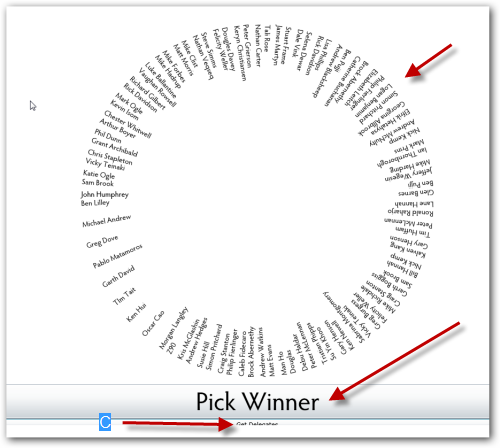
It actually turned out okay.  It turns out that they had 2 raffles so Adobe got to use their app (they actually couldn’t agree on 1 so they built 3…but really only 1 worked for the raffle) and we got to use ours.  Here’s the before/after shots showing my developer wireframe and the final product:

ContestChooser Wireframe

The circle is actually a styled ListBox.  There is an (obvious) button and a smaller button to load the data dymically and data-bind it to the list box.  Here’s what Arturo came up with for the final:

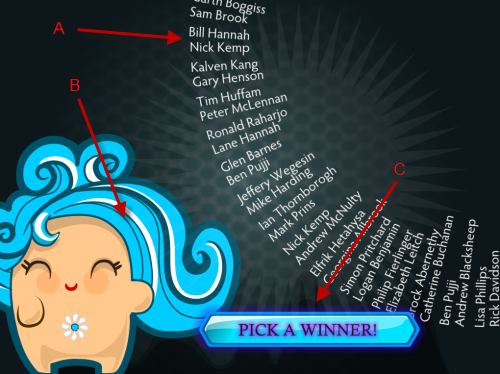
ContestChooser final

Notice the styling.  The “B” is the data load button, and A/C should be obvios what they are.  The circle actually rotates with a sort of ‘batman’ like highlight that also rotates, then picks a winner.  There is some cheesy wheel of fortune remix audio that we added as well.  While it isn’t production code by the slightest, it was fun to do and I think we did okay.  Nigel has more and a raw video of the contest ending here.

Yes, I know the code is not the best.  I spent all of about an hour hacking it together.  I’m aware of some of the bugs :-).

All in all, WEB09 was awesome.  On to WEB10!!!  John and other volunteers did a fantastic job organizing the event and providing a balance of information across the two days.  I’m sure the challenge they will have for next year is how to deal with the growth!  Great job everyone and thank you Auckland!  It was awesome to chat with people for those three days and the after party was great as well!  We were then off to Wellington for the next week…

If your a developer that spends any time with web services, you’ll basically probably end up working in one of two camps: REST- or SOAP-based services.  Now with SOAP services you’re likely used to having a WSDL document describing the service, providing type definitions, etc. – something you can use developer tools like Visual Studio to Add Service Reference and get a strongly-typed object model to work with.

If you’ve been doing Silverlight or ASP.NET (or any other technology really) development with mashup services, you probably have been working with REST-based services.  These are services that don’t self-describe themselves in a manner like SOAP with WSDL does.  Often I’ve found that really only the larger REST service providers provide good documentation for their services.  As a consumer of a REST service, you’re at the mercy of the documentation to understand the structure of the requests/responses that you’ll be working with…at times that can be frustrating.  If you are like me, you’ve probably either found someone else’s wrapper to the API or tried to work some other method to avoid spelunking the XML nodes.

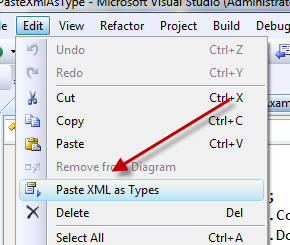
If you don’t need to take on the full wrapper that you may have found someone already doing and maybe just need to consume something quick or whatever, enter Paste XML as Types.  Located in the WCF REST Starter Kit Preview 2, this is a Visual Studio new option under the Edit menu.  Let’s take a look at an example.

Twitter sounds like it would be a good example, but honestly they provide so many different formats (JSON, XML, RSS) that I’m not sure you would really want the XML version when RSS is more of a known type and easy to work with.  So let’s look at the Flickr API which is a similarly popular one and has a well-documented REST interface.  Let’s say you wanted to work with the results of their ‘interestingness’ public query which will provide you with a list of photos.  We can see in their documentation that they provide us with a sample response:

   1: <photos page="2" pages="89" perpage="10" total="881">
   2:     <photo id="2636" owner="47058503995@N01" 
   3:         secret="a123456" server="2" title="test_04"
   4:         ispublic="1" isfriend="0" isfamily="0" />
   5:     <photo id="2635" owner="47058503995@N01"
   6:         secret="b123456" server="2" title="test_03"
   7:         ispublic="0" isfriend="1" isfamily="1" />
   8: </photos>

Sweet.  Copy that sample response.  Go into Visual Studio in your project class file (or create a new one), go to the edit menu:

Paste XML as Types

Booyah!  Watch as the magic happens and the XML structure is transformed into strong types for you.

Well, sorta.  Turns out while I think this is a cool feature, it might have some work still to go.  My first assumption was that the documentation on Flickr matched exactly the response (heck, it says sample response).  But it really is only the response body.  There was some missing response header nodes.  You should call the API directly to see a real response.  Second, even with that it looks like I’m getting some weird namespace stuff.

But regardless of that, even taking an XML file and being able to reflect on that to create an object model on paste is pretty cool. 

Try this out – if you see issues leave comments on the WCF REST Starter Kit site so they can see them – you’re welcome to leave them here as well, but I’m not on that team and it’s better to give direct feedback on their project.

Last week I was wanting to do something on my site sort of a ‘breaking news’ style banner that would span the entire site width but only when I wanted it too – based on a cookie or something else.  And I didn’t want to do something server side, because I was sick of doing stuff like that.

Not having played with jQuery, I thought I’d take a dive.  Prior to MIX09, I’d been testing something that the MIXOnline team had been toying with, which has just been released: Glimmer.  Glimmer is described as a jQuery Interactive Design Tool.  A helper for those like me who know nothing about it.  Sure, jQuery has a ton of resources, and my Twitter peeps came through helping me navigate some of the things that aren’t glaringly obvious for noobs like me :-).

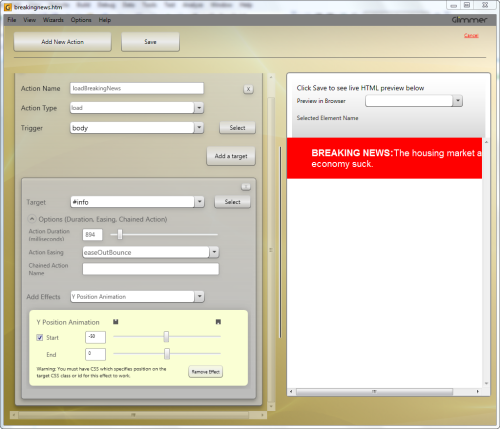
But Glimmer got me started, and I think that’s the point.  I had an overall HTML structure already and had the div element that I wanted to work with in jQuery – my goal was to animate it in a ‘breaking news’ sort of manner (or at least what’s in my head when I think of that concept).  I opened up my HTML in Glimmer and went to work.  I simply added the action (the function I wanted to trigger), then pointed it to the element to target.  Here’s what my simple Glimmer UI action setup looked like:

Glimmer UI

I clicked save and it created a JavaScript file for me with the completed code:

   1: jQuery(function($) {
   2:  
   3: function loadBreakingNews(event)
   4: {
   5:      $("#info").css("top","-50px");
   6:     $("#info").animate({"top":0}, 894, "easeOutBounce", null);
   7: }
   8:  
   9: loadBreakingNews();
  10:  
  11: });

Sure, to you jQuery pros, this looks simple, but this tool helped me quickly use a design-time tool to generate this without previous knowledge of jQuery.  Now, I’ve learned a few things about jQuery since my first incarnation – all of which took 2 seconds with Glimmer.  I decided I wanted to use the built-in “slideDown” feature in jQuery.  Some things like this aren’t supported in Glimmer yet, but simple things are…and quite frankly, the combination of Y position animation and an easing function accomplished the same goal.

I made a few hand-modifications to fit my needs (checking for cookies to trigger the banner, etc), but Glimmer got me started right away figuring things out quickly…it was awesome.  I think it comes with a free ShamWow as well, I’m not sure, but I swear Karsten told me that. :-)  Check out Glimmer today if you are new (or even seasoned) to jQuery.  There is a plugin model I haven’t explored, but check out the Glimmer project site for more information.

Next maybe I should explore working with jQuery and Silverlight as I know there is more to jQuery than animations and I think it would make a helpful library for the HTML interop layer.

It’s that time of year my friends in Arizona.  No, I’m not talking about when the air conditioners start get turned on, nor how the golf green fee rates are reduced or the snowbirds fly away…although those are good things as well.

I’m talking geek fest time.  Mark your calendars:

26 May 2009 – 8:00 AM

The community leaders in the area have organized another big event for your benefit.  So who is coming?  Here’s the rundown:

Glenn Block – come see why you should get addicted to MEF.  Don’t know what it is?  That’s an even better reason to come.  If you haven’t learned about MEF, you’ll want to see what Glenn has to show and talk about…it’s quite cool.

Jaime Rodriguez – from the WPF side of the house, Jaime is coming to talk about WPF development and the continuum of reusing skills (and some code) from Silverlight and WPF development.  Want to know what is going on in the WPF world?  Come and ask Jaime. 

NOTE: Also don’t forget to register for the Phoenix WPF training event for free as well! Info here and Register here for the WPF LOB Tour.

And last but not least…

Scott Guthrie – he returns to brave the early heat of the desert!  Scott is ready to talk about Silverlight and ASP.NET MVC frameworks and what his teams are up to.  Bring your questions and take advantage of this opportunity to talk with the one responsible for building the web platform for Microsoft.

This truly sounds like a great event and one NOT TO MISS!  Tell your co-workers and friends.  This is a free event!  You can register for this event here.  Please come and spread the word to support this community event.  Your community leaders will thank you (and be able to do more things like this for the community).

Spread the word! REGISTER

There seems to be a lot of buzz around Silverlight lately and I admit, I like it :-).  But I also think that there is a huge misconception about Silverlight “replacing” WPF.  I get emails a lot about people asking me questions about Silverlight and after a bit of prodding, I see that their target platform for their application is Windows.  I then begin my rant on why it should be WPF if that is the target platform.  I’m usually met with some weird looks being that I do a lot of Silverlight, but I state my case accordingly.

The conversation usually follows about not understanding WPF or trying to find more information about it.  Well, the WPF teams are trying to change that perception.  In fact, Jaime Rodriquez and Karl Shifflett have been organizing a WPF LOB Tour to provide 2 days of free WPF training for developers.  Jaime is the technical evangelist for WPF and Karl works on the WPF team.  They will be in these cities soon:

  • Los Angeles, CA
  • London, UK
  • New York, NY
  • Chicago, IL
  • Phoenix, AZ

Take a look at what they’ll be covering about WPF:

  • Day One:

    • Lap Around WPF
    • WPF Tools ( Blend, Visual Studio 2008)
    • Graphics Subsystem
    • Layout
    • WPF Fundamentals and new concepts
      • Application Model
      • Dependency Properties
      • Trees (logical & visual)
      • Events
      • Threading
      • Resources
    • Controls
    • Styling
    • Templating
    • Q&A with instructors at end of day
  • Day Two:
    • WPF integration with Win32 and Windows Forms
    • Data binding
    • Introduction to Model-View-ViewModel
    • Commanding in M-V-VM
    • Views, Navigation and Transitions
    • Data Validation
    • Error handling, Model dialogs, Logging
    • Unit Testing
    • MVVM & LOB tips and tricks
    • Q&A with the instructor
  • If this is coming to an area near you, I’d strongly encourage you to make the time to be there.  There is no cost to you other than getting yourself there (if it isn’t in your same city).  Their first event packed a full house on registration within 2 hours and the feedback from the training was overwhelmingly positive and exciting.  Karl is such a dynamic and fun guy to be around, it will be worth your price of admission to hang out with him and Jaime for 2 days.  I’d love for one city to rally together and all show up wearing Hawaiian shirts to make Karl feel at home :-).

You can find all the information about the events on Karl’s blog or Jaime’s blog.  Registration links and everything are listed there.  If you have a question about the event, please reach out to Karl or Jaime.  I know their most asked question is "why aren’t you coming to <fill-in-the-blank-location>?  Honestly after talking to Karl I’m convinced he wouldn’t sleep if he could go everywhere…and he wants to as well!  I think there are some plans to do some studio recordings and produce the information online, but there is no timeframe for that just yet…and I do believe that nothing really supplements being able to network with others learning and being in-person to ask questions, etc.  It’s a great opportunity to learn and demystify WPF development for yourself…really, make the time to be there.

Additionally, there have been some organized XAMLFest events happening around the country (US – but if there are others worldwide, leave a comment where they are happening).  These aren’t 2-day workshop trainings, but are events organized around our XAML technologies, specifically WPF and Silverlight. 

I think WPF and Silverlight are really great technologies and compliment each other well.  Try not to learn one without the other.  I know personally I’m trying to do more WPF learning myself as the natural progression of the Microsoft platform is the continuum of Silverlight to WPF as shared application platforms.  I hope you’ll do the same.

If you’ve attended one of these WPF events listed above, please leave a comment about your feedback as well.