
POLL: Silverlight developer patterns
My friend Joel Neubeck is doing a survey on his site about what patterns people prefer for Silverlight development. I’m very interested in these results as well, so if you have 2 seconds, please post your vote:
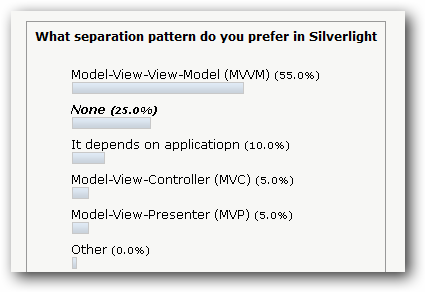
Link: Poll: What separation pattern do you prefer in Silverlight development?
Integrating Silverlight and ASP.NET MVC
- | Posted in
- silverlight
- xaml
- aspnet
- mvc
- aspnet mvc
[previously named "Silverlight as the V in ASP.NET MVC" but changed per comments]
One thing that I’m excited about is learning new technologies. Moving to the Silverlight team, I’ve moved away from a breadth of technology knowledge to something a bit more narrow. Now I feel like all other developers trying to keep up with the technologies we are releasing. As such, I’m a beginner for most. One such technology is ASP.NET MVC, which was just released to release candidate stability.
I thought I’d play around with it in the context of Silverlight and use Silverlight as the “view” in the model-view-controller concept. It’s easy to link the two. In fact when you create a new Silverlight project, you now have the option of creating an ASP.NET MVC application as the host:

So right from the beginning, you can marry the two together. Now from here, how can we leverage Silverlight as a view. Well, here’s my take…learn with me (and comment where you’d do it differently/better and why).
First, I’m still going to create my MVC architecture. I’m using the Northwind database for simplicity sake in this learning task. I’ve created a LINQ to SQL data model to that database (which is a local SQLExpress instance). I then wanted to take the simple task of showing the products by category and displaying them in a simple Silverlight application.
NOTE: Yes, this Silverlight view is basically just a layout of ListBoxes, but remember, this is just a learning experiment for us. You may also ask yourself about Authentication/Authorization…again, this post is about an experiment and not a full-featured implementation, so there are bound to be missing pieces.
I decided to create a CategoryController and a ProductController which would handle the actions to retrieve list of categories and products and then drill into the detail of a product. From there I still need some web View to be a container for my real view, the Silverlight application. I created a View for Category, since essentially that’s the initial view my user would see. All it is is an index page hosting my Silverlight application:
1: <%@ Page Title="" Language="C#" MasterPageFile="~/Views/Shared/Site.Master" AutoEventWireup="true" CodeBehind="Index.aspx.cs" Inherits="SilverMvc.Web.Views.Category.Index" %>
2: <asp:Content ID="Content1" ContentPlaceHolderID="MainContent" runat="server">
3: <p>
4: <object data="data:application/x-silverlight-2," type="application/x-silverlight-2" width="100%" height="100%">
5: <param name="source" value="ClientBin/SilverlightWithMvc.xap"/>
6: <param name="onerror" value="onSilverlightError" />
7: <param name="background" value="white" />
8: <param name="minRuntimeVersion" value="2.0.31005.0" />
9: <param name="autoUpgrade" value="true" />
10: <a href="http://go.microsoft.com/fwlink/?LinkID=124807" style="text-decoration: none;">
11: <img src="http://go.microsoft.com/fwlink/?LinkId=108181" alt="Get Microsoft Silverlight" style="border-style: none"/>
12: </a>
13: </object>
14: </p>
15: </asp:Content>
Now all I have to do is start building my real view that will be here, the SilverlightWithMvc.xap application. But first I obviously need my controllers to respond so some requests. I wanted the CategoryController to display a list of categories and a list of products associated with a category. But remember, my View will not be the ASPNET View, but rather my Silverlight app. How then could I get the ViewData to be sent to my Silverlight application.
In MVC, typically your code will return a View from the action, similar to my Index view in my CategoryController:
1: public ActionResult Index()
2: {
3: return View();
4: }
See where the return is an ActionResult (common) and the return is a View, also common. This return would expect that there would be a View named Index in the project hierarchy, which in our case there is and again, is the initial hosting page for our app (located in /Views/Category/Index.aspx). But what about our other data. I wanted to add a controller action called List and Products that would list all the categories (List) and then list all the products for a given category (Products). But I just wanted the data. It turns out that the MVC framework can give us just the data instead of the View. There is a Json return type. So using my LINQ queries I created the two actions:
1: public ActionResult List()
2: {
3: NorthwindDataContext db = new NorthwindDataContext();
4: var cats = from cat in db.Categories
5: select new
6: {
7: cat.CategoryID,
8: cat.CategoryName
9: };
10:
11: return Json(cats);
12: }
13:
14: public ActionResult Products(int id)
15: {
16: NorthwindDataContext db = new NorthwindDataContext();
17: var prods = from prod in db.Products.Where(cat => cat.CategoryID == id)
18: select new
19: {
20: prod.ProductID,
21: prod.ProductName,
22: prod.UnitPrice,
23: };
24: return Json(prods);
25: }
As you can see the return type is Json and passing in the model data of what I need…as opposed to saying return View([modelData]). I now get Json formatted data as a return result. Great, now how to consume them?
Within Silverlight, we know we can consume Json data and we can take advantage of that capability to bring MVC and Silverlight together. First let’s look at my layout UI code for the Silverlight application…it’s basically going to be a cascading ListBox view:
1: <UserControl x:Class="SilverMvc.Page"
2: xmlns="http://schemas.microsoft.com/winfx/2006/xaml/presentation"
3: xmlns:x="http://schemas.microsoft.com/winfx/2006/xaml">
4: <Grid x:Name="LayoutRoot" Background="White">
5: <StackPanel Orientation="Horizontal">
6: <StackPanel Orientation="Vertical" Margin="0,0,25,0" x:Name="CategoryListing">
7: <TextBlock Text="Select a category..." FontWeight="Bold" />
8: <ListBox Width="200" Height="150" x:Name="CategoryList" ItemsSource="{Binding}" SelectionChanged="CategoryList_SelectionChanged" />
9: </StackPanel>
10: <StackPanel Orientation="Vertical" Margin="0,0,25,0" x:Name="ProductListings" Visibility="Collapsed">
11: <TextBlock Text="Select a product..." FontWeight="Bold" />
12: <ListBox Width="200" Height="150" x:Name="ProductList" SelectionChanged="ProductList_SelectionChanged" />
13: </StackPanel>
14: <StackPanel Orientation="Vertical" x:Name="ProductDetail" Visibility="Collapsed">
15: <TextBlock Text="Product Details:" FontWeight="Bold" />
16: <Grid>
17: <Grid.RowDefinitions>
18: <RowDefinition Height="Auto" />
19: <RowDefinition Height="Auto" />
20: </Grid.RowDefinitions>
21: <Grid.ColumnDefinitions>
22: <ColumnDefinition Width="Auto" />
23: <ColumnDefinition Width="Auto" />
24: </Grid.ColumnDefinitions>
25: <TextBlock Grid.Column="0" Grid.Row="0" Text="Product Name: " />
26: <TextBox Width="200" Grid.Column="1" Grid.Row="0" Text="{Binding Path=ProductName, Mode=TwoWay, NotifyOnValidationError=True, ValidatesOnExceptions=True}" HorizontalAlignment="Left" VerticalAlignment="Top" />
27: <TextBlock Grid.Column="0" Grid.Row="1" Text="Unit Price: " />
28: <TextBox Width="200" Grid.Column="1" Grid.Row="1" Text="{Binding Path=UnitPrice, Mode=TwoWay, NotifyOnValidationError=True, ValidatesOnExceptions=True}" HorizontalAlignment="Left" VerticalAlignment="Top" />
29: </Grid>
30: </StackPanel>
31: </StackPanel>
32: </Grid>
33: </UserControl>
Where one selection drives the next portion of the layout, etc. You can see that I have several {Binding} statements in there as well as some selection changed handlers. Let’s look at what happens on Loaded of the app:
1: void Page_Loaded(object sender, RoutedEventArgs e)
2: {
3: WebClient mvc = new WebClient();
4: mvc.OpenReadCompleted += new OpenReadCompletedEventHandler(mvc_OpenReadCompleted);
5: mvc.OpenReadAsync(new Uri("http://localhost:33828/Category/List"));
6: }
You can see that I’m making a WebRequest call to a URI that happens to be our CategoryController with the List action command. On the return event handler I’m getting that stream of data, which we know to be Json data, and setting the DataContext of my first ListBox:
1: void mvc_OpenReadCompleted(object sender, OpenReadCompletedEventArgs e)
2: {
3: DataContractJsonSerializer json = new DataContractJsonSerializer(typeof(List<Category>));
4: List<Category> cats = (List<Category>)json.ReadObject(e.Result);
5: CategoryList.DisplayMemberPath = "CategoryName";
6: CategoryListing.DataContext = cats;
7: }
Now you may at this point be asking a few questions about some of my decisions here within Silverlight. First, the use of DataContractJsonSerializer. Where is it? Add a reference to System.ServiceModel.Web and you’ll get it. You can also see that I’m using the ReadObject method and casting it to a List<Category>.
Why not use System.Json and LINQ to JSON? You could absolutely. In doing so you could use your LINQ skills and get the data out of the Json stream and put it into a new object. You’ll still have to create a local class representation because Silverlight can’t bind to an anonymous type. This is the first reason I like just using the serializer. The second reason is size. I don’t know why I’m so picky, but I am. Using the DataContractSerializer method here, my app is about 7K. Adding a reference to System.Json and using those methods, my app is 27K. For me, there is no additional benefit in code for what I’m doing to add that extra size, so I choose not to. But you can…absolutely. Your application needs may be different and the size cost/benefit analysis may result in a different outcome than mine…but there, I’ve stated my reasons here.
Where is Category defined? Great question! Category is a class defined in my Silverlight object that maps the data to a strongly-typed class..here’s the class definition:
1: public class Category
2: {
3: public int CategoryID { get; set; }
4: public string CategoryName { get; set; }
5: }
Now that that is done, my data is retrieved, typed and bound to my UI. Then in the category ListBox when a category is selected, we trigger a similar event to retrieve the products within that category and populate the product list using the same technique. The final stage is that when a product is selected we populate a simple UI to show the details. We could also have called another controller action, but here since we had most of the data in the product listing, we simply push the data to the DataContext of the layout container for the details:
1: private void ProductList_SelectionChanged(object sender, SelectionChangedEventArgs e)
2: {
3: if (ProductList.SelectedIndex > -1)
4: {
5: Product p = ProductList.SelectedItem as Product;
6: ProductDetail.DataContext = p;
7: ProductDetail.Visibility = Visibility.Visible;
8: }
9: }
You can see we get the SelectedItem as a Product (another internal class like Category) and make it the DataContext of the ProductDetail StackPanel who’s children have binding instructions. The end result is this “view” below (the headings above the list boxes are not in the UI, but rather just labels to map to the controller action used to populate:
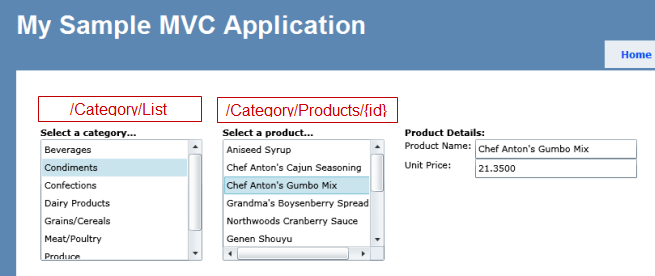
As I completed this little experiment, several things did come to mind…
- What about deep linking? The URI in the app didn’t change.
- Now that I’m looking at a detail view, does the URI stating the initial view matter?
I think mostly these are “simple” things, but important to an MVC developer audience. The interaction of URI semantics with Silverlight are important and things we are addressing in Silverlight 3 to make even this simple experiment easier.
So tell me, ASP.NET MVC experts, does this make sense? Good/bad/what would you do different? Help me learn how you would make the interaction between ASP.NET MVC and Silverlight better?
You can download my sample code for this project here (requires SQL 2008 and VS2008 with Silverlight and ASP.NET MVC tools installed): SilverlightWithMvc.zip
My Blogging Toolbox
From time to time I’ve gotten a few inquiries as to what platform my blog is, what tools do I use, etc. After a recent trip to Redmond and visiting with the Live Writer team, I got another inquiry while talking with a customer. I thought I’d just spit out my thoughts.
First, my platform. Yes there are many platforms out there for blogging. Probably the most popular are Wordpress and Blogspot. I think those are popular because you can get up and running for free and have it hosted. My wife and her friends mostly use Blogspot for that reason. Only a little customization is allowed, but skilled people can get creative. For us propeller heads though, we don’t like hosted solutions :-). I started a long while back on the .TEXT platform. When Scott Watermasysk had started working with Telligent and Community Server, the .TEXT project was at a bit of a stand-still for growth. A few picked up the project source code, forked it and created Subtext, which is the platform I now use. Subtext has a good developer ecosystem around it and led by Phil Haack, there are constant improvements being discussed on the developer list. It has served me well since I made the move and I’ve contributed features/fixes myself to make it better for me to use! I’ve tinkered with Graffiti CMS, but for now, Subtext is my comfort zone and has given me no reason to leave. There are a few things in the overall engine that are a bit dated, but heck the team is all volunteers and open source, so I’m not holding that against anyone.
As for tools, I’ve come to love Windows Live Writer. Honestly, if you are a blogger and don’t use Writer, I have to ask why. Seriously…even if you are the casual blogger. I’ve heard my wife’s friends complain about formatting pictures in Blogspot…then they see Writer and love it! When I first started blogging I would use the web site and my blog engine. But quite honestly that is limiting to very basic posting information. It doesn’t make authoring easy. I initially started using BlogJet in the early days. Honestly, it’s a good tool and I happily paid for it. Probably my only reason for switching to Live Writer was because of the programming model. As a developer I wanted to be able to customize it and take advantage of other customizations from others. I remember getting word that Live Writer was available internally. I took a look at it.
The moment I downloaded it and installed it I knew we were going to be on to something. But there were glaring holes. That being said, I was a responsible beta user and gave feedback…very blunt feedback. I remember within a week being invited on a phone call with the team to help them understand my feedback. It was GREAT! I told them that as-is they shouldn’t release…there were too many holes and releasing without a few key features would be detrimental to future releases. Quickly I was introduced to some APIs and we talked through certain scenarios. A few we agreed at the time couldn’t be core, and I volunteered some time to look at building some plugins with their help. That was the birth of a few of my tools (Tag4Writer and Flickr4Writer). Tag4Writer was a stop-gap until the Tags feature could get into the next release (which the functionality has and much better). Flickr4Writer was a great learning experience in client development as well as working with a great team. I’ve constantly stayed close to the feedback loop with the team to make it a better product. To date, there is no better authoring product for me than Live Writer.
That being said, here’s my complete tools for blogging:
- Subtext – my blog engine
- Windows Live Writer (WLW) – authoring tool
- Flickr4Writer – a plugin for WLW that enables browsing and insertion of pictures from Flickr and also has BlogThis support
- S3Browser - a plugin that enables insertion/upload of bits to Amazon S3 storage. I wrote this along with tremendous help from Aaron Lerch. This enables me to keep my images/files stored on a reliable network and reduce overall bandwidth usage.
- Leo Vildosa’s Code Snippet plugin – another plugin for WLW which enables me to insert formatted code snippets. I know people have their favorites (and there are a lot of them) – this one is mine.
- Dynamic Templates – a WLW plugin from one of the developers of Writer that enables you to provide your own “macros” within the plugin, helpful in a lot of cases
- Creative Commons footer – a WLW plugin to append a Creative Commons note to every post without having to think about it.
- Twitter Notify plugin: a WLW plugin to automatically update Twitter after posting
- Templates: every blog should be as unique as you can make it. Some of us are more skilled in design than others. I’m not one of them. I get my inspiration from others. Wordpress has the best ecosystem of templates…learn from them. There are a few sites that advertise templates like wpSnap.com and others. Also look at SmashingMagazine.com always, they have some great stuff they find/provide with liberal licensing.
As you can see, my tools completely revolve around Live Writer. There is only one instance where I can’t use it to do what I need: Enclosures – and I’ve been providing the team feedback around this feature to hopefully get it into their next release.
For Mac Users: No, there isn’t a version of Writer for Mac :-(. I’ve heard a lot of people on Mac say they keep a Windows virtual image around just for using Live Writer…wow. There are some other tools (ecto and Mars Edit) but I haven’t used them extensively to know if they are good or not. I know they don’t provide the suite of tools that I use so I don’t even bother exploring for now.
I’ve made a lot of investment in making Writer+Subtext an easy authoring setup for me and it has paid off in productivity savings. Hopefully you have a set of tools on your own as well that keep you productive!
Presto – a great device for less technically inclined
- | Posted in
- presto mail
- presto
- mailstation
I’m sure I’m not unlike most people who have more “experienced in years” relatives. Sadly it seems that generation has been slow(er) to adopt current technology advancements. I think this issue is exasperated, for me at least, when those relatives are not in close proximity so that you can force help them move into that age of technology. Just recently my father asked me how easy it was to set up a webcam so that he could talk/see my nephew and sister who live in Denver, Colorado. This is a good step in the right direction for family who is dispersed all over.
My relatives in New York, however, have less geeky grandsons/nephews to count on nearby :-). But luckily my aunt and uncle are trying to solve some of this. In the past my grandmother has had WebTV to use. I remember seeing it last time I was there last May. It looked a bit dusty. I asked her if she used it and she said it seemed to take a while, and she didn’t really understand it a bunch. Hence, it didn’t work as a reliable way to communicate online with my grandmother. One of my other relatives has a Mailstation device, which can only send/receive text-based mail. It totally works for her though and she’s good about checking it and using it. But you still have to check it.
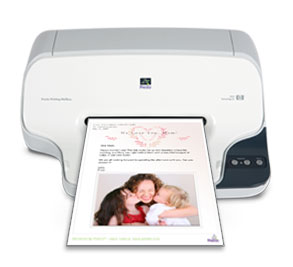 My uncle sent me a note the other day saying he equipped my grandmother’s home with a new gadget. A Presto device. He provided the new email address and said we could send notes and pictures to grandma. Intrigued, as I’ve never heard of this, I researched. Turns out this is a one-way device. I initially thought this would suck, but I think for the usage scenario of my grandmother, this would be great…albeit a bit analog.
It’s basically a pseudo fax machine/printer. The device is wired to a phone line and can receive “Presto Mail” which is mail sent through it’s network. When an email is received, it will print it out, in full color, with picture attachments printed out as well. My grandmother doesn’t do anything. The account apparently can be configured to dial out and retrieve the batch of messages for the device. This removes the task of requiring her to be proactive about “email” and rather wait for messages to come to her.
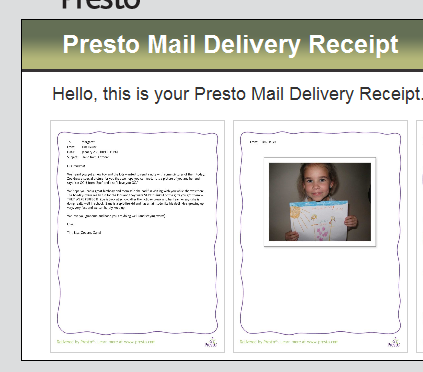
Still skeptical, I tried the Presto preview option they had on their site. You could send an email to their test account and they will show you exactly how it will be printed out for a user. I tried with several lengths of messages, and several types of pictures and sizes. It seemed to work as advertised. You could also “template” your message by adding a special subject moniker to your message, like [Presto Squiggle] which would apply a pre-defined template called Squiggle to the message. The templates are different types of borders/fonts/colors that will be applied to your email. They have generic templates as well as occasion templates like birthdays, anniversary, holidays, etc.
That night I decided to gather my kids and send a message to “GG” from her great grandkids. I told my daughter Zoe to draw a picture for GG that we could send it to her. I then took pictures of her holding the picture, my son Zane and me, and also scanned the picture itself (so GG could actually see the detail). I sent a quick note in email and attached 4 pictures. The next morning I received a message from Presto that my message was delivered and it also included a link for me, the sender, to view the resulting format. Cool. A week later I got a letter from my grandma, in the old-school postal service kind of way, thanking her for the pictures and note and that she added Zoe’s picture to her photo album. It worked! Grandma loved the pictures/note, didn’t have to check anything as it just prints out to her home, and I get to use my chosen medium (digital) to communicate. Sure, the "reply stream isn’t there, but for grandma, this is okay.
I know there are other mechanisms, like photo frames, but I think those require a bit more work for that generation. We had thought about a photo frame before, but unless connected to broadband it wouldn’t get updated that frequently and we’d have to send updated memory cards and felt that just might confuse people (i.e., why can’t i see the old pictures plus the new ones you sent?). I’m sure there are better frames out there that allow for ease of storage, etc. but I still think it is a more-than-no-touch support gift.
For my grandmother, I think the Presto system will work well keeping in touch more frequently with me at least (I’m a horrible sibling/son/grandkid with regard to keeping in touch with family). If you have relatives further away, you may want to consider this as well. I was really impressed so far with the use. Thanks Uncle Frank for setting it up!