i recently got an email from a developer who was using on a site to display high-quality media.  what?! you though silverlight was a windows-only technology? blasphemy!  you see, silverlight is a client-technology, which means as long as it can be served up to the browser (and the user has the plugin), the server can be your own custom version of l337hax0r web edition or whatever.  now, there are advantages of using internet information services on windows and some integration with asp.net, but that's not what this post is about.  on to the issue at hand will you...

so the email...he was getting an error message:

ActionController::RoutingError (No route matches "/player.xaml" with {:method=>:get}):

now i'm not incredibly familiar with what web server configuration he is running (although he is running netbeans/mongrel), but it got me thinking of 2 things.  first, maybe he needed to add a mime mapping.

for silverlight, the following MIME map is for .xaml files: .xaml: application/xaml+xml

but then i also thought that it might be something of some files moved around and such.  i deduced from his note that an template was being used as he mentioned he moved the javascript files to the javascripts directory of his rails application.  for those who don't know, rails is an MVC pattern web framework.  when creating a rails application you get a few different folders created for you (note: i'm just talking rails foo command here).  a lot of the work is done in controllers/models/views folder but there is also a folder called public.  within there are your typical images and javascripts type folders.  basically you can think of public mapping to "/" for static files.

now most rails applications probably wouldn't want all the encoder output to be dumped into /public as-is.  if developers are anything like me (OCD about project folder organization), then you want *.js to be in one place, etc.  i suspected that my reader put all the encoder files in the /public/javascripts folder.  this would be fine and should work okay.  but lets say you want some organization.

for example, i want to put my .js files in /public/javascripts, my jpg/pngs in /public/images and i'm going to create a folder for my xaml and a folder for media (wmv).  great, so we move all the files around then we run the Default.html page.  nothing happens.  why?  well a few things need to change if you move things around.

first, you need your hosting page (in this case right now it is Default.html) to reference the right path to the javascript locations.  so in our example we'd modify (in Default.html) lines like:

<script type='text/javascript' src="Silverlight.js"></script>
<script type='text/javascript' src="BasePlayer.js"></script>

to this:

<script type='text/javascript' src="javascripts/Silverlight.js"></script>
<script type='text/javascript' src="javascripts/BasePlayer.js"></script>

noting that of course there are more than just these two files.  now if we run the application it would still fail.  this is for two reasons, both of which are in StartPlayer.js.  the first is on or about line 8 of the script:

   1:   
   2:   
   3:   
   4:  function get_mediainfo(mediainfoIndex) {
   5:      switch (mediainfoIndex) {        
   6:   
   7:          case 0:
   8:              return  { "mediaUrl": "CodeTripSample.wmv",
   9:                        "placeholderImage": "CodeTripSample_Thumb.jpg",

the next is on or about line 24:

  22:  function StartPlayer_0(parentId) {
  23:      this._hostname = EePlayer.Player._getUniqueName("xamlHost");
  24:      Silverlight.createObjectEx( {   source: player.xaml', 

these both need to map to the right references of where that content has moved...so noting my above folder changes (images/javascripts/media/xaml) my StartPlayer.js file now starts like this:

   1:   
   2:   
   3:   
   4:  function get_mediainfo(mediainfoIndex) {
   5:      switch (mediainfoIndex) {        
   6:   
   7:          case 0:
   8:              return  { "mediaUrl": "media/CodeTripSample.wmv",
   9:                        "placeholderImage": "images/CodeTripSample_Thumb.jpg",
  10:                        "chapters": [               
  11:                                    ] };                                                                
  12:                            
  13:          default:
  14:               throw Error.invalidOperation("No such mediainfo");
  15:       }
  16:  }
  17:   
  18:  function StartWithParent(parentId, appId) {
  19:      new StartPlayer_0(parentId);
  20:  }
  21:   
  22:  function StartPlayer_0(parentId) {
  23:      this._hostname = EePlayer.Player._getUniqueName("xamlHost");
  24:      Silverlight.createObjectEx( {   source: 'xaml/player.xaml', 

and all is well -- my rails app starts and my silverlight content is loaded.  my resulting rails app structure looks like this:
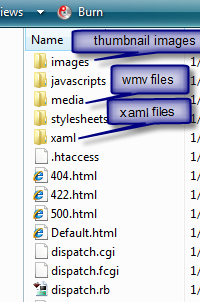
simple enough, but if you move things around you might not have known where you need to change things.  you may wonder why you don't have to change the MediaElement in the player.xaml file.  well, if you are using an expression encoder template, the Url of that element is controlled by the StartPlayer.js mediaUrl attribute being passed to the player.

so if you have static information for your rails app this would probably work fine for you, but i suspect your rails application might be using views and such.  so you'd probably want to ensure you are modifying the appropriate view in views/layouts to ensure the javascript reference is correct, etc.

hope this helps.

Apple MacBook Airi was peripherally listening to the macworld keynote today waiting for something that would interest me.  i read all the rumors about a sub-compact laptop and was hoping for the best.  i am not a lover of widescreen laptops.  i love my 14" lenovo and all other standard sizes before that.  i've always felt that when you get into the widescreens, it no longer becomes a notebook, but a portable...i want the lightweight but powerful notebook.  to that end i use a lenovo thinkpad and a macbook pro (15").  i like them both...a lot.  for my daily typing i find i'm more comfortable on the lenovo keyboard...it has that tactile response akin to a 1985 ibm keyboard...for me it works.  but i love the overall industrial design, display and weight of my macbook.  at macworld, i was hoping for the announcement of the 13" macbook pro.  i like the macbook current design, but wanted a more powerful machine and an aluminum case (maybe even colored like their ipod lines).  but alas, steve seemed to be catering to the super lightweight class of design.

at a cost of USD $1800 as a base price, i feel they introduced something cool and priced it out.  for me it isn't even compelling enough to look at for that price (the solid state one is over USD $3000).  i know people say that the lack of an optical drive is no big deal because you rarely use it.  i used to think that too until i tried to use a laptop without one.  especially being ultra portable, i would have considered macbook air for a travel machine, but would want to watch DVDs, etc. (why not itunes movies you ask -- well, because i have my own DVDs and i like DVD extras and the ability to get new releases).  also the lack of ethernet is a bit troubling.  i use wireless all the time and i think rarely plugin, but i look to the times when i do plug in and would be frustrated that i would have to carry an ethernet dongle there.  when it is all said and done, the macbook air is cool looking and i can't wait to stop by an apple store and mess around with one, but for me, the features aren't there to make it worth the investment.  maybe i'll wait 3 months for jobs to screw the early adopters and reduce the price.

i wish it was a 13" macbook pro.  i love a lot of my macbook pro now, just wish that power was harnessed in the size of the macbook.  is that so hard?  if that would have been the announcement, i would have snuck out to a 'meeting' and gotten one today.

over the past 6 months i've received numerous questions whether or not a user group for sharepoint existed in arizona.  it didn't (there was one but it drizzled away), but i'm happy to announce that some volunteers rallied to start another one.  they have set a date for their first meeting or the arizona sharepoint professionals group.

here's the information i have:

Date:  Thursday, 31 JAN 2008
Time: 4:30 PM - 6:30 PM
Locations: University of Advancing Technology, 2625 W Baseline Rd, Tempe, AZ

they are asking people to register (not sure why) so if you plan on attending, please do register for them.  you can click the registration link here.  if you experience problems registering, i'd say just show up :-).  sorry, no web site for further information other than the registration site.  if you do go, encourage them to do 2 things for me (i'll be in denver or i'd go): 1) start an email group instead of a forum and 2) post their events on azgroups.com so others can see (i've posted this first one).

the guys over at sapphiresteel software released ruby in steel text edition, a full-featured ruby on rails IDE built on the visual studio 2008 shell.

as a microsoft developer interested in looking at ruby on rails early on, i loved when the sapphire project was first released.  i had played with earlier version and after re-paving my machine need to take a look at the updated versions.

if you don't own a copy of visual studio 2008, when you get the ruby in steel text edition, you get visual studio 2008 (ruby language support only) -- so this isn't an add-on only, it is a full deal.  if you already have vs2008, this will install into your current environment.  it has all the goodness you'd expect of an IDE: color coding, snippets, code folding, integrated debugger, and interactive consoles.

the sapphire guys also have the developer edition which is a little more full featured, and includes a faster debugger and few other features like dynamic update intellisense.  DHH was quoted as saying:

"Ruby In Steel is particularly interesting to developers coming over from the Microsoft world as Visual Studio is a familiar environment to them. That'll likely ease the transition." source: InfoWorld

i think this is great for people interested in learning new environments as well as new languages.  already being familiar with a tool like visual studio may help you understand about ruby without having to learn any new tool.

and no, it doesn't run on a mac.

Inkscape.orgi had previously done a screencast where i talked about the tools i use to convert vector graphics in SVG format to XAML assets to be consumed in either WPF or Silverlight applicaitons.  one of the tools mentioned in the screencast is .  inkscape is an open source vector graphics editor, with capabilitis siilar to illustrator, freehand, etc and uses the SVG file format (mostly).  one of the cool things about inkscape is the extensibility already offered in the open source platform.  after having some colorful discussions with my local linux group on their discussion group, i met one of the inkscape contributors.  we 'chatted' (read: emailed) privately off the group for a while about vector formats, why not SVG, etc., etc. and ended up in an amicable place understanding the role of XAML.  through this, ted, helped contribute a checkin to the inkscape project that enables files being edited in inkscape to be exported directly to XAML format.

ted tells me the inkscape guys will have a booth at the southern california linux expo in february.  i think that they'll have a stable build of the xaml feature by then (crossing fingers).  if you are brave enough for daily builds it is already in there if you want to try it out.  if you are going to be in in southern california, you should stop by the expo and chat it up with the inkscape crew that will be manning the booth.  it's a great tool that has helped me in the past few months.  while the conference isn't free, well neither is the expo, the expo hall looks like a $10 ticket.

UPDATE: register with code MOF1 and you'll get 50% off the registration to SCALE!  thanks ilan!

UPDATE2: jon galloway demonstrates his tests of inkscape