It has been two months since I retired from Microsoft and, more broadly, from a technology career that spanned nearly 30 years. That is still a weird sentence to write.

Two months is not very long. It is certainly not enough time to offer some grand wisdom on retirement, how to do it right, or what I have figured out about the next chapter of life. I have figured out very little. But it is long enough for the initial feeling of being on an extended vacation to start wearing off, and long enough to notice some things.

Sunday nights are different

For most of my adult life, Sunday night had a certain feeling to it. I don’t think I ever had a particularly bad case of the “Sunday scaries,” but there was always a mental transition happening because Monday was coming. What meetings did I have? What did I forget to finish Friday? What problem was waiting for me? What was first on the calendar?

Sunday evening was when part of my brain started loading work back into memory.

That doesn’t happen anymore.

Sunday night is just…Sunday night. There is no Monday morning meeting, no inbox waiting for me, no calendar I need to mentally prepare myself for. It is wonderful, but also a little strange. When work has provided the rhythm of your weeks for essentially your entire adult life, removing it changes more than your calendar.

I’ve spent decades organizing life around work. Now I get to figure out what organizes life without it.

So what do I actually do all day?

This is probably the question I’ve been asked the most, and the answer is both “a lot” and “I’m not really sure.”

I’ve spent more time with family. I’ve been outside more. I’ve exercised, done projects around the house, handled errands at absurdly convenient times, and had appointments without doing calendar calculus to figure out where they fit between meetings. I’ve had lunches that didn’t need to end because someone had a 1:00. There is something pretty great about deciding to do something on a Tuesday morning simply because you can.

I’ve also had days where I look back and I’m not entirely sure what I accomplished. That part has taken some adjustment. For most of my life, productivity was easy to measure. There was always a list, a deliverable, a problem solved, a decision made, a person helped.

It turns out I’ve trained myself pretty well to believe a day needs an output.

I’m not sure I’m very good at unlearning that yet.

Shouldn’t I be doing more?

There’s another version of that same discomfort I didn’t expect.

For years I said some variation of, “If I only had more time…” Well, now I have more time. A lot more of it.

So why am I not traveling constantly? Why haven’t I booked all those trips? The world is my oyster, so why am I sitting at home on a random Wednesday?

There is a weird pressure that comes with having complete control over your time. You spend years wishing you had more of it, and when you finally do, suddenly there’s this obligation to make sure you don’t waste it. I can catch myself wondering whether I’m somehow failing at retirement by not maximizing retirement.

Which sounds ridiculous as soon as I write it down.

I spent a long time optimizing work, schedules, finances, and time. It would be pretty easy to turn around and start optimizing retirement too. Maybe having freedom doesn’t mean I have to consume all of it immediately. Maybe not every empty square on the calendar needs to be filled simply because the squares are finally mine.

I’m still figuring this one out.

Retirement wasn’t a spontaneous decision

One thing I don’t want to gloss over is the part that actually made all of this possible.

I retired from Microsoft on a particular day, but preparing for retirement didn’t start that day or even that year. It took years of thinking intentionally about what we wanted our future to look like and, just as importantly, talking about it together.

My wife and I had to be aligned on what we wanted. What would “enough” look like? What were we willing to change? What weren’t we willing to change? What did we want retirement to enable for us and our family? Those conversations happened over years, not weeks.

We also sought professional advice. I’m reasonably comfortable with numbers, spreadsheets, and obsessing over scenarios, but that doesn’t make me a financial professional. We asked questions, modeled different outcomes, and tried to understand the risks rather than simply hoping everything would work out.

One lesson I’d offer anyone thinking about their own future is to make every dollar work as hard as it reasonably can. That doesn’t have to mean complicated investment strategies. Sometimes it is incredibly boring.

Cash is an easy example. If you have money sitting around that you don’t immediately need, know what it is earning. A traditional checking or savings account might pay essentially nothing while a high-yield savings account can pay meaningfully more for doing exactly the same thing: sitting there.

I realize I’m not exactly revealing the secrets of Wall Street here.

That’s sort of the point.

Small, boring decisions matter. Pay attention to where your money is, what it costs you, and what it earns. Start earlier than you think you need to, communicate with the people you’re building a life with, and seek advice from people who know more than you do.

A shout out here to my friend James Montemagno, who built My FIRE Number, a great set of tools for exploring financial independence scenarios. A calculator isn’t a financial plan and someone else’s FIRE number isn’t yours, but putting numbers around “someday” can help turn it into an actual conversation.

For us, the goal was never simply to stop working as early as possible. It was to create the option. Eventually the question changed from “Could I retire?” to “If we can do this, do I actually want to?”

That was a much more interesting question.

Turns out I liked being needed

This has probably been the most surprising part.

I’ve always believed your job shouldn’t define you. I’ve given that advice to other people. I’ve written versions of it here before. Back in 2013, I wrote about priorities, passion, employment, and work-life balance and admitted pretty plainly that I worked too much.

At the time I was wrestling with priorities, family, career growth, and the realization that making different choices might mean I wouldn’t know everything happening around me professionally.

Apparently I was foreshadowing something.

What I didn’t fully appreciate then was how much validation work provides. For nearly 30 years, there were signals almost every day telling me that I was useful. Someone wanted my opinion, needed help with a problem, valued some experience I had, or thought I might be able to make something better.

There is ego wrapped up in that whether we like to admit it or not. I was useful to people, and work told me so constantly.

Then one day I retired and that faucet basically turned off.

My wife and I have discussed this, and I have explained to her that Microsoft previously employed thousands of people who collectively provided the validation necessary to sustain my self-esteem. She has not yet agreed to take on the additional workload.

I may need to establish some SLAs.

Joking aside, this has been a real adjustment. There is a difference between knowing intellectually that your job is not your identity and actually removing the job. For a long time, being useful was almost automatic.

Now I have to think differently about what useful means.

Nobody needs me to keep up anymore

I still see the barrage of technology news, especially in AI. New models, new tools, new announcements, new products, and a steady stream of things people insist will change everything.

For almost 30 years, seeing that kind of news triggered an automatic response: I should understand this.

There was also always somebody around to talk about it with. People at work, friends in tech, people building things. Somebody else had seen the same news and wanted to dissect it.

Now I see something new and interesting and my wife doesn’t care.

To be clear, this may be the healthier response.

I can explain that some new model just did something that would have seemed impossible a year ago, and she can respond with a perfectly reasonable, “Okay.”

And that’s it.

Nobody is waiting for me to have an opinion. Nobody needs me to understand it before tomorrow. For the first time in a long time, I have to decide for myself whether this deserves three hours of my attention.

Should I care this much?

That’s a harder question than I expected.

There is absolutely a part of me that worries I’m being left behind faster than I thought I would be. Of course I am. I retired. The technology industry, somewhat rudely, did not.

But I’m starting to realize that my curiosity and my professional insecurity may have been intertwined for a very long time. When I see something new and immediately think, “I need to understand that,” I’m trying to ask myself something else.

Do I actually want to understand it?

Or do I just want to know that I still could?

Those aren’t the same thing.

Thirteen years ago I worried that changing my priorities might mean knowing less professionally. I can now confirm that completely stepping away is a very effective way to accomplish that.

Turns out I’m not entirely comfortable with it yet.

Parenting when time isn’t the excuse

One of the reasons retirement made sense for me was family. For years, one of the easiest things to wish for was more time. More time with my wife, more time with my kids, more flexibility, more ability to say yes.

Now I have it.

And, somewhat inconsiderately, everyone else has continued having their own lives. My kids did not reorganize their schedules around my retirement. Apparently this was not part of the agreement.

I’ve also discovered that having more time does not necessarily mean I should use all of it to help.

My daughter has been going through some genuinely challenging things, and my instinct as a parent is to help. More specifically, my instinct is to solve. I have time now. Lots of it. I can research the problem, find people to talk to, develop options, make a plan, and figure out the next five steps.

I can research the hell out of almost anything now.

And sometimes that’s exactly the wrong thing to do.

My wife and I have talked a lot about how sometimes our job is simply to listen, be compassionate, and wait until help is actually asked for. That is much harder than it sounds when you have both the instinct and the available time to solve the problem.

For most of my career the pattern was fairly straightforward: problem, investigate, develop options, solve, feel useful. Parenting doesn’t always work that way, especially as your kids get older.

Sometimes being useful means resisting the urge to prove that you are useful.

I’m still learning that one too.

Finding a new tribe

Retirement also happened at the same time as a move, which meant leaving behind some of my closest friends.

They’re still my friends, of course. We text, talk, and stay connected. Distance doesn’t erase any of that, but it does change the shape of a friendship. There is no “want to grab lunch?” No “let’s ride Saturday morning.” No assumption that if you don’t catch up today you’ll probably see each other Wednesday anyway.

I miss that more than I expected.

Something wonderful has happened too, though. We call each other more. Actual phone calls and actual conversations. When you can’t count on the Wednesday meetup, you have to be more intentional. Some of those conversations have been longer and deeper because we’re not assuming we’ll just pick things up again in a couple of days.

I love that part.

What I miss is the spontaneity. The friends I left behind became close friends through years of rides, dinners, trips, jokes, difficult moments, random conversations, and a thousand other small things. There is no shortcut for history, and you can’t manufacture it in two months.

So now I’m trying to find a new tribe in a new place, which is weird when you’re older. You have to show up, introduce yourself, be the new person, and eventually make that slightly awkward transition from “person I see around” to “person I might actually call and ask if they want to do something.”

Cycling helps. Community helps. Showing up helps.

But I still wish sometimes that my best friends were close enough to text, “Ride Saturday?” and have that be the entire plan.

Finding places to be useful

I’ve found myself thinking more about causes and community and places where I might contribute. I’d like to believe this is driven entirely by a noble desire to give back, but I’m self-aware enough to know there is probably some “please find me useful” mixed in there too.

That’s okay.

For most of my career, usefulness was attached to expertise. I knew something. I’d seen something before. I could help solve a particular kind of problem.

Maybe part of what comes next is learning that usefulness doesn’t always require expertise. Sometimes it might just require showing up, caring, and having the time to help.

I have some of that now.

Two months is not a conclusion

I don’t have a neat conclusion to any of this, which feels appropriate because it has only been two months.

And just to be clear, I’m fine.

More than fine, really. I’m enjoying having control over my time. I’m spending more of it with my family. I’m outside more. I’m exercising more. I have choices that I spent years making intentional decisions to create.

I also recognize the privilege in even being able to write a post wondering what to do with all my free time. I had a long and fortunate career, we planned for this for years, and I have a partner who was part of every one of those decisions. A lot of people don’t have the option to just decide they’re done working, and I don’t take for granted that I did. So none of this is meant as “woe is me, I have too much time.” If anything, I’m realizing that I spent years preparing for retirement financially and almost no time preparing for it emotionally.

It’s just weird.

I spent nearly 30 years knowing roughly what I was supposed to be doing on a Monday morning. I knew how to measure whether I was productive. I knew how to be useful. I knew why I needed to keep learning the next thing. A surprising amount of validation came bundled with all of that.

Now I get to decide which of those instincts I want to keep and which ones I can let go.

I don’t think I want another job right now. I also suspect I’ll eventually find more things to fill some of the dead time. Maybe that is helping with causes I care about. Maybe it is building something because I actually want to rather than because somebody needs it. Maybe it is travel, more riding, new people, or something I haven’t even thought of yet.

I’m trying not to be in too much of a hurry to figure it out.

Thirteen years ago I worried that prioritizing other parts of life might mean knowing less professionally. Well, I finally did it. I know less. People need my professional opinion less. The technology world is moving on without me exactly as it should.

And I’m okay. I’m just still figuring out what comes next.

For now, it’s Sunday night. Tomorrow is Monday, and for the first time in essentially my entire adult life, that doesn’t require anything from me.

It’s wonderful.

It’s also still a little weird.

tl;dr - I’m leaving Microsoft.

I'm leaving Microsoft

I’ve been given a chance at early retirement and the timing works out for my family. It’s been a fantastic ride at Microsoft, but I’m looking forward to spending more time with my family and outdoors.

This blog will likely go stale for sure, but if you’ve been a reader for a while, I thank you for helping grow my own voice with developers along the way.

If you want to read a bit more, I wrote more on LinkedIn.

I recently was actually building a personal app that integrated with 5 different third-party APIs, each having different authentication requirements or API keys to navigate the calls. I normally would just use .http files and be done with it, but I’m a GUI person at heart and as much as I was iterating with the app and these services (across sandbox/prod environments too), navigating the single .http file just as raw text was getting frustrating for me honestly. I was already using the Rest Client for VS Code extension which is great and the absolute simplest and likely widely used. I tried a few other extensions in the marketplace but they have really shifted to be ‘enterprise’ and SaaS based and I just didn’t need all those capabilities or want a service.

So I just decided to have Copilot help me and iterate on a plan and implementation…and decided to call it “Endpoint” and here we are.

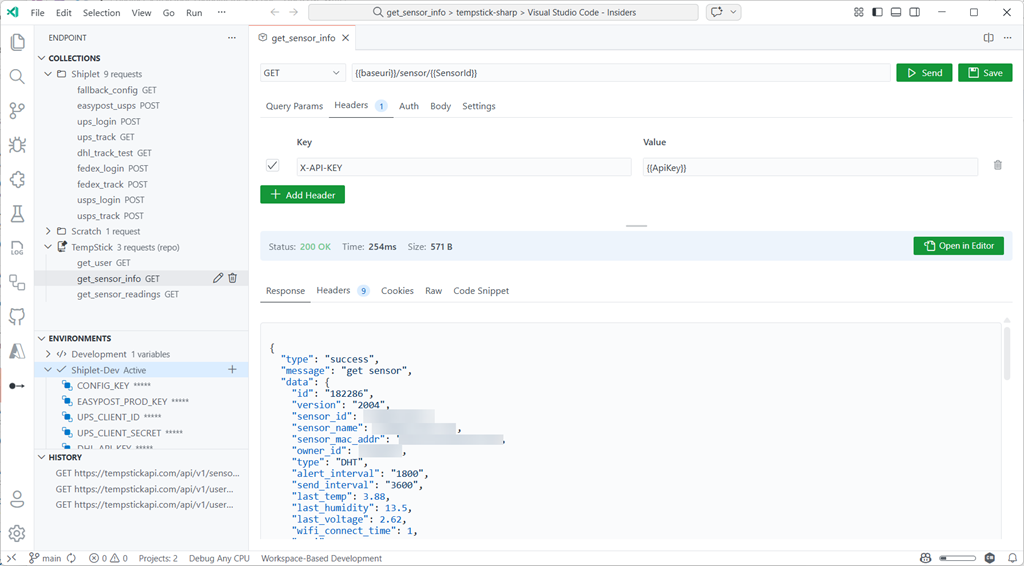
Screenshot of Endpoint for VS Code

It’s basically a REST client, but biased hard toward *staying inside the editor* and keeping your requests portable.

What problem this is trying to solve (for me)

There are already a lot of ways to “test an endpoint.” This isn’t meant to be a hot take about existing tools. This is more like: what do I personally want when I’m iterating fast and gives me a structured way of seeing output?

For me the pain points are:

  • I want an API client that feels like part of VS Code: Same theme, same UX expectations, no “external app” vibe.
  • I want requests to be roaming with me, or shareable in the repo just like .http files: If a request is useful, I want it in source control not in a service.
  • I want multi-step flows to be easy: The classic “call login, grab token, call the real endpoint” loop.
  • I wanted some level of compatibility with the .http format because I do use multiple tools

Endpoint is my attempt at optimizing those loops for me.

But don’t `.http` files already do this?

Yep — and that’s actually part of the point. I like `.http` files because they’re **portable**, **diffable**, and **live well in source control**. If all you need is “a request in a file that I can run,” `.http` is a great answer and REST Client is a great simple tool!

Endpoint leans into that by supporting import/export so you can move between the file format and the GUI workflow. In other words: even if you don’t start in `.http`, you can end up there (and vice versa). Endpoint isn’t trying to replace that model; it’s a selfish tool for GUI lovers who want something around the same workflow and make it easier, intuitive, and graphical:

  • A native GUI for editing params/headers/auth/body without living in raw text all day
  • Collections + defaults (shared headers/auth/variables) so you don’t repeat yourself
  • Environments that are quick to switch (and don’t accidentally leak secrets into git)
  • Chaining + pre-requests for the auth/multi-step reality of modern APIs
  • Code snippets if you need bridge from “it works” to “ship it in the app”

So if you already have `.http` files you love, cool — keep them. Endpoint is me acknowledging that the file format is great, but I personally wanted fewer papercuts while iterating.

Why not just persist everything as `.http` all the time?  Mostly because the GUI needs a structured model (headers on/off, auth type fields, body mode, collection defaults/inheritance, secret handling, etc.). You *can* represent a lot of that in text, but you quickly end up either losing fidelity or inventing extra conventions. I chose to persist a richer model for the day-to-day workflow, and then use import/export as the compatibility layer when you want the portable file representation.

What about other existing GUI tools?

Yep, there are a good set of ones out there that are incredibly rich. Some are mostly freemium models too though. And some may not be able to be used in certain environments because of organizational policies. These are all fantastic tools, but they didn’t work for my every need, so I just selfishly wanted my own flow…which I acknowledge may not work for anyone else’s need :-).  But by all means, the ones out there are super popular, incredibly powerful, and do way more for advanced scenarios.

What Endpoint gives me (in practice)

At a high level, it’s a request builder + response viewer that stays inside VS Code. The part I care about isn’t the checklist of features — it’s that the whole loop (edit → send → inspect → tweak → repeat) happens without me leaving the editor.

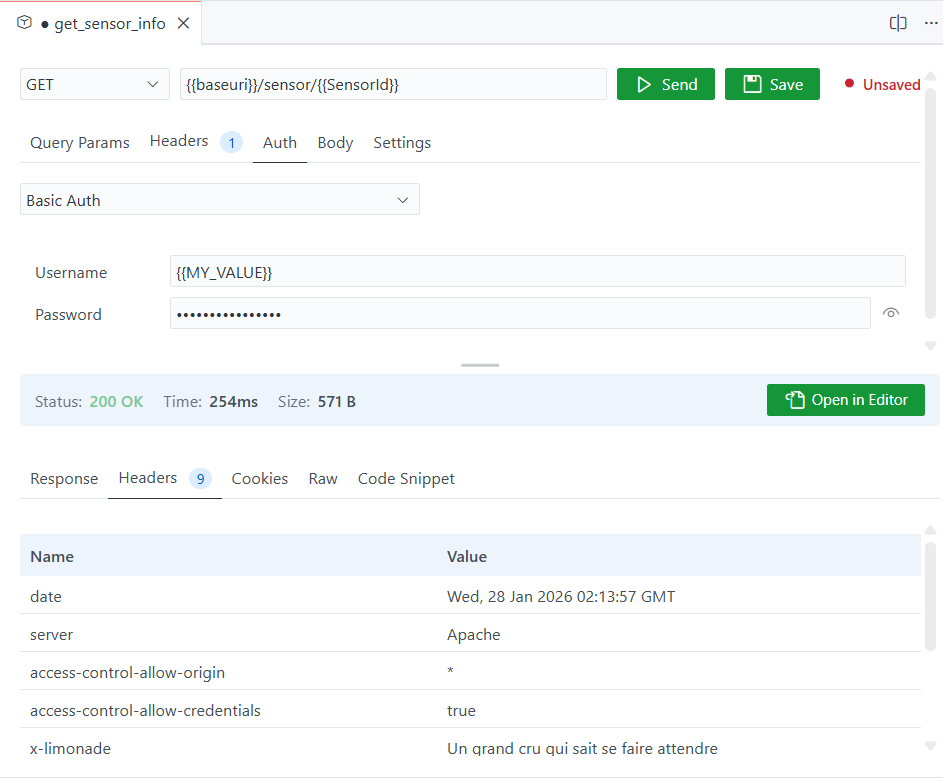
Screenshot of the Endpoint split pane

The mental model is simple: Collections for grouped project scopes and saved requests, Environments for variables, and a simple split request/response view with the most important things at the surface.

The small set of things I reach for most:

  • Variables + `.env` support so I’m not hardcoding base URLs or keys (supports .env files, or stored in VS Code SecretStorage)
  • Repeatable/shared/inherited properties for headers and auth
  • Chaining / pre-requests for “login then use token” flows
  • Roaming saved collections across machines – even when I’m not wanting to persist these to team repo yet
  • Export/import for when I want to serialize for sharing broadly if needed

I’m still iterating, but those cover 90% of my day-to-day.

Summary

This isn’t meant to replace every API tool ever as I mentioned. Nearly every tool I create starts for extremely selfish reasons. It’s optimized for the thing I do the most: tight inner-loop iteration while already living in VS Code.

If you need heavyweight collaboration features, deep test scripting, or a bunch of external integrations, this isn’t going to be it and you might still prefer something else.

But if your primary pain is “I just want to hit this endpoint while I’m validating, and I don’t want to leave the editor and have the same editor UI,” then this has been a meaningful productivity boost for me and maybe for you.

Install in VS Code Install in VS Code Insiders

Feel free to try it out and log issues as you face them using “Report Issue” in VS Code!

When I first started using AI in my developer workflow, I treated it like a smarter search engine.

Short prompts. Minimal context. Very atomic asks. And usually in the editor as a comment, triggering the completions flow is where I operated!

“Write me a regex for X.”
“Why is this failing?”
“Convert this to C#.”

Image showing using comments as a prompt

Sometimes it worked. Often it didn’t. And when it didn’t, my instinct was to tweak a word or two and try again, the same way I would refine a Google query. That mindset held me back longer than I realized.

Early Exploration: Terse Prompts, Terse Results

Those early days were mostly frustration disguised as curiosity. I was optimizing for speed, not clarity. I would fire off a one-liner, get something half right, then either patch it myself or throw it away.

The ‘early days’ is also funny to think about how fast things are moving. I’ll acknowledge that the models I was using as an early adopter also were not as advanced as they are as of this writing in January 2026, nor will be in a month, 2 months, 3 months from now! The breadth of models and their capabilities is one of the rapid accelerations in this space.

What I didn’t appreciate at the time was that I was giving the model no room to reason. I was asking for outcomes without offering intent. No constraints. No tradeoffs. No plan.

AI isn’t terrible at this, but it is also not where it shines. I was leaving a lot of capability on the table.

The Shift: Planning First, Prompting Second

The biggest unlock for me wasn’t a new model. It was planning. I saw my peers like Pierce Boggan really leverage a two-phased approach using custom prompts (what we called ‘chat modes’ earlier) around Planning and Implementation.  Pierce shared some early iterations around how he did that and I found myself really starting to switch to these modes (here is what I used to use: Planning, Implementation).

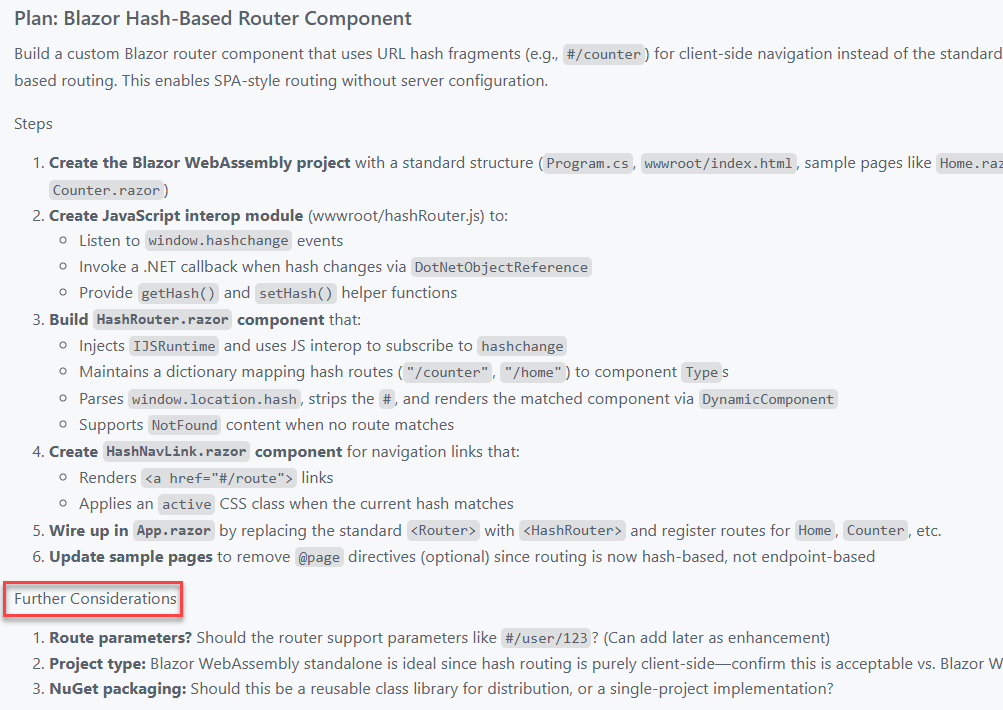
Once I started explicitly asking the AI to plan before writing code, everything changed. Instead of jumping straight to implementation, I would ask for a high-level approach, assumptions, risks, tradeoffs, and open questions.

This became useful not just for greenfield projects, but especially for bigger features inside existing systems. The kind of work where you need to think about impact radius, backwards compatibility, and how something will age over time.

This planning mode is now built in to nearly every tool. There are some heavier-weight workflows like SpecKit and things that require some ‘constitution’ setup and if that’s for you, that’s great. Those also can be re-usable inputs to any planning mode as well. For me an open slate has been fine and I just iterate IN planning mode and ensure that I address any follow-ups

Screenshot of a plan chat in VS Code with Copilot

The real step change came when I started persisting those plans as an artifact and task list (again, before task-tracking was in any of the tools I used).

I now drop them into a /docs/ folder. Sometimes they are lightweight notes. Sometimes they look more like a product requirements document. Either way, they live alongside the code. That means they are reviewable, shareable, and reusable.

Treating that conversation as an artifact was not only a context-saving changer, but also a time one! Those documents also become prompts. I didn’t have to rely on memory sessions and instead could get back later and start prompting with “Let’s work on part 3 of the plan now” and Copilot could pick right up with all the context. When I come back days or weeks later, I can feed the plan back into the model and say, “Continue from here.” That continuity has been incredibly valuable. So when offered to ‘start implementation’ or save the plan…always opt to save the plan!

Agents and Longer-Lived Context

From there, moving into agents felt natural.

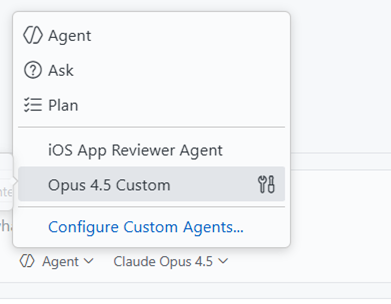
I have been starting many projects using Burke Holland’s Opus Agent, and it was a great on-ramp. What clicked for me was not just the output, but the structure.

Screenshot of choosing a custom agent in VS Code

Sub-agents handling focused tasks. Instructions that evolve as the project evolves. A clearer separation between thinking and doing. Instructions to also persist new-learnings for the benefit of later sessions. This part of the prompt can’t be stated enough how valuable it is.  Here’s the snippet:

Each time you complete a task or learn important information about the project, you should update the `.github/copilot-instructions.md` or any `agent.md` file that might be in the project to reflect any new information that you've learned or changes that require updates to these instructions files.

That structure maps much more closely to how I actually work as a developer. Iterative. Layered. Occasionally opinionated.

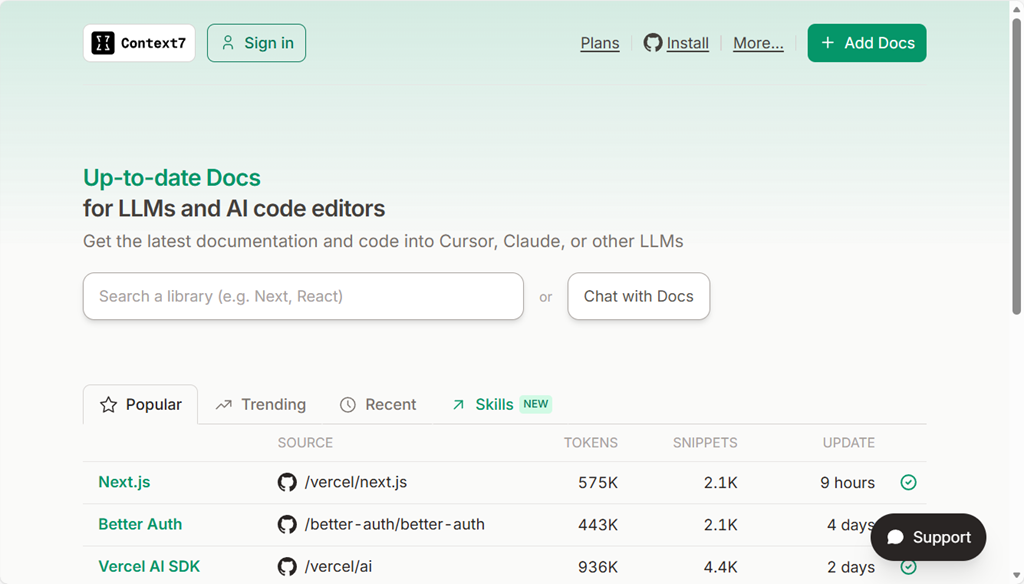
Context helpers are also essential. I’ve found Context7 (who was a first mover in the MCP server context race) to be fantastic for my needs so far! It serves as part of the researcher in this custom agent fetching information about frameworks, documentation about guidelines, blog posts that might be helpful, and reasoning with all of that to provide me with some well-rounded options. Seriously, use it.

Image of the Context7 web site

Sessions, State, and Knowing When to Start Fresh

Another habit I have had to learn is session management.

I now treat a new problem like opening a new terminal window. If I am switching domains, rethinking an approach, or starting a distinct feature, I open a new session.

That reset matters. It avoids dragging along stale assumptions and accidental context. State is powerful, but only when it is intentional.

Different Models for Different Jobs

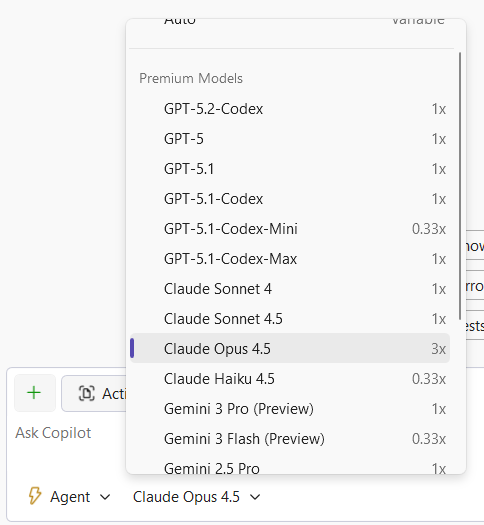
I also no longer believe there is a single best model. This has really been where the massive advancements have taken place in my opinion. GPT was amazing, until Claude Sonnet 3.x came out, until Claude Sonnet 4.5 came out, until Claude Opus 4.5 came out, until Gemini Pro 3, etc, etc.

Right now, my personal defaults look like this:

    • Opus 4.5 for coding and deeper technical reasoning
    • Gemini Pro for UI exploration and visual-adjacent thinking
    • “-mini” variants at time for some speed needs

      They have different strengths, and leaning into that has made the workflow feel more like a toolbox and less like a magic button. Your own mileage may vary depending on the tech, problem space, and tool you are using. Try them all is my advice and you’ll settle on one that works with your style, your tooling and your desired output you prefer. I focus on finding the one to help me complete the ‘job to be done’ versus any bias I have on whether it is good for any given framework I may be familiar with.

      Debug inner-loop

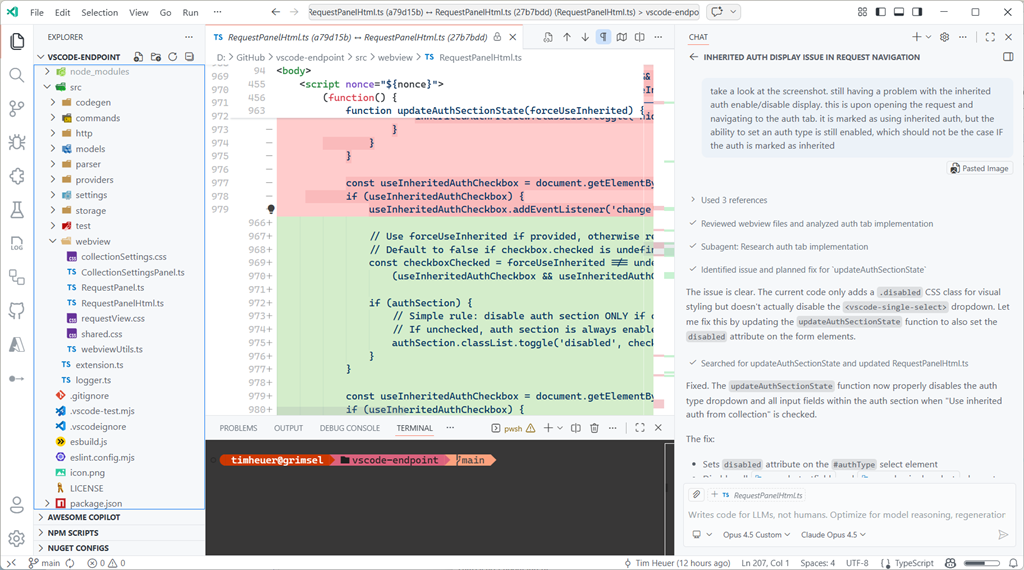
      I’ve also got a lot more comfortable with debugging with the Copilot in my inner-loop. If I have any error that wasn’t caught in build (where Copilot would normally see it and fix), or a UI that isn’t quite right, or an output that is wrong…I just copy paste that into that same fix session (or use a new one if a new problem) and sometimes just say “fix it.” Quite literally I’ve taken screenshots, pasted, said “fix it” and it does – interpreting the image, the issue, and scoping the fix. Amazing iterative process for most things! Heck I even pasted Apple App Store rejection notes into a new session “app got rejected, here was the notes” and BOOM with confidence it started to get to work Ah, I see where <appname> is violating this guideline, I’ll work on a fix… These moments make me smile every time.

      An Honest Take: I Still Prefer a GUI

      One thing worth saying out loud is that I still strongly prefer working in a GUI. Sorry, I’m just old I guess.

      A lot of AI tooling momentum right now is centered around the CLI. Agents that live in terminals. Prompts piped through commands. Workflows that assume you want to live in a shell all day.

      While I can do that, I do not particularly enjoy it. For me, the CLI experience is not intuitive.

      I am far more effective inside environments like VS Code or Visual Studio, where I already live. I can review code visually and contextually. I can leverage other extensions alongside AI. I can navigate files, diffs, tests, logs, and resources in one place. I can reason about the project as a whole, not just a stream of text. That familiarity matters. AI works best for me when it is embedded into that environment, not when it pulls me out of it. When I am already thinking about a feature, a refactor, or a bug, I want the AI to meet me there rather than forcing a context switch just to interact with it. Easier for me to mentally see other context, relationship to my repo, quick diff reviewing, etc.

      Screenshot of a coding session in VS Code

      This also ties back to planning. Having plans, docs, and context living next to the code makes everything easier to review, validate, and evolve. The GUI is not just comfort. It is leverage.

      I know plenty of developers feel the opposite, and that is great. This is just what works best for me. And I acknowledge just like my transition to using AI, my transition to using different methods of development will also evolve I’m sure. I’m personally just not seeing a huge benefit to moving to a CLI-only flow for what I do development on these days – I don’t need 10 terminal instances running at one time.

      Acknowledging the Privilege

      One thing I do not want to gloss over is that this workflow is enabled by paid plans. That matters. Not everyone can or should stack subscriptions just to experiment.

      Screenshot of model selection in Visual Studio

      I am fortunate to be able to explore these tools deeply, and I try to stay conscious of that when talking about what has worked for me. I’m starting to pay more close attention to what feeds into my context window either on-purpose or accidental as I know it impacts token-based billing and just efficiency of the LLM as well.

      Where I Have Landed

      AI has not replaced how I build software. It has changed how I think while building it.

      I plan more.  
      I am clearer about intent.
      I have found a ‘peer’ to communicate with, not command. The more I can express as I would with a co-worker, the greater success I find.

      And ironically, those improvements would still pay off even if the AI disappeared tomorrow.

      That might be the biggest takeaway for me. The most valuable part of integrating AI into my workflow was not automation. It was becoming a more deliberate developer.

      Have you heard about .NET Aspire yet? If not, go read, then maybe watch. It’s okay I’ll wait.

      Ok, great now that you have some grounding, I’m going to share some tips time-to-time of things that I find delightful that may not be obvious.  In this example I’m using the default .NET Aspire application template and added an ASP.NET Web API with enlisting into the orchestration. What does that mean exactly? Well the AppHost project (orchestrator) now has a reference to the project like so:

      var builder = DistributedApplication.CreateBuilder(args);
      

      builder.AddProject<Projects.WebApplication1>(“webapplication1”);

      builder.Build().Run();

      When I run the AppHost it launches all my services, etc. Yes this is a VERY simple case and only one service…I’m here to make a point, stay with me.

      If in my service I add some Aspire components they may come with their own configuration information. Things like connection strings or configuration options for the components. A lot of times these will result in environment variables at deploy time that the components will read. You can see this if you run and inspect the environment variables of the app:

      Screenshot of .NET Aspire dashboard environment variables

      But what if I have a configuration/variable that I need to set that isn’t coming from a component? I want that to be a part of the application model so that the orchestrator puts things in the right places, but also deployment tooling is aware of my whole config needs. No problem, here’s a quick tip if you haven’t discovered it yet!

      I want a config value in my app as MY_ENV_CONFIG_VAR…a very important variable. It is a value my API needs as you can see in this super important endpoint:

      app.MapGet("/somerandomconfigvar", () =>
      {
          var config = builder.Configuration.GetValue<string>("MY_ENV_CONFIG_VAR");
          return config;
      });
      

      How can I get this in my Aspire environment so the app model is aware, deployment manifests are aware, etc. Easy. In the AppHost change your AddProject line to add a WithEnvironment() call specifying the variable/value to set. Like this:

      var builder = DistributedApplication.CreateBuilder(args);
      
      builder.AddProject<Projects.WebApplication1>("webapplication1")
          .WithEnvironment("MY_ENV_CONFIG_VAR", "Hello world!");
      
      builder.Build().Run();
      

      Now when I launch the orchestrator runs all my services and adds them to the environment variables for that app:

      Screenshot of .NET Aspire dashboard environment variables

      And when I produce a deployment manifest, that information is stamped as well for deployment tools to reason with and set in their configuration way.

      {
        "resources": {
          "webapplication1": {
            "type": "project.v0",
            "path": "..\\WebApplication1\\WebApplication1.csproj",
            "env": {
              "OTEL_DOTNET_EXPERIMENTAL_OTLP_EMIT_EXCEPTION_LOG_ATTRIBUTES": "true",
              "OTEL_DOTNET_EXPERIMENTAL_OTLP_EMIT_EVENT_LOG_ATTRIBUTES": "true",
              "MY_ENV_CONFIG_VAR": "Hello world!"
            },
            "bindings": {
              "http": {
                "scheme": "http",
                "protocol": "tcp",
                "transport": "http"
              },
              "https": {
                "scheme": "https",
                "protocol": "tcp",
                "transport": "http"
              }
            }
          }
        }
      }
      

      Pretty cool, eh? Anyhow, just a small tip to help you on your .NET Aspire journey.