automating an encoding pipeline
while preparing for the code trip, we have several 'on-board' needs. one of which is a quick method to get our content encoded for consumption by devices and frameworks (i.e., silverlight). we want a smooth method so that we aren't boggled down with multiple tools opening and changing settings, cutting and pasting, etc.
so, inspired by my colleagues post about using workflow to automate, i set about the task. we're going to be making several assumptions along our production, one of which is we know we'll have multiple video/audio sources and that there *will* be some post-edit being done. but once we have that post edit completed, we'll want all videos to feel similar (size, quality, etc.) and encoded for multiple uses. i've pretty much decided that there really are 3 formats that would suffice the world: WMV, MP4, MP3. if we get all of these, we can accommodate most. here's how i justify that:
- WMV: we'll have standard (4:3) and widescreen (16:9) format for viewing offline as well as online via silverlight (we'll be using the widescreen online most likely). we'll also have a Zune formatted version for quick updating.
- MP4: itunes, ipod, mac viewing in both standard and widescreen formats
- MP3: audio format beloved by all
so the first step is to tackle the how. if you don't know, expression encoder has a command-line interface. this is especially helpful for a few things, namely our batch processing (you can also save job files and send in a job to the command-line interface quickly). so the first thing i did was wrap the input parameters into a windows workflow foundation activity. luckily michael did a lot of this for me in his webcast :-). it basically abstracts all the possible input parameters and enables you to optionally send them into the activity:
for the mp4 encoding i'm using a piece of software that also has an command-line interface. this one isn't as flexible so given my two known encoding types i'm pretty much hard-wiring in some of the settings and only enabling the size parameters for alteration.
mp3 version -- let's get to that later.
now that i have my activities (one for WMV, one for MP4) in an activity library, i'm ready for a client tool. for our purposes, we don't need a fancy GUI tool, so i settled for a command-line interface. in my client i added a sequential workflow and then added my activities. i re-used the WMV activity 3 times to alter the different settings and then use the output of them to feed into my MP4 activity (used twice). the resulting visual workflow looks like this:

the input to the command line looks for a source WMV file, title, description, author, album. these input parameters are sent as named parameters to the workflow activity:
var namedArguments = new Dictionary<string, object>();namedArguments.Add(“SourceFilename”, args[0]); namedArguments.Add(“Title”, args[1]); namedArguments.Add(“Description”, args[2]); namedArguments.Add(“Author”, args[3]); namedArguments.Add(“Album”, args[4]);
which are then mapped to properties of the activities:
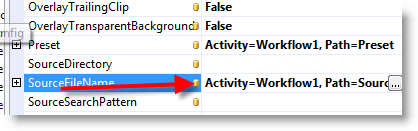
the activity libraries also expose a few other properties that i'm passing in to my commands. for example, i want each video to have a bumper intro and then an icon overlay in the right location. i'm able to pass in these parameters which then map to expression encoder properties. i'm also able to tell it to make sure to letterbox content that isn't native 16:9 aspect ratio for the standard format encodings. the result of these activities is that i have three WMV files appropriate for my use. expression encoder also generates thumbnail images of a frame in each video. i've not much use for them, so i added the last workflow code to simply clean up the jpeg images generate (delete them) from the output directory.
one problem i had was that expression encoder exposes a lot of properties but not for metadata individually. i wanted to embed the appropriate metadata for the WMV files for the title, description, etc. luckily there is one input parameter for encoder that i can append to my other custom ones, and that is "/Preset" which enables me to provide certain presets that will be passed in and here is where it allows me to make metadata a part of that preset. the input parameter looks for a literal xml file so i have to create one. i added the template as a resource in my project:
<?xml version="1.0" encoding="utf-8"?>
<Preset>
  <MediaFiles>
    <Metadata>
          <Item
            Name="Title"
            Value="{0}" />
          <Item
            Name="Author"
            Value="{1}" />
          <Item
            Name="Copyright"
            Value="2008, Microsoft" />
          <Item
            Name="WM/MediaCredits"
            Value="{2}" />
          <Item
            Name="Description"
            Value="{3}" />
          <Item
            Name="WM/AlbumArtist"
            Value="{4}" />
          <Item
            Name="WM/AlbumTitle"
            Value="{4}" />
          <Item
            Name="WM/Genre"
            Value="Podcast" />
          <Item
            Name="WM/Year"
            Value="{5}" />
        </Metadata>
  </MediaFiles>
</Preset>
and then when the user executes the command-line interface, i take their input, merge it with the xml here and output a temporary xml file that is then passed into the named parameter dictionary for the workflow activity. when no longer needed it is cleaned up (on the workflow completed event handler). now my WMV file is complete with formats and metadata.
for the MP4 format i chose to use the resulting output of the WMV file and do a single pass there. the settings for the tool weren't ideal for adding overlays, etc. so using the resulting WMV file and same bitrates i'm just passing in the resulting WMV and creating two MP4 formats. boom. done. the metadata actually *was* parameters i could send into this tool, so it was easy to ensure that metadata was in there.
now, on to the MP3 format. sigh. what i need is a tool that will enable me an WMV or MP4 input and extract the audio-only track into an MP3 file. i found all sorts of tools that will do this, but none that can be automated from a command-line. this is my last resulting automation problem for now. if anyone has tips on how to do this, i'll send you a prize :-).
now on to decisions. while we'll have several formats to offer viewers, we also want to have feeds with enclosures for readers. that brings us to a decision. podcast formats for enclosures only enable one enclosure. so, dear reader, what do we choose? i figure we offer a WMV, MP4 and MP3 feed uniquely...but then which format do we supply? is this a lame question? the widescreen will be the best quality, but will it render okay on all devices/readers? what do you choose?
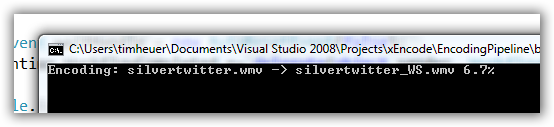
anyhow, a fun little project i finished (except for the MP3 -- prize awaiting) and thought i'd share how it is accomplished. one little command "encodepipe.exe <file> <title> <desc> <author> <album>" and a few short minutes later i have all the formats i need. the next step is to automate upload to a content delivery network so i don't have to pick and choose uploading!
we just posted the schedule for our trip, so if you want to subscribe to the feed to be notified when we'll start putting out some content, that would be cool. real-time updates via twitter as well. see you on the road!


