Adding jQuery to your site with Glimmer
Last week I was wanting to do something on my site sort of a ‘breaking news’ style banner that would span the entire site width but only when I wanted it too – based on a cookie or something else. And I didn’t want to do something server side, because I was sick of doing stuff like that.
Not having played with jQuery, I thought I’d take a dive. Prior to MIX09, I’d been testing something that the MIXOnline team had been toying with, which has just been released: Glimmer. Glimmer is described as a jQuery Interactive Design Tool. A helper for those like me who know nothing about it. Sure, jQuery has a ton of resources, and my Twitter peeps came through helping me navigate some of the things that aren’t glaringly obvious for noobs like me :-).
But Glimmer got me started, and I think that’s the point. I had an overall HTML structure already and had the div element that I wanted to work with in jQuery – my goal was to animate it in a ‘breaking news’ sort of manner (or at least what’s in my head when I think of that concept). I opened up my HTML in Glimmer and went to work. I simply added the action (the function I wanted to trigger), then pointed it to the element to target. Here’s what my simple Glimmer UI action setup looked like:
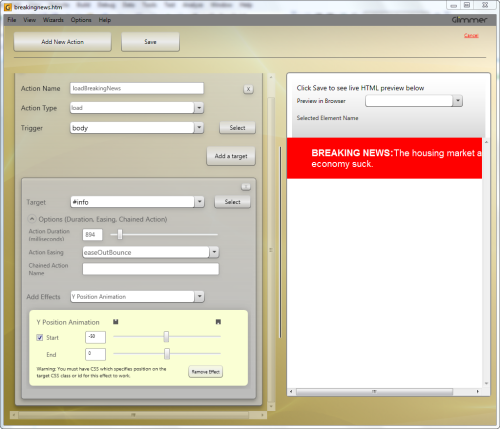
I clicked save and it created a JavaScript file for me with the completed code:
1: jQuery(function($) {
<pre style="border-bottom-style: none; text-align: left; padding-bottom: 0px; line-height: 12pt; border-right-style: none; background-color: #f4f4f4; margin: 0em; padding-left: 0px; width: 100%; padding-right: 0px; font-family: 'Courier New', courier, monospace; direction: ltr; border-top-style: none; color: black; font-size: 8pt; border-left-style: none; overflow: visible; padding-top: 0px"><span style="color: #606060" id="lnum2"> 2:</span> </pre><pre style="border-bottom-style: none; text-align: left; padding-bottom: 0px; line-height: 12pt; border-right-style: none; background-color: #f4f4f4; margin: 0em; padding-left: 0px; width: 100%; padding-right: 0px; font-family: 'Courier New', courier, monospace; direction: ltr; border-top-style: none; color: black; font-size: 8pt; border-left-style: none; overflow: visible; padding-top: 0px"><span style="color: #606060" id="lnum3"> 3:</span> <span style="color: #0000ff">function</span> loadBreakingNews(<span style="color: #0000ff">event</span>)</pre><pre style="border-bottom-style: none; text-align: left; padding-bottom: 0px; line-height: 12pt; border-right-style: none; background-color: #f4f4f4; margin: 0em; padding-left: 0px; width: 100%; padding-right: 0px; font-family: 'Courier New', courier, monospace; direction: ltr; border-top-style: none; color: black; font-size: 8pt; border-left-style: none; overflow: visible; padding-top: 0px"><span style="color: #606060" id="lnum4"> 4:</span> {</pre><pre style="border-bottom-style: none; text-align: left; padding-bottom: 0px; line-height: 12pt; border-right-style: none; background-color: #f4f4f4; margin: 0em; padding-left: 0px; width: 100%; padding-right: 0px; font-family: 'Courier New', courier, monospace; direction: ltr; border-top-style: none; color: black; font-size: 8pt; border-left-style: none; overflow: visible; padding-top: 0px"><span style="color: #606060" id="lnum5"> 5:</span> $(<span style="color: #006080">"#info"</span>).css(<span style="color: #006080">"top"</span>,<span style="color: #006080">"-50px"</span>);</pre><pre style="border-bottom-style: none; text-align: left; padding-bottom: 0px; line-height: 12pt; border-right-style: none; background-color: #f4f4f4; margin: 0em; padding-left: 0px; width: 100%; padding-right: 0px; font-family: 'Courier New', courier, monospace; direction: ltr; border-top-style: none; color: black; font-size: 8pt; border-left-style: none; overflow: visible; padding-top: 0px"><span style="color: #606060" id="lnum6"> 6:</span> $(<span style="color: #006080">"#info"</span>).animate({<span style="color: #006080">"top"</span>:0}, 894, <span style="color: #006080">"easeOutBounce"</span>, <span style="color: #0000ff">null</span>);</pre><pre style="border-bottom-style: none; text-align: left; padding-bottom: 0px; line-height: 12pt; border-right-style: none; background-color: #f4f4f4; margin: 0em; padding-left: 0px; width: 100%; padding-right: 0px; font-family: 'Courier New', courier, monospace; direction: ltr; border-top-style: none; color: black; font-size: 8pt; border-left-style: none; overflow: visible; padding-top: 0px"><span style="color: #606060" id="lnum7"> 7:</span> }</pre><pre style="border-bottom-style: none; text-align: left; padding-bottom: 0px; line-height: 12pt; border-right-style: none; background-color: #f4f4f4; margin: 0em; padding-left: 0px; width: 100%; padding-right: 0px; font-family: 'Courier New', courier, monospace; direction: ltr; border-top-style: none; color: black; font-size: 8pt; border-left-style: none; overflow: visible; padding-top: 0px"><span style="color: #606060" id="lnum8"> 8:</span> </pre><pre style="border-bottom-style: none; text-align: left; padding-bottom: 0px; line-height: 12pt; border-right-style: none; background-color: #f4f4f4; margin: 0em; padding-left: 0px; width: 100%; padding-right: 0px; font-family: 'Courier New', courier, monospace; direction: ltr; border-top-style: none; color: black; font-size: 8pt; border-left-style: none; overflow: visible; padding-top: 0px"><span style="color: #606060" id="lnum9"> 9:</span> loadBreakingNews();</pre><pre style="border-bottom-style: none; text-align: left; padding-bottom: 0px; line-height: 12pt; border-right-style: none; background-color: #f4f4f4; margin: 0em; padding-left: 0px; width: 100%; padding-right: 0px; font-family: 'Courier New', courier, monospace; direction: ltr; border-top-style: none; color: black; font-size: 8pt; border-left-style: none; overflow: visible; padding-top: 0px"><span style="color: #606060" id="lnum10"> 10:</span> </pre><pre style="border-bottom-style: none; text-align: left; padding-bottom: 0px; line-height: 12pt; border-right-style: none; background-color: #f4f4f4; margin: 0em; padding-left: 0px; width: 100%; padding-right: 0px; font-family: 'Courier New', courier, monospace; direction: ltr; border-top-style: none; color: black; font-size: 8pt; border-left-style: none; overflow: visible; padding-top: 0px"><span style="color: #606060" id="lnum11"> 11:</span> });</pre>Sure, to you jQuery pros, this looks simple, but this tool helped me quickly use a design-time tool to generate this without previous knowledge of jQuery. Now, I’ve learned a few things about jQuery since my first incarnation – all of which took 2 seconds with Glimmer. I decided I wanted to use the built-in “slideDown” feature in jQuery. Some things like this aren’t supported in Glimmer yet, but simple things are…and quite frankly, the combination of Y position animation and an easing function accomplished the same goal.
I made a few hand-modifications to fit my needs (checking for cookies to trigger the banner, etc), but Glimmer got me started right away figuring things out quickly…it was awesome. I think it comes with a free ShamWow as well, I’m not sure, but I swear Karsten told me that. :-) Check out Glimmer today if you are new (or even seasoned) to jQuery. There is a plugin model I haven’t explored, but check out the Glimmer project site for more information.
Next maybe I should explore working with jQuery and Silverlight as I know there is more to jQuery than animations and I think it would make a helpful library for the HTML interop layer.
Please enjoy some of these other recent posts...