from the geniuses who determined that only a one quart bag full of 3.5 oz liquids is permitted, comes new rules about bringing lithium-ion batteries in united states travel.
what seems odd to me is that the restriction is on checked baggage and not carry-on luggage per se. from the site, it indicates that a spare battery is something not installed on the device. and if you wanted to bring a spare lithium ion battery along, you have to put it in your carry-on luggage as putting it in your checked luggage is forbidden. what?!
what concerns me (as i don't believe this will affect my day-to-day travel...i don't travel with spare batteries that much. but i've recently gotten some camera equipment that has a lot of batteries: 2 for the camera, one huge li-ion for the light equipment. and the bummer is that all of it won't fit in a case that is carry-on size...so it has to be checked.
so now the question becomes...what happens when you leave your luggage with TSA to be processed and you walk to your gate...do they make a discovery of a battery and then decide not to send your luggage? take out the battery and replace it with a note "sorry, we have your battery now"?
brilliant.
this time from telerik. telerik has just announced their RAD Controls for Silverlight 1.1(2.0). they have a site up with some demonstrations, etc. (obviously requiring silverlight 1.1 to render). they have controls like:
- upload
- button
- combobox
- listbox
- menus
- progress bar
- tab strip
- textbox
- treeview
- slider
- and some animation controls
a pretty comprehensive list. very cool. i've always been impressed with the partner ecosystem of microsoft 3rd party developers. telerik is no substitute. i knew that they'd be one that would be providing a great control story for silverlight.
take a look at their demo site and play around.
i've got a few messages about 'hey, where did the silverlight project template go in visual studio 2008? what the heck, doesn't microsoft want us to create projects?'
trouble is that it is there, but different...you know same, but different.
if you have visual studio 2008 installed, make sure you install the silverlight tools for visual studio 2008. yeah, i know it says 'tools for alpha' -- just install it would ya. after you install it, you'll have the project templates for silverlight 1.1 2.0 as well as for 1.0. but where is it?
File...New Web Site... then you should see this:
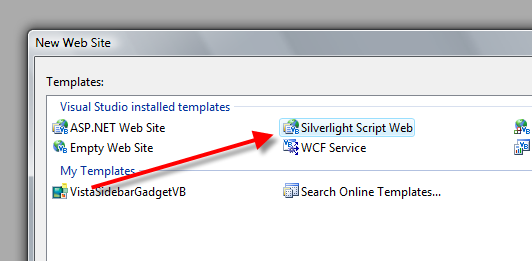
that's what you want. hope this helps.
i had previously written about creating custom expression encoder templates and integrating them into the encoder workflow (if you haven't read that, check it out, very simple process). my process was simple and followed the "CASE" methodology*.
Copy
Always
Steal
Everything
basically i would encode a video file to get the output of the encoder template, then blast away all the xaml in player.xaml, and create your own silverlight media player skin. really the only thing you need to know is the 'well known names' for certain controls (the most common of which i outline in my blog post. i've received comments and questions about how to get more into the code and curiosities of what else could be done and what is going on under the hoods to the bindings of the well known names. all this magic happens in baseplayer.js -- a file included in the encoder templates.
problem is that baseplayer.js is a crunched/optimized javascript file and really not human readable in a short time at least.
now the expression encoder team has went one step further. they've released a 22-page document outlining the process for creating a custom template that is bit more 'official' than my simple steps, but essentially encompasses the ideas. what is great is this document includes all the well known names that you might want to implement as well as descriptions on how to override default behaviors as well -- i've included a direct link to the document at the end of this post. one of the most valuable things i like in the document is a visual layout of a player and the well known names mapped so you can see them:

in addition to that, the team has provided a debug version of baseplayer.js as a supplement to expression encoder (the debug version comes with a EULA so be sure to read it -- only licensed users of expression encoder may use this debug version. this means it is human readable :-). this should help you understand the bindings more and determine what (if anything) else you would want to do.
so take a look at my previous post if you haven't, then download the docs and debug version if you have expression encoder to start building your templates today!
File: Developing Silverlight Media Player Skins
File: BasePlayer.js debug version