Managing Silverlight 3 navigation behavior
I’ve been playing around with the Silverlight 3 navigation framework some more (thanks for the comments/thoughts on the last post about sharing data). I got a few emails about understanding how the navigation works and people coming up with interesting uses. Let’s take a moment to explore two of these concepts: out-of-browser navigation and controlling your navigation in your app.
Navigation Basics
If you are using Visual Studio 2008 and the Silverlight 3 tools, you’ll notice that when you choose to create a new project (or perhaps you didn’t notice and this will be new to you) that you have an option to create a Silverlight Navigation Application which is a starter template for some basic navigation framework. This isn’t required to use the navigation framework, but merely a starting point.
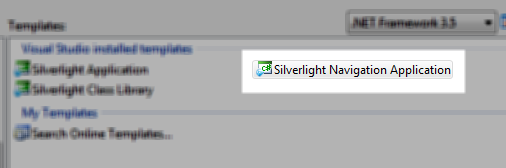
Once you have this template and click on the different navigation buttons (and/or add your own as well) you’ll see that the content changes based on the event. Additionally you should notice that the browser’s back/forward buttons integrate with this functionality and allow you to navigate back/forward using the browser controls as well, honoring the navigation context of the application.
Out-of-browser Navigation
So now you’ve finished your app, complete with navigation and also added the functionality to allow the application to be installed out-of-browser. Yipee! Your users install the application offline and boom, they call you and say “how do I go back to where I was?” Well, ideally you’ve created an application that has good navigation points in it for them, but perhaps you want to add simple forward/back functionality while in out-of-browser mode similar to the in-browser buttons that come with their preferred Internet browsing software.
Guess what? The navigation framework provides some APIs to help you that are a part of the Frame that you are navigating:
- CanGoForward/CanGoBack
- GoForward/GoBack
With these two you can emulate the same browser back/forward functionality. Here’s an example using the default VS2008 navigation template. In MainPage.xaml I’ve removed the branding information (your.application.name) and added the following (about line 30):
1: <StackPanel Style="{StaticResource BrandingPanelStyle}" x:Name="JournalNav">
<pre style="border-bottom-style: none; text-align: left; padding-bottom: 0px; line-height: 12pt; border-right-style: none; background-color: #f4f4f4; margin: 0em; padding-left: 0px; width: 100%; padding-right: 0px; font-family: 'Courier New', courier, monospace; direction: ltr; border-top-style: none; color: black; font-size: 8pt; border-left-style: none; overflow: visible; padding-top: 0px"><span style="color: #606060" id="lnum2"> 2:</span> <span style="color: #0000ff"><</span><span style="color: #800000">Button</span> <span style="color: #ff0000">Content</span><span style="color: #0000ff">="back"</span> <span style="color: #ff0000">Style</span><span style="color: #0000ff">="{StaticResource PageLinkStyle}"</span></pre><pre style="border-bottom-style: none; text-align: left; padding-bottom: 0px; line-height: 12pt; border-right-style: none; background-color: #f4f4f4; margin: 0em; padding-left: 0px; width: 100%; padding-right: 0px; font-family: 'Courier New', courier, monospace; direction: ltr; border-top-style: none; color: black; font-size: 8pt; border-left-style: none; overflow: visible; padding-top: 0px"><span style="color: #606060" id="lnum3"> 3:</span> <span style="color: #ff0000">x:Name</span><span style="color: #0000ff">="NavBack"</span> <span style="color: #ff0000">Click</span><span style="color: #0000ff">="NavBack_Click"</span> <span style="color: #0000ff">/></span></pre><pre style="border-bottom-style: none; text-align: left; padding-bottom: 0px; line-height: 12pt; border-right-style: none; background-color: #f4f4f4; margin: 0em; padding-left: 0px; width: 100%; padding-right: 0px; font-family: 'Courier New', courier, monospace; direction: ltr; border-top-style: none; color: black; font-size: 8pt; border-left-style: none; overflow: visible; padding-top: 0px"><span style="color: #606060" id="lnum4"> 4:</span> <span style="color: #0000ff"><</span><span style="color: #800000">Button</span> <span style="color: #ff0000">Content</span><span style="color: #0000ff">="forward"</span> <span style="color: #ff0000">Style</span><span style="color: #0000ff">="{StaticResource PageLinkStyle}"</span> </pre><pre style="border-bottom-style: none; text-align: left; padding-bottom: 0px; line-height: 12pt; border-right-style: none; background-color: #f4f4f4; margin: 0em; padding-left: 0px; width: 100%; padding-right: 0px; font-family: 'Courier New', courier, monospace; direction: ltr; border-top-style: none; color: black; font-size: 8pt; border-left-style: none; overflow: visible; padding-top: 0px"><span style="color: #606060" id="lnum5"> 5:</span> <span style="color: #ff0000">x:Name</span><span style="color: #0000ff">="NavFwd"</span> <span style="color: #ff0000">Click</span><span style="color: #0000ff">="NavFwd_Click"</span> <span style="color: #0000ff">/></span></pre><pre style="border-bottom-style: none; text-align: left; padding-bottom: 0px; line-height: 12pt; border-right-style: none; background-color: #f4f4f4; margin: 0em; padding-left: 0px; width: 100%; padding-right: 0px; font-family: 'Courier New', courier, monospace; direction: ltr; border-top-style: none; color: black; font-size: 8pt; border-left-style: none; overflow: visible; padding-top: 0px"><span style="color: #606060" id="lnum6"> 6:</span> <span style="color: #0000ff"></</span><span style="color: #800000">StackPanel</span><span style="color: #0000ff">></span></pre>The NavBack/NavFwd click functions look like this:
1: private void NavBack_Click(object sender, RoutedEventArgs e)
<pre style="border-bottom-style: none; text-align: left; padding-bottom: 0px; line-height: 12pt; border-right-style: none; background-color: #f4f4f4; margin: 0em; padding-left: 0px; width: 100%; padding-right: 0px; font-family: 'Courier New', courier, monospace; direction: ltr; border-top-style: none; color: black; font-size: 8pt; border-left-style: none; overflow: visible; padding-top: 0px"><span style="color: #606060" id="lnum2"> 2:</span> {</pre><pre style="border-bottom-style: none; text-align: left; padding-bottom: 0px; line-height: 12pt; border-right-style: none; background-color: #f4f4f4; margin: 0em; padding-left: 0px; width: 100%; padding-right: 0px; font-family: 'Courier New', courier, monospace; direction: ltr; border-top-style: none; color: black; font-size: 8pt; border-left-style: none; overflow: visible; padding-top: 0px"><span style="color: #606060" id="lnum3"> 3:</span> <span style="color: #0000ff">this</span>.Frame.GoBack();</pre><pre style="border-bottom-style: none; text-align: left; padding-bottom: 0px; line-height: 12pt; border-right-style: none; background-color: #f4f4f4; margin: 0em; padding-left: 0px; width: 100%; padding-right: 0px; font-family: 'Courier New', courier, monospace; direction: ltr; border-top-style: none; color: black; font-size: 8pt; border-left-style: none; overflow: visible; padding-top: 0px"><span style="color: #606060" id="lnum4"> 4:</span> }</pre><pre style="border-bottom-style: none; text-align: left; padding-bottom: 0px; line-height: 12pt; border-right-style: none; background-color: #f4f4f4; margin: 0em; padding-left: 0px; width: 100%; padding-right: 0px; font-family: 'Courier New', courier, monospace; direction: ltr; border-top-style: none; color: black; font-size: 8pt; border-left-style: none; overflow: visible; padding-top: 0px"><span style="color: #606060" id="lnum5"> 5:</span> </pre><pre style="border-bottom-style: none; text-align: left; padding-bottom: 0px; line-height: 12pt; border-right-style: none; background-color: #f4f4f4; margin: 0em; padding-left: 0px; width: 100%; padding-right: 0px; font-family: 'Courier New', courier, monospace; direction: ltr; border-top-style: none; color: black; font-size: 8pt; border-left-style: none; overflow: visible; padding-top: 0px"><span style="color: #606060" id="lnum6"> 6:</span> <span style="color: #0000ff">private</span> <span style="color: #0000ff">void</span> NavFwd_Click(<span style="color: #0000ff">object</span> sender, RoutedEventArgs e)</pre><pre style="border-bottom-style: none; text-align: left; padding-bottom: 0px; line-height: 12pt; border-right-style: none; background-color: #f4f4f4; margin: 0em; padding-left: 0px; width: 100%; padding-right: 0px; font-family: 'Courier New', courier, monospace; direction: ltr; border-top-style: none; color: black; font-size: 8pt; border-left-style: none; overflow: visible; padding-top: 0px"><span style="color: #606060" id="lnum7"> 7:</span> {</pre><pre style="border-bottom-style: none; text-align: left; padding-bottom: 0px; line-height: 12pt; border-right-style: none; background-color: #f4f4f4; margin: 0em; padding-left: 0px; width: 100%; padding-right: 0px; font-family: 'Courier New', courier, monospace; direction: ltr; border-top-style: none; color: black; font-size: 8pt; border-left-style: none; overflow: visible; padding-top: 0px"><span style="color: #606060" id="lnum8"> 8:</span> <span style="color: #0000ff">this</span>.Frame.GoForward();</pre><pre style="border-bottom-style: none; text-align: left; padding-bottom: 0px; line-height: 12pt; border-right-style: none; background-color: #f4f4f4; margin: 0em; padding-left: 0px; width: 100%; padding-right: 0px; font-family: 'Courier New', courier, monospace; direction: ltr; border-top-style: none; color: black; font-size: 8pt; border-left-style: none; overflow: visible; padding-top: 0px"><span style="color: #606060" id="lnum9"> 9:</span> }</pre>Now on the Frame that I’m using I added an event handler for Navigated that looks like this:
1: private void Frame_Navigated(object sender, NavigationEventArgs e)
<pre style="border-bottom-style: none; text-align: left; padding-bottom: 0px; line-height: 12pt; border-right-style: none; background-color: #f4f4f4; margin: 0em; padding-left: 0px; width: 100%; padding-right: 0px; font-family: 'Courier New', courier, monospace; direction: ltr; border-top-style: none; color: black; font-size: 8pt; border-left-style: none; overflow: visible; padding-top: 0px"><span style="color: #606060" id="lnum2"> 2:</span> {</pre><pre style="border-bottom-style: none; text-align: left; padding-bottom: 0px; line-height: 12pt; border-right-style: none; background-color: #f4f4f4; margin: 0em; padding-left: 0px; width: 100%; padding-right: 0px; font-family: 'Courier New', courier, monospace; direction: ltr; border-top-style: none; color: black; font-size: 8pt; border-left-style: none; overflow: visible; padding-top: 0px"><span style="color: #606060" id="lnum3"> 3:</span> NavBack.Opacity = Frame.CanGoBack ? 1 : 0;</pre><pre style="border-bottom-style: none; text-align: left; padding-bottom: 0px; line-height: 12pt; border-right-style: none; background-color: #f4f4f4; margin: 0em; padding-left: 0px; width: 100%; padding-right: 0px; font-family: 'Courier New', courier, monospace; direction: ltr; border-top-style: none; color: black; font-size: 8pt; border-left-style: none; overflow: visible; padding-top: 0px"><span style="color: #606060" id="lnum4"> 4:</span> NavFwd.Opacity = Frame.CanGoForward ? 1:0;</pre><pre style="border-bottom-style: none; text-align: left; padding-bottom: 0px; line-height: 12pt; border-right-style: none; background-color: #f4f4f4; margin: 0em; padding-left: 0px; width: 100%; padding-right: 0px; font-family: 'Courier New', courier, monospace; direction: ltr; border-top-style: none; color: black; font-size: 8pt; border-left-style: none; overflow: visible; padding-top: 0px"><span style="color: #606060" id="lnum5"> 5:</span> }</pre>And finally I’ve added a Loaded event handler to MainPage to handle the initial load:
1: void MainPage_Loaded(object sender, RoutedEventArgs e)
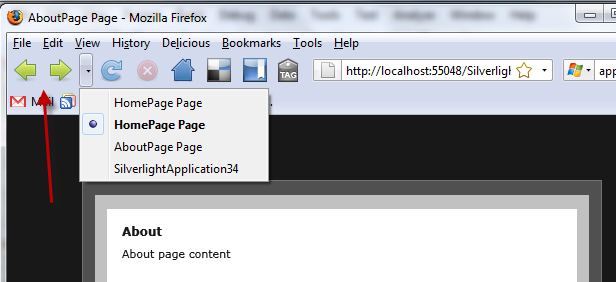
<pre style="border-bottom-style: none; text-align: left; padding-bottom: 0px; line-height: 12pt; border-right-style: none; background-color: #f4f4f4; margin: 0em; padding-left: 0px; width: 100%; padding-right: 0px; font-family: 'Courier New', courier, monospace; direction: ltr; border-top-style: none; color: black; font-size: 8pt; border-left-style: none; overflow: visible; padding-top: 0px"><span style="color: #606060" id="lnum2"> 2:</span> {</pre><pre style="border-bottom-style: none; text-align: left; padding-bottom: 0px; line-height: 12pt; border-right-style: none; background-color: #f4f4f4; margin: 0em; padding-left: 0px; width: 100%; padding-right: 0px; font-family: 'Courier New', courier, monospace; direction: ltr; border-top-style: none; color: black; font-size: 8pt; border-left-style: none; overflow: visible; padding-top: 0px"><span style="color: #606060" id="lnum3"> 3:</span> JournalNav.Visibility = App.Current.RunningOffline ? Visibility.Visible : Visibility.Collapsed;</pre><pre style="border-bottom-style: none; text-align: left; padding-bottom: 0px; line-height: 12pt; border-right-style: none; background-color: #f4f4f4; margin: 0em; padding-left: 0px; width: 100%; padding-right: 0px; font-family: 'Courier New', courier, monospace; direction: ltr; border-top-style: none; color: black; font-size: 8pt; border-left-style: none; overflow: visible; padding-top: 0px"><span style="color: #606060" id="lnum4"> 4:</span> }</pre>The end result is the application in-browser works fine and uses the browser software back/forward buttons. When installed out-of-browser, you’ll notice that an application-specific “back” and “forward” links are created (only when they are applicable) and the user can still navigate the frame that way.
In browser:
Out-of-browser:
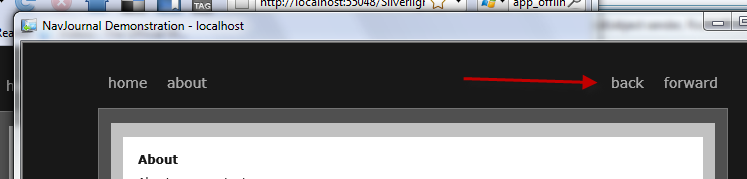
Simple enough and I would not have had to change anything about how I already used the navigation framework in my application.
Controlling your navigation history
The other comment I’ve got is if people wanted to have ultimate control over their history navigation and have some parts integrate with the browser and other parts not. Let me introduce you to a property of Frame: JournalOwnership. By default the setting is Automatic, which means that the frame integrates with the browser history journal. Setting it to something else, like OwnsJournal for example, means that it will not automatically integrate and you are now responsible for that navigation.
What this means is that you can have a frame that is independent of the browser navigation, but still leverage the power of the framework. Let’s alter our default template and add one of our navigation pages to include it’s own navigation pages, but those we don’t want to be a part of the overall app.
I’ve modified the MainPage to add a link to another page called SubNavigation.xaml which then looks like this:
1: <StackPanel>
<pre style="border-bottom-style: none; text-align: left; padding-bottom: 0px; line-height: 12pt; border-right-style: none; background-color: #f4f4f4; margin: 0em; padding-left: 0px; width: 100%; padding-right: 0px; font-family: 'Courier New', courier, monospace; direction: ltr; border-top-style: none; color: black; font-size: 8pt; border-left-style: none; overflow: visible; padding-top: 0px"><span style="color: #606060" id="lnum2"> 2:</span> <span style="color: #0000ff"><</span><span style="color: #800000">StackPanel</span> <span style="color: #ff0000">x:Name</span><span style="color: #0000ff">="JournalNav"</span> <span style="color: #ff0000">Orientation</span><span style="color: #0000ff">="Horizontal"</span><span style="color: #0000ff">></span></pre><pre style="border-bottom-style: none; text-align: left; padding-bottom: 0px; line-height: 12pt; border-right-style: none; background-color: #f4f4f4; margin: 0em; padding-left: 0px; width: 100%; padding-right: 0px; font-family: 'Courier New', courier, monospace; direction: ltr; border-top-style: none; color: black; font-size: 8pt; border-left-style: none; overflow: visible; padding-top: 0px"><span style="color: #606060" id="lnum3"> 3:</span> </pre><pre style="border-bottom-style: none; text-align: left; padding-bottom: 0px; line-height: 12pt; border-right-style: none; background-color: #f4f4f4; margin: 0em; padding-left: 0px; width: 100%; padding-right: 0px; font-family: 'Courier New', courier, monospace; direction: ltr; border-top-style: none; color: black; font-size: 8pt; border-left-style: none; overflow: visible; padding-top: 0px"><span style="color: #606060" id="lnum4"> 4:</span> <span style="color: #0000ff"><</span><span style="color: #800000">Button</span> <span style="color: #ff0000">Click</span><span style="color: #0000ff">="NavButton_Click"</span> <span style="color: #ff0000">Tag</span><span style="color: #0000ff">="/Views/SubNav/SubNav1.xaml"</span> <span style="color: #ff0000">Content</span><span style="color: #0000ff">="section 1"</span> </pre><pre style="border-bottom-style: none; text-align: left; padding-bottom: 0px; line-height: 12pt; border-right-style: none; background-color: #f4f4f4; margin: 0em; padding-left: 0px; width: 100%; padding-right: 0px; font-family: 'Courier New', courier, monospace; direction: ltr; border-top-style: none; color: black; font-size: 8pt; border-left-style: none; overflow: visible; padding-top: 0px"><span style="color: #606060" id="lnum5"> 5:</span> <span style="color: #ff0000">Style</span><span style="color: #0000ff">="{StaticResource PageLinkStyle}"</span><span style="color: #0000ff">/></span></pre><pre style="border-bottom-style: none; text-align: left; padding-bottom: 0px; line-height: 12pt; border-right-style: none; background-color: #f4f4f4; margin: 0em; padding-left: 0px; width: 100%; padding-right: 0px; font-family: 'Courier New', courier, monospace; direction: ltr; border-top-style: none; color: black; font-size: 8pt; border-left-style: none; overflow: visible; padding-top: 0px"><span style="color: #606060" id="lnum6"> 6:</span> <span style="color: #0000ff"><</span><span style="color: #800000">Button</span> <span style="color: #ff0000">Click</span><span style="color: #0000ff">="NavButton_Click"</span> <span style="color: #ff0000">Tag</span><span style="color: #0000ff">="/Views/SubNav/SubNav2.xaml"</span> <span style="color: #ff0000">Content</span><span style="color: #0000ff">="section 2"</span> </pre><pre style="border-bottom-style: none; text-align: left; padding-bottom: 0px; line-height: 12pt; border-right-style: none; background-color: #f4f4f4; margin: 0em; padding-left: 0px; width: 100%; padding-right: 0px; font-family: 'Courier New', courier, monospace; direction: ltr; border-top-style: none; color: black; font-size: 8pt; border-left-style: none; overflow: visible; padding-top: 0px"><span style="color: #606060" id="lnum7"> 7:</span> <span style="color: #ff0000">Style</span><span style="color: #0000ff">="{StaticResource PageLinkStyle}"</span><span style="color: #0000ff">/></span></pre><pre style="border-bottom-style: none; text-align: left; padding-bottom: 0px; line-height: 12pt; border-right-style: none; background-color: #f4f4f4; margin: 0em; padding-left: 0px; width: 100%; padding-right: 0px; font-family: 'Courier New', courier, monospace; direction: ltr; border-top-style: none; color: black; font-size: 8pt; border-left-style: none; overflow: visible; padding-top: 0px"><span style="color: #606060" id="lnum8"> 8:</span> </pre><pre style="border-bottom-style: none; text-align: left; padding-bottom: 0px; line-height: 12pt; border-right-style: none; background-color: #f4f4f4; margin: 0em; padding-left: 0px; width: 100%; padding-right: 0px; font-family: 'Courier New', courier, monospace; direction: ltr; border-top-style: none; color: black; font-size: 8pt; border-left-style: none; overflow: visible; padding-top: 0px"><span style="color: #606060" id="lnum9"> 9:</span> <span style="color: #0000ff"><</span><span style="color: #800000">Button</span> <span style="color: #ff0000">Content</span><span style="color: #0000ff">="back"</span> <span style="color: #ff0000">Style</span><span style="color: #0000ff">="{StaticResource PageLinkStyle}"</span> </pre><pre style="border-bottom-style: none; text-align: left; padding-bottom: 0px; line-height: 12pt; border-right-style: none; background-color: #f4f4f4; margin: 0em; padding-left: 0px; width: 100%; padding-right: 0px; font-family: 'Courier New', courier, monospace; direction: ltr; border-top-style: none; color: black; font-size: 8pt; border-left-style: none; overflow: visible; padding-top: 0px"><span style="color: #606060" id="lnum10"> 10:</span> <span style="color: #ff0000">x:Name</span><span style="color: #0000ff">="NavBack"</span> <span style="color: #ff0000">Click</span><span style="color: #0000ff">="NavBack_Click"</span> <span style="color: #0000ff">/></span></pre><pre style="border-bottom-style: none; text-align: left; padding-bottom: 0px; line-height: 12pt; border-right-style: none; background-color: #f4f4f4; margin: 0em; padding-left: 0px; width: 100%; padding-right: 0px; font-family: 'Courier New', courier, monospace; direction: ltr; border-top-style: none; color: black; font-size: 8pt; border-left-style: none; overflow: visible; padding-top: 0px"><span style="color: #606060" id="lnum11"> 11:</span> <span style="color: #0000ff"><</span><span style="color: #800000">Button</span> <span style="color: #ff0000">Content</span><span style="color: #0000ff">="forward"</span> <span style="color: #ff0000">Style</span><span style="color: #0000ff">="{StaticResource PageLinkStyle}"</span> </pre><pre style="border-bottom-style: none; text-align: left; padding-bottom: 0px; line-height: 12pt; border-right-style: none; background-color: #f4f4f4; margin: 0em; padding-left: 0px; width: 100%; padding-right: 0px; font-family: 'Courier New', courier, monospace; direction: ltr; border-top-style: none; color: black; font-size: 8pt; border-left-style: none; overflow: visible; padding-top: 0px"><span style="color: #606060" id="lnum12"> 12:</span> <span style="color: #ff0000">x:Name</span><span style="color: #0000ff">="NavFwd"</span> <span style="color: #ff0000">Click</span><span style="color: #0000ff">="NavFwd_Click"</span> <span style="color: #0000ff">/></span></pre><pre style="border-bottom-style: none; text-align: left; padding-bottom: 0px; line-height: 12pt; border-right-style: none; background-color: #f4f4f4; margin: 0em; padding-left: 0px; width: 100%; padding-right: 0px; font-family: 'Courier New', courier, monospace; direction: ltr; border-top-style: none; color: black; font-size: 8pt; border-left-style: none; overflow: visible; padding-top: 0px"><span style="color: #606060" id="lnum13"> 13:</span> <span style="color: #0000ff"></</span><span style="color: #800000">StackPanel</span><span style="color: #0000ff">></span></pre><pre style="border-bottom-style: none; text-align: left; padding-bottom: 0px; line-height: 12pt; border-right-style: none; background-color: #f4f4f4; margin: 0em; padding-left: 0px; width: 100%; padding-right: 0px; font-family: 'Courier New', courier, monospace; direction: ltr; border-top-style: none; color: black; font-size: 8pt; border-left-style: none; overflow: visible; padding-top: 0px"><span style="color: #606060" id="lnum14"> 14:</span> <span style="color: #0000ff"><</span><span style="color: #800000">navigation:Frame</span> <span style="color: #ff0000">x:Name</span><span style="color: #0000ff">="SubFrame"</span> <span style="color: #ff0000">JournalOwnership</span><span style="color: #0000ff">="OwnsJournal"</span></pre><pre style="border-bottom-style: none; text-align: left; padding-bottom: 0px; line-height: 12pt; border-right-style: none; background-color: #f4f4f4; margin: 0em; padding-left: 0px; width: 100%; padding-right: 0px; font-family: 'Courier New', courier, monospace; direction: ltr; border-top-style: none; color: black; font-size: 8pt; border-left-style: none; overflow: visible; padding-top: 0px"><span style="color: #606060" id="lnum15"> 15:</span> <span style="color: #ff0000">HorizontalContentAlignment</span><span style="color: #0000ff">="Stretch"</span> <span style="color: #ff0000">Source</span><span style="color: #0000ff">="/Views/SubNav/SubNav1.xaml"</span></pre><pre style="border-bottom-style: none; text-align: left; padding-bottom: 0px; line-height: 12pt; border-right-style: none; background-color: #f4f4f4; margin: 0em; padding-left: 0px; width: 100%; padding-right: 0px; font-family: 'Courier New', courier, monospace; direction: ltr; border-top-style: none; color: black; font-size: 8pt; border-left-style: none; overflow: visible; padding-top: 0px"><span style="color: #606060" id="lnum16"> 16:</span> <span style="color: #ff0000">VerticalContentAlignment</span><span style="color: #0000ff">="Stretch"</span></pre><pre style="border-bottom-style: none; text-align: left; padding-bottom: 0px; line-height: 12pt; border-right-style: none; background-color: #f4f4f4; margin: 0em; padding-left: 0px; width: 100%; padding-right: 0px; font-family: 'Courier New', courier, monospace; direction: ltr; border-top-style: none; color: black; font-size: 8pt; border-left-style: none; overflow: visible; padding-top: 0px"><span style="color: #606060" id="lnum17"> 17:</span> <span style="color: #ff0000">Padding</span><span style="color: #0000ff">="15,10,15,10"</span></pre><pre style="border-bottom-style: none; text-align: left; padding-bottom: 0px; line-height: 12pt; border-right-style: none; background-color: #f4f4f4; margin: 0em; padding-left: 0px; width: 100%; padding-right: 0px; font-family: 'Courier New', courier, monospace; direction: ltr; border-top-style: none; color: black; font-size: 8pt; border-left-style: none; overflow: visible; padding-top: 0px"><span style="color: #606060" id="lnum18"> 18:</span> <span style="color: #ff0000">Background</span><span style="color: #0000ff">="White"</span><span style="color: #0000ff">/></span></pre><pre style="border-bottom-style: none; text-align: left; padding-bottom: 0px; line-height: 12pt; border-right-style: none; background-color: #f4f4f4; margin: 0em; padding-left: 0px; width: 100%; padding-right: 0px; font-family: 'Courier New', courier, monospace; direction: ltr; border-top-style: none; color: black; font-size: 8pt; border-left-style: none; overflow: visible; padding-top: 0px"><span style="color: #606060" id="lnum19"> 19:</span> <span style="color: #0000ff"></</span><span style="color: #800000">StackPanel</span><span style="color: #0000ff">></span></pre>You’ll see it looks similar (just for demonstration purposes) and includes a Frame. Notice the JournalOwnership property set to OwnsJournal. Now I also have the same back/fwd links and functions to control them (GoBack/GoForward) in this sample, but now since I (well, SubFrame) owns the journal, I’m responsible for the navigation. So here’s what happens:
- User navigates to app
- User clicks “about” – browser history appended
- User clicks “sub navigation” – browser history appended
- Within the “sub navigation” page, user clicks “subnav 2” – browser history not updated
- User clicks “back” within the “subnav 2” page – user is taken back to “subnav 1”
So By changing the JournalOwnership, I get the control to manage the journal navigation, but also have to remember that.
Summary
I hope these two little experiments help you look at the navigation feature in some new ways. It’s really a great feature I’m having fun thinking about things out loud with you all and getting feedback and more ideas. I can’t wait to see great Silverlight 3 applications built with our framework!
The code that I used for these experiments is available here: slnavexperiments1.zip. You will need the Silverlight 3 developer tools to run this code. You can obtain all those tools here at the Silverlight 3 beta information section.
Hope this helps!