I’ve just completed my upgrade to my site of the official 2.0 release of Subtext, the Open Source blogging engine that I use to manage content on this site.  You can read the full announcement from grand poohba Haack himself here.

I’m loving this release because of the improvements made but also a little selfishly because the modifications I’ve made to my own fork I’ve been using have made it into this release!  These modifications really make this the best platform for me when using Live Writer.  This may not make a difference to a lot of you, but it really is exciting for me to see my check-ins make it into the release and to not have to use my custom assemblies anymore!

Thanks to the Subtext team for supporting my contributions and I look forward to seeing how I can participate in v3!  Get your Subtext 2.0 upgrade today!

I’ve had a couple things sitting in my inbox for a week or so and rather than call them out individually and take up your precious aggregation space, I’ll summarize them here.

3rd Party Silverlight Controls

Got a note from Valentin about the roadmap for the Telerik Silverlight controls.  As they’ve previously noted, they are planning a set of controls: Window, Menu, TreeView, TabControl, PanelBar, Cube, ComboBox, Upload, Calendar, DatePicker, NumericUpDown, MediaPlayer, Range Slider, ProgressBar, WrapPanel, DockPanel, UniformGridPanel.  Right now it looks like they are incorporating the feedback provided and doing some polish work like adding Blend tool support for skinning, etc.  They also announced a Grid and Carousel control for Silverlight as well.  I particularly thought their mention of working on something similar to their RadDock for Windows for Silverlight sounded particularly interesting.

Silverlight Sidebar Gadget Template

Microsoft has a program called Student Partners.  These are individuals still in higher education and have shown their enthusiasm toward Microsoft technologies.  I’ve had the pleasure of meeting quite a few of these individuals and appreciate their energy around geekness.  Ioan Lazarciuc is one such Student Partner and took one of my previous samples of a Vista Sidebar Gadget Template for Visual Studio and Silverlight-ified it…enabling a template for creating Silverlight content-enabled Vista Sidebar Gadgets.

Ion’s got a great post about the work and the known issues that he still faces and had to get used to.  Go check it out and give some feedback on the work!

Deep Zoom and Mosaics

Creating Deep Zoom applications seem to be all the rage these days :-).  Another tool is making it more fun (and easier) to create some pretty cool visualizations with Deep Zoom and images.  The tool is Andrea Mosaic and is a tool to take a set of images and make a mosaic picture out of the images.  Then taking those mosaic collections and Doom Zoom-ifying them.  One hilarious implementation is the DeepLOL, using the various LOLCat phrases/images.  Take a look at what Rob Burke did (via Silverlight Streaming – hint: move your mouse and zoom in with the scroll wheel):

NBCOlympics.com

Of course you’ve probably heard of the Olympics on NBC.  The NBCOlympics.com by MSN site is serving over 3,600 hours of online content live and on-demand for your viewing pleasure.  If you install Silverlight you’ll get to enjoy the enhanced player experience that will deliver HD-quality content to your computer in the comfort of your own home.  I’m pretty excited to see some of the Olympics this year and will have to check out this experience for some of the live events.  I already like the HD experience I’ve seen so far…check it out!

That’s a few I had in my queue…more to come!

With the Olympic ceremony only days away and being able to enjoy the Olympic experience online via Silverlight, why not get a little excited and play some casual games, Olympic style.  All of these were build using Silverlight and the Popfly game creator:

I played them and they are pretty fun and amazing what can be done using a non-programming tool for gaming and Silverlight!

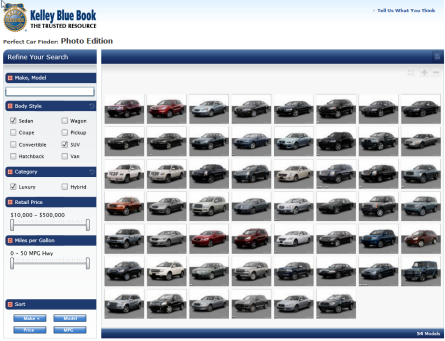
Have you seen those television commercials about used car markets and someone standing in a white background and as they vocalize their automobile preferences the selections fly in and around them.  That’s what I was reminded of when I came upon the new feature on Kelley Blue Book’s comparison feature on their site.  I had previously written about some innovative uses of DeepZoom with Jose’s samples and I like what KBB has done here as well.

They’ve leveraged Silverlight with DeepZoom in a way that provides some good user functionality but at the same time provides a line-of-business application for their organization.  You can get to the comparison feature by starting at their Perfect Car Finder® section of their site and clicking the Photo Edition near the bottom of the application.  Once launched you are presented with an array of vehicles which you can start trimming down by using the controls to specify your preferences.  As you enter options the images of vehicles filter and wrap into a new grid view.

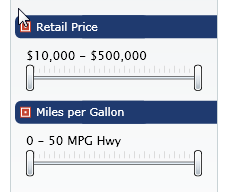
I saw something that I’ve been working on as well for a blog post used in this application…a range control:

I did some snooping and was able to spend some time chatting with the developers of this beta application for KBB.  It was great to hear how they’ve got to this point in such a short time (abt a week) and with a developer who said this was his first Silverlight application.  I like that they had a need for a custom control and built it.  If you play around with it on the site you can see that it is basically the Slider functionality with two Thumb controls (which is the direction of my sample as well).  Changing these slider values also filters the car selections as well.

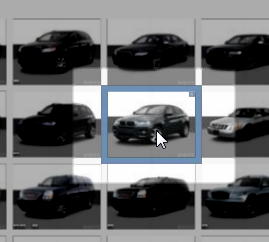
The car pictures are the DeepZoom portion of the application and do what you’d expect any DeepZoom app to do at this point with some great resolution photos.  One thing that KBB has done here is monitor where you (the user) are viewing within the DeepZoom collection and provide some highlighting of the car you are looking at (via a border).  Once you click on a specific vehicle it also zooms directly into that vehicle to provide you additional information.

They are making use of knowing where the user is as well as where in the collection that car exists to provide the best functionality to the end user.

I think this is another great use of Silverlight and DeepZoom together to provide some business functionality that is fun for the customer and functional for their organization.  It’s a great mix of services and client technology.  In talking with their developers I made a few suggestions that I think could even enhance the overall user experience and they understand they have some refinement they are desiring to do as well.  But from nothing to an integrated experience in a short time is great!  I’m looking forward to see how this application evolves.  Go check it out and tell them what you think.  Great job KBB team!

If you are a constant reader of this blog, I suspect you’re a geek as well.  And with most geeks it is generally pretty hard to buy gifts.  We usually buy gadgets when they come out and don’t give much room for ‘wish lists’ for our significant others to shop for us.  As such my house around holidays is usually no gifts for me of substantial surprise…that’s fine by me.

This father’s day was different.  My family got me a portable GPS device.  Specifically the Garmin Nuvi 260.  To be most accurate, my family actually got me a Magellan device but my wife gave it to me with the “I’m not sure if this is a good one so you can get which one you want.”  I love the “you can get” with regard to marriage and purchases…we share the same money don’t we? :-)

After a good amount of research I settled on the Garmin Nuvi line as the best.  Almost every review site I went to had the Garmin Nuvi models at the top of their list.  TomTom was a close second and actually from the experience I liked their physical designs a little better. 

I already have a GPS system in my car, but it is a year 2000 model car, so my GPS screen looks like a mainframe app compared to modern devices…and operates like one as well!  I didn’t think I’d like this idea of the Nuvi because of that, but was I wrong.  Man I turn that thing on to go check the mail.  Honestly I don’t know why, but I’m having so much fun with it!  There was a widescreen model that was about $80 more but had ZERO added features so I opted for the 260 model.  I have NOT been disappointed at all.  The screen is great, the directions are great, re-routing is fast.  I bought the Mexico maps for my device because I go there often.  The Mexico maps came as an SD card I pop in.  I thought this was a little weird because other maps can be downloaded directly into the device…why is Mexico (and some others) different?

This leads me to a little rant.  My Navteq car system wants to charge me $200+ for the map updates to my car.  Garmin - $90.  WTF Navteq!?!?  It’s the same data.  I’ve written to them and asked them why such the difference.  As you would expect: no response.

I used to think about GPS systems in cars and always wanted the in-dash in all my cars.  Never again.  For the cost (walmart.com had the best price for my model at the time of purchase – Best Buy price matched too), you just can’t beat the convenience.  I’ve heard of car companies like Volvo offering a credit voucher instead of in-dash systems.  I must say that is a great idea!  The lack of in-dash is the only thing I don’t like about my device…aesthetically I don’t like the extra thing hanging from my windshield, but the added convenience of taking with me no matter what vehicle I’m in is awesome.  It also has a “walking” mode that routes differently if you are walking.

I couldn’t have possibly asked for a better gift and to-date this has been the best gift I’ve received…and I didn’t even need it!  Bravo family, bravo.  If you are in the market for a GPS unit, check out the Nuvi line.  There are varying features for different models.  I think the 260 is the lowest model I would have went as the one feature I wanted was voice-announced streets (“turn right on Raven” rather than “turn right ahead”).  I don’t much car to integrate my device with as a Bluetooth speakerphone, but there are models that can do that.  Voice commands (available in the 800 series) is something I would have liked, but not at the price differential.  Check out the Nuvi.

I used these sites to help me decide: gpsreview.net and gpsmagazine.com (great buying guide).