I’ve been getting a few notes on issues relating to people trying Silverlight beta 2 and WCF or other services.  The most common issue I’m seeing reported is “my exception is showing a 404-not found error message, but the service is there and works!”

Okay, there could be several things happening here, but let’s tackle the “make sure it is plugged in” type situations.  I don’t mean to make light of the error, because at first I, too, was banging my head against a wall.  Sometimes it helps to have a second set of eyes or a deeper understanding of the issue…or both.

First, the situation.  Most of the time you’ll see this exception when your Silverlight application is accessing a service not hosted on the same application domain.  This is considered cross-domain access and requires the service host to enable an opt-in policy file so rich client platforms are allowed to access the service.  In Silverlight we call that the clientaccesspolicy.xml file.  You can learn all about cross-domain policy files by viewing this video on the Silverlight community site (a great resource).  In beta 2, there was a subtle change to the policy file that is required.  I wrote about that here as well (and note the code download for the video has the updated policy file).

Ok, so under what conditions might you get the “(404) Not found” error message when accessing services?

No policy file at all

Silverlight will first check for clientaccesspolicy.xml first and then fallback and see if a supported crossdomain.xml file exists.  If neither exists at all, 404 baby.  Also remember Silverlight is looking for this file in the root of the requesting domain.  So if you have a file but it is in your app root…this could be the issue at all.

Incorrect, mail-formed, just plain wrong policy file

Silverlight will check for a clientaccesspolicy.xml file and if it finds one but it has an incorrect format or is mal-formed it will treat it as invalid and then look for crossdomain.xml…and if not found, boom: 404.  This is what most are running into in starting to use beta 2 with your policy files.  The missing http-request-headers attribute renders the file mal-formed.

HTML response

Most sites have custom error messages for page not found.  For example, when you visit google.com/timheuer you’ll get a less-than-helpful message, but custom nonetheless or as another example microsoft.com/timheuer you’ll get another custom response with a sitemap.  Both of these are essentially custom error messages that are returning valid HTML, but not a valid policy file.  In these instances, Silverlight sees the response, but sees it as invalid/mal-formed and treats it like it didn’t exist: 404.

These are the most common instances where a 404 would be generated and making you bang your head against the closest semi-hard surface.  How can you figure out what is going on?  Well first, make sure you do your best to ensure you meet all the requirements.  But also use some development helper tools.

Web Development Helper

For me, in service/remote/AJAX development there is a single indispensable tool that I can’t live without.  That is NikhilK’s Web Development Helper.  This tool is a plugin to Internet Explorer (yes I know there are others similar in nature for Firefox, etc. – but I LOVE this implementation and IE is fine by me) that provides in the browser HTTP-traffic sniffing.  No need for any funky port configuration or changing proxy server settings, etc.  Just enable it and it works.  I highly recommend you use this tool or something similar like it (Fiddler is another good one although requires some additional config steps usually when working with Visual Studio’s web development server).

Seriously, a tool like this will save you so much time in troubleshooting your service interactions with Silverlight, Flash, AJAX, whatever – it will help you immediately figure out where to start looking rather than grabbing your climbing gear and spelunking in unknown caverns.

So why a ‘404’ – what gives?

I’ve also heard people say “you need to make that exception be more descriptive, 404 is not accurate.”  I’m on the fence on this one.  As a .NET developer I can see where the concerns are coming from in having the most descriptive exception possible.  But one must realize what is happening under the hood.  The polciy file is being requested as a GET request, so basically an HttpWebRequest object is our object here.  Because of this, we return HTTP-specific errors.  There isn’t one for “Silverlight policy file found, but not correct” in the HTTP spec right now.  So because of this, we use a RESTful approach in providing a standard HTTP response.  In our case “404-not found” seems to be a valid response – indicating “The request for a valid policy file resulted in a valid policy file not being found.”  We make no distinction between partially valid or finding a specific typo, etc. – we simply indicate that a valid policy wasn’t found.  One could argue 406,409 or 417 might be other responses, but I’m not sure that would make anyone feel any better – we’re still going to use an HTTP response code.

Hope this helps!
Now that beta 2 is out and some of the features or more solid, and a majority of the breaking changes have been announced, there is no excuse to hold back anymore.  Oh yeah, and there is a commercial go-live license available now, so no more excuses :-).

So where to get started?  Well you should first head over to the Silverlight community site and visit the Get Started section.  There you will find a rather simple formula to get started:

The community feed includes some great folks like Pete Brown, Shawn Wildermuth, Dave Campbell just to name a few.  As an example…all things ADO.NET Data Services (and with Silverlight): Shawn is your man right now.  I was thinking about giving him a hard time about his “ADO Guy” moniker…but he’s holding true to it for now :-).

The Learn section of the Silverlight community site is intended to help you.  Watch the videos, download the source code, read the tutorials, try the hands-on-labs (thanks Hanu!), post feedback – and post here what you want to see.  We have a lot in production right now that will be filtering over the next weeks (including some “Silverlight for Business” content) so be sure to stay posted (and subscribed for auto updates).

Once you’ve created that masterpiece, be sure to let us know about it!

An important note for those using Sockets in Silverlight 2.  In beta 1, Sockets were limited to site-of-origin (meaning you could only connect back to the same host that served up the Silverlight application).  This has changed in beta 2 to allow your Silverlight application to connect to any server exposing some Socket connections.

One important note, however, is that a policy implementation has been added.  This policy implementation affects not only cross-domain Socket calls, but site-of-origin ones as well.  So if you are using Sockets, you must have a policy implementation in place.

The policy implementation is done via a similar file mechanism as HTTP-based cross-domain requests.  The policy file looks similar and here is a basic example:

<?xml version="1.0" encoding ="utf-8"?>
<access-policy>
  <cross-domain-access>
    <policy>
      <allow-from>
        <domain uri="file:///" />
      </allow-from>
      <grant-to>
        <socket-resource port="4502-4506" protocol="tcp" />
      </grant-to>
    </policy>
  </cross-domain-access>
</access-policy>
/ } .csharpcode pre { margin: 0em; } .csharpcode .rem { color: #008000; } .csharpcode .kwrd { color: #0000ff; } .csharpcode .str { color: #006080; } .csharpcode .op { color: #0000c0; } .csharpcode .preproc { color: #cc6633; } .csharpcode .asp { background-color: #ffff00; } .csharpcode .html { color: #800000; } .csharpcode .attr { color: #ff0000; } .csharpcode .alt { background-color: #f4f4f4; width: 100%; margin: 0em; } .csharpcode .lnum { color: #606060; }]]>Notice how you can restrict the ports here (note: Sockets in general in Silverlight are limited to ports 4502-4534).

This policy information must be made available on a TCP port request on port 943.  Any Socket request will first look for that policy information to respond on this port 934 request.  If successful, the remaining communication will be allowed.  If not, the communication will fail.

UPDATE: I accidentally typed "934" originally as the port -- it is 943.

There is no code change you need to have in your current Socket implementation other than implementing a Socket policy server to respond to the policy request.  I’ll be covering the basics of sockets on a video over on the Silverlight community site which will demonstrate and provide code on doing this implementation.  Stay tuned for that one.

Hope this helps.

We were all jumping for joy when Silverlight 2 beta 1 was released and the ability to connect to services was more readily/easily available to us.  For discoverable services that provided a WSDL we were quickly able to implement them using the Add Service Reference capability in Visual Studio 2008.  Beta 2 brings a few changes to the world of services that you should know about.  I’ll do my best to recap some of them here.

Generating a WCF Service

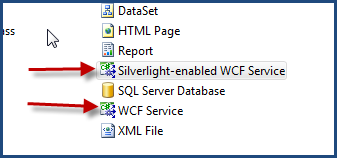
In beta 1 when we created a WCF service for use in Silverlight, we used the “WCF Service” template in Visual Studio (assuming you used Visual Studio).  This was fine and created a standard WCF service for us.  There were a few changes that we had to make to ensure that our Silverlight application could consume it in an acceptable manner.  First, we had to change the binding configuration in ASP.NET web.config from wsHttpBinding to basicHttpBinding as Silverlight only supports that binding type right now.  Secondly, we might have had to add capabilities to enable ASP.NET compatibility support depending on what we were doing with the service.  In beta 2, this process gets a bit simpler for services specifically built for Silverlight.  After you install the tools for Visual Studio, you now get a new item type:

It is important to note that the WCF Service template is still a perfectly acceptable one to choose, you just have to ensure to make those changes accordingly.  The new Silverlight-enabled WCF Service basically does those for us as well as add the ASP.NET compatibility attributes for us in the code.  Additionally, the traditional interface/implementation is simplified into a single class.  Again, the other ways are still valid, but for services specifically built for Silverlight, this might be an easier route to get them done.

Cross-domain policy file updates

Cross-domain restrictions still apply within beta 2 and the same rules apply.  There is one subtle change that is required to your clientaccesspolicy.xml file that is required.  In the allow-from node of the policy file, the attribute http-request-headers is now required.  If your service is an open/public one then specifying “*” is probably acceptable (you’ll have to be the judge of that.  If you only wanted to allow specific headers (besides the blacklisted ones) you can provide those in a comma-separated list and can use wildcards as well.  For example you could use X-MyApp-* if you wanted.

Another thing to note about the support for Adobe’s crossdomain.xml policy file is one thing we found in interpretation of the policy template.  Previously Flash was a Macromedia product and as such that file is adorned with a DOCTYPE that represents a schema with macromedia in it.  Well, Adobe has changed the schema a little bit and also updated the DOCTYPE to reflect Adobe as the authority.  Right now, Silverlight still expects to validate the macromedia declaration.

ServiceReferences.ClientConfig

In beta 1, when you performed the Add Service Reference operation a file named ServiceReferences.ClientConfig was created and had some configuration information in it.  This file, however, wasn’t really used.  In beta 2, this configuration file can be shipped with your XAP and used as configuration.  It provides a subset of WCF configuration.  Refined details of those settings are in the SDK, but I thought it might be helpful to know.

Change to WebClient

In beta 1, WebClient was the easiest library to use in accessing non-discoverable services.  One challenge was that it only supported GET verb requests.  In beta 2 WebClient has changed to enable POST verb actions as well.  the UploadStringAsync function will send the request but the endpoint URI must be a URI that accepts the POST verb.

In addition, WebClient is now callable on a background thread in addition to the UI thread.  This may come in handy for some situations.

I see these as small but helpful changes.  Most are based on feedback we received from beta 1 customers and community, so thank you for that feedback.  I hope this helps!

I previously wrote about a known issue with Silverlight Streaming services and videos encoded with Encoder 2.  The quick recap is that a video already encoded to VC-1 using Encoder 2 will not process when using the Manage Videos feature of Silverlight Streaming services.  I provided 3 work around options (#3 being the easiest of those 3) to get you past the issue and get the video uploaded.

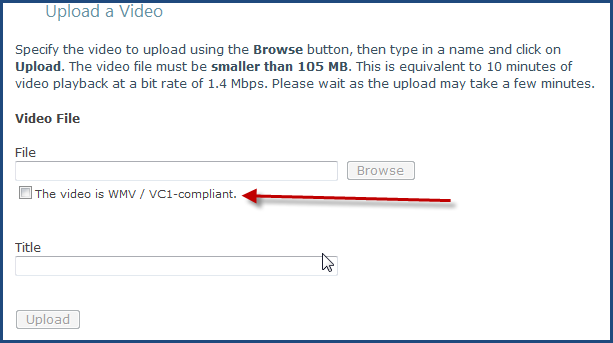
The SLS team recently just added another option into the actual process and enables you to use the Manage Videos feature rather than act like uploading an application or renaming files.  When you log into your account (you get 10GB free by the way), click on the Manage Videos option and then choose to upload a video.  You’ll be presented with this screen:

Notice the new option of The video is WMV / VC1-compliant. (It should actually read VC-1 to be picky, but I digress.)  Here’s what you do if your video is already VC-1.  This only applies to this situation…if you still want to use the transcode service, feel free with your AVIs, etc.

First, click that checkbox first.  Do this before you browse the file to set the flag that you will be bypassing the transcode.  Then browse to your file, give it a title and upload.

I hope this helps get around this issue the team identified.  Thanks to the SLS team for implementing a better work around in a short time after the problem was identified.