Silverlight Toolkits now on NuGet
 Last night after a quick e-mail exchange with Phil, David and Scott I revised my Silverlight Toolkit “NuPack” packages I had previously created when NuPack NuGet first came out. At the time there were a couple of things still not supported and frankly, I got busy and never bothered to check back. Scott had seen something on a forum inquiring why Silverlight stuff, namely our open source controls, aren’t deployable via NuGet. There wasn’t any other reason other than resources not currently scheduled to add this to the build flows, etc. So I spent a few minutes revising the packages and putting them up there:
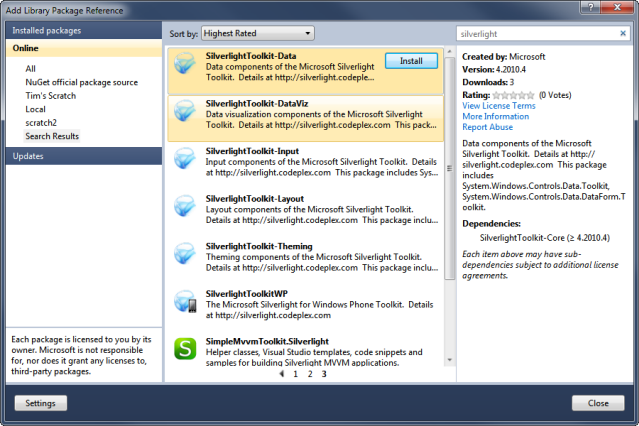
What you see above is the “Add Library Package Reference” results after you install NuGet. Now instead of having to install an MSI, etc. you can basically add a reference to the package and the bits will be copied to your project and automatically referenced. In order to componentize the main Silverlight Toolkit, I created the NuGet packages in a way that they can be individually consumed, or a meta-package as “All.” It’s cool that NuGet allows you to create a meta-package which is basically a dependency graph. For instance, my “all” package has zero content…but here is the .nuspec contents:
1: <?xml version="1.0" encoding="utf-8"?>
<pre class="alteven"><span id="lnum2" class="lnum"> 2:</span> <span class="kwrd"><</span><span class="html">package</span><span class="kwrd">></span> </pre><pre class="alteven"><span id="lnum3" class="lnum"> 3:</span> <span class="kwrd"><</span><span class="html">metadata</span><span class="kwrd">></span> </pre><pre class="alteven"><span id="lnum4" class="lnum"> 4:</span> <span class="kwrd"><</span><span class="html">id</span><span class="kwrd">></span>SilverlightToolkit-All<span class="kwrd"></</span><span class="html">id</span><span class="kwrd">></span> </pre><pre class="alteven"><span id="lnum5" class="lnum"> 5:</span> <span class="kwrd"><</span><span class="html">version</span><span class="kwrd">></span>4.2010.04<span class="kwrd"></</span><span class="html">version</span><span class="kwrd">></span> </pre><pre class="alteven"><span id="lnum6" class="lnum"> 6:</span> <span class="kwrd"><</span><span class="html">authors</span><span class="kwrd">></span>Microsoft<span class="kwrd"></</span><span class="html">authors</span><span class="kwrd">></span></pre><pre class="alteven"><span id="lnum7" class="lnum"> 7:</span> <span class="kwrd"><</span><span class="html">description</span><span class="kwrd">></span>The complete Microsoft Silverlight Toolkit. Details at http://silverlight.codeplex.com<span class="kwrd"></</span><span class="html">description</span><span class="kwrd">></span> </pre><pre class="alteven"><span id="lnum8" class="lnum"> 8:</span> <span class="kwrd"><</span><span class="html">language</span><span class="kwrd">></span>en-US<span class="kwrd"></</span><span class="html">language</span><span class="kwrd">></span></pre><pre class="alteven"><span id="lnum9" class="lnum"> 9:</span> <span class="kwrd"><</span><span class="html">licenseUrl</span><span class="kwrd">></span>http://silverlight.codeplex.com/license<span class="kwrd"></</span><span class="html">licenseUrl</span><span class="kwrd">></span> </pre><pre class="alteven"><span id="lnum10" class="lnum"> 10:</span> <span class="kwrd"><</span><span class="html">projectUrl</span><span class="kwrd">></span>http://silverlight.codeplex.com/<span class="kwrd"></</span><span class="html">projectUrl</span><span class="kwrd">></span></pre><pre class="alteven"><span id="lnum11" class="lnum"> 11:</span> <span class="kwrd"><</span><span class="html">dependencies</span><span class="kwrd">></span></pre><pre class="alteven"><span id="lnum12" class="lnum"> 12:</span> <span class="kwrd"><</span><span class="html">dependency</span> <span class="attr">id</span><span class="kwrd">="SilverlightToolkit-Core"</span> <span class="attr">version</span><span class="kwrd">="4.2010.04"</span> <span class="kwrd">/></span></pre><pre class="alteven"><span id="lnum13" class="lnum"> 13:</span> <span class="kwrd"><</span><span class="html">dependency</span> <span class="attr">id</span><span class="kwrd">="SilverlightToolkit-Data"</span> <span class="attr">version</span><span class="kwrd">="4.2010.04"</span> <span class="kwrd">/></span></pre><pre class="alteven"><span id="lnum14" class="lnum"> 14:</span> <span class="kwrd"><</span><span class="html">dependency</span> <span class="attr">id</span><span class="kwrd">="SilverlightToolkit-DataViz"</span> <span class="attr">version</span><span class="kwrd">="4.2010.04"</span> <span class="kwrd">/></span></pre><pre class="alteven"><span id="lnum15" class="lnum"> 15:</span> <span class="kwrd"><</span><span class="html">dependency</span> <span class="attr">id</span><span class="kwrd">="SilverlightToolkit-Input"</span> <span class="attr">version</span><span class="kwrd">="4.2010.04"</span> <span class="kwrd">/></span></pre><pre class="alteven"><span id="lnum16" class="lnum"> 16:</span> <span class="kwrd"><</span><span class="html">dependency</span> <span class="attr">id</span><span class="kwrd">="SilverlightToolkit-Layout"</span> <span class="attr">version</span><span class="kwrd">="4.2010.04"</span> <span class="kwrd">/></span></pre><pre class="alteven"><span id="lnum17" class="lnum"> 17:</span> <span class="kwrd"><</span><span class="html">dependency</span> <span class="attr">id</span><span class="kwrd">="SilverlightToolkit-Theming"</span> <span class="attr">version</span><span class="kwrd">="4.2010.04"</span> <span class="kwrd">/></span></pre><pre class="alteven"><span id="lnum18" class="lnum"> 18:</span> <span class="kwrd"></</span><span class="html">dependencies</span><span class="kwrd">></span></pre><pre class="alteven"><span id="lnum19" class="lnum"> 19:</span> <span class="kwrd"><</span><span class="html">title</span><span class="kwrd">></span>Silverlight Toolkit - All<span class="kwrd"></</span><span class="html">title</span><span class="kwrd">></span></pre><pre class="alteven"><span id="lnum20" class="lnum"> 20:</span> <span class="kwrd"><</span><span class="html">owners</span><span class="kwrd">></span>Tim Heuer<span class="kwrd"></</span><span class="html">owners</span><span class="kwrd">></span></pre><pre class="alteven"><span id="lnum21" class="lnum"> 21:</span> <span class="kwrd"><</span><span class="html">iconUrl</span><span class="kwrd">></span>http://silverlight.microsoft.com/assets/sl-32.png<span class="kwrd"></</span><span class="html">iconUrl</span><span class="kwrd">></span></pre><pre class="alteven"><span id="lnum22" class="lnum"> 22:</span> <span class="kwrd"><</span><span class="html">tags</span><span class="kwrd">></span>silverlight toolkit sltoolkit<span class="kwrd"></</span><span class="html">tags</span><span class="kwrd">></span></pre><pre class="alteven"><span id="lnum23" class="lnum"> 23:</span> <span class="kwrd"></</span><span class="html">metadata</span><span class="kwrd">></span> </pre><pre class="alteven"><span id="lnum24" class="lnum"> 24:</span> <span class="kwrd"></</span><span class="html">package</span><span class="kwrd">></span></pre>It’ basically defines the pointers to what it needs and NuGet does the magic to manage the dependencies on install. For the Silverlight for Windows Phone Toolkit, we also have icons. NuGet allows me to package up those icons as well so that when the package gets added, so do the icons (NOTE: there is still a step to mark them as content in the project). I point this out because when the phone toolkit first came out some of the samples weren’t working for people because they didn’t read that they had to actually include some icons to get them to work. Using NuGet, at least we’re able to help them even further.
I really like this model. I love that I can use a familiar “Add Reference” gesture in Visual Studio, but I can also use a PowerShell VS window to do my package management as well if I wanted. Take a look at the NuGet stuff and if you are a Silverlight developer, now you have everything easily at your fingertips!
NOTE: The version numbers in the toolkit packages are package version numbers. We’ve never really promoted the toolkit versions as they literally are (i.e., 4.0.31319.blah) but rather as the release timeframe i.e., “April 2010” release. Because NuGet follows CLR versioning taxonomy I created the package versions to hopefully be somewhat descriptive: 4.2010.04 – For Silverlight 4, April 2010 release – as an example. It’s not perfect, but it works.
NuGet has over 670 packages now in the repository with an amazing set of tools readily available at your fingertips. There are some good Silverlight nuggets in there as well and it is nice to have our toolkits in there now also! When updates come out, the Library Package Manager will show the updates, giving the developer the option to update them quickly.
Hope this helps!