Today we had the SIlverlight Firestarter event and revealed to the world for the first time, not only the plans for the next version of Silverlight, but also a slew of demonstrations of some key features.
If you weren’t able to attend live or online real-time, we have recorded the sessions which will be available later this week on Channel 9.
There has been a lot of confusion on the future of Silverlight. Microsoft wants to ensure we have a great developer platform portfolio that supports all great technologies like HTML5, Silverlight and WPF. We’ll continue to invest in these technologies for the future of developers to target multiple platforms, technologies and devices.
But for now, let me share some of the things we announced that we’re working on to deliver for Silverlight 5…
Media Improvements
Hardware Decode and presentation of H.264 media
“TrickPlay” allows video to be played at different speeds and supports fast-forward and rewind. At up to twice the speed, audio pitch correction allows users to watch videos while preserving a normal audio pitch.
Improved power awareness prevents the screen saver from being shown while watching video and allows the computer to sleep when video is not active.
Remote-control support allowing users to control media playback.
Digital rights management advancements allow seamless switching between DRM media sources.
Application Development
Fluid user interface enables smoother animation within the UI. Layout transitions allow developers to specify animations to apply when elements are added, removed or re-ordered within a layout. This provides smoother user experiences when, for example, items are inserted into a list.
Text improvements make it possible to build rich magazine-style text layouts:
Multicolumn text and linked text container allow text to flow around other elements.
Tracking/leading set precisely how far apart each character is for full creative control.
Text clarity is improved with Pixel Snapping.
Text layout performance is significantly improved.
OpenType support has been enhanced.
Support for Postscript vector printing enables users to create reports and documents, including the ability to create a virtual print view different from what is shown on the screen.
Applications can now work the way users expect with added support for double-click and ComboBox type ahead.
Databinding enhancements allow more work to be done more easily via XAML:
Debugging support now allows breakpoints to be set on a binding, so you can step through binding failures.
Implicit DataTemplates allow templates to be created across an application to support a particular type by default.
Ancestor RelativeSource allows, for example, a DataTemplate to bind to a property on the control that contains it.
Binding in style setters allows bindings to be used within styles to reference other properties.
The DataContextChanged event is being introduced. Markup extensions allow code to be run at XAML parse time for both properties and event handlers, enabling cutting-edge MVVM support.
Networking and Windows Communication Foundation enhancements:
Reduced network latency by using a background thread for networking.
WS-Trust support: Security Assertion Markup Language authentication token.
Silverlight 5 performance improvements include these:
Reduced network latency by using a background thread for networking.
XAML parser improvements that speed up startup and runtime performance.
Support for 64-bit operating systems.
Graphics improvements
Graphics Processing Unit (GPU) accelerated 3-D application programming interface (API) provides rich graphics on the Web for building advanced data visualizations and rich user experience (UI).
Immediate mode graphics API allows direct rendering to the GPU.
Hardware acceleration is enabled in windowless mode with Internet Explorer 9.
Silverlight offers a new class of trusted applications that brings desktop capabilities to the browser for the first time. These features, when enabled via a group policy registry key and an application certificate, mean users won’t need to leave the browser to perform complex tasks:
Host HTML content as a Web browser control within the Silverlight application. HTML pages, such as help content or e-mail, can be integrated within the application.
Read and write files to the user’s My Documents folder, making it easier to find media files or create local copies of reports.
Launch Microsoft Office and other desktop programs. Users can open Microsoft Outlook and create an e-mail message, or send a report to Word utilizing the power of Office.
Access devices and other system capabilities by calling into application COM components. Users can access a USB security card reader or a bar-code scanner.
Enjoy full keyboard support in full screen, which enables richer kiosk and media viewing applications.
Call existing unmanaged code directly from within Silverlight with P/Invoke.
Out-of-browser trusted applications are further enhanced:
Existing unmanaged code can be called directly from within Silverlight with P/Invoke.
Child Window support allows multiple windows to be launched from the application.
Summary
So as you can see an impressive list of features we’ve been really working hard on to deliver. We hope you like the features. Please continue to suggest features to our team at http://silverlight.mswish.net and vote up others that already exist. We really hope you look forward to the next version of Silverlight as we’re excited to bring it to you.
Sorry to burst your bubble, but no downloadable bits for you to play with just yet :-).
In the release of Visual Studio 2010 Feature Pack 2 one feature that might be interesting to Silverlight developers is the introduction of support for the coded UI test framework and Silverlight 4 applications, specifically:
Use Microsoft Test Manager to capture and playback action recordings for Silverlight 4 applications
Create coded UI tests for Silverlight 4 applications with Visual Studio 2010 Premium or Ultimate
There are more features in the feature pack (see link above for more details) but also some videos to help you understand these features. Here’s a video of the one of the examples:
November is here…time for an updated Windows 7 Smashing Magazine theme pack!
The November themes mostly concentrate on a lot of fall themes. I am particular fond of Movember and UX Cake (both shown above) as well as the Hendrix one with the lyrics – pretty cool. So here is your November 2010 Windows 7 Theme Packs for wallpapers – unfiltered and uncensored – about 50 wallpapers in all.
PUBLIC SERVICE ANNOUNCEMENT: The service I use to host these theme packs, drop.io, has been acquired by Facebook (weird, huh?). They will be shutting down their service 15-Dec-2010. If you like any of the previous theme packs, please go download them now as they will be shut down. I have no intention of re-uploading them to another service for the past ones. I will be switching to using TransferBigFiles.com which has a great service that you should check out.
For details on these and to see past ones, visit the Smashing Magazine Windows 7 Theme information for the specifications I used for the theme pack as well as previous themes. Want to participate and submit yours? Join in!
Well PDC10 is over (note: head on over to the PDC site to view all the sessions). There was a lot of talk about Internet Explorer 9 (and another preview update) as well as general web development. There had been some reports on the 2nd day of PDC commenting about the shift in strategy about Silverlight.
You may have read the initial story from Mary Jo Foley which led to the tsunami of information about Silverlight being done, over and killed except for the Windows Phone 7 platform. Other popular news outlets picked up on the story, reporting on it and adding their own, yet unconfirmed, statements to the situation.
Many of you have emailed me personally asking for information. I sincerely appreciate your candor and contact in reaching out. I’ve strived to be a transparent individual and an approachable one as well within the beast that is Microsoft. I’ve never hid my contact information and do my best (not always successful) at responding to inquiries.
Please be sure to read Bob’s message above. It re-affirms our commitment to Silverlight. A number of us wanted to share our feelings immediately upon this news storm, but wanted to ensure that you heard it from the top. I’ll add my own personal commentary here…
One email I got (in response to all this news hype) was from a CIO expressing concern about his decision to use Silverlight in a multi-million dollar application investment he was making. He wanted to know if his bet would be a good one. My response had nothing to do about which technologies are better than the other. Here is basically what I shared:
This past year I decided to take a deeper role in the engineering side of Silverlight. In making this decision I had to relocate to Redmond. This involved me relocating my family away from our comfort zone and having to start completely new. It was perhaps the biggest personal change in my life I’ve made yet. My kids left their friends, as did we. My wife left her close knit family in AZ. My wife stopped a business she was just getting great momentum on before this decision. We sold our house at a significant personal financial loss. We moved to an area where home prices didn’t fall like we were used to and thus aren’t in a position of buying power. You’ll forgive me if I say that no software project has made more of a bet on Silverlight than I have personally this year.
I don’t write this to ask anyone to have pity on me that I lost money on my house…I’m a big boy and understand what consequences mean. I write this to hit more at the heart that I’m personally invested in the success of Silverlight. I uprooted my family and a comfortable lifestyle to work closer with it. I’ve made a big bet on Silverlight. I hope to see it continue to grow. I don’t have a crystal ball and nobody can tell the future in 5-10 years, but in the near term that I can tell you we’re invested in Silverlight.
Yesterday there was quite a buzz around something Microsoft just released called “NuPack” which is described as:
NuPack is a free open source package manager that makes it easy for you to find, install, and use .NET libraries in your projects. It works with all .NET project types (including, but not limited to, both ASP.NET Web Forms and ASP.NET MVC).
NuPack enables developers who maintain open source projects (for example, projects like Moq, NHibernate, Ninject, StructureMap, NUnit, Windsor, RhinoMocks, Elmah, etc) to package up their libraries and register them with an online gallery/catalog that is searchable.
It’s a pretty cool mechanism for getting .NET libraries. For other open source developers this concept isn’t something new (i.e., gems). But for .NET developers it might be because it is a difference from the way we typically have received dependent and 3rd party assemblies for our projects. It provides a PowerShell script mechanism for adding packages as well as the well-known “Add Reference” gesture for VS developers.
All the initial information around NuPack has been from folks like Scott Guthrie, Phil Haack, David Ebbo, etc. You might recognize these names from the ASP.NET world. In fact if you do your first “list-package” command you’ll see a lot of ASP.NET-related packages. If you didn’t know any better and weren’t an ASP.NET developer you might ignore this. However, NuPack is for everyone!
One of the most commonly installed items for Silverlight developers after the toolset is the Silverlight Toolkit. It is a plethora of controls that frankly you probably can’t live without (at least one of them) if you are developing a broad Silverlight application. After spending a few minutes reading on NuPack I decided to explore.
My initial playground – Building the MyNuLibrary package
I first just wanted to play around and created a Silverlight class library MyNuLibrary. It has one class Math that just has two functions. The contents is pretty much irrelevant here. I wanted to create a package for this and test it out.
In my project structure I decided to put the tools in the project. To be clear, this felt completely wrong. My “tools” shouldn’t be a part of my project. I think this will be resolved with better build task integration, but for now to create a package you need the NuPack.exe tool. I put that and NuPack.Core.dll in a Tools folder in my project. I then created my manifest (MyNuLibrary.nuspec) file as follows and put it in the root of my project (marking the build action as None of course):
You can see that the <files/> node tells the package where to put things. Notice the lib\SL4 target attribute value. This tells NuPack (and installers of the package) that this library is really targeting Silverlight 4 (uses TargetFramework value of the source project when installing the package to verify). There is more information on the NuPack project site about this.
Since my tools were relative to the root I needed to provide the bin\debug path in the source attribute value. Initially this caused me problems as the NuPack.exe unmodified then bundled them into lib\SL4\bin\debug\MyNuLibrary.dll path. When installing (using add-package) it failed because it said it couldn’t find any assembly that would match my project. Apparently right now NuPack expects binaries to be in the framework folders, but not in tree structure. For me, I modified PathResolver (in NuPack.Core):
for my needs. I’ve communicated the issue to some folks on the NuPack core team and I think there may be some changes (I haven’t submitted a patch yet until I understand the need for the original code path). And yes, I realize my change above effectively makes the if…else do the same thing and thus the if…else isn’t needed. Again, I’m awaiting confirmation of the valid scenarios before submitting what I think the patch should be.
All that aside, I then added a post-build event to my project (note I added quoted params here which is not in the CodePlex documentation sample – if you don’t use quotes and you have spaces in your paths, then your post-build will fail…adding the quotes saves you time):
And upon build I now have a MyNuLibrary.1.4.nupkg file as an artifact of my build. Done! If we look at the contents (it’s actually just a OPC ZIP file we can see the structure and you’ll notice that our binary is in the lib\SL4 folder.
Surfacing MyNuLibrary package
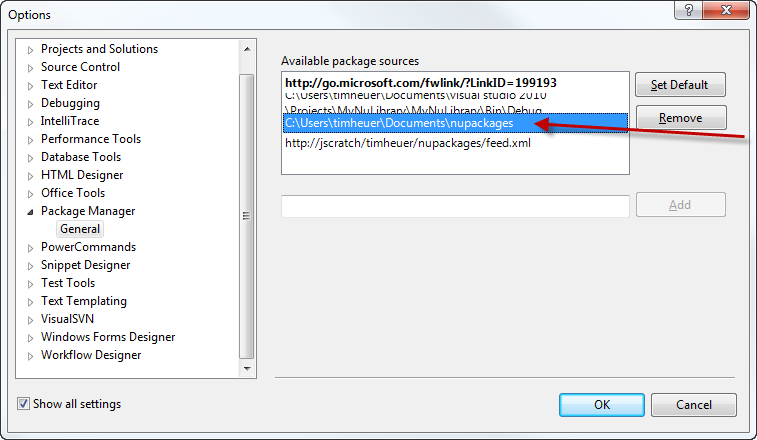
The next step is to have your package visible somewhere. The NuPack VS shell and the Add Reference dialog can recognize 2 types of paths: an Atom feed or a local directory. For testing I just used a local directory using the settings in VS:
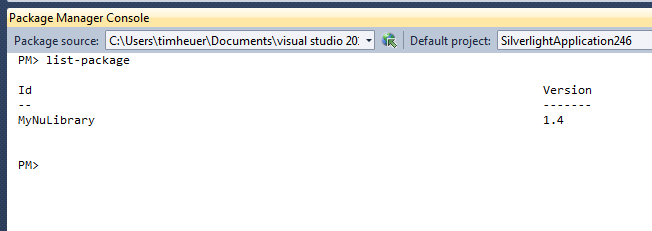
And then when I run list-package it shows only my packages from that “feed”:
Now I can consume it.
Consuming MyNuLibrary package
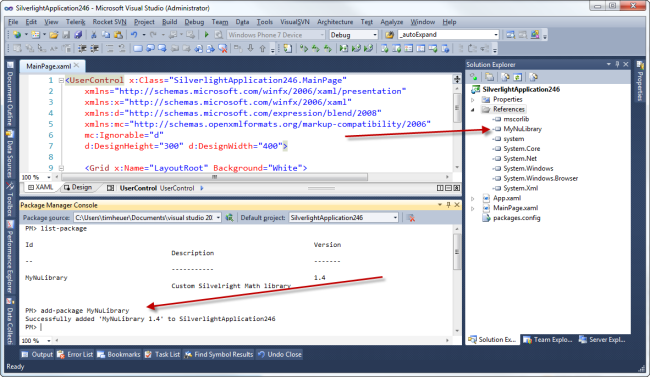
Now I can start a new Silverlight project and open up the VS Package Window and initiate a command to add the package. I call add-package MyNuLibrary and see that my Silverlight project gets the reference automatically included in my project (and the literal binary is placed alongside my solution for the reference path):
And I’m done. Pretty cool. Any updates I (as the library author) would just update my .nuspec file to the new version, generate a new package, and publish it again. The app developer can initiate update-package MyNuLibrary and get the updated bits.
Real world – Silverlight Toolkits
While my above exercise was interesting and demonstrated that NuPack could be used for Silverlight projects as well (ahem, SilverlightContrib) I thought I’d explore a more useful sample. I took the Silverlight Toolkit binaries and packaged them up for NuPack. Here was my manifest:
Since the source code is available for the toolkit I just used that base (hence the “Binaries”) folder name in the manifest.
The end result is me being able to include the Silverlight Toolkit and referencing it in one step rather than downloading, installing the MSI, and adding references. Here’s a quick video of how simple that was:
Awesome huh? Now I could (and probably should have) actually made these independent packages so you could only get the Visualizations if you didn’t need anything else…and then could use the dependency feature of NuPack if needed.
Notice how I also did the Silverlight for Windows Phone Toolkit as well and that it automatically added the Icons for the ApplicationBar in my project as well. That was due to a helpful tip from Phil about naming conventions in the package.
Summary
I think NuPack is pretty cool Yes, flame away that it is nothing new conceptually. That’s fine. However the interation into the tool I use most is great and that I don’t have to go to a different console window and then back and forth. That level of integration is pretty slick.
Will the Silverlight Toolkit(s) be deployed like this? Who knows, right now it is just an experiment. But it was pretty cool to see it all working as expected. I think for an alpha view of the process it’s pretty good. Oh and if you want IntelliSense on the nuspec file, they’ve published the schema so you can put that in a text file (nuspec.xsd) and place it in your %ProgramFiles%\Microsoft Visual Studio 10.0\Xml\Schemas directory. Then notice my xmlns that I have in the snippets above? Adding that will give you IntelliSense on the file format.