About twice a year my wife freaks out (well, my terms not hers) about money, material things, life, etc. It’s a good freak out actually…and it is what has kept me grounded more in life than my past habits (you know, when you felt you *had* to have everything). I’ve learned to not care about things that aren’t worth the trouble. Her balance in my life really has made a good impact in things worldly.
Back to the freak out :-) …
We’re constantly looking for ways to save money. At times it is because we have to (or should) and others it is because we are wanting to put those resources elsewhere. The latest has been with TV cable. I like watching TV. It’s a break from reality and just lets me escape real world for a few hours a week. But the truth be told, nobody in my house really cares about it. Each month we pay roughly USD $80 for cable service. This includes HD service and an HD DVR. Honestly when I evaluate my watching, I really only watch major network shows (I’m not a sports guy) and re-runs of Law and Order. I LOVE HD and hate watching anything else. When I came to this realization though, I finally acquiesced and said we should cancel our cable. We were paying $80 for basically 9 channels…it was ridiculous how our provider (Cox) prices. I wish I could cafeteria shop what I wanted, but they aren’t there yet. I didn’t care about reducing my fee (which they offered) and I wasn’t interested in DirecTV or other satellite offerings. If I was going to cancel, it was going to be completely.
So there. I’ve committed. We’re cancelling. But I still want TV occaisionally. We’ll get movies through Netflix and I’ll explore Hulu via PlayON perhaps. But there may be times where I just want to setup TiVo for The Office and watch it at leisure. I decided I’ll explore doing the over-the-air HD. I sent out a Twitter note about it and got some great feedback. I didn’t find anything online that showed someone in my situation in a step-by-step thought and execution process though. That leads me here. This is my adventure…to rid myself of cable and keep standard broadcast and FREE over-the-air HD channels. Here we go. Hopefully this helps someone else as well.
The Home Setup
My home has 3 primary TVs:
- Bedroom – old 27” tube-based TV.
- Living Room – 42” LCD which currently only displays in yellow tints because one of the blue lamps busted and we decided screw it, we don’t watch enough TV and the kids won’t notice.
- Basement – 60” LCD – the ‘main’ unit. My sanctuary. Where the HD takes place.
We also use TiVo:
- Bedroom is hooked up to a TiVo Series 2 DVR which has been customized with a 500GB storage drive.
- Living Room is hooked up to a Toshiba TiVo/DVD player (effectively a Series 2)
- Basement uses the cable provider’s HD DVR which will be going away.
Basement is also where the XBOX 360 is hooked up and Netflix is watched as well as most DVD viewing.
Our home is fairly modern (5 years old) and so has structured wiring built in. I have an access panel where all central wiring goes:
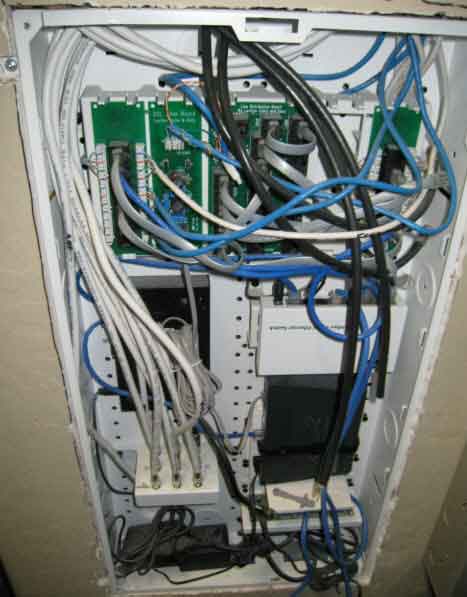
You can see that the intertubes come in through here as well as my cable is routed to one place and then distributed via the splitter. I refer to this area of my home as my NOC.
The Goal
The primary goal is to get major network HD broadcast into the home (ABC, NBC, CBS, Fox, local). The secondary goal here is to not disrupt any workflow or viewing behavior (other than some channels we no longer get which we’ll supplement with Netflix Instant Watch for the kids shows). Now I know Basement will suffer because the HD DVR will be going away…we’ll get to that when we can, but this is the goal.
We also want to use the existing infrastructure of the home with minimal (if any) purchases or re-tooling/wiring of anything.
These, my friends, are the goals…plain and simple.
Initial Research
My quest started on a Thursday. I obviously knew I was going to need an antenna. Part one was finding out which one would be best and what I’d need. The NOC has a cable that is there that is labeled ‘antenna’ so I can only hope when I search for the other end it may be in my attic or perhaps out on my roof…I start thinking good thoughts.
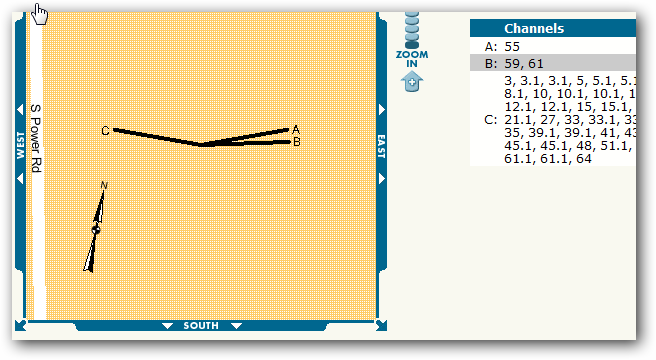
My initial Twitter post yielded some great information (much of which also showed up in search engines, but it is good to validate against trusted resources and ‘real’ people). The best piece of starting information was one web site that seems to be pointed everywhere as a definitive source of digital signal information. That site is AntennaWeb. It was recommended to start here to map out where you live in relation to the current digital signals. Their database of information would identify which stations would be available and recommend an antenna type for you. It tells you the areas, the compass headings, their channel number, etc. It even gives you a map of your address and where the best place to point your antenna to for the channels you want best:
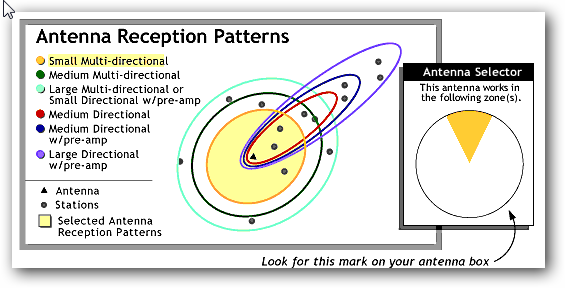
The rating it also provides is to help you choose which antenna you should look for. In my case, it was clear that I should shop for a “yellow” rated one:
Since most online places I quickly scanned didn’t put this rating on it, I figured this was going to result in a trip to the store. Several people recommended the Philips MANT940 (Walmart for <$40). The reviews looked great on this unit so I decided to check it out. Hal Hostetler (a Microsoft MVP who also happens to work for a local broadcaster) gave me a ring and helped me understand some things as well. His hopeful thoughts meant I should be well on my way. The reviews are good on this unit and for the cost, I decide to take a gamble.
The Wiring
Luckily as I mentioned, my home is already wired for an antenna and in fact it did go up to the attic so I was all set. I put the power booster in the NOC and crawled up the attic and put the antenna in there. All systems go…so I thought.
Problems Arise
Now remember my goal is not to change a thing in the workflow. My first pass was to re-setup my TiVo unit attached to Living Room. I started the process and then TiVo asks me if I have a digital-to-analog converter box ready. Argh. I was hoping in my idiocy that my thinking was wrong. Alas, I wasn’t. Some quick searches confirm from TiVo that Series 2 and Toshiba/Humax DVD units require a converter box. Even worse was the PDF describing that the infrared controller from the TiVo would need to be busted out to control the converter box.
NOTE: I generally am the type of guy that researches things step-by-step unfortunately. My searches for “tivo hdtv antenna” didn’t yield much, but a search for “tivo converter box” brought me the information I should have found earlier. Suck. My fault in my eagerness to start connecting things.
Well, now I’m at an impasse. I consult my TiVo trusted advisors and they inform me that I have 2 choices: use converter box or get a TiVo HD unit. Okay, here’s where my mind starts thinking and this time at least I stop and do some calculations before buying anything else :-).
Deciding on Options
With my 3 TV’s I was looking at 3 more purchases. Now considering that let’s say a converter box was about $50 (I know there are the coupons but I wasn’t eligible to get one this late now), let’s start breaking some things down. I could buy 3 of them ($150) and hook them up, but then i’d be using lame IR connections on my 2 TiVo Series 2 units. This was not desirable. I didn’t want to add components to my setup. I wanted to remain the same. At this point, I realize this will no longer be possible.
So for my Living Room (the TV that is broken anyway) I try to just connect the antenna feed direct to the TV (after all it was ‘HDTV ready’). This doesn’t allow me to use TiVo at all anymore on this TV and my ‘lifetime’ service is wasted on this unit until/unless I get cable again.
Bedroom is an older TV and will require a converter box. This sucks because it makes the Bedroom TV setup more complex then it needs to be. I’ve not resolved yet on what I’m going to do for this situation.
Basement is the key here. I mean, I got a large TV for HD viewing. Clearly I’m in a dilemma. I love TiVo and had considered getting the TiVo HD before for this unit and ditching the cable provider’s DVR. Now the cost of a low-end TiVo HD is about $300 and then you still have to pay for the TiVo guide service for either $13/month or $400 for ‘lifetime’ – and no, they won’t transfer my existing unit service anymore. My other dilemma for Basement is that it is hooked up to an entertainment system receiver, so ideally I do want something that can have component hookups. Most of the converter boxes I saw did not, but TiVo HD does. This is important because if I decide the antenna-only route, this impacts Basement and the entertainment setup.
So if I go that route, I’ve not eliminated a bill from my home (I’m lowering it to $13 from $80 I suppose), and also adding a large chunk down to even get that started (equivalent of 3 months of HD cable). This is not sounding good to me.
My goal of not changing anything was not looking like it was going to happen. I really didn’t want to invest more in hardware or substantially in services either…I’m trying to eliminate, not change slightly.
My solution and learning
I sit back and realize I don’t watch television enough anymore to really go the extra mile here. I didn’t want to change anything. Having to invest more to keep that goal isn’t desirable. Having to change the way I watch TV (i.e., I relied on TiVo because I never watched anything live) was probably not going to work out.
So, no TV for me. I might try to see how the antenna-only solution goes for a while since it was $40 and I could give it a try for a bit. But in the end…we wanted to eliminate costs, not swap them out even for a short term. And at this point in our lives, we can say that TV isn’t important enough to stretch it out. It looks like I’ll be spending more time on Hulu, etc.
The solution is possible though as I learned. The challenge for me was that I already had an investment in older DVR technology. If you are in the same situation, keep that in mind. If you don’t use DVRs or that is something you can easily give up, then this situation could really work. I got about 22 channels (some random) of digital antenna broadcast that would probably be fine for most casual network broadcast viewers. If you’ve been in this situation and have better solutions, let me know! Oh well, we’ll see what happens at the Heuer household, but at this point, it was a fun little 2 day experiment that made me realize immediately what was going to change.

