Okay, about a month ago I was shown this demonstration by my new favorite friend Ward Bell of IdeaBlade.  Why is he my new favorite friend?  Well besides being a great guy, wait till you see what he has to show you.  I briefly alluded to my excitement via Twitter as a teaser. 

I previously mentioned that we saw some sneak peeks of Silverlight 3 added features for line-of-business application development with Brad Abrams.  Today, check out what Ward has to show you:

Get Microsoft Silverlight

I am really, really excited about this platform that Ward showed me and I think that you will be as well.  Watch the video and show how easy it is to use their framework to enable rapid business application development with data.  Visit their DevForce for Silverlight page for information and to sign up for the March 2009 Release Candidate.  It’s chalk full of great features including client-side data caching binding to anonymous types and easy validation customization.

Ward will be at and you must grab him for some personal demonstration.  Hopefully we can convince him to grab some common area and chat with a group of people.  He’ll gladly answer all your questions and even accept your jabs if you have them.  He’s just returned from the Alt.NET conference in Seattle as well and hopefully can share some thoughts around that with regard to Silverlight and this framework.

Honestly, check this out.  What do you think?  Sign up for the RC.

Want some sneak peeks at Silverlight enhancements for line-of-business applications?  Check out the video with Robert Hess and Brad Abrams where Brad shows some some sneak preview of some feature enhancements.

Get Microsoft Silverlight

If you want to download the episode above, visit the Channel 9 page here.  Be sure to stay tuned for MIX09 for more announcements and updates!

Did you know that there are some whitepapers on Silverlight development?  Just recently released is one on security in Silverlight development and deployment.  You can view some others (some older, but there are still some gems):

  • Security Guidance for Silverlight Applications
  • Search Engine Optimization (SEO) for Silverlight Applications
  • Silverlight and Web Analytics
  • Content Protection
  • Silverlight Migration Guide – Upgrading Online Media

These can all be found on the Silverlight community site in the whitepapers section.  We’ll be adding more soon, hmmm, say around March perhaps?

The other day I was given a peek at a company who implemented a full-frame Silverlight application that when I saw it it was one of those “wow” moments.  A lot of the public-facing Silverlight examples are very different from one another and sometimes you see some that are full Silverlight applications that really give you a glimpse of how people are thinking about using the platform and how creative you can get.  Colaab is one such example that I saw at PDC last year (check it out if you haven’t).

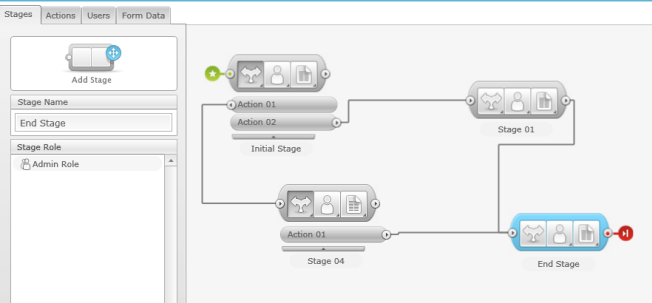
Another example is a recent one called SnapFlow.  SnapFlow itself is a tool to really make creating workflows simpler to the end user.  The way they have designed their product makes it easy to understand how to create a decision-driven workflow that can be exposed to your users (customers, employees, etc.).  Essentially they separate the workflow into Stages, Actions and Data – all integrated into a user interface that if you are an Office user, you would have no problem understanding.  The best part is…the entire user interface is Silverlight.  Take a look at the screen below:

All of that design surface is Silverlight with full drag around behavior, connecting stages together in a visual, intuitive manner.  The application is very responsive and incorporates a lot of features.  I highly recommend you view the simple walk through video below for a view into all of the features…everything you see is Silverlight:

What is cool in one of the features is that once you, the creator of the workflow, are complete, you can then deploy that workflow into your web site or other portal (the demonstration shows using Sharepoint for example).  So you could develop a workflow for gathering some data from your web site, and embed the generated Silverlight application on your site with absolutely no coding required on your part.  Your employees will be able to act upon that workflow given the permissions assigned to them which then triggers the next part of the workflow (duh, it’s a workflow!) based on the action chosen.

It’s a convenient use of workflow, both simple and complex.  I am really impressed with the use of Silvelright and how responsive and fluid the user experience is.  I have walked through the application a few times and send my beta feedback on some things that I’ve seen from a general usability standpoint and the company was responsive.

The team at SnapFlow also put up a blog, where one of their first posts is: Why Silverlight?  It is an interesting read from a customer standpoint demonstrating some of the pros/cons in their decision and use.

SnapFlow is in beta right now and you really can’t appreciate it just looking at a screen shot.  Sign up for the beta and try it out yourself to see how they’ve used Silverlight to implement these types of usability features.  It uses a lot: controls, user interaction (drag/drop), popup modals, data input/validation, connecting objects, etc. – it’s a great example.  Sign up for the beta to play around with it.

If you are a developer who likes various aspect of testing in your application (beyond the “does it work” testing), you may be interested in a few frameworks for Silverlight.

Microsoft Silverlight Unit Test Framework

This testing framework was developed by Jeff Wilcox of the Silverlight Toolkit fame among other things.  This test framework is used by the Silverlight Toolkit team themselves (as is what is shipped with the source code for the project).  This framework runs unit test inside the browser and includes the ability to test rich controls as well as the entire Silverlight platform.
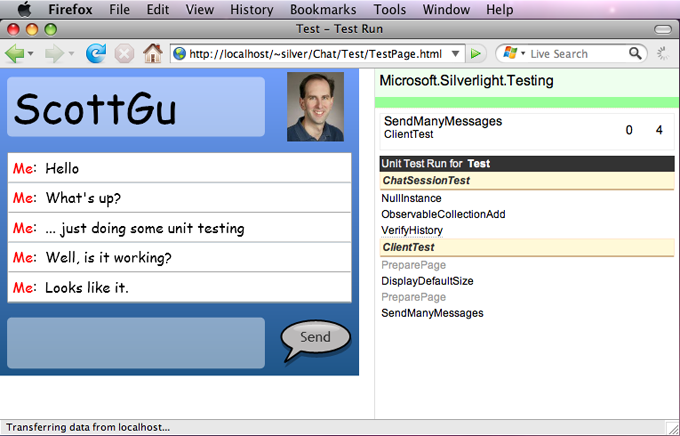
Jeff has a great blog post which includes a video walk-through of this test framework.  Check it out: Silverlight Unit Test Framework.

SilverUnit

Just yesterday, Roy Osherove released SilverUnit, which he describes as

a new open source unit testing framework for Silverlight (true unit testing, not the Integration style, browser-backed, async-driven C#-only-friendly, monster of a Test Framework…”

Hmm, maybe we should have a death match at MIX between Jeff and Roy :-).  Reading the more detailed information about SilverUnit, Roy further describes:

You can run then as a regular NUnit test run, they run only in memory. The CThru engine underneath takes care of intercepting and “skipping” all calls to the silverlight runtime. SilverUnit does its part and mimics the missing pieces (Dependency Properties, RoutedEvents to a degree and so on).

The project is hosted on CodePlex as a part of the CThru project and you can get the bits and some demonstration there: SilverUnit.

Selenium

My friend Ted Neward turned me on to something new today: Silverlight-Selenium.  For those who don’t know Selenium, it is a very awesome web application testing framework, that is a bit of unit tests and a bit automation testing.  I personally have used Selenium for simulation of end-user interaction testing in web applications.  I think the framework is great and comes with some good tools to help record tests and automate the creation of scripts…but enough about that.

The new project extends Selenium a bit adding the ability for Silverlight communication.  If you are familiar with Selenium, you know that it uses JavaScript to communicate with the browser.  In order for this extension to Selenium to work with Silverlight, your code needs to be exposed as scriptable objects.  This is the only thing I see problematic with this framework.  I’m not sure that having a separate build for testing to add the [Scriptable] attributes will be palatable to most, but I’m sure there is some #IF DEBUG type stuff you could do to make that easier.

This project also includes “silvernium” (not sure that’s an actual element is it? ;-) in order to communicate with the Silverlight object model without you having to worry about that part.  This is an interesting project to watch.

Summary

Testing and patterns of testing vary.  I’ve seen many religious debates about TDD and what people think is right/wrong/whatever.  I’m not here to say anything on that – but that if you are testing beyond compiling and playing with it, that you should look at these types of frameworks evolving…they are easy to use and should be great additions to your development lifecycle. 

What else have you seen for Silverlight testing?