Now that the Silverlight 2 Video Player is available from Codeplex, I wanted to make it a template for Expression Encoder.  I’ll attempt to articulate the steps below.  It’s actually pretty trivial.  In fact in the current incarnation, you have to throw some extra stuff in there you may not need :-).

Step 1 – Creating the template folder

While I’ve covered this in previous posts and this is also well documented in the Encoder SDK documentation.

First you’ll navigate to C:\Program Files\Microsoft Expression\Encoder 2\Templates\en and you’ll see the existing template folders.  The folders do not represent the name of the template in the Encoder UI, so don’t worry about that.  Create a folder here.  I called mine SL2VideoPlayer.
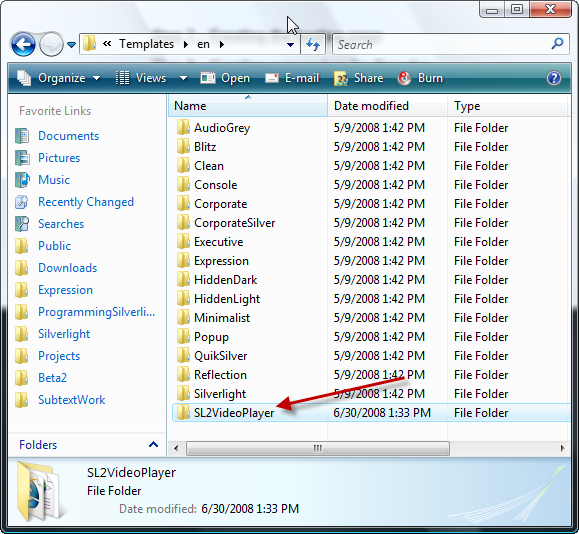
Step 2 – Creating the hosting page

Go into that folder and we’ll start creating some files here.  We’ll need the XAP from our media player (in my case VideoPlayer.xap) and simply place it in here.  We’ll also want to put a snapshot of our player here.  You can really name it to be anything, but I’m a fan of consistency and other templates call it preview.jpg so I stuck with that.  I recommend a proportionate image size.  You’ll notice the other templates don’t have this image anymore in Encoder 2.  That’s because their preview actually renders the player in Silverlight.  I’ll be honest here and tell you I haven’t messed around enough to know how to enable that, but my static preview image works and I’m sticking with that as it serves its purpose.

The main file we’ll need here is a hosting page.  I’ve called mine default.html again for consistency.  It is here where we have the magic happen.  In fact this step bleeds into the next 2 steps.  For now, you’ll want to create your hosting page that will host the Silverlight player.  This can be basic or elaborate…just create one.  In the next step we’ll make it wake up.

For me I just took the test page format provided to me by Visual Studio 2008 and the Silverlight project template.

Step 3 – Creating parameters for Encoder

Having a static page is nice, but doesn’t really help Encoder understand what we mean.  To our hosting page let’s add some parameters.  Encoder’s build process understands a certain set of parameters that are helpful for us.  It isn’t the intention of this post to emit them all to you, that’s what the SDK is for, but I’ll point out some key ones.  Let’s take a look at the ‘header’ of our hosting page:

   1: <!-- <$@ Options LaunchPage="true"$> -->
<pre style="padding-right: 0px; padding-left: 0px; font-size: 8pt; padding-bottom: 0px; margin: 0em; overflow: visible; width: 100%; color: black; border-top-style: none; line-height: 12pt; padding-top: 0px; font-family: consolas, 'Courier New', courier, monospace; border-right-style: none; border-left-style: none; background-color: #f4f4f4; border-bottom-style: none"><span style="color: #606060">   2:</span> <span style="color: #008000">&lt;!-- &lt;$@ Options Name="Silverlight 2 Video Player"$&gt; --&gt;</span></pre>

<pre style="padding-right: 0px; padding-left: 0px; font-size: 8pt; padding-bottom: 0px; margin: 0em; overflow: visible; width: 100%; color: black; border-top-style: none; line-height: 12pt; padding-top: 0px; font-family: consolas, 'Courier New', courier, monospace; border-right-style: none; border-left-style: none; background-color: #f4f4f4; border-bottom-style: none"><span style="color: #606060">   3:</span> <span style="color: #008000">&lt;!-- &lt;$@ Options TemplatePreviewImage="preview.JPG"$&gt; --&gt;</span></pre>

These are the first 3 lines of my default.html page.  They should be pretty self explanatory.  You can see now where the Encoder UI gets the template name from.  The next few lines immediately after this are interesting.  Here’s what my template looks like (after the first 3 lines above):

   1: <!-- <$@ Parameter Name="AutoPlay" Caption="Automatically start video when cued" Tooltip="Select to begin playback when video is loaded" Type="System.Boolean" Default="False" $> -->
<pre style="padding-right: 0px; padding-left: 0px; font-size: 8pt; padding-bottom: 0px; margin: 0em; overflow: visible; width: 100%; color: black; border-top-style: none; line-height: 12pt; padding-top: 0px; font-family: consolas, 'Courier New', courier, monospace; border-right-style: none; border-left-style: none; background-color: #f4f4f4; border-bottom-style: none"><span style="color: #606060">   2:</span> <span style="color: #008000">&lt;!-- &lt;$@ Parameter Name="EnableCaptions" Caption="Allow closed captions to show" Tooltip="Select to allow closed caption text over video during playback"Type="System.Boolean" Default="False" $&gt; --&gt;</span></pre>

<pre style="padding-right: 0px; padding-left: 0px; font-size: 8pt; padding-bottom: 0px; margin: 0em; overflow: visible; width: 100%; color: black; border-top-style: none; line-height: 12pt; padding-top: 0px; font-family: consolas, 'Courier New', courier, monospace; border-right-style: none; border-left-style: none; background-color: #f4f4f4; border-bottom-style: none"><span style="color: #606060">   3:</span> <span style="color: #008000">&lt;!-- &lt;$@ Parameter Name="Muted" Caption="Mute player on start" Tooltip="Select to begin playback in a muted state" Type="System.Boolean" Default="False" $&gt; --&gt;</span></pre>

<pre style="padding-right: 0px; padding-left: 0px; font-size: 8pt; padding-bottom: 0px; margin: 0em; overflow: visible; width: 100%; color: black; border-top-style: none; line-height: 12pt; padding-top: 0px; font-family: consolas, 'Courier New', courier, monospace; border-right-style: none; border-left-style: none; background-color: #f4f4f4; border-bottom-style: none"><span style="color: #606060">   4:</span> <span style="color: #008000">&lt;!-- &lt;$@ Parameter Name="MediaMarkers" Caption="Enable Media Marker Animations" Tooltip="Select to enable animations to appear when media markers are found" Type="System.Boolean" Default="False" $&gt; --&gt;</span></pre>

<pre style="padding-right: 0px; padding-left: 0px; font-size: 8pt; padding-bottom: 0px; margin: 0em; overflow: visible; width: 100%; color: black; border-top-style: none; line-height: 12pt; padding-top: 0px; font-family: consolas, 'Courier New', courier, monospace; border-right-style: none; border-left-style: none; background-color: #f4f4f4; border-bottom-style: none"><span style="color: #606060">   5:</span> <span style="color: #008000">&lt;!-- &lt;$@ Parameter Name="ScaleMode" Caption="Stretch Mode" Tooltip="Change the way the template is displayed on the page" Type="System.Enum" EnumValues="Profile Size=1,Stretch=2" Default="Profile Size" $&gt; --&gt;</span></pre>

Okay, these may need a bit more understanding.  Let’s dissect one of them a bit as the all are of type parameter.  First the Name – this is what will be known to your code later (in step 4) so this is really an internal name…not visible to the user.  The second attribute, Caption, will be seen to your user and should be descriptive, but concise.  Tooltip is, well, a tooltip…and if you don’t know what that is, maybe you shouldn’t be customizing templates?  Type is the data type of your parameter…these are standard .NET types like System.String, System.Boolean, etc.  The final attribute, Default, is exactly what it sounds like – providing a default value for the parameter.  At this point you may be asking yourself: How is the user providing input to these values? and that would be a great question.

You see, when you add parameters to your template they show up as advanced options to the template.  Let’s look at Encoder 2 after we’ve selected our template.  Notice the template name and then the expander decorator:
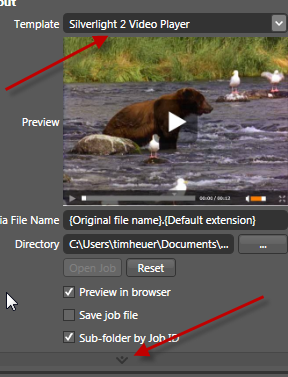
If you expand these advanced properties you’ll see your parameters.  Here’s my setup for the SL2VideoPlayer template:
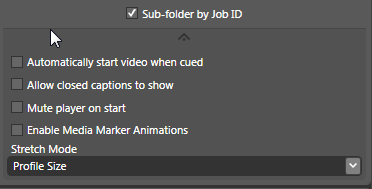
Pretty cool, huh?  You can totally provide your users of your template the option to provide input parameters.  Now my params are pretty obvious but you could probably think of some other creative uses.  But we didn’t have to do anything to get some of this free UI goodness!  Now we have our template selectable and our users can provide certain parameters…let’s see how we can use them.

Step 4 – Reading the parameters in the template

We’ve got the input parameters, how do we use them?  Well for my input parameters, these directly translate to initParams for my Silverlight application.  However regardless there are some other things you can get other than parameters.  Again, I’ll defer to the full Encoder SDK, but since you are encoding a file, I’m guessing at least the output of that file is an important attribute you’ll want to be aware of.  Again, let’s take a look at other code in my default.html template where I use code to get at these parameters:

   1: <object data="data:application/x-silverlight," type="application/x-silverlight-2-b2" 
<pre style="padding-right: 0px; padding-left: 0px; font-size: 8pt; padding-bottom: 0px; margin: 0em; overflow: visible; width: 100%; color: black; border-top-style: none; line-height: 12pt; padding-top: 0px; font-family: consolas, 'Courier New', courier, monospace; border-right-style: none; border-left-style: none; background-color: #f4f4f4; border-bottom-style: none"><span style="color: #606060">   2:</span>     &lt;$ <span style="color: #0000ff">if</span> (TemplateParameter.ScaleMode == <span style="color: #006080">"1"</span>) { $&gt;width=<span style="color: #006080">"&lt;$=PublishedItems[0].MediaItem.VideoSize.Width$&gt;"</span> </pre>

<pre style="padding-right: 0px; padding-left: 0px; font-size: 8pt; padding-bottom: 0px; margin: 0em; overflow: visible; width: 100%; color: black; border-top-style: none; line-height: 12pt; padding-top: 0px; font-family: consolas, 'Courier New', courier, monospace; border-right-style: none; border-left-style: none; background-color: #f4f4f4; border-bottom-style: none"><span style="color: #606060">   3:</span>     height=<span style="color: #006080">"&lt;$=PublishedItems[0].MediaItem.VideoSize.Height$&gt;"</span>&lt;$}<span style="color: #0000ff">else</span>{$&gt;width=<span style="color: #006080">"100%"</span> height=<span style="color: #006080">"100%"</span>&lt;$}$&gt;&gt;</pre>

<pre style="padding-right: 0px; padding-left: 0px; font-size: 8pt; padding-bottom: 0px; margin: 0em; overflow: visible; width: 100%; color: black; border-top-style: none; line-height: 12pt; padding-top: 0px; font-family: consolas, 'Courier New', courier, monospace; border-right-style: none; border-left-style: none; background-color: #f4f4f4; border-bottom-style: none"><span style="color: #606060">   4:</span>         &lt;param name=<span style="color: #006080">"source"</span> <span style="color: #0000ff">value</span>=<span style="color: #006080">"VideoPlayer.xap"</span>/&gt;</pre>

<pre style="padding-right: 0px; padding-left: 0px; font-size: 8pt; padding-bottom: 0px; margin: 0em; overflow: visible; width: 100%; color: black; border-top-style: none; line-height: 12pt; padding-top: 0px; font-family: consolas, 'Courier New', courier, monospace; border-right-style: none; border-left-style: none; background-color: #f4f4f4; border-bottom-style: none"><span style="color: #606060">   5:</span>         &lt;param name=<span style="color: #006080">"onerror"</span> <span style="color: #0000ff">value</span>=<span style="color: #006080">"onSilverlightError"</span> /&gt;</pre>

<pre style="padding-right: 0px; padding-left: 0px; font-size: 8pt; padding-bottom: 0px; margin: 0em; overflow: visible; width: 100%; color: black; border-top-style: none; line-height: 12pt; padding-top: 0px; font-family: consolas, 'Courier New', courier, monospace; border-right-style: none; border-left-style: none; background-color: #f4f4f4; border-bottom-style: none"><span style="color: #606060">   6:</span>         &lt;param name=<span style="color: #006080">"background"</span> <span style="color: #0000ff">value</span>=<span style="color: #006080">"white"</span> /&gt;</pre>

<pre style="padding-right: 0px; padding-left: 0px; font-size: 8pt; padding-bottom: 0px; margin: 0em; overflow: visible; width: 100%; color: black; border-top-style: none; line-height: 12pt; padding-top: 0px; font-family: consolas, 'Courier New', courier, monospace; border-right-style: none; border-left-style: none; background-color: #f4f4f4; border-bottom-style: none"><span style="color: #606060">   7:</span>         &lt;param name=<span style="color: #006080">"initParams"</span> <span style="color: #0000ff">value</span>=<span style="color: #006080">"autostart=&lt;$=TemplateParameter.AutoPlay$&gt;,muted=&lt;$=TemplateParameter.Muted$&gt;,</span></pre>

<pre style="padding-right: 0px; padding-left: 0px; font-size: 8pt; padding-bottom: 0px; margin: 0em; overflow: visible; width: 100%; color: black; border-top-style: none; line-height: 12pt; padding-top: 0px; font-family: consolas, 'Courier New', courier, monospace; border-right-style: none; border-left-style: none; background-color: #f4f4f4; border-bottom-style: none"><span style="color: #606060">   8:</span>             captions=&lt;$=TemplateParameter.EnableCaptions$&gt;,markers=&lt;$=TemplateParameter.MediaMarkers$&gt;,</pre>

<pre style="padding-right: 0px; padding-left: 0px; font-size: 8pt; padding-bottom: 0px; margin: 0em; overflow: visible; width: 100%; color: black; border-top-style: none; line-height: 12pt; padding-top: 0px; font-family: consolas, 'Courier New', courier, monospace; border-right-style: none; border-left-style: none; background-color: #f4f4f4; border-bottom-style: none"><span style="color: #606060">   9:</span>             m=&lt;$=PublishedItems[0].OutputFileName$&gt;" /&gt;</pre>

<pre style="padding-right: 0px; padding-left: 0px; font-size: 8pt; padding-bottom: 0px; margin: 0em; overflow: visible; width: 100%; color: black; border-top-style: none; line-height: 12pt; padding-top: 0px; font-family: consolas, 'Courier New', courier, monospace; border-right-style: none; border-left-style: none; background-color: #f4f4f4; border-bottom-style: none"><span style="color: #606060">  10:</span>         &lt;a href=<span style="color: #006080">"http://go.microsoft.com/fwlink/?LinkID=115261"</span> style=<span style="color: #006080">"text-decoration: none;"</span>&gt;</pre>

<pre style="padding-right: 0px; padding-left: 0px; font-size: 8pt; padding-bottom: 0px; margin: 0em; overflow: visible; width: 100%; color: black; border-top-style: none; line-height: 12pt; padding-top: 0px; font-family: consolas, 'Courier New', courier, monospace; border-right-style: none; border-left-style: none; background-color: #f4f4f4; border-bottom-style: none"><span style="color: #606060">  11:</span>              &lt;img src=<span style="color: #006080">"http://go.microsoft.com/fwlink/?LinkId=108181"</span> alt=<span style="color: #006080">"Get Microsoft Silverlight"</span> style=<span style="color: #006080">"border-style: none"</span>/&gt;</pre>

<pre style="padding-right: 0px; padding-left: 0px; font-size: 8pt; padding-bottom: 0px; margin: 0em; overflow: visible; width: 100%; color: black; border-top-style: none; line-height: 12pt; padding-top: 0px; font-family: consolas, 'Courier New', courier, monospace; border-right-style: none; border-left-style: none; background-color: #f4f4f4; border-bottom-style: none"><span style="color: #606060">  12:</span>         &lt;/a&gt;</pre>

<pre style="padding-right: 0px; padding-left: 0px; font-size: 8pt; padding-bottom: 0px; margin: 0em; overflow: visible; width: 100%; color: black; border-top-style: none; line-height: 12pt; padding-top: 0px; font-family: consolas, 'Courier New', courier, monospace; border-right-style: none; border-left-style: none; background-color: #f4f4f4; border-bottom-style: none"><span style="color: #606060">  13:</span> &lt;/<span style="color: #0000ff">object</span>&gt;</pre>

See some familiar code here?  the “<$>” decoration is instructing the Encoder build process that this is code to be executed.  What kind of code?  .NET baby.  My example is very, very simple here and in fact I’m just extracting attributes.  The SDK has examples of more advanced techniques should you need them.

You can see the use of TemplateParameter that enables me to get at the parameter configuration options that we’ve provided to the user.  I just retrieve them, can inspect them, etc.  Some of them I’m just passing in the parameter, others I’m acting upon.

The one thing that you’ll want to familiarize yourself with is the PublishedItems model.  This represents the Encoder job activities.  You can see that my reference actually uses an index of 0.  This is because Encoder supports encoding multiple files at once and your output could contain more than one file.  This could be helpful in creating a template that uses multiple media sources and you are creating a visual playlist feature.  For me, I’m just using one, so I grab the first item.  I can then reflect on properties of that published item such as name, video size of the media, etc.  A very helpful and powerful little scripting-looking language that can be leveraged to really customize your template.

Using this code we now have our default.html file that in the end will be complete and have all our HTML provided for us.  I should note that the attributes in the header of the page will not be emitted.

Step 5 – Additional File(s)

What is really cool is that the process looks at other files in your template to see if they need to be acted upon as well.  So if you have javascript or other files that might need to be dynamic based on output, you can use the same coding methods as above in other files – it doesn’t all have to live in default.html at all!

Step 6 – Prepare the template for Silverlight Streaming

At this point our template will work.  We can import a video media asset, choose our template and click Encode.  After encoding the start page will launch with our options passed in and render.  But what about the next step?  What if I wanted to upload to Silverlight Streaming Services to host my media and application.  Well, I know that there is already a plugin that allows a quick upload for this – the SLSPlugin.  How can we tap into this?  I thought that I’d be able to just click publish and it would work, but that isn’t the case.

First the plugin expects at least one XAML file to exist…and we have a XAP.  So trick one, create foo.xaml with nothing in it and put it in the template folder.  Done.

Second, it expects a manifest.xml file to exist.  This is because the plugin is packaging our template assets into a ZIP that Silverlight Streaming understands for multiple assets.  This requires a manifest definition file that is a part of that ZIP.  So I create a manifest.xml file and put it in my template directory.  Remember step 5?  In my manifest I have it with some code as well:

   1: <SilverlightApp>
<pre style="padding-right: 0px; padding-left: 0px; font-size: 8pt; padding-bottom: 0px; margin: 0em; overflow: visible; width: 100%; color: black; border-top-style: none; line-height: 12pt; padding-top: 0px; font-family: consolas, 'Courier New', courier, monospace; border-right-style: none; border-left-style: none; background-color: #f4f4f4; border-bottom-style: none"><span style="color: #606060">   2:</span>   <span style="color: #0000ff">&lt;</span><span style="color: #800000">source</span><span style="color: #0000ff">&gt;</span>VideoPlayer.xap<span style="color: #0000ff">&lt;/</span><span style="color: #800000">source</span><span style="color: #0000ff">&gt;</span></pre>

<pre style="padding-right: 0px; padding-left: 0px; font-size: 8pt; padding-bottom: 0px; margin: 0em; overflow: visible; width: 100%; color: black; border-top-style: none; line-height: 12pt; padding-top: 0px; font-family: consolas, 'Courier New', courier, monospace; border-right-style: none; border-left-style: none; background-color: #f4f4f4; border-bottom-style: none"><span style="color: #606060">   3:</span>   <span style="color: #0000ff">&lt;</span><span style="color: #800000">version</span><span style="color: #0000ff">&gt;</span>2.0<span style="color: #0000ff">&lt;/</span><span style="color: #800000">version</span><span style="color: #0000ff">&gt;</span></pre>

<pre style="padding-right: 0px; padding-left: 0px; font-size: 8pt; padding-bottom: 0px; margin: 0em; overflow: visible; width: 100%; color: black; border-top-style: none; line-height: 12pt; padding-top: 0px; font-family: consolas, 'Courier New', courier, monospace; border-right-style: none; border-left-style: none; background-color: #f4f4f4; border-bottom-style: none"><span style="color: #606060">   4:</span>   <span style="color: #0000ff">&lt;</span><span style="color: #800000">name</span><span style="color: #0000ff">&gt;&lt;</span>$=PublishedItems[0].MediaItem.Name$<span style="color: #0000ff">&gt;&lt;/</span><span style="color: #800000">name</span><span style="color: #0000ff">&gt;</span></pre>

<pre style="padding-right: 0px; padding-left: 0px; font-size: 8pt; padding-bottom: 0px; margin: 0em; overflow: visible; width: 100%; color: black; border-top-style: none; line-height: 12pt; padding-top: 0px; font-family: consolas, 'Courier New', courier, monospace; border-right-style: none; border-left-style: none; background-color: #f4f4f4; border-bottom-style: none"><span style="color: #606060">   5:</span>     <span style="color: #0000ff">&lt;</span>$if (TemplateParameter.ScaleMode == "1") {$<span style="color: #0000ff">&gt;</span></pre>

<pre style="padding-right: 0px; padding-left: 0px; font-size: 8pt; padding-bottom: 0px; margin: 0em; overflow: visible; width: 100%; color: black; border-top-style: none; line-height: 12pt; padding-top: 0px; font-family: consolas, 'Courier New', courier, monospace; border-right-style: none; border-left-style: none; background-color: #f4f4f4; border-bottom-style: none"><span style="color: #606060">   6:</span>         <span style="color: #0000ff">&lt;</span><span style="color: #800000">width</span><span style="color: #0000ff">&gt;&lt;</span>$=PublishedItems[0].MediaItem.VideoSize.Width$<span style="color: #0000ff">&gt;&lt;/</span><span style="color: #800000">width</span><span style="color: #0000ff">&gt;</span></pre>

<pre style="padding-right: 0px; padding-left: 0px; font-size: 8pt; padding-bottom: 0px; margin: 0em; overflow: visible; width: 100%; color: black; border-top-style: none; line-height: 12pt; padding-top: 0px; font-family: consolas, 'Courier New', courier, monospace; border-right-style: none; border-left-style: none; background-color: #f4f4f4; border-bottom-style: none"><span style="color: #606060">   7:</span>         <span style="color: #0000ff">&lt;</span><span style="color: #800000">height</span><span style="color: #0000ff">&gt;&lt;</span>$=PublishedItems[0].MediaItem.VideoSize.Height$<span style="color: #0000ff">&gt;&lt;/</span><span style="color: #800000">height</span><span style="color: #0000ff">&gt;</span></pre>

<pre style="padding-right: 0px; padding-left: 0px; font-size: 8pt; padding-bottom: 0px; margin: 0em; overflow: visible; width: 100%; color: black; border-top-style: none; line-height: 12pt; padding-top: 0px; font-family: consolas, 'Courier New', courier, monospace; border-right-style: none; border-left-style: none; background-color: #f4f4f4; border-bottom-style: none"><span style="color: #606060">   8:</span>     <span style="color: #0000ff">&lt;</span>$}$<span style="color: #0000ff">&gt;</span></pre>

<pre style="padding-right: 0px; padding-left: 0px; font-size: 8pt; padding-bottom: 0px; margin: 0em; overflow: visible; width: 100%; color: black; border-top-style: none; line-height: 12pt; padding-top: 0px; font-family: consolas, 'Courier New', courier, monospace; border-right-style: none; border-left-style: none; background-color: #f4f4f4; border-bottom-style: none"><span style="color: #606060">   9:</span> <span style="color: #0000ff">&lt;/</span><span style="color: #800000">SilverlightApp</span><span style="color: #0000ff">&gt;</span></pre>

So my manfiest is dynamically generated based on the output as well.  This file is created as a part of the encode process and is not a part of the default.html file…so you can see an example of separate files being able to access the parameters as well as the PublishedItems collection as well.  Now that the file is created it can get packaged into the app!

However, with my implementation of SL2 Video Player I run into a snag.  You see the default.html page is great and we can use it and it supplies all of our needs because we are using initParams.  However SLS doesn’t use our hosting page.  It generates it’s own HTML hosting page and creates the Silverlight object using createObject.  This is fine except for one thing: it doesn’t currently support initParams.  Yes I know createObject does, but SLS hasn’t built in the support to use those yet.  So alas, my final step here for my particular use is broken :-(.  I’m working with the SLS guys to implement initParams support much easier.  I’d love to see it a part of the manfiest options so I could have:

   1: <SilverlightApp>
<pre style="padding-right: 0px; padding-left: 0px; font-size: 8pt; padding-bottom: 0px; margin: 0em; overflow: visible; width: 100%; color: black; border-top-style: none; line-height: 12pt; padding-top: 0px; font-family: consolas, 'Courier New', courier, monospace; border-right-style: none; border-left-style: none; background-color: #f4f4f4; border-bottom-style: none"><span style="color: #606060">   2:</span>     <span style="color: #0000ff">&lt;</span><span style="color: #800000">source</span><span style="color: #0000ff">&gt;</span>VideoPlayer.xap<span style="color: #0000ff">&lt;/</span><span style="color: #800000">source</span><span style="color: #0000ff">&gt;</span></pre>

<pre style="padding-right: 0px; padding-left: 0px; font-size: 8pt; padding-bottom: 0px; margin: 0em; overflow: visible; width: 100%; color: black; border-top-style: none; line-height: 12pt; padding-top: 0px; font-family: consolas, 'Courier New', courier, monospace; border-right-style: none; border-left-style: none; background-color: #f4f4f4; border-bottom-style: none"><span style="color: #606060">   3:</span>     <span style="color: #0000ff">&lt;</span><span style="color: #800000">initParams</span><span style="color: #0000ff">&gt;</span>m=foo.wmv,captions=true<span style="color: #0000ff">&lt;/</span><span style="color: #800000">initParams</span><span style="color: #0000ff">&gt;</span></pre>

<pre style="padding-right: 0px; padding-left: 0px; font-size: 8pt; padding-bottom: 0px; margin: 0em; overflow: visible; width: 100%; color: black; border-top-style: none; line-height: 12pt; padding-top: 0px; font-family: consolas, 'Courier New', courier, monospace; border-right-style: none; border-left-style: none; background-color: #f4f4f4; border-bottom-style: none"><span style="color: #606060">   4:</span> <span style="color: #0000ff">&lt;/</span><span style="color: #800000">SilverlightApp</span><span style="color: #0000ff">&gt;</span></pre>

And then the solution would be complete and life would be glorious.  We’ll let you know when that happens.

Summary

In brief summary hopefully this let’s you see some of the options you have for still being able to use Silverlight 2 in your Encoder 2 workflow.  The SDK provides a way for us to get integrated into the encoding pipeline and do our customizations.  It’s simple to do and will only get better.  You can download my complete template example here.  Please note that this was based on an earlier build of the SL2 Video Player.  The project has been progressing and you can get the latest version of the player at the Codeplex project site.

After posting my sample implementation of accessing Amazon Simple Storage Solution (S3) via Silverlight, I reflected quickly and also chatted with some AWS engineers.

Cross-domain Policy

One thing that you should never do is just deploy a global clientaccesspolicy.xml file blindly.  Often times in samples, we (I) do this.  I need to be better about this guidance to be honest, so I’ll start here.  As an example, for the S3 cross domain policy file, we really should add some additional attributes to it to make it more secure.  Since we know it is a SOAP service, we can ratchet down the requests a little bit by adding the http-request-headers restrictions like this:

   1: <?xml version="1.0" encoding="utf-8" ?>
<pre style="padding-right: 0px; padding-left: 0px; font-size: 8pt; padding-bottom: 0px; margin: 0em; overflow: visible; width: 100%; color: black; border-top-style: none; line-height: 12pt; padding-top: 0px; font-family: consolas, 'Courier New', courier, monospace; border-right-style: none; border-left-style: none; background-color: #f4f4f4; border-bottom-style: none"><span style="color: #606060">   2:</span> <span style="color: #0000ff">&lt;</span><span style="color: #800000">access-policy</span><span style="color: #0000ff">&gt;</span></pre>

<pre style="padding-right: 0px; padding-left: 0px; font-size: 8pt; padding-bottom: 0px; margin: 0em; overflow: visible; width: 100%; color: black; border-top-style: none; line-height: 12pt; padding-top: 0px; font-family: consolas, 'Courier New', courier, monospace; border-right-style: none; border-left-style: none; background-color: #f4f4f4; border-bottom-style: none"><span style="color: #606060">   3:</span>   <span style="color: #0000ff">&lt;</span><span style="color: #800000">cross-domain-access</span><span style="color: #0000ff">&gt;</span></pre>

<pre style="padding-right: 0px; padding-left: 0px; font-size: 8pt; padding-bottom: 0px; margin: 0em; overflow: visible; width: 100%; color: black; border-top-style: none; line-height: 12pt; padding-top: 0px; font-family: consolas, 'Courier New', courier, monospace; border-right-style: none; border-left-style: none; background-color: #f4f4f4; border-bottom-style: none"><span style="color: #606060">   4:</span>     <span style="color: #0000ff">&lt;</span><span style="color: #800000">policy</span><span style="color: #0000ff">&gt;</span></pre>

<pre style="padding-right: 0px; padding-left: 0px; font-size: 8pt; padding-bottom: 0px; margin: 0em; overflow: visible; width: 100%; color: black; border-top-style: none; line-height: 12pt; padding-top: 0px; font-family: consolas, 'Courier New', courier, monospace; border-right-style: none; border-left-style: none; background-color: #f4f4f4; border-bottom-style: none"><span style="color: #606060">   5:</span>       <span style="color: #0000ff">&lt;</span><span style="color: #800000">allow-from</span> <span style="color: #ff0000">http-request-headers</span><span style="color: #0000ff">="SOAPAction,Content-Type"</span><span style="color: #0000ff">&gt;</span></pre>

<pre style="padding-right: 0px; padding-left: 0px; font-size: 8pt; padding-bottom: 0px; margin: 0em; overflow: visible; width: 100%; color: black; border-top-style: none; line-height: 12pt; padding-top: 0px; font-family: consolas, 'Courier New', courier, monospace; border-right-style: none; border-left-style: none; background-color: #f4f4f4; border-bottom-style: none"><span style="color: #606060">   6:</span>         <span style="color: #0000ff">&lt;</span><span style="color: #800000">domain</span> <span style="color: #ff0000">uri</span><span style="color: #0000ff">="*"</span><span style="color: #0000ff">/&gt;</span></pre>

<pre style="padding-right: 0px; padding-left: 0px; font-size: 8pt; padding-bottom: 0px; margin: 0em; overflow: visible; width: 100%; color: black; border-top-style: none; line-height: 12pt; padding-top: 0px; font-family: consolas, 'Courier New', courier, monospace; border-right-style: none; border-left-style: none; background-color: #f4f4f4; border-bottom-style: none"><span style="color: #606060">   7:</span>       <span style="color: #0000ff">&lt;/</span><span style="color: #800000">allow-from</span><span style="color: #0000ff">&gt;</span></pre>

<pre style="padding-right: 0px; padding-left: 0px; font-size: 8pt; padding-bottom: 0px; margin: 0em; overflow: visible; width: 100%; color: black; border-top-style: none; line-height: 12pt; padding-top: 0px; font-family: consolas, 'Courier New', courier, monospace; border-right-style: none; border-left-style: none; background-color: #f4f4f4; border-bottom-style: none"><span style="color: #606060">   8:</span>       <span style="color: #0000ff">&lt;</span><span style="color: #800000">grant-to</span><span style="color: #0000ff">&gt;</span></pre>

<pre style="padding-right: 0px; padding-left: 0px; font-size: 8pt; padding-bottom: 0px; margin: 0em; overflow: visible; width: 100%; color: black; border-top-style: none; line-height: 12pt; padding-top: 0px; font-family: consolas, 'Courier New', courier, monospace; border-right-style: none; border-left-style: none; background-color: #f4f4f4; border-bottom-style: none"><span style="color: #606060">   9:</span>         <span style="color: #0000ff">&lt;</span><span style="color: #800000">resource</span> <span style="color: #ff0000">include-subpaths</span><span style="color: #0000ff">="true"</span> <span style="color: #ff0000">path</span><span style="color: #0000ff">="/"</span><span style="color: #0000ff">/&gt;</span></pre>

<pre style="padding-right: 0px; padding-left: 0px; font-size: 8pt; padding-bottom: 0px; margin: 0em; overflow: visible; width: 100%; color: black; border-top-style: none; line-height: 12pt; padding-top: 0px; font-family: consolas, 'Courier New', courier, monospace; border-right-style: none; border-left-style: none; background-color: #f4f4f4; border-bottom-style: none"><span style="color: #606060">  10:</span>       <span style="color: #0000ff">&lt;/</span><span style="color: #800000">grant-to</span><span style="color: #0000ff">&gt;</span></pre>

<pre style="padding-right: 0px; padding-left: 0px; font-size: 8pt; padding-bottom: 0px; margin: 0em; overflow: visible; width: 100%; color: black; border-top-style: none; line-height: 12pt; padding-top: 0px; font-family: consolas, 'Courier New', courier, monospace; border-right-style: none; border-left-style: none; background-color: #f4f4f4; border-bottom-style: none"><span style="color: #606060">  11:</span>     <span style="color: #0000ff">&lt;/</span><span style="color: #800000">policy</span><span style="color: #0000ff">&gt;</span></pre>

<pre style="padding-right: 0px; padding-left: 0px; font-size: 8pt; padding-bottom: 0px; margin: 0em; overflow: visible; width: 100%; color: black; border-top-style: none; line-height: 12pt; padding-top: 0px; font-family: consolas, 'Courier New', courier, monospace; border-right-style: none; border-left-style: none; background-color: #f4f4f4; border-bottom-style: none"><span style="color: #606060">  12:</span>   <span style="color: #0000ff">&lt;/</span><span style="color: #800000">cross-domain-access</span><span style="color: #0000ff">&gt;</span></pre>

<pre style="padding-right: 0px; padding-left: 0px; font-size: 8pt; padding-bottom: 0px; margin: 0em; overflow: visible; width: 100%; color: black; border-top-style: none; line-height: 12pt; padding-top: 0px; font-family: consolas, 'Courier New', courier, monospace; border-right-style: none; border-left-style: none; background-color: #f4f4f4; border-bottom-style: none"><span style="color: #606060">  13:</span> <span style="color: #0000ff">&lt;/</span><span style="color: #800000">access-policy</span><span style="color: #0000ff">&gt;</span></pre>

Additionally (and ideally) we’d be hosting our application from a known domain.  In this instance let’s say I was going to host my application on timheuer.com in the root domain.  I would add the allow from attribute and complete my security like this:

   1: <?xml version="1.0" encoding="utf-8" ?>
<pre style="padding-right: 0px; padding-left: 0px; font-size: 8pt; padding-bottom: 0px; margin: 0em; overflow: visible; width: 100%; color: black; border-top-style: none; line-height: 12pt; padding-top: 0px; font-family: consolas, 'Courier New', courier, monospace; border-right-style: none; border-left-style: none; background-color: #f4f4f4; border-bottom-style: none"><span style="color: #606060">   2:</span> <span style="color: #0000ff">&lt;</span><span style="color: #800000">access-policy</span><span style="color: #0000ff">&gt;</span></pre>

<pre style="padding-right: 0px; padding-left: 0px; font-size: 8pt; padding-bottom: 0px; margin: 0em; overflow: visible; width: 100%; color: black; border-top-style: none; line-height: 12pt; padding-top: 0px; font-family: consolas, 'Courier New', courier, monospace; border-right-style: none; border-left-style: none; background-color: #f4f4f4; border-bottom-style: none"><span style="color: #606060">   3:</span>   <span style="color: #0000ff">&lt;</span><span style="color: #800000">cross-domain-access</span><span style="color: #0000ff">&gt;</span></pre>

<pre style="padding-right: 0px; padding-left: 0px; font-size: 8pt; padding-bottom: 0px; margin: 0em; overflow: visible; width: 100%; color: black; border-top-style: none; line-height: 12pt; padding-top: 0px; font-family: consolas, 'Courier New', courier, monospace; border-right-style: none; border-left-style: none; background-color: #f4f4f4; border-bottom-style: none"><span style="color: #606060">   4:</span>     <span style="color: #0000ff">&lt;</span><span style="color: #800000">policy</span><span style="color: #0000ff">&gt;</span></pre>

<pre style="padding-right: 0px; padding-left: 0px; font-size: 8pt; padding-bottom: 0px; margin: 0em; overflow: visible; width: 100%; color: black; border-top-style: none; line-height: 12pt; padding-top: 0px; font-family: consolas, 'Courier New', courier, monospace; border-right-style: none; border-left-style: none; background-color: #f4f4f4; border-bottom-style: none"><span style="color: #606060">   5:</span>       <span style="color: #0000ff">&lt;</span><span style="color: #800000">allow-from</span> <span style="color: #ff0000">http-request-headers</span><span style="color: #0000ff">="SOAPAction,Content-Type"</span><span style="color: #0000ff">&gt;</span></pre>

<pre style="padding-right: 0px; padding-left: 0px; font-size: 8pt; padding-bottom: 0px; margin: 0em; overflow: visible; width: 100%; color: black; border-top-style: none; line-height: 12pt; padding-top: 0px; font-family: consolas, 'Courier New', courier, monospace; border-right-style: none; border-left-style: none; background-color: #f4f4f4; border-bottom-style: none"><span style="color: #606060">   6:</span>         <span style="color: #0000ff">&lt;</span><span style="color: #800000">domain</span> <span style="color: #ff0000">uri</span><span style="color: #0000ff">="http://timheuer.com"</span><span style="color: #0000ff">/&gt;</span></pre>

<pre style="padding-right: 0px; padding-left: 0px; font-size: 8pt; padding-bottom: 0px; margin: 0em; overflow: visible; width: 100%; color: black; border-top-style: none; line-height: 12pt; padding-top: 0px; font-family: consolas, 'Courier New', courier, monospace; border-right-style: none; border-left-style: none; background-color: #f4f4f4; border-bottom-style: none"><span style="color: #606060">   7:</span>       <span style="color: #0000ff">&lt;/</span><span style="color: #800000">allow-from</span><span style="color: #0000ff">&gt;</span></pre>

<pre style="padding-right: 0px; padding-left: 0px; font-size: 8pt; padding-bottom: 0px; margin: 0em; overflow: visible; width: 100%; color: black; border-top-style: none; line-height: 12pt; padding-top: 0px; font-family: consolas, 'Courier New', courier, monospace; border-right-style: none; border-left-style: none; background-color: #f4f4f4; border-bottom-style: none"><span style="color: #606060">   8:</span>       <span style="color: #0000ff">&lt;</span><span style="color: #800000">grant-to</span><span style="color: #0000ff">&gt;</span></pre>

<pre style="padding-right: 0px; padding-left: 0px; font-size: 8pt; padding-bottom: 0px; margin: 0em; overflow: visible; width: 100%; color: black; border-top-style: none; line-height: 12pt; padding-top: 0px; font-family: consolas, 'Courier New', courier, monospace; border-right-style: none; border-left-style: none; background-color: #f4f4f4; border-bottom-style: none"><span style="color: #606060">   9:</span>         <span style="color: #0000ff">&lt;</span><span style="color: #800000">resource</span> <span style="color: #ff0000">include-subpaths</span><span style="color: #0000ff">="true"</span> <span style="color: #ff0000">path</span><span style="color: #0000ff">="/"</span><span style="color: #0000ff">/&gt;</span></pre>

<pre style="padding-right: 0px; padding-left: 0px; font-size: 8pt; padding-bottom: 0px; margin: 0em; overflow: visible; width: 100%; color: black; border-top-style: none; line-height: 12pt; padding-top: 0px; font-family: consolas, 'Courier New', courier, monospace; border-right-style: none; border-left-style: none; background-color: #f4f4f4; border-bottom-style: none"><span style="color: #606060">  10:</span>       <span style="color: #0000ff">&lt;/</span><span style="color: #800000">grant-to</span><span style="color: #0000ff">&gt;</span></pre>

<pre style="padding-right: 0px; padding-left: 0px; font-size: 8pt; padding-bottom: 0px; margin: 0em; overflow: visible; width: 100%; color: black; border-top-style: none; line-height: 12pt; padding-top: 0px; font-family: consolas, 'Courier New', courier, monospace; border-right-style: none; border-left-style: none; background-color: #f4f4f4; border-bottom-style: none"><span style="color: #606060">  11:</span>     <span style="color: #0000ff">&lt;/</span><span style="color: #800000">policy</span><span style="color: #0000ff">&gt;</span></pre>

<pre style="padding-right: 0px; padding-left: 0px; font-size: 8pt; padding-bottom: 0px; margin: 0em; overflow: visible; width: 100%; color: black; border-top-style: none; line-height: 12pt; padding-top: 0px; font-family: consolas, 'Courier New', courier, monospace; border-right-style: none; border-left-style: none; background-color: #f4f4f4; border-bottom-style: none"><span style="color: #606060">  12:</span>   <span style="color: #0000ff">&lt;/</span><span style="color: #800000">cross-domain-access</span><span style="color: #0000ff">&gt;</span></pre>

<pre style="padding-right: 0px; padding-left: 0px; font-size: 8pt; padding-bottom: 0px; margin: 0em; overflow: visible; width: 100%; color: black; border-top-style: none; line-height: 12pt; padding-top: 0px; font-family: consolas, 'Courier New', courier, monospace; border-right-style: none; border-left-style: none; background-color: #f4f4f4; border-bottom-style: none"><span style="color: #606060">  13:</span> <span style="color: #0000ff">&lt;/</span><span style="color: #800000">access-policy</span><span style="color: #0000ff">&gt;</span></pre>

Of course if I had a cool application and others wanted to embed it, I could add more domains to that allow list as well and just list them in there.  But restricting it makes sense if you want to provide some secure access to your APIs (as a service provider) and to you (in methods of doing things like this sample).

More security with SSL

As I mentioned in the initial sample I changed the binding configuration, modifying the binding to use a security mode of “None” instead of “Transport.”  I actually did this because I use the built-in web server from Visual Studio for most of my development and it doesn’t support HTTPS connectivity.  To demonstrate my sample with S3 I had to ensure the schemes matched because in Silverlight 2 right now to access a secure service, the XAP itself would have to be served from a secure location.  The contexts must match.

I’ve come to learn that even with a bucket alias (except ones with “.” characters) you can use the SSL cert from Amazon S3 as it is a wildcard certificate.  So your endpoint (assuming a bucket name of timheuer-aws) could be https://timheuer-aws.s3.amazonaws.com/soap and it would work.

Using SSL of course means that currently you will have to serve your application from an SSL endpoint as well to avoid cross-scheme violations.

I hope this helps clear some things up and provide you with a more secure and recommended way of accessing Amazon S3 services with Silverlight!

Gary Krakow has gone insane.  I was going to say he’s an idiot, but I’ll leave that up to Cali.

In his latest article on TheStreet.com, he writes (regarding the iPhone and battery life):

In our tests, iPhone batteries really can't handle the extra drain of Microsoft Exchange mail. Blame it mostly on Microsoft.

Microsoft's mobile email software is a pig. It always has been a battery hog. Everyone who has ever lived with a Microsoft Mobile phone knows that battery life stinks if you constantly "push" email to your device. That's why I'm surprised that Apple chose to default their Exchange mail software to "push" email. If you set up your phone without changing that setting, you will get only four to five hours before you have to recharge the battery.

source – TheStreet.com – New iPhone’s Battery Falls Down on the Job

Okay, I’ve written as well about the battery life sucking hard core, but “Blame it mostly on Microsoft”?!  Um.  For what.  For the inability to manage resources for a feature?  C’mon Gary, pull it out man.  My Blackjack 2 connected to the same server using the same “push” settings (Windows Mobile calls this as items arrive) and with 3G enabled and I get at least twice battery life that I get with iPhone 3G.

Microsoft’s mobile email software is a pig.

What?!  What mobile software of Microsoft’s is on the iPhone?  Do you actually understand the technology you are writing about in this article?  The only think “Microsoft” on that device is the license to use the ActiveSync technology…which acts as a message broker.  Maybe Apple isn’t effectively managing the messages coming in/out?  Who knows, but your claim is just blatantly wrong to assert with that authority.

It always has been a battery hog.

I challenge thee on that statement.  HTC, Samsung and others have been able to create great WinMo devices that have good standby/call battery time with 3G/EVDO and “Push” features enabled.  So do they have smarter engineers than Apple?

How about a more balanced viewpoint Gary.  You say “mostly on Microsoft” but then don’t write about where other blame (to use your word) might lie.  This is the first time iPhone has enabled such “push” technology.  Wire up a MobileMe account and push “business grade” messaging through that…I suspect the battery life issues will be the same.  I’m not arguing that push mail is a battery drain on the iPhone, but certainly it can be improved looking at where the inefficiencies lie…and not just saying some server product is to blame.  Will you start blaming business power field users because they use email? 

Ridonkulous Gary.  Simply uninformed and scandalous.

iPhone not backward compatI’m a little pissed right now.  Today I had a long drive downtown and on the way home I was planning on charging my iPhone (since battery life sucks bad) as well as listen to some of the tunes.  I upgraded my car system last year to support iPod connectors and put a dock in my car attached to my OEM stereo.  It was a project I was pretty proud I was able to do myself :-).  You can read and see about it here and here.  At the time I did this I was asked why I didn’t use a Zune…after all I do work for Microsoft.  Well I have a Zune and actually think it is a great device.  The current one brings pretty much parity with iPod from a device standpoint and has some additional features that are interesting to some.  The problem was that Zune didn’t have a great aftermarket accessory story…especially for OEM car integration. 

I researched for my specific vehicle and came across a great solution which I purchased and implemented.  One of the great stories I heard was about how many accessories were available and how they all used the same connector, etc.  This is true and a great story for iPod.  Pretty much every accessory works with every iPod/Phone connectors.  This was true for my car kit that worked with iPod and iPhone v1 (charged and played).  Today I was greeted with the message at the top of this post.  Argh.  I chose either option and the integration didn’t work nor would it act as a charger.  What?!  A bit of researching shows that others are having similar problems.  It seems that there was some significant enough changes to the 3G hardware unit that will render certain accessories useless (namely charging and interactive ones…but what other kinds are there).  I’ve been reading that Firewire support is gone in iPhone 3G and because of that there is some voltage charging requirements (must be 5V) that make some chargers useless…especially the well integrated ones. 

One of the top manufacturers of iPod/phone integration kits, BlitzSafe, is pretty affected by this and I’ve been seeing complaints sent to them.  If there was a hardware change, this could be upsetting to most that spent money on a tight integration kit.  I guess the “same connector” really isn’t and that’s a little misleading.  I’m thinking that the advertisements should really expand that asterisk on their image.

I’ve contacted my manufacturer of the device to see if they are aware of this and maybe they can provide some type of firmware update themselves (for my dock) but I’m guessing it isn’t possible…I’m going to wait to see what they say as options…if anyone know how BlitzSafe is affected and their response, I’d be interested in knowing as well.  Aside from the voltage charge feature it seems that the v1 software commands aren’t honored as well.  Hey Mr. Jobs, can you release a software update that ensures that old docks with interactive commands are mapped to any new v2.0 software commands so that you have backward compat with device accessories?  If not, I really think you should add some truth in advertising and a warning on the features (and if there is one, can someone point it out to me as a part of the official documentation?).

iPhone 3G Max Battery.appAs another aside, in dealing with the battery life for a typical business day (it was dead at 5pm), I’ve decided that I need to manage my own battery life now (oddly enough is there a battery meter that actually shows the % left rather than just the icon on the device?).  This led me to flipping different options all day.  What is funny is that Apple’s own documention on improving battery life pretty much instructs you to turn off all features that make the 3G, well, the iPhone 3G: turn off 3G, minimize use of location services, turn off push mail, minimize use of 3rd party applications.  This cracked me up.  Given that I busted out the iPhone SDK and desired to write an application.  I consider myself not a genius but not an idiot.  I honestly couldn’t figure out how to add an event handler to a button click.  Some of you may laugh…go ahead.  I didn’t find any real helpful tutorials to guide me either.  If there are some, please point me.  At any rate, if there is someone who’d like to collaborate on creating “Max Battery.app” with me, leave a comment and let’s setup a project.  Of course the downside is to actually even test this we’ll have to pay $100 and won’t even be able to give it to others to test (see developer comments in previous post).  My goal would be to write a utility app that would be one place where you could do what Apple suggests.  Currently these settings are in 4 different places.  I’d love a single button to that is labeled either “Make iPhone v1” or “Extreme Savings” or something like that which would automatically toggle all these settings off instead of individually.

Anyhow, first 24 hours.  Disappointing in the key areas that were of interest to me.


This work is licensed under a Creative Commons Attribution By license.

Well now that the iPhone 3G (and actually more specifically the 2.0 software) are out, I promised myself I’d take another look, especially given that the claims of “for the Enterprise” were there (which really meant ‘we added ActiveSync’).  I had been holding on to some gift cards to subsidize this gadget investigation and so alas, I am testing the iPhone 3G for my use.

Now because the device itself isn’t really much different (physically the changes are subtle) I’m not really commenting on the “iPhone” itself but rather on the claims of what 2.0 software brought to the device.  The 3G and GPS are additive value, and I’ll comment on them a little bit.  The physical device is still great looking, feels good in your hand and has a bright display…but still has some shortcomings I think as well.

For me the claim of “ready for the Enterprise” should mean a lot more than ‘we've technically implemented the spec for ActiveSync.’  Given Apple’s track record with user experience design, I was surprised to see some really lacking implementations coming from an environment where I live in Exchange ActiveSync (EAS) and have experienced that integration since it was available on the Windows Mobile platform…which in this instance is the bar.  No, I’m not saying Windows Mobile is the bar…I’m saying the EAS integration is the bar.  How it operates, how the user interacts with it as a part of their usual desktop experience as well.  So here goes my feedback.  Remember, this is feedback regarding the ‘ready for the Enterprise’ claims.

I’ve already admitted in the past I hate the term ‘Enterprise’ but Apple seems to be defining it here as anyone who wants to use Exchange.  I think that is a wrong definition by a long shot.  Lots of people use Exchange – it’s why they added support for it!  That being said, my brain definition of ‘Enterprise’ is a large corporation.  I’m using my current usage of my digital lifestyle (personal and work) in that definition.

My feedback based on my experience (note: firmware version 2.0 5A347).

Multiple Calendar/EAS profiles

I’ve seen this complaint several times in the blogging circles.  People want to be able to sync multiple Exchange accounts or combine with EAS and MobileMe, etc.  I must admit that it doesn’t appeal to me.  I have one address book.  While I can see people wanting to do that, I can see how it wouldn’t be ideally supported.  The device seems to have single contact stores (calendar, contacts, etc.) – so adding two accounts would seemingly blend these together.  Admittedly I haven’t looked into this because it is a feature that I don’t care about…so if I’m wrong and it does support it, forgive me.

Large Contact Store

I have currently 1,172 contacts in my address book.  Notice I did not say friends.  These don’t represent every Twitter follower, Facebook friend, etc.  These are valid contacts that I want to retain in my personal and business life.  Networking is key in my industry and I make sure that I maintain relationships over time.  People may say there is no way you can manage that many contacts and would be true…I don’t ping these people daily, but keep contact information for people I’ve met of value over time – it has paid off tremendously to do this.  But enough about that…

iPhone sucks at handing large contact stores.  I suspect that a hard-core sales person ‘in the Enterprise’ has many more contacts than I do.  When I switch to the contacts application (or when using Contacts in To/From type fields) the software is painfully slow.  In the contact screen, it comes up and then when I click the search field there is a noticeable delay before that is enabled.  Then as I type it starts to filter….slowly.  This has to improve in my opinion.  For me the #2 functionality of my device (phone function being 1) is contacts.  This feels almost unusable to me.

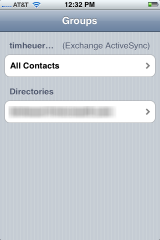
The Exchange directory feature is also hidden.  In Windows Mobile when you search and nothing is found, you get an immediate option to check the ‘company directory’ which is the Exchange global address list.  iPhone buries that in 3 more gestures away…it is not an integrated experience within the default contacts and is behind the Group icon on the device…then you pick the Directories section.

This area needs improvement.  Windows Mobile has a superior experience here in both performance of large contact stores and GAL integration.

Meeting Invitations/Appointments

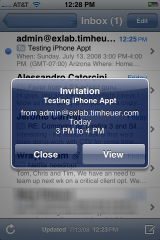
This one is an odd one as I’ve experienced two different things and it hasn’t been consistent in my testing (even though the meeting requests are coming from the same place).  With that said, this was one area that I felt took a lot to get used to as it does not exhibit the same behavior as Windows Mobile.  In WinMo, when you receive a meeting request it is the same as in the Outlook desktop experience.  You get it in your inbox, open it up, accept/maybe/decline with an option immediately for inline comments as well.  iPhone does it a little different.  First, you get a popup notice (this can be turned off) for your ‘Invitation’ (that is what iPhone calls them):

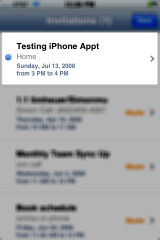
If you click view, it takes you to the Calendar application under the Invitations section:

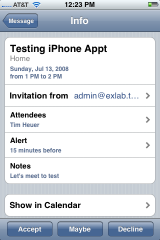
And once you click on the new invite (as denoted with a blue dot), you see the meeting request with the option of accepting/etc.

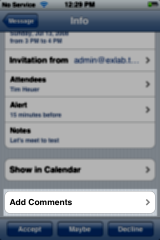
The problem is where is the option to provide feedback/comments on why I might decline?  The screenshot above implies that it isn’t there and gives you no indication that you can scroll down…but when you do:

Not very intuitive and not the same experience of a typical Exchange user who is used to taking action and adding comments at the time. 

The other thing that was odd for me was that if you ignored or didn’t see the popup, you’d have a much different experience in getting your appointment.  Take a look at the screenshots below.


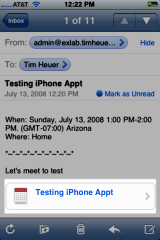
On the home screen when you receive an invite you get a new notice on the calendar icon.  Hmm…that doesn’t imply ‘new meeting request’ to me as an Exchange user…it implied I have one item today.  When you click on the calendar application you go to your calendar view and if you look at the second screenshot you’ll see the lower right corner what appears to be an inbox?  Clicking on that takes you to the Invitations screen (pictured previously).  So to me, it was an odd workflow, especially given that I didn’t have an email in my inbox with the meeting request!  I thought that was odd.  My future testing, however, showed the emails starting to show up (third screenshot above).  It is pretty much what you’d expect and when clicking on the appointment link takes you to the Invitations screen (again, pictured previously above).

UPDATE: New Meeting Requests

What?!  When I create a new calendar item I cannot invite people?  Shame.  Shame.

So for me, the process coming from a world of EAS and the Outlook desktop experience was different.  I can’t say this is bad yet, but if I miss a meeting request because it isn’t in my inbox, I’ll be pissed.  No vote on this one yet…the experience is ‘different’ for now.

No EAS Feedback

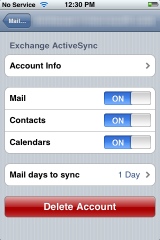
WinMo has an explicit icon to go to ActiveSync.  Here you can see your settings, but more importantly view any issues that may have occurred with the last sync.  This could include conflicts, EAS status messages, connectivity issues, etc.  I see none of that in iPhone.  It gives me no feedback of if everything is operating okay or not.  Am I just to assume it is?  Here’s the config screen I expected to see it in:

Location Services

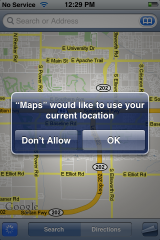
Seems to be the most popular thing to build iPhone applications off of!  As a side note I think the UrbanSpoon application is the best.  It is a great innovation to the age old question “what are we doing for dinner?”  That said, every app seems to want to take advantage of GPS.  Here’s the problem – GPS is a battery suck.  So for me I turned it off immediately which you can do easily.  When I then go to Maps (which uses Google maps), I am presented with this when I choose the Locate Me feature (lower left corner icon button):

If I choose Don’t Allow the feature goes away.  What?!  What happened to even my fake GPS with Google maps?  It doesn’t seem like it is an option anymore…it’s either real or none.  Clicking ok on here turns on your GPS radio as well, so start the battery suck.  This is odd to me and I think a loss for Google maps.  Sure real GPS is great, but I would expect that it fallback on the tower triangulation that was an acceptable option for most…espeically those in dense areas where GPS line-of-sight might be troubled, but signal triangulation might be easier to attain.

On a side note, developers should do exactly what UrbanSpoon does – gives me the option to use my current location and if I choose Don’t Allow then it falls back to still let me manually select and still use the application…well done.

Battery Life

Wow, noticeable battery life drain on this device compared to the previous incarnation.  I mean, really bad.  I’ve got GPS/WiFi turned off and have tuned my mail settings accordingly.  My battery was dead after first day.  Yikes.  This is failure ‘for the Enterprise’ given how mobile employees are.  I’m making sure my car adapter works and never leaving home without the wall cable.  I really hope this improves for their sake.  My WinMo device is a BlackJack II (which also has GPS turned off) and I get at least 2 days on a full charge with 3G activity and push email.  I know people complain about the BJII as well, but in comparison I think WinMo devices have fine tuned for the most part the battery usage that EAS and always-on push email uses. 

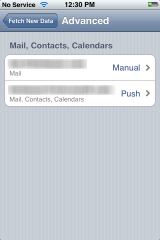
I don’t think the configuration options for the email/push are incredibly intuitive.  In fact when i configured my IMAP account, it automatically set it for Fetch rather than manual (this seemed to be a change from the previous software in my experience).  I noticed there was an Advanced button that would allow me to change the per-email account settings:

This enabled me to say Manual for this account and Push for the other.  This option is under the “Fetch” section of the Settings applet.  I recommend fine tuning these to your needs, maybe even turning off push all together for optimal battery life if you get a lot of mail.

16GB and no document storage

Seriously.  16GB and still no option to save documents?  Now I am not a heavy document user on my WinMo device either but I do like the ability to save documents to the device (whatever ‘documents’ means to you) when I need to.  I know iPhone can be used for USB storage, but my WinMo device can respond to the inquiry of ‘Hey, can you email me that spec?’ To which i can Save As…to my SD card and transfer later if needed…or transfer via ActiveSync via Bluetooth…neither of which iPhone can do.  WinMo clearly wins here for this feature that I think people use a bit in the Enterprise.

Home Screen Customization

Where is the home screen customization?  One great thing about all ‘for the Enterprise’ devices (WinMo and Blackberry) is they provide Today style home screens.  Date/Time, # emails, # appointments, next appointment, etc.  The iPhone home screen gives me # of emails (but doesn’t tell me which accounts those numbers exist in…WinMo does) but tells me nothing about my day until I click a few times.  This should be a customizable feature that iPhone should enable.  Even in the locked screen state I’d love to see my message counts and next appointment.  This is a common use for me in my business life.  I’m not even sure their SDK would allow such overriding of the icon display home page UI?

Pin Unlock

Most larger corporations would implement the EAS feature of policies and require a device pin lock.  This is fine.  What sucks is that when pin lock is enabled, you essentially have to double-unlock.  Slide to unlock, then enter pin.  Sigh…that sucks.  I’m not sure that can be improved as the pin lock feature is tied to a timeout and I do like my device preventing me from using features when in my pocket.  Maybe if you have a pin, then the Auto lock settings are used.  Either way I think it should be one or the other…not both.

The Developer Story

Much has been said about AppStore and how wonderful it is.  I agree, the iTunes experience is pretty seemless.  Having one place to acquire apps is nice.  I think this is one area where WinMo really hasn’t nailed although there are exponentially larger amount of applications for WinMo available, it is not an integrated experience to get them.  Handango comes close, but I believe this is one area where the carrier customization of the devices bites WinMo in the end in my opinion…nobody chooses to include Handango in their distribution.

Aside from distribution, the developer story sucks a little for me.  Sure the tools are free…for emulation only.  Want to deploy to your iPhone?  $100.  Now, I don’t think that’s such a bad price actually.  My problem is that it limits you to a device.  It is hard to tell from the terms (I haven’t signed up fully) whether you can deploy an app to multiple devices (it notes Registered Device IDs).  If not, this is epic fail for me.  How do you get your app out there for people to beta test and give you feedback?  Will AppStore allow beta versions since that is the only mainstream distribution channel?  This seems like a developer shortcoming to me.  I love the WinMo experience of being able to write something, debug in emulation, change and deploy to my device, or write an installer that I can email to my friends who can receive it over the air, save to their device and install.  I’d really like to know the equivalent process here for iPhone development.

Ready?

In the end, I’m not convinced all the kinks are worked out for really declaring the badge ‘ready for the Enterprise’ valid.  Simply adding one feature to your software hasn’t made it that ready.  I guess ‘the Enterprise’ will eventually tell Apple what needs to be done.  For me, as an enterprise user, as an EAS user…it isn’t complete.  It needs some fine tuning in certain areas for sure.

UPDATE: See Exchange features broken/missing/weird, help us build the wiki: iPhone Exchange Issues

How did you take those screenshots?

I have a friend that runs a blog called On a Mac that you should subscribe to if you are a mac user.  He clued me in to how to take screenshots on iPhone using a new feature in the 2.0 software.

Related Posts:

    • "If you're a business user, then we feel the answer is no, it's not worth it." Speaking on a business user purchasing an iPhone 3G Source: ars technica