Silverlight data binding and value converters
If you are working with Silverlight and data you most likely are going to leverage data binding at some point and run into some needs to format the data in the XAML. Luckily this can be done using value converters, which have been available for WPF since it’s inception as well. Let’s explore what I’m talking about using a common formatting need: dates.
Consider this list box output binding:
1: <ListBox x:Name="FeedList">
<pre style="padding-right: 0px; padding-left: 0px; font-size: 8pt; padding-bottom: 0px; margin: 0em; overflow: visible; width: 100%; color: black; border-top-style: none; line-height: 12pt; padding-top: 0px; font-family: consolas, 'Courier New', courier, monospace; border-right-style: none; border-left-style: none; background-color: #f4f4f4; border-bottom-style: none"><span style="color: #606060"> 2:</span> <span style="color: #0000ff"><</span><span style="color: #800000">ListBox.ItemTemplate</span><span style="color: #0000ff">></span></pre>
<pre style="padding-right: 0px; padding-left: 0px; font-size: 8pt; padding-bottom: 0px; margin: 0em; overflow: visible; width: 100%; color: black; border-top-style: none; line-height: 12pt; padding-top: 0px; font-family: consolas, 'Courier New', courier, monospace; border-right-style: none; border-left-style: none; background-color: #f4f4f4; border-bottom-style: none"><span style="color: #606060"> 3:</span> <span style="color: #0000ff"><</span><span style="color: #800000">DataTemplate</span><span style="color: #0000ff">></span></pre>
<pre style="padding-right: 0px; padding-left: 0px; font-size: 8pt; padding-bottom: 0px; margin: 0em; overflow: visible; width: 100%; color: black; border-top-style: none; line-height: 12pt; padding-top: 0px; font-family: consolas, 'Courier New', courier, monospace; border-right-style: none; border-left-style: none; background-color: #f4f4f4; border-bottom-style: none"><span style="color: #606060"> 4:</span> <span style="color: #0000ff"><</span><span style="color: #800000">StackPanel</span> <span style="color: #ff0000">Orientation</span><span style="color: #0000ff">="Vertical"</span><span style="color: #0000ff">></span></pre>
<pre style="padding-right: 0px; padding-left: 0px; font-size: 8pt; padding-bottom: 0px; margin: 0em; overflow: visible; width: 100%; color: black; border-top-style: none; line-height: 12pt; padding-top: 0px; font-family: consolas, 'Courier New', courier, monospace; border-right-style: none; border-left-style: none; background-color: #f4f4f4; border-bottom-style: none"><span style="color: #606060"> 5:</span> <span style="color: #0000ff"><</span><span style="color: #800000">TextBlock</span> <span style="color: #ff0000">FontFamily</span><span style="color: #0000ff">="Arial"</span> <span style="color: #ff0000">FontWeight</span><span style="color: #0000ff">="Bold"</span> <span style="color: #ff0000">Foreground</span><span style="color: #0000ff">="Red"</span> <span style="color: #ff0000">Text</span><span style="color: #0000ff">="{Binding Title.Text}"</span> <span style="color: #0000ff">/></span></pre>
<pre style="padding-right: 0px; padding-left: 0px; font-size: 8pt; padding-bottom: 0px; margin: 0em; overflow: visible; width: 100%; color: black; border-top-style: none; line-height: 12pt; padding-top: 0px; font-family: consolas, 'Courier New', courier, monospace; border-right-style: none; border-left-style: none; background-color: #f4f4f4; border-bottom-style: none"><span style="color: #606060"> 6:</span> <span style="color: #0000ff"><</span><span style="color: #800000">TextBlock</span> <span style="color: #ff0000">FontFamily</span><span style="color: #0000ff">="Arial"</span> <span style="color: #ff0000">Text</span><span style="color: #0000ff">="{Binding PublishDate}"</span> <span style="color: #0000ff">/></span></pre>
<pre style="padding-right: 0px; padding-left: 0px; font-size: 8pt; padding-bottom: 0px; margin: 0em; overflow: visible; width: 100%; color: black; border-top-style: none; line-height: 12pt; padding-top: 0px; font-family: consolas, 'Courier New', courier, monospace; border-right-style: none; border-left-style: none; background-color: #f4f4f4; border-bottom-style: none"><span style="color: #606060"> 7:</span> <span style="color: #0000ff"></</span><span style="color: #800000">StackPanel</span><span style="color: #0000ff">></span></pre>
<pre style="padding-right: 0px; padding-left: 0px; font-size: 8pt; padding-bottom: 0px; margin: 0em; overflow: visible; width: 100%; color: black; border-top-style: none; line-height: 12pt; padding-top: 0px; font-family: consolas, 'Courier New', courier, monospace; border-right-style: none; border-left-style: none; background-color: #f4f4f4; border-bottom-style: none"><span style="color: #606060"> 8:</span> <span style="color: #0000ff"></</span><span style="color: #800000">DataTemplate</span><span style="color: #0000ff">></span></pre>
<pre style="padding-right: 0px; padding-left: 0px; font-size: 8pt; padding-bottom: 0px; margin: 0em; overflow: visible; width: 100%; color: black; border-top-style: none; line-height: 12pt; padding-top: 0px; font-family: consolas, 'Courier New', courier, monospace; border-right-style: none; border-left-style: none; background-color: #f4f4f4; border-bottom-style: none"><span style="color: #606060"> 9:</span> <span style="color: #0000ff"></</span><span style="color: #800000">ListBox.ItemTemplate</span><span style="color: #0000ff">></span></pre>
<pre style="padding-right: 0px; padding-left: 0px; font-size: 8pt; padding-bottom: 0px; margin: 0em; overflow: visible; width: 100%; color: black; border-top-style: none; line-height: 12pt; padding-top: 0px; font-family: consolas, 'Courier New', courier, monospace; border-right-style: none; border-left-style: none; background-color: #f4f4f4; border-bottom-style: none"><span style="color: #606060"> 10:</span> <span style="color: #0000ff"></</span><span style="color: #800000">ListBox</span><span style="color: #0000ff">></span></pre>Assume this XAML binds to SyndicationFeed.Items data coming from an RSS feed. If we simply bind it the result would be this:
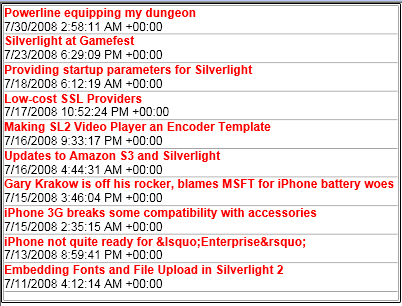
Maybe we don’t want our date to be formatted in such ‘system’ looking format and we want something like “July 16.” Enter the IValueConverter class. First we’ll add a class to our Silverlight application, let’s call it Formatter. Once we add that class we need to implement the IValueConverter interface which gives us Convert and ConvertBack functions we have to implement:
1: public class Formatter : IValueConverter
<pre style="padding-right: 0px; padding-left: 0px; font-size: 8pt; padding-bottom: 0px; margin: 0em; overflow: visible; width: 100%; color: black; border-top-style: none; line-height: 12pt; padding-top: 0px; font-family: consolas, 'Courier New', courier, monospace; border-right-style: none; border-left-style: none; background-color: #f4f4f4; border-bottom-style: none"><span style="color: #606060">   2:</span> {</pre>

<pre style="padding-right: 0px; padding-left: 0px; font-size: 8pt; padding-bottom: 0px; margin: 0em; overflow: visible; width: 100%; color: black; border-top-style: none; line-height: 12pt; padding-top: 0px; font-family: consolas, 'Courier New', courier, monospace; border-right-style: none; border-left-style: none; background-color: #f4f4f4; border-bottom-style: none"><span style="color: #606060">   3:</span>     <span style="color: #cc6633">#region</span> IValueConverter Members</pre>

<pre style="padding-right: 0px; padding-left: 0px; font-size: 8pt; padding-bottom: 0px; margin: 0em; overflow: visible; width: 100%; color: black; border-top-style: none; line-height: 12pt; padding-top: 0px; font-family: consolas, 'Courier New', courier, monospace; border-right-style: none; border-left-style: none; background-color: #f4f4f4; border-bottom-style: none"><span style="color: #606060">   4:</span>  </pre>

<pre style="padding-right: 0px; padding-left: 0px; font-size: 8pt; padding-bottom: 0px; margin: 0em; overflow: visible; width: 100%; color: black; border-top-style: none; line-height: 12pt; padding-top: 0px; font-family: consolas, 'Courier New', courier, monospace; border-right-style: none; border-left-style: none; background-color: #f4f4f4; border-bottom-style: none"><span style="color: #606060">   5:</span>     <span style="color: #0000ff">public</span> <span style="color: #0000ff">object</span> Convert(<span style="color: #0000ff">object</span> <span style="color: #0000ff">value</span>, Type targetType, <span style="color: #0000ff">object</span> parameter, System.Globalization.CultureInfo culture)</pre>

<pre style="padding-right: 0px; padding-left: 0px; font-size: 8pt; padding-bottom: 0px; margin: 0em; overflow: visible; width: 100%; color: black; border-top-style: none; line-height: 12pt; padding-top: 0px; font-family: consolas, 'Courier New', courier, monospace; border-right-style: none; border-left-style: none; background-color: #f4f4f4; border-bottom-style: none"><span style="color: #606060">   6:</span>     {</pre>

<pre style="padding-right: 0px; padding-left: 0px; font-size: 8pt; padding-bottom: 0px; margin: 0em; overflow: visible; width: 100%; color: black; border-top-style: none; line-height: 12pt; padding-top: 0px; font-family: consolas, 'Courier New', courier, monospace; border-right-style: none; border-left-style: none; background-color: #f4f4f4; border-bottom-style: none"><span style="color: #606060">   7:</span>         <span style="color: #0000ff">throw</span> <span style="color: #0000ff">new</span> NotImplementedException();</pre>

<pre style="padding-right: 0px; padding-left: 0px; font-size: 8pt; padding-bottom: 0px; margin: 0em; overflow: visible; width: 100%; color: black; border-top-style: none; line-height: 12pt; padding-top: 0px; font-family: consolas, 'Courier New', courier, monospace; border-right-style: none; border-left-style: none; background-color: #f4f4f4; border-bottom-style: none"><span style="color: #606060">   8:</span>     }</pre>

<pre style="padding-right: 0px; padding-left: 0px; font-size: 8pt; padding-bottom: 0px; margin: 0em; overflow: visible; width: 100%; color: black; border-top-style: none; line-height: 12pt; padding-top: 0px; font-family: consolas, 'Courier New', courier, monospace; border-right-style: none; border-left-style: none; background-color: #f4f4f4; border-bottom-style: none"><span style="color: #606060">   9:</span>  </pre>

<pre style="padding-right: 0px; padding-left: 0px; font-size: 8pt; padding-bottom: 0px; margin: 0em; overflow: visible; width: 100%; color: black; border-top-style: none; line-height: 12pt; padding-top: 0px; font-family: consolas, 'Courier New', courier, monospace; border-right-style: none; border-left-style: none; background-color: #f4f4f4; border-bottom-style: none"><span style="color: #606060">  10:</span>     <span style="color: #0000ff">public</span> <span style="color: #0000ff">object</span> ConvertBack(<span style="color: #0000ff">object</span> <span style="color: #0000ff">value</span>, Type targetType, <span style="color: #0000ff">object</span> parameter, System.Globalization.CultureInfo culture)</pre>

<pre style="padding-right: 0px; padding-left: 0px; font-size: 8pt; padding-bottom: 0px; margin: 0em; overflow: visible; width: 100%; color: black; border-top-style: none; line-height: 12pt; padding-top: 0px; font-family: consolas, 'Courier New', courier, monospace; border-right-style: none; border-left-style: none; background-color: #f4f4f4; border-bottom-style: none"><span style="color: #606060">  11:</span>     {</pre>

<pre style="padding-right: 0px; padding-left: 0px; font-size: 8pt; padding-bottom: 0px; margin: 0em; overflow: visible; width: 100%; color: black; border-top-style: none; line-height: 12pt; padding-top: 0px; font-family: consolas, 'Courier New', courier, monospace; border-right-style: none; border-left-style: none; background-color: #f4f4f4; border-bottom-style: none"><span style="color: #606060">  12:</span>         <span style="color: #0000ff">throw</span> <span style="color: #0000ff">new</span> NotImplementedException();</pre>

<pre style="padding-right: 0px; padding-left: 0px; font-size: 8pt; padding-bottom: 0px; margin: 0em; overflow: visible; width: 100%; color: black; border-top-style: none; line-height: 12pt; padding-top: 0px; font-family: consolas, 'Courier New', courier, monospace; border-right-style: none; border-left-style: none; background-color: #f4f4f4; border-bottom-style: none"><span style="color: #606060">  13:</span>     }</pre>

<pre style="padding-right: 0px; padding-left: 0px; font-size: 8pt; padding-bottom: 0px; margin: 0em; overflow: visible; width: 100%; color: black; border-top-style: none; line-height: 12pt; padding-top: 0px; font-family: consolas, 'Courier New', courier, monospace; border-right-style: none; border-left-style: none; background-color: #f4f4f4; border-bottom-style: none"><span style="color: #606060">  14:</span>  </pre>

<pre style="padding-right: 0px; padding-left: 0px; font-size: 8pt; padding-bottom: 0px; margin: 0em; overflow: visible; width: 100%; color: black; border-top-style: none; line-height: 12pt; padding-top: 0px; font-family: consolas, 'Courier New', courier, monospace; border-right-style: none; border-left-style: none; background-color: #f4f4f4; border-bottom-style: none"><span style="color: #606060">  15:</span>     <span style="color: #cc6633">#endregion</span></pre>

<pre style="padding-right: 0px; padding-left: 0px; font-size: 8pt; padding-bottom: 0px; margin: 0em; overflow: visible; width: 100%; color: black; border-top-style: none; line-height: 12pt; padding-top: 0px; font-family: consolas, 'Courier New', courier, monospace; border-right-style: none; border-left-style: none; background-color: #f4f4f4; border-bottom-style: none"><span style="color: #606060">  16:</span> }</pre>
You can see that the Convert function gets some good information that we can use to do the conversion. The parameter value is the formatter passed into the argument. For example in our desire to display “July 16” we want to use the date formatter shortcut of “M” for the parameter. Let’s start the conversion.
1: public object Convert(object value, Type targetType, object parameter, System.Globalization.CultureInfo culture)
<pre style="padding-right: 0px; padding-left: 0px; font-size: 8pt; padding-bottom: 0px; margin: 0em; overflow: visible; width: 100%; color: black; border-top-style: none; line-height: 12pt; padding-top: 0px; font-family: consolas, 'Courier New', courier, monospace; border-right-style: none; border-left-style: none; background-color: #f4f4f4; border-bottom-style: none"><span style="color: #606060">   2:</span> {</pre>

<pre style="padding-right: 0px; padding-left: 0px; font-size: 8pt; padding-bottom: 0px; margin: 0em; overflow: visible; width: 100%; color: black; border-top-style: none; line-height: 12pt; padding-top: 0px; font-family: consolas, 'Courier New', courier, monospace; border-right-style: none; border-left-style: none; background-color: #f4f4f4; border-bottom-style: none"><span style="color: #606060">   3:</span>     <span style="color: #0000ff">if</span> (parameter != <span style="color: #0000ff">null</span>)</pre>

<pre style="padding-right: 0px; padding-left: 0px; font-size: 8pt; padding-bottom: 0px; margin: 0em; overflow: visible; width: 100%; color: black; border-top-style: none; line-height: 12pt; padding-top: 0px; font-family: consolas, 'Courier New', courier, monospace; border-right-style: none; border-left-style: none; background-color: #f4f4f4; border-bottom-style: none"><span style="color: #606060">   4:</span>     {</pre>

<pre style="padding-right: 0px; padding-left: 0px; font-size: 8pt; padding-bottom: 0px; margin: 0em; overflow: visible; width: 100%; color: black; border-top-style: none; line-height: 12pt; padding-top: 0px; font-family: consolas, 'Courier New', courier, monospace; border-right-style: none; border-left-style: none; background-color: #f4f4f4; border-bottom-style: none"><span style="color: #606060">   5:</span>         <span style="color: #0000ff">string</span> formatterString = parameter.ToString();</pre>

<pre style="padding-right: 0px; padding-left: 0px; font-size: 8pt; padding-bottom: 0px; margin: 0em; overflow: visible; width: 100%; color: black; border-top-style: none; line-height: 12pt; padding-top: 0px; font-family: consolas, 'Courier New', courier, monospace; border-right-style: none; border-left-style: none; background-color: #f4f4f4; border-bottom-style: none"><span style="color: #606060">   6:</span>  </pre>

<pre style="padding-right: 0px; padding-left: 0px; font-size: 8pt; padding-bottom: 0px; margin: 0em; overflow: visible; width: 100%; color: black; border-top-style: none; line-height: 12pt; padding-top: 0px; font-family: consolas, 'Courier New', courier, monospace; border-right-style: none; border-left-style: none; background-color: #f4f4f4; border-bottom-style: none"><span style="color: #606060">   7:</span>         <span style="color: #0000ff">if</span> (!<span style="color: #0000ff">string</span>.IsNullOrEmpty(formatterString))</pre>

<pre style="padding-right: 0px; padding-left: 0px; font-size: 8pt; padding-bottom: 0px; margin: 0em; overflow: visible; width: 100%; color: black; border-top-style: none; line-height: 12pt; padding-top: 0px; font-family: consolas, 'Courier New', courier, monospace; border-right-style: none; border-left-style: none; background-color: #f4f4f4; border-bottom-style: none"><span style="color: #606060">   8:</span>         {</pre>

<pre style="padding-right: 0px; padding-left: 0px; font-size: 8pt; padding-bottom: 0px; margin: 0em; overflow: visible; width: 100%; color: black; border-top-style: none; line-height: 12pt; padding-top: 0px; font-family: consolas, 'Courier New', courier, monospace; border-right-style: none; border-left-style: none; background-color: #f4f4f4; border-bottom-style: none"><span style="color: #606060">   9:</span>             <span style="color: #0000ff">return</span> <span style="color: #0000ff">string</span>.Format(culture, formatterString, <span style="color: #0000ff">value</span>);</pre>

<pre style="padding-right: 0px; padding-left: 0px; font-size: 8pt; padding-bottom: 0px; margin: 0em; overflow: visible; width: 100%; color: black; border-top-style: none; line-height: 12pt; padding-top: 0px; font-family: consolas, 'Courier New', courier, monospace; border-right-style: none; border-left-style: none; background-color: #f4f4f4; border-bottom-style: none"><span style="color: #606060">  10:</span>         }</pre>

<pre style="padding-right: 0px; padding-left: 0px; font-size: 8pt; padding-bottom: 0px; margin: 0em; overflow: visible; width: 100%; color: black; border-top-style: none; line-height: 12pt; padding-top: 0px; font-family: consolas, 'Courier New', courier, monospace; border-right-style: none; border-left-style: none; background-color: #f4f4f4; border-bottom-style: none"><span style="color: #606060">  11:</span>     }</pre>

<pre style="padding-right: 0px; padding-left: 0px; font-size: 8pt; padding-bottom: 0px; margin: 0em; overflow: visible; width: 100%; color: black; border-top-style: none; line-height: 12pt; padding-top: 0px; font-family: consolas, 'Courier New', courier, monospace; border-right-style: none; border-left-style: none; background-color: #f4f4f4; border-bottom-style: none"><span style="color: #606060">  12:</span>  </pre>

<pre style="padding-right: 0px; padding-left: 0px; font-size: 8pt; padding-bottom: 0px; margin: 0em; overflow: visible; width: 100%; color: black; border-top-style: none; line-height: 12pt; padding-top: 0px; font-family: consolas, 'Courier New', courier, monospace; border-right-style: none; border-left-style: none; background-color: #f4f4f4; border-bottom-style: none"><span style="color: #606060">  13:</span>     <span style="color: #0000ff">return</span> <span style="color: #0000ff">value</span>.ToString();</pre>

<pre style="padding-right: 0px; padding-left: 0px; font-size: 8pt; padding-bottom: 0px; margin: 0em; overflow: visible; width: 100%; color: black; border-top-style: none; line-height: 12pt; padding-top: 0px; font-family: consolas, 'Courier New', courier, monospace; border-right-style: none; border-left-style: none; background-color: #f4f4f4; border-bottom-style: none"><span style="color: #606060">  14:</span> }</pre>
What we are doing here is ensuring that a parameter is passed in and then using the String object to handle the formatting for us. Great, now we have our Convert function (in this sample we are doing one-way binding so I’m going to leave ConvertBack alone for now). Let’s compile our code and then move back to the XAML. In XAML we now want to make our converter available for use. The first step is to add the CLR namespace to our root XAML node:
1: xmlns:converter="clr-namespace:TypeConverter_CS"
The next step is to add our converter class as a resource to our XAML control so that we can use it throughout the control later:
1: <UserControl.Resources>
<pre style="padding-right: 0px; padding-left: 0px; font-size: 8pt; padding-bottom: 0px; margin: 0em; overflow: visible; width: 100%; color: black; border-top-style: none; line-height: 12pt; padding-top: 0px; font-family: consolas, 'Courier New', courier, monospace; border-right-style: none; border-left-style: none; background-color: #f4f4f4; border-bottom-style: none"><span style="color: #606060"> 2:</span> <span style="color: #0000ff"><</span><span style="color: #800000">converter:Formatter</span> <span style="color: #ff0000">x:Key</span><span style="color: #0000ff">="FormatConverter"</span> <span style="color: #0000ff">/></span></pre>
<pre style="padding-right: 0px; padding-left: 0px; font-size: 8pt; padding-bottom: 0px; margin: 0em; overflow: visible; width: 100%; color: black; border-top-style: none; line-height: 12pt; padding-top: 0px; font-family: consolas, 'Courier New', courier, monospace; border-right-style: none; border-left-style: none; background-color: #f4f4f4; border-bottom-style: none"><span style="color: #606060"> 3:</span> <span style="color: #0000ff"></</span><span style="color: #800000">UserControl.Resources</span><span style="color: #0000ff">></span></pre>Now if we go back to our XAML where we are data binding the date we can implement this and pass in the converter parameter (format) we want to use. The end result full XAML looks like this:
1: <UserControl x:Class="TypeConverter_CS.Page"
<pre style="padding-right: 0px; padding-left: 0px; font-size: 8pt; padding-bottom: 0px; margin: 0em; overflow: visible; width: 100%; color: black; border-top-style: none; line-height: 12pt; padding-top: 0px; font-family: consolas, 'Courier New', courier, monospace; border-right-style: none; border-left-style: none; background-color: #f4f4f4; border-bottom-style: none"><span style="color: #606060"> 2:</span> <span style="color: #ff0000">xmlns</span><span style="color: #0000ff">="http://schemas.microsoft.com/winfx/2006/xaml/presentation"</span> </pre>
<pre style="padding-right: 0px; padding-left: 0px; font-size: 8pt; padding-bottom: 0px; margin: 0em; overflow: visible; width: 100%; color: black; border-top-style: none; line-height: 12pt; padding-top: 0px; font-family: consolas, 'Courier New', courier, monospace; border-right-style: none; border-left-style: none; background-color: #f4f4f4; border-bottom-style: none"><span style="color: #606060"> 3:</span> <span style="color: #ff0000">xmlns:x</span><span style="color: #0000ff">="http://schemas.microsoft.com/winfx/2006/xaml"</span></pre>
<pre style="padding-right: 0px; padding-left: 0px; font-size: 8pt; padding-bottom: 0px; margin: 0em; overflow: visible; width: 100%; color: black; border-top-style: none; line-height: 12pt; padding-top: 0px; font-family: consolas, 'Courier New', courier, monospace; border-right-style: none; border-left-style: none; background-color: #f4f4f4; border-bottom-style: none"><span style="color: #606060"> 4:</span> <span style="color: #ff0000">xmlns:converter</span><span style="color: #0000ff">="clr-namespace:TypeConverter_CS"</span></pre>
<pre style="padding-right: 0px; padding-left: 0px; font-size: 8pt; padding-bottom: 0px; margin: 0em; overflow: visible; width: 100%; color: black; border-top-style: none; line-height: 12pt; padding-top: 0px; font-family: consolas, 'Courier New', courier, monospace; border-right-style: none; border-left-style: none; background-color: #f4f4f4; border-bottom-style: none"><span style="color: #606060"> 5:</span> <span style="color: #ff0000">Width</span><span style="color: #0000ff">="400"</span> <span style="color: #ff0000">Height</span><span style="color: #0000ff">="300"</span><span style="color: #0000ff">></span></pre>
<pre style="padding-right: 0px; padding-left: 0px; font-size: 8pt; padding-bottom: 0px; margin: 0em; overflow: visible; width: 100%; color: black; border-top-style: none; line-height: 12pt; padding-top: 0px; font-family: consolas, 'Courier New', courier, monospace; border-right-style: none; border-left-style: none; background-color: #f4f4f4; border-bottom-style: none"><span style="color: #606060"> 6:</span> <span style="color: #0000ff"><</span><span style="color: #800000">UserControl.Resources</span><span style="color: #0000ff">></span></pre>
<pre style="padding-right: 0px; padding-left: 0px; font-size: 8pt; padding-bottom: 0px; margin: 0em; overflow: visible; width: 100%; color: black; border-top-style: none; line-height: 12pt; padding-top: 0px; font-family: consolas, 'Courier New', courier, monospace; border-right-style: none; border-left-style: none; background-color: #f4f4f4; border-bottom-style: none"><span style="color: #606060"> 7:</span> <span style="color: #0000ff"><</span><span style="color: #800000">converter:Formatter</span> <span style="color: #ff0000">x:Key</span><span style="color: #0000ff">="FormatConverter"</span> <span style="color: #0000ff">/></span></pre>
<pre style="padding-right: 0px; padding-left: 0px; font-size: 8pt; padding-bottom: 0px; margin: 0em; overflow: visible; width: 100%; color: black; border-top-style: none; line-height: 12pt; padding-top: 0px; font-family: consolas, 'Courier New', courier, monospace; border-right-style: none; border-left-style: none; background-color: #f4f4f4; border-bottom-style: none"><span style="color: #606060"> 8:</span> <span style="color: #0000ff"></</span><span style="color: #800000">UserControl.Resources</span><span style="color: #0000ff">></span></pre>
<pre style="padding-right: 0px; padding-left: 0px; font-size: 8pt; padding-bottom: 0px; margin: 0em; overflow: visible; width: 100%; color: black; border-top-style: none; line-height: 12pt; padding-top: 0px; font-family: consolas, 'Courier New', courier, monospace; border-right-style: none; border-left-style: none; background-color: #f4f4f4; border-bottom-style: none"><span style="color: #606060"> 9:</span> <span style="color: #0000ff"><</span><span style="color: #800000">Grid</span> <span style="color: #ff0000">x:Name</span><span style="color: #0000ff">="LayoutRoot"</span> <span style="color: #ff0000">Background</span><span style="color: #0000ff">="White"</span><span style="color: #0000ff">></span></pre>
<pre style="padding-right: 0px; padding-left: 0px; font-size: 8pt; padding-bottom: 0px; margin: 0em; overflow: visible; width: 100%; color: black; border-top-style: none; line-height: 12pt; padding-top: 0px; font-family: consolas, 'Courier New', courier, monospace; border-right-style: none; border-left-style: none; background-color: #f4f4f4; border-bottom-style: none"><span style="color: #606060"> 10:</span> <span style="color: #0000ff"><</span><span style="color: #800000">ListBox</span> <span style="color: #ff0000">x:Name</span><span style="color: #0000ff">="FeedList"</span><span style="color: #0000ff">></span></pre>
<pre style="padding-right: 0px; padding-left: 0px; font-size: 8pt; padding-bottom: 0px; margin: 0em; overflow: visible; width: 100%; color: black; border-top-style: none; line-height: 12pt; padding-top: 0px; font-family: consolas, 'Courier New', courier, monospace; border-right-style: none; border-left-style: none; background-color: #f4f4f4; border-bottom-style: none"><span style="color: #606060"> 11:</span> <span style="color: #0000ff"><</span><span style="color: #800000">ListBox.ItemTemplate</span><span style="color: #0000ff">></span></pre>
<pre style="padding-right: 0px; padding-left: 0px; font-size: 8pt; padding-bottom: 0px; margin: 0em; overflow: visible; width: 100%; color: black; border-top-style: none; line-height: 12pt; padding-top: 0px; font-family: consolas, 'Courier New', courier, monospace; border-right-style: none; border-left-style: none; background-color: #f4f4f4; border-bottom-style: none"><span style="color: #606060"> 12:</span> <span style="color: #0000ff"><</span><span style="color: #800000">DataTemplate</span><span style="color: #0000ff">></span></pre>
<pre style="padding-right: 0px; padding-left: 0px; font-size: 8pt; padding-bottom: 0px; margin: 0em; overflow: visible; width: 100%; color: black; border-top-style: none; line-height: 12pt; padding-top: 0px; font-family: consolas, 'Courier New', courier, monospace; border-right-style: none; border-left-style: none; background-color: #f4f4f4; border-bottom-style: none"><span style="color: #606060"> 13:</span> <span style="color: #0000ff"><</span><span style="color: #800000">StackPanel</span> <span style="color: #ff0000">Orientation</span><span style="color: #0000ff">="Vertical"</span><span style="color: #0000ff">></span></pre>
<pre style="padding-right: 0px; padding-left: 0px; font-size: 8pt; padding-bottom: 0px; margin: 0em; overflow: visible; width: 100%; color: black; border-top-style: none; line-height: 12pt; padding-top: 0px; font-family: consolas, 'Courier New', courier, monospace; border-right-style: none; border-left-style: none; background-color: #f4f4f4; border-bottom-style: none"><span style="color: #606060"> 14:</span> <span style="color: #0000ff"><</span><span style="color: #800000">TextBlock</span> <span style="color: #ff0000">FontFamily</span><span style="color: #0000ff">="Arial"</span> <span style="color: #ff0000">FontWeight</span><span style="color: #0000ff">="Bold"</span> <span style="color: #ff0000">Foreground</span><span style="color: #0000ff">="Red"</span> <span style="color: #ff0000">Text</span><span style="color: #0000ff">="{Binding Title.Text}"</span> <span style="color: #0000ff">/></span></pre>
<pre style="padding-right: 0px; padding-left: 0px; font-size: 8pt; padding-bottom: 0px; margin: 0em; overflow: visible; width: 100%; color: black; border-top-style: none; line-height: 12pt; padding-top: 0px; font-family: consolas, 'Courier New', courier, monospace; border-right-style: none; border-left-style: none; background-color: #f4f4f4; border-bottom-style: none"><span style="color: #606060"> 15:</span> <span style="color: #0000ff"><</span><span style="color: #800000">TextBlock</span> <span style="color: #ff0000">FontFamily</span><span style="color: #0000ff">="Arial"</span> <span style="color: #ff0000">Text</span><span style="color: #0000ff">="{Binding PublishDate, Converter={StaticResource FormatConverter}, ConverterParameter=\{0:M\}}"</span> <span style="color: #0000ff">/></span></pre>
<pre style="padding-right: 0px; padding-left: 0px; font-size: 8pt; padding-bottom: 0px; margin: 0em; overflow: visible; width: 100%; color: black; border-top-style: none; line-height: 12pt; padding-top: 0px; font-family: consolas, 'Courier New', courier, monospace; border-right-style: none; border-left-style: none; background-color: #f4f4f4; border-bottom-style: none"><span style="color: #606060"> 16:</span> <span style="color: #0000ff"></</span><span style="color: #800000">StackPanel</span><span style="color: #0000ff">></span></pre>
<pre style="padding-right: 0px; padding-left: 0px; font-size: 8pt; padding-bottom: 0px; margin: 0em; overflow: visible; width: 100%; color: black; border-top-style: none; line-height: 12pt; padding-top: 0px; font-family: consolas, 'Courier New', courier, monospace; border-right-style: none; border-left-style: none; background-color: #f4f4f4; border-bottom-style: none"><span style="color: #606060"> 17:</span> <span style="color: #0000ff"></</span><span style="color: #800000">DataTemplate</span><span style="color: #0000ff">></span></pre>
<pre style="padding-right: 0px; padding-left: 0px; font-size: 8pt; padding-bottom: 0px; margin: 0em; overflow: visible; width: 100%; color: black; border-top-style: none; line-height: 12pt; padding-top: 0px; font-family: consolas, 'Courier New', courier, monospace; border-right-style: none; border-left-style: none; background-color: #f4f4f4; border-bottom-style: none"><span style="color: #606060"> 18:</span> <span style="color: #0000ff"></</span><span style="color: #800000">ListBox.ItemTemplate</span><span style="color: #0000ff">></span></pre>
<pre style="padding-right: 0px; padding-left: 0px; font-size: 8pt; padding-bottom: 0px; margin: 0em; overflow: visible; width: 100%; color: black; border-top-style: none; line-height: 12pt; padding-top: 0px; font-family: consolas, 'Courier New', courier, monospace; border-right-style: none; border-left-style: none; background-color: #f4f4f4; border-bottom-style: none"><span style="color: #606060"> 19:</span> <span style="color: #0000ff"></</span><span style="color: #800000">ListBox</span><span style="color: #0000ff">></span></pre>
<pre style="padding-right: 0px; padding-left: 0px; font-size: 8pt; padding-bottom: 0px; margin: 0em; overflow: visible; width: 100%; color: black; border-top-style: none; line-height: 12pt; padding-top: 0px; font-family: consolas, 'Courier New', courier, monospace; border-right-style: none; border-left-style: none; background-color: #f4f4f4; border-bottom-style: none"><span style="color: #606060"> 20:</span> <span style="color: #0000ff"></</span><span style="color: #800000">Grid</span><span style="color: #0000ff">></span></pre>
<pre style="padding-right: 0px; padding-left: 0px; font-size: 8pt; padding-bottom: 0px; margin: 0em; overflow: visible; width: 100%; color: black; border-top-style: none; line-height: 12pt; padding-top: 0px; font-family: consolas, 'Courier New', courier, monospace; border-right-style: none; border-left-style: none; background-color: #f4f4f4; border-bottom-style: none"><span style="color: #606060"> 21:</span> <span style="color: #0000ff"></</span><span style="color: #800000">UserControl</span><span style="color: #0000ff">></span></pre>Notice how we made a reference to our StaticResource (using the key name we provided) and then passed in the ConverterParameter of {0:M} to format our date. The resulting output is now:
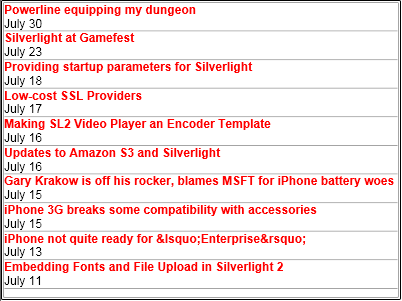
And you’ll notice the date formatting. Now in our converter we could have been real explicit in our Convert function and looked for a date and converted it specifically, but our converter code is generic enough that it can handle some other input types like more complex date formats or numbers. If we used this same converter code on a number we could pass in the ConverterParameter of {0:c} for currency formatted information.
If you use Expression Blend as well, you can also use some of the user interface properties to specify the binding values that will get output as XAML…here’s a screenshot of the converter settings UI in blend:

This method is useful when you may have custom conversion needs for your data. Hope this helps! You can download this sample here: TypeConverter_CS.zip
 As such I never expected to be down there, I never wired for anything beyond the one port for the wireless access point. I had a cabling guy stop by last night to talk with me about my options. I didn’t like the 15-20 drywall hole option too much and said I’d think about it. I remembered seeing something about ethernet over power lines. I did some research and found the
  Two Silverlight presentations were given. One by