A developer asked me this question and while a simple answer, I thought it would be a good quick tip to share for those who may be in similar situations.

The scenario is the classic master-details scenario where perhaps you have a grid of data and when a user selects the row, the details are enabled in a form (or perhaps the child of the element) for editing.  Maybe something like this:
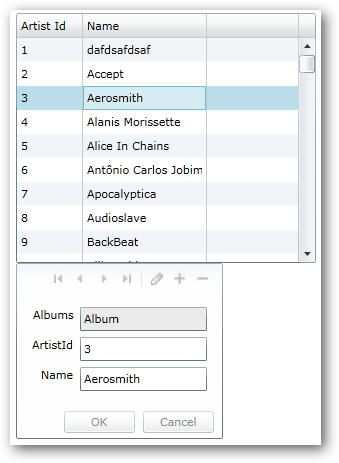
Master-details Typical view

See you can see the row clearly selected (note: this is using the default DataGrid styling).  But watch what happens when you go to the form to edit:
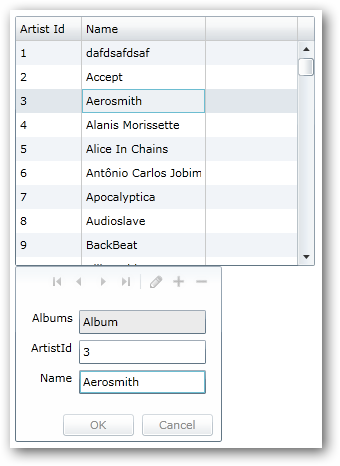
Focus change on selected row

Notice the focus now on the TextBox in the form, and the row, while still ‘selected’ is much more subtle in which row is selected.  The uninformed eye might miss which one.  For some scenarios this might be important.  Some might even think the row isn’t selected anymore since the visual state changed.

In fact it still *IS* selected and the only thing that changed *IS* the visual state…literally.  Since Silverlight has the concept of the VisualStateManager, that is what we are seeing in action here.  So you want to change that to make your desired UI as expected…having the row retain it’s selected look even when the user is editing.  This is simple.

Using Expression Blend, you can select the DataGrid element and then choose Edit Additional Templates to find the RowStyle template to edit a copy of:
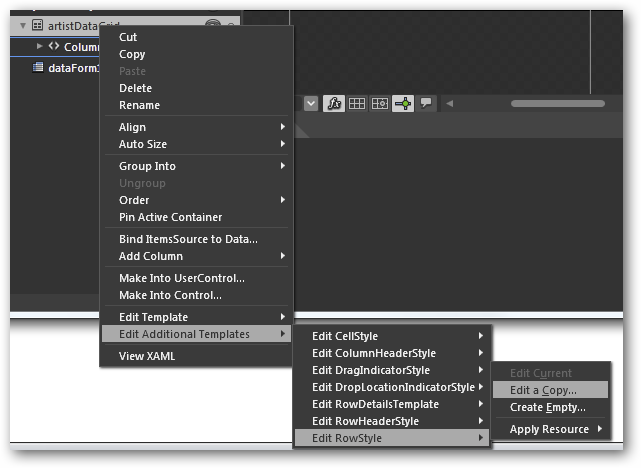
Expression Blend edit template

Once you have this, click the States tab in the tool and you’ll see the various visual states that a DataGridRow can have.  Notice the NormalSelected and UnfocusedSelected states:
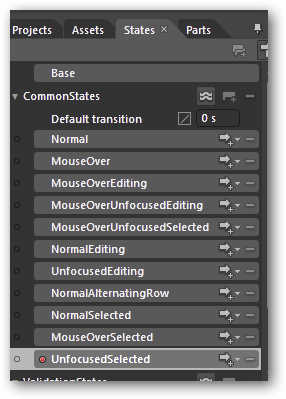
Visual States for DataGridRow

You would modify the Fill.Color property of the UnfocusedSelected state to accomplish the desired change.  In this example, I just used the same color as the default grid for illustration.  The end result is what the user may be expecting more.  Notice the focus is on the TextBox in the form still, but the row still has a prominent selected color view:
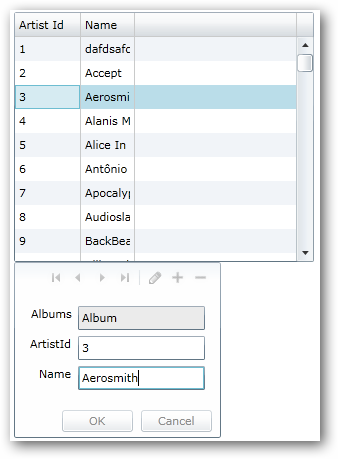
Fixed focus visual UI

A simple edit, but a helpful UI change to give your users more indication of what they are doing.  Of course I’m just using the default styles of the DataGrid here, but you could use your own styles as well.  Hope this helps!

Here is my style XAML as I completed the task above: StaySelectedStyle.txt


it’s that time again…beginning of a new month!  That means that Smashing Magazine has released their monthly wallpaper pictures again.

Smashing Magazine February 2010 Wallpaper

As you could expect, February entries are full of a lot of Valentine type stuff.  Here are your February Windows 7 Theme Packs for the wallpapers though…including all images (note: some ‘without calendar’ images are not provided by the authors) unfiltered.

UPDATE PLEASE READ (4-Feb):

There is an issue with the .themepack file for some reason.  Although I’m using the prescribed mechanism for creating these it is not functioning as easily as the January one.  I’ve got some folks on the Windows team looking into it, but no resolution yet.  In the interim, you can extract the .themepack file using 7-Zip (a free and great utility) and then double-click on the .theme file where you extracted it.  This should trigger the installation of the theme.

For details on these and to see past ones, visit the Smashing Magazine Windows 7 Theme information for the specifications I used for the theme pack as well as previous themes.  Want to participate and submit yours?  Join in!


I’m working on a little sample application for music management in Silverlight using WCF RIA Services and some other new Silverlight 4 features.  One thing that I wanted to add to the application was the ability to drag an audio file and either lookup the data and/or add a new album/artist/song to the library automatically.

Audio formats have a ‘tag’ format known as ID3.  It’s a format used for audio file metadata that is used in Windows Media Player, iTunes, and various hardware devices as well.  Over the years there has been an evolution of this format, with the older ID3v1 format basically taking up a header space with fixed character spaces for various things like Album, Artist, Title, Year, Track.  Over time though the ID3v2 format has been adapted more as it is more flexible for things like album art, and longer titles, etc.  There are various implementations of ID3 libraries for .NET that developers can choose from.  All of these implementations don’t take into account Silverlight unfortunately.

Silverlight can only reference Silverlight-compatible libraries.  Most of these libraries were targeted for the full .NET Framework and thus I can’t binary reference them.  Luckily most of them (except one) are Open Source so I could tinker.  I took the step of simply copying the files to a Silverlight project and recompiling.  This did not work 100% in a single task.  Most of the libraries had some form of Serialization attributes/constructors and almost all used some form of ASCII encoding for various string manipulation of byte arrays.

I settled on TagLib# as the library that was the easiest to modify for me.  I had to make the same changes I mentioned above to this library as well.  I created a new Silverlight 4 class library and compiled it as such.  One thing that TagLib# didn’t have was a stream input implementation.  Most of the libraries, in fact, assumed a local file path.  Luckily the library was written using a generic ‘File’ interface, so I just had to create my own StreamFileAbstraction.  I chose to do this within my project rather than the base library.  It was easy since the LocalFileAbstraction actually perfomed an Open on the file as it’s first task and set some public variables.  My abstraction basically just hands the stream already and ready to go.

Now, using the Silverlight 4 drop target feature, I created just a simple test harness to test my theory.  My XAML basically is this (pretty rudimentary just to test my theory):

   1: <Grid x:Name="LayoutRoot" Background="White">
<pre class="alteven"><span id="lnum2" class="lnum">   2:</span>         <span class="kwrd">&lt;</span><span class="html">StackPanel</span><span class="kwrd">&gt;</span></pre>
<pre class="alteven"><span id="lnum3" class="lnum">   3:</span>             <span class="kwrd">&lt;</span><span class="html">Border</span> <span class="attr">x:Name</span><span class="kwrd">="DropZone"</span> <span class="attr">Width</span><span class="kwrd">="700"</span> <span class="attr">Height</span><span class="kwrd">="300"</span> <span class="attr">Background</span><span class="kwrd">="Silver"</span> <span class="attr">CornerRadius</span><span class="kwrd">="8"</span> <span class="attr">AllowDrop</span><span class="kwrd">="True"</span> <span class="attr">Drop</span><span class="kwrd">="DropZone_Drop"</span><span class="kwrd">&gt;</span></pre>
<pre class="alteven"><span id="lnum4" class="lnum">   4:</span>                 <span class="kwrd">&lt;</span><span class="html">TextBlock</span> <span class="attr">TextWrapping</span><span class="kwrd">="Wrap"</span> <span class="attr">Text</span><span class="kwrd">="drop here"</span> <span class="attr">FontSize</span><span class="kwrd">="64"</span> <span class="attr">HorizontalAlignment</span><span class="kwrd">="Center"</span> <span class="attr">VerticalAlignment</span><span class="kwrd">="Center"</span> <span class="attr">Foreground</span><span class="kwrd">="Gray"</span><span class="kwrd">/&gt;</span></pre>
<pre class="alteven"><span id="lnum5" class="lnum">   5:</span>             <span class="kwrd">&lt;/</span><span class="html">Border</span><span class="kwrd">&gt;</span></pre>
<pre class="alteven"><span id="lnum6" class="lnum">   6:</span>             <span class="kwrd">&lt;</span><span class="html">Grid</span> <span class="attr">Height</span><span class="kwrd">="255"</span> <span class="attr">Width</span><span class="kwrd">="700"</span><span class="kwrd">&gt;</span></pre>
<pre class="alteven"><span id="lnum7" class="lnum">   7:</span>                 <span class="kwrd">&lt;</span><span class="html">Grid.ColumnDefinitions</span><span class="kwrd">&gt;</span></pre>
<pre class="alteven"><span id="lnum8" class="lnum">   8:</span>                     <span class="kwrd">&lt;</span><span class="html">ColumnDefinition</span> <span class="attr">Width</span><span class="kwrd">="111"</span><span class="kwrd">/&gt;</span></pre>
<pre class="alteven"><span id="lnum9" class="lnum">   9:</span>                     <span class="kwrd">&lt;</span><span class="html">ColumnDefinition</span> <span class="attr">Width</span><span class="kwrd">="*"</span><span class="kwrd">/&gt;</span></pre>
<pre class="alteven"><span id="lnum10" class="lnum">  10:</span>                 <span class="kwrd">&lt;/</span><span class="html">Grid.ColumnDefinitions</span><span class="kwrd">&gt;</span></pre>
<pre class="alteven"><span id="lnum11" class="lnum">  11:</span>                 <span class="kwrd">&lt;</span><span class="html">Grid.RowDefinitions</span><span class="kwrd">&gt;</span></pre>
<pre class="alteven"><span id="lnum12" class="lnum">  12:</span>                     <span class="kwrd">&lt;</span><span class="html">RowDefinition</span> <span class="attr">Height</span><span class="kwrd">="Auto"</span><span class="kwrd">/&gt;</span></pre>
<pre class="alteven"><span id="lnum13" class="lnum">  13:</span>                     <span class="kwrd">&lt;</span><span class="html">RowDefinition</span> <span class="attr">Height</span><span class="kwrd">="Auto"</span><span class="kwrd">/&gt;</span></pre>
<pre class="alteven"><span id="lnum14" class="lnum">  14:</span>                     <span class="kwrd">&lt;</span><span class="html">RowDefinition</span> <span class="attr">Height</span><span class="kwrd">="Auto"</span><span class="kwrd">/&gt;</span></pre>
<pre class="alteven"><span id="lnum15" class="lnum">  15:</span>                     <span class="kwrd">&lt;</span><span class="html">RowDefinition</span> <span class="attr">Height</span><span class="kwrd">="Auto"</span> <span class="kwrd">/&gt;</span></pre>
<pre class="alteven"><span id="lnum16" class="lnum">  16:</span>                     <span class="kwrd">&lt;</span><span class="html">RowDefinition</span> <span class="attr">Height</span><span class="kwrd">="50*"</span> <span class="kwrd">/&gt;</span></pre>
<pre class="alteven"><span id="lnum17" class="lnum">  17:</span>                 <span class="kwrd">&lt;/</span><span class="html">Grid.RowDefinitions</span><span class="kwrd">&gt;</span></pre>
<pre class="alteven"><span id="lnum18" class="lnum">  18:</span>                 <span class="kwrd">&lt;</span><span class="html">dataInput:Label</span> <span class="attr">Content</span><span class="kwrd">="Artist"</span> <span class="attr">HorizontalAlignment</span><span class="kwrd">="Right"</span> <span class="attr">VerticalAlignment</span><span class="kwrd">="Top"</span> <span class="attr">FontWeight</span><span class="kwrd">="Bold"</span> <span class="attr">Margin</span><span class="kwrd">="4"</span> <span class="kwrd">/&gt;</span></pre>
<pre class="alteven"><span id="lnum19" class="lnum">  19:</span>                 <span class="kwrd">&lt;</span><span class="html">dataInput:Label</span> <span class="attr">Content</span><span class="kwrd">="Album"</span> <span class="attr">Grid</span>.<span class="attr">Row</span><span class="kwrd">="1"</span> <span class="attr">HorizontalAlignment</span><span class="kwrd">="Right"</span> <span class="attr">VerticalAlignment</span><span class="kwrd">="Top"</span> <span class="attr">FontWeight</span><span class="kwrd">="Bold"</span> <span class="attr">Margin</span><span class="kwrd">="4"</span> <span class="kwrd">/&gt;</span></pre>
<pre class="alteven"><span id="lnum20" class="lnum">  20:</span>                 <span class="kwrd">&lt;</span><span class="html">dataInput:Label</span> <span class="attr">Content</span><span class="kwrd">="Title"</span> <span class="attr">Grid</span>.<span class="attr">Row</span><span class="kwrd">="2"</span> <span class="attr">HorizontalAlignment</span><span class="kwrd">="Right"</span> <span class="attr">VerticalAlignment</span><span class="kwrd">="Top"</span> <span class="attr">FontWeight</span><span class="kwrd">="Bold"</span> <span class="attr">Margin</span><span class="kwrd">="4"</span> <span class="kwrd">/&gt;</span></pre>
<pre class="alteven"><span id="lnum21" class="lnum">  21:</span>                 <span class="kwrd">&lt;</span><span class="html">dataInput:Label</span> <span class="attr">Grid</span>.<span class="attr">Column</span><span class="kwrd">="1"</span> <span class="attr">HorizontalAlignment</span><span class="kwrd">="Left"</span> <span class="attr">Name</span><span class="kwrd">="Artist"</span> <span class="attr">Margin</span><span class="kwrd">="4"</span> <span class="kwrd">/&gt;</span></pre>
<pre class="alteven"><span id="lnum22" class="lnum">  22:</span>                 <span class="kwrd">&lt;</span><span class="html">dataInput:Label</span> <span class="attr">Grid</span>.<span class="attr">Column</span><span class="kwrd">="1"</span> <span class="attr">Grid</span>.<span class="attr">Row</span><span class="kwrd">="1"</span> <span class="attr">HorizontalAlignment</span><span class="kwrd">="Left"</span> <span class="attr">Name</span><span class="kwrd">="Album"</span> <span class="attr">Margin</span><span class="kwrd">="4"</span> <span class="kwrd">/&gt;</span></pre>
<pre class="alteven"><span id="lnum23" class="lnum">  23:</span>                 <span class="kwrd">&lt;</span><span class="html">dataInput:Label</span> <span class="attr">Grid</span>.<span class="attr">Column</span><span class="kwrd">="1"</span> <span class="attr">Grid</span>.<span class="attr">Row</span><span class="kwrd">="2"</span> <span class="attr">HorizontalAlignment</span><span class="kwrd">="Left"</span> <span class="attr">VerticalAlignment</span><span class="kwrd">="Top"</span> <span class="attr">Name</span><span class="kwrd">="Title"</span> <span class="attr">Margin</span><span class="kwrd">="4"</span> <span class="kwrd">/&gt;</span></pre>
<pre class="alteven"><span id="lnum24" class="lnum">  24:</span>                 <span class="kwrd">&lt;</span><span class="html">Image</span> <span class="attr">Grid</span>.<span class="attr">Column</span><span class="kwrd">="1"</span> <span class="attr">Grid</span>.<span class="attr">Row</span><span class="kwrd">="4"</span> <span class="attr">Height</span><span class="kwrd">="118"</span> <span class="attr">HorizontalAlignment</span><span class="kwrd">="Left"</span> <span class="attr">Margin</span><span class="kwrd">="4,2,0,0"</span> <span class="attr">Name</span><span class="kwrd">="AlbumArt"</span> <span class="attr">Stretch</span><span class="kwrd">="Fill"</span> <span class="attr">VerticalAlignment</span><span class="kwrd">="Top"</span> <span class="attr">Width</span><span class="kwrd">="118"</span> <span class="kwrd">/&gt;</span></pre>
<pre class="alteven"><span id="lnum25" class="lnum">  25:</span>             <span class="kwrd">&lt;/</span><span class="html">Grid</span><span class="kwrd">&gt;</span></pre>
<pre class="alteven"><span id="lnum26" class="lnum">  26:</span>         <span class="kwrd">&lt;/</span><span class="html">StackPanel</span><span class="kwrd">&gt;</span></pre>
<pre class="alteven"><span id="lnum27" class="lnum">  27:</span>     <span class="kwrd">&lt;/</span><span class="html">Grid</span><span class="kwrd">&gt;</span></pre>

Notice on the Border the AllowDrop=”True” attribute.  This tells Silverlight that the element can be used as a drop target (for a file from the file system).  The rendered UI looks like this:

Sample MP3 test UI

You may also notice the Drop attribute on the Border element that maps to the event handler DropZone_Drop.  This event handler basically gives us an event argument that represents the dropped objects on the surface (yes you can drop more than one).  The initial stub of this function looks like this:

   1: private void DropZone_Drop(object sender, DragEventArgs e)
<pre class="alteven"><span id="lnum2" class="lnum">   2:</span> {</pre>
<pre class="alteven"><span id="lnum3" class="lnum">   3:</span>     IDataObject drop = e.Data <span class="kwrd">as</span> IDataObject;</pre>
<pre class="alteven"><span id="lnum4" class="lnum">   4:</span>  </pre>
<pre class="alteven"><span id="lnum5" class="lnum">   5:</span>     <span class="kwrd">object</span> data = drop.GetData(DataFormats.FileDrop);</pre>
<pre class="alteven"><span id="lnum6" class="lnum">   6:</span>  </pre>
<pre class="alteven"><span id="lnum7" class="lnum">   7:</span>     FileInfo[] files = data <span class="kwrd">as</span> FileInfo[];</pre>
<pre class="alteven"><span id="lnum8" class="lnum">   8:</span>  </pre>
<pre class="alteven"><span id="lnum9" class="lnum">   9:</span>     FileInfo file = files[0];</pre>
<pre class="alteven"><span id="lnum10" class="lnum">  10:</span> }</pre>

I’m being a little verbose in the code to show each of the steps.  As you can see you get a FileInfo array and can pull items out of that.  For my sample I’m just assuming one item was dropped.  In the next steps I just need to get the Stream from the file and use my library.  Here is the full function (with a quick check to make sure it is a supported audio file):

   1: private void DropZone_Drop(object sender, DragEventArgs e)
<pre class="alteven"><span id="lnum2" class="lnum">   2:</span> {</pre>
<pre class="alteven"><span id="lnum3" class="lnum">   3:</span>     IDataObject drop = e.Data <span class="kwrd">as</span> IDataObject;</pre>
<pre class="alteven"><span id="lnum4" class="lnum">   4:</span>  </pre>
<pre class="alteven"><span id="lnum5" class="lnum">   5:</span>     <span class="kwrd">object</span> data = drop.GetData(DataFormats.FileDrop);</pre>
<pre class="alteven"><span id="lnum6" class="lnum">   6:</span>  </pre>
<pre class="alteven"><span id="lnum7" class="lnum">   7:</span>     FileInfo[] files = data <span class="kwrd">as</span> FileInfo[];</pre>
<pre class="alteven"><span id="lnum8" class="lnum">   8:</span>  </pre>
<pre class="alteven"><span id="lnum9" class="lnum">   9:</span>     FileInfo file = files[0];</pre>
<pre class="alteven"><span id="lnum10" class="lnum">  10:</span>  </pre>
<pre class="alteven"><span id="lnum11" class="lnum">  11:</span>     <span class="kwrd">if</span> (file.Extension.ToLower() != <span class="str">".mp3"</span> &amp;&amp; file.Extension.ToLower() != <span class="str">".wma"</span>)</pre>
<pre class="alteven"><span id="lnum12" class="lnum">  12:</span>     {</pre>
<pre class="alteven"><span id="lnum13" class="lnum">  13:</span>         MessageBox.Show(<span class="str">"Must be an MP3 file"</span>);</pre>
<pre class="alteven"><span id="lnum14" class="lnum">  14:</span>     }</pre>
<pre class="alteven"><span id="lnum15" class="lnum">  15:</span>     <span class="kwrd">else</span></pre>
<pre class="alteven"><span id="lnum16" class="lnum">  16:</span>     {</pre>
<pre class="alteven"><span id="lnum17" class="lnum">  17:</span>         Stream fileStream = file.OpenRead();</pre>
<pre class="alteven"><span id="lnum18" class="lnum">  18:</span>  </pre>
<pre class="alteven"><span id="lnum19" class="lnum">  19:</span>         TagLib.File.IFileAbstraction fileAbstraction = <span class="kwrd">new</span> StreamFileAbstraction(fileStream, file.Name);</pre>
<pre class="alteven"><span id="lnum20" class="lnum">  20:</span>  </pre>
<pre class="alteven"><span id="lnum21" class="lnum">  21:</span>         TagLib.File tagFile = TagLib.File.Create(fileAbstraction);</pre>
<pre class="alteven"><span id="lnum22" class="lnum">  22:</span>  </pre>
<pre class="alteven"><span id="lnum23" class="lnum">  23:</span>         <span class="kwrd">if</span> (tagFile.Tag.TagTypes.HasFlag(TagLib.TagTypes.Id3v2))</pre>
<pre class="alteven"><span id="lnum24" class="lnum">  24:</span>         {</pre>
<pre class="alteven"><span id="lnum25" class="lnum">  25:</span>             Artist.Content = tagFile.Tag.FirstAlbumArtist;</pre>
<pre class="alteven"><span id="lnum26" class="lnum">  26:</span>             Album.Content = <span class="kwrd">string</span>.IsNullOrEmpty(tagFile.Tag.Album) ? <span class="str">"NO ALBUM NAME"</span> : tagFile.Tag.Album;</pre>
<pre class="alteven"><span id="lnum27" class="lnum">  27:</span>             Title.Content = tagFile.Tag.Title;</pre>
<pre class="alteven"><span id="lnum28" class="lnum">  28:</span>             <span class="kwrd">if</span> (tagFile.Tag.Pictures.Length &gt; 0)</pre>
<pre class="alteven"><span id="lnum29" class="lnum">  29:</span>             {</pre>
<pre class="alteven"><span id="lnum30" class="lnum">  30:</span>                 IPicture pic = tagFile.Tag.Pictures[0];</pre>
<pre class="alteven"><span id="lnum31" class="lnum">  31:</span>                 MemoryStream img = <span class="kwrd">new</span> MemoryStream(pic.Data.Data);</pre>
<pre class="alteven"><span id="lnum32" class="lnum">  32:</span>                 BitmapImage bmp = <span class="kwrd">new</span> BitmapImage();</pre>
<pre class="alteven"><span id="lnum33" class="lnum">  33:</span>                 bmp.SetSource(img);</pre>
<pre class="alteven"><span id="lnum34" class="lnum">  34:</span>  </pre>
<pre class="alteven"><span id="lnum35" class="lnum">  35:</span>                 AlbumArt.Source = bmp;</pre>
<pre class="alteven"><span id="lnum36" class="lnum">  36:</span>             }</pre>
<pre class="alteven"><span id="lnum37" class="lnum">  37:</span>         }</pre>
<pre class="alteven"><span id="lnum38" class="lnum">  38:</span>         <span class="kwrd">else</span></pre>
<pre class="alteven"><span id="lnum39" class="lnum">  39:</span>         {</pre>
<pre class="alteven"><span id="lnum40" class="lnum">  40:</span>             MessageBox.Show(<span class="str">"no id3v2 tag"</span>);</pre>
<pre class="alteven"><span id="lnum41" class="lnum">  41:</span>         }</pre>
<pre class="alteven"><span id="lnum42" class="lnum">  42:</span>     }</pre>

Once all the pieces are together you drag an audio file on the drop surface and the items will populate.  Here’s a quick video showing how it all works together.

Get Microsoft Silverlight

So this is just a start – and I’ve got only the tag reading working…didn’t bother looking at the other parts of the library so I know it isn’t fully ported for Silverlight.

What do you think?  Found a better implementation of ID3 tag reading?


As noted in a previous update post on my Foxit PDF Previewer for Outlook and Vista/Windows 7, there is an issue in the Office 2010 64-bit Beta (specifically Outlook) for executing 32-bit preview handlers on 64-bit Outlook.  I’ve got an update for those temporarily.

First, I can confirm that the issue is fixed in the later builds of Outlook 2010, so this fix is indeed only temporary.

Thanks to some assistance that Leo Davidson provided, I was able to provide a work around for my previewer that I’ve been able to confirm “works for me” on my installation of Outlook 64-bit on Windows 7 64-bit edition.

WARNING: This temporary fix involves messing with your registry.  You should do this with caution.  While I’ve done it successfully and tested fine, don’t hold me responsible if you computer catches on fire or neighbor pet animals die by doing this.  You should backup your registry before applying this to be safe.  Again, that said, it’s minor, only updates my application area settings and shouldn’t interfere with your settings.

The fix involves massaging some registry settings.  I’ve provided the registry settings in a file you can download here: FoxitPreviewerTempFix.zip.  There are two (2) registry files here.  Even though they are labeled 32-bit and 64-bit, they both need to be merged for this fix to work.  You should be able to double-click the .reg file and it will merge it auotomatically.  Additionally you can start regedit.exe and use the Import option (this is what I do).

Once complete, and assuming you have my previewer installed, then PDF preview attachment with my handler for Outlook 64-bit should be fixed for you.  Again, the requirement first here is that you have my Foxit PDF Previewer installed FIRST.

Please leave comments if this solved your issue.  This is ONLY for Outlook 2010 64-bit.  This is not necessary if you are running Outlook 2010 (32-bit), even if you are on Windows 64-bit.  That’s a lot of ‘bit’ talk I know.

Hope this helps! (and thanks Leo!)

Remember the final moments of the Scott Guthrie keynote presentation at PDC09?  Where Brian Goldfarb came on stage and demonstrated a completed application using a lot of the features of Silverlight 4?  Yeah, that Facebook application.  Well, it’s here now!

Microsoft Silverlight 4 Beta Client for Facebook

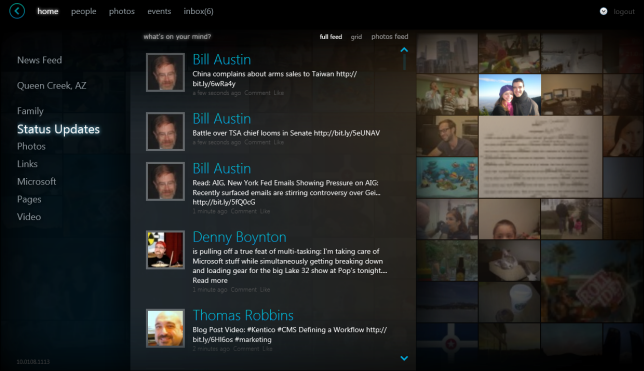
Silverlight Client for Facebook - Home view

The Microsoft Silverlight 4 Beta Client for Facebook has been released as a developer preview sample.  In order to use it you must have Silverlight 4 developer builds installed.

NOTE: When you run this application you’ll be installing the developer builds of Silverlight.  When Silverlight 4 releases, unless you are a developer, you’ll likely want to uninstall this plugin and install the released software.  This sample application is being provided as a developer preview to showcase and inspire.

The application is installed as a trusted application and does all the things you’d expect for Facebook.

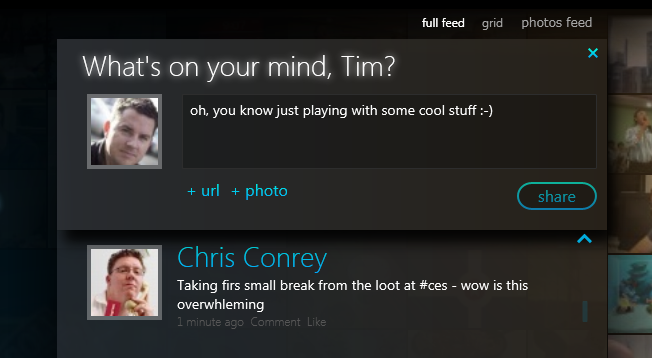
Status updates:

Silverlight Client for Facebook - Status updates

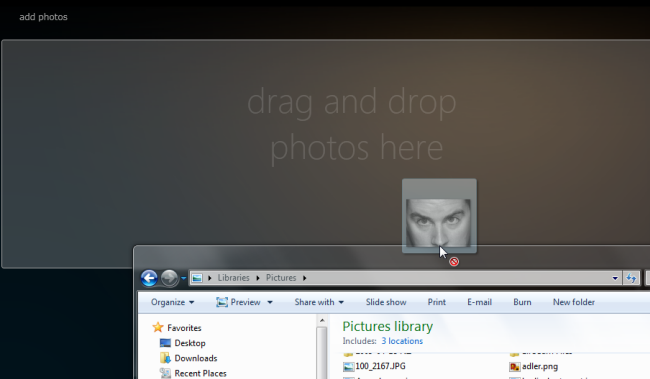
Drag/drop pictures from your computer to a photo album:

Silverlight Client for Facebook - Add photo

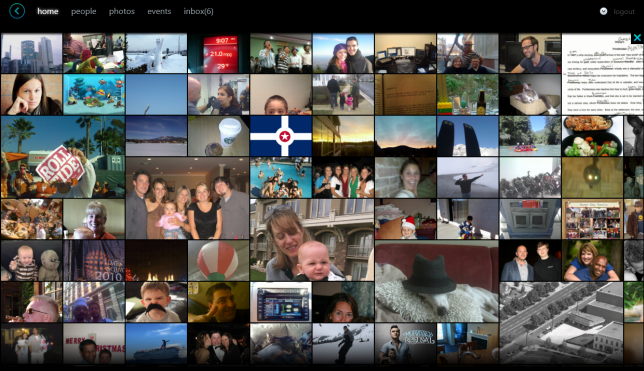
A photo feed view:

Silverlight Client for Facebook - photo feed

Notifications for messages to you:

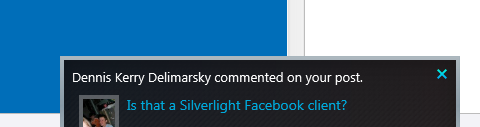
Silverlight Client for Facebook - notification window

Add a photo to a post using your web camera on your computer:

Silverlight Client for Facebook - Webcamera input

And yes, anyone uploading video to Facebook can be played back in the app as well:

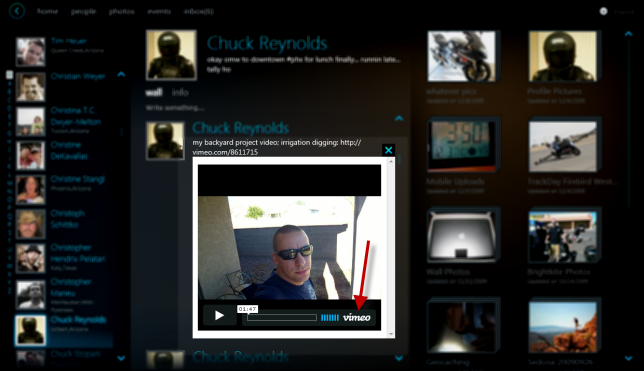
Silverlight Client for Facebook - flash video playback in Silverlight

A lot of cool ways to explore your Facebook information (sorry, no mafia war games…for me that’s a good thing).  You can also see some Outlook integration if you right-click on events that you may have to send an email and such (I don’t have any events in my Facbook account to snapshot).

So what’s NOT in there?

Good question.  At PDC09 you may have seen a few things that I haven’t mentioned yet above.  The chromeless (borderless application) aspect of the application is not in this preview.  This is because the beta of Silverlight doesn’t include that feature right now.  Additionally the plug-in the camera and have it automatically import the pictures is not in this preview as well.  That was implemented using some COM integration and the team just didn’t clean that code up for this preview for the public.

What about source code?

At this time no source code is being provided…and probably won’t be.  I’m not the decision maker on ultimately if it will or not, just my assumption.  The Facebook client is meant to be a working demonstration/inspiration of what one could do with existing services and providing different views into an existing application framework.

How can I install this and will it work on my Mac?

You can play around with the app by visiting the Microsoft Silverlight 4 Beta Client for Facebook app on the Silverlight samples site (which also includes the other sample applications from PDC09).  As a reminder, this is a developer preview build and intended for developers.  You will need to have Silverlight 4 installed on your machine (which is a beta plugin).  The link to the app will direct you where you can get the appropriate download.

Yes, it will work on your Mac (as long as you have an Intel processor version).  When you install the app you’ll see the Apple preferred install guidelines to drag the application to your Applications folder and can navigate to it there or use Spotlight search to find it.

This is a fun little application to navigate your Facebook account.  The team had a good time building it and is excited to share it with others.  Have fun!