Suppose you use Firefox as your default web browser and you are a Silverlight developer using Visual Studio. You may have been frustrated at times in being able to get the debugger to attach to your breakpoints. You’ve triple-checked that you are in debug mode, that the Silverlight checkbox is marked in the hosting web application’s property pages and it still is not breaking for you. You stare at the dreaded empty red circle in Visual Studio reading the tooltip of “No debug symbols have been loaded…” a thousand times.
But it works in Internet Explorer.
I’ve faced this a few times and always forget the tip. I’m recording it for my own posterity, but hopefully it will help others as well.
Here’s how to ensure the VS debugger attaches to the Silverlight app for debugging:
- In Firefox address bar type about:config
- Read the warning, choose your preference to always remind you or not and accept
- In the search bar of the config options now type: npctrl
- You should then see the entry: dom.ipc.plugins.enabled.npctrl.dll
- Change the value from true to false (simply double-clicking will change this for you)
- Restart Firefox
And your debugging should come back to normal. It has frustrated me more than once. Hopefully it helps some others.
One of the biggest discussions I started getting into when Windows Phone development was announced to the world was sparked with this single question I posed to our internal Windows Phone developer teams:
What is the use case for when you would want to use a Pano versus Pivot application layout?
I asked this in the context of an application for Yelp that I was writing. Information was similar but not identical. It was only similar in the sense that the data was all about user reviews and venues. In my eyes I saw this like the fact that games are similar in that they are games, but their individual information (the play) is different.
I guess I was expecting a definitive or clear view on when to use either given my use case I presented. I laughed as I collected numerous various viewpoints from all areas of the dev platform folks. It was clear there was no clarity for me. I actually have saved the most concise definition the discussion generated and had been wanting to blog about it for a while.
Today, Jaime released a bunch of videos from a ‘design days’ event that was held in Redmond for Windows Phone developers. They are all great, but there was one that caught my eye: Windows Phone Design Days – Pivot and Pano. In this video a few UX researchers walk through some of the key tenets of each control. Here’s some of my mental notes:
Pivot
- Application view manager
- Filter same data on different views (the “inbox” is a great example of this)
- Optimized for current screen size
- Filter of data doesn’t have to be same view (agenda/day)
- Related content is ok to pivot on as long as related content is truly related
- Focused
Panorama
- Horizontal broad canvas, not confined to current screen size
- A ‘top layer’ view into underlying experiences/tasks
- Exploratory in nature
- Don’t use if you need an application bar
- Don’t have a pano that takes the user to a pivot control constantly
- Leverage things inherently interesting (use ‘about me’ type information)
- Never place a pano *in* a pivot
There was some good information in this video (like don’t use pivot/pano for wizard-based UI) and one of the better descriptions/examples of answering my root question. The other videos are great and I encourage you to take a look at them.
I’d encourage you to take a look at all of these videos to get a good sense on some of the user experience research done for Windows Phone developers and how you can learn to target a great experience in your app/game.
I recently got a note about a nagging issue in using StringFormat in XAML binding expressions and how it doesn’t honor the current user’s culture settings. This is true that there is an issue in that it doesn’t in WPF or Silverlight. If you don’t know what I’m talking about, Silverlight introduced the ability to use StringFormat in data binding expressions (WPF has had this since 3.5 SP1) so you could do some formatting in-line in your binding. Like this:
1: <TextBlock Text="{Binding Path=CurrentDate, StringFormat=Current Timestamp is: \{0:G\}}" />
This would result in text that would be formatted directly using your string Formatter without the need for code-behind or any generic ValueConverter. This is a very helpful feature for formatting UI values as well as in some cases replacing ValueConverters for simple tasks.
The problem is that StringFormat isn’t honoring the user’s culture settings. Take for example this complete XAML:
1: <StackPanel x:Name="FooContainer">
<pre class="alteven"><span id="lnum2" class="lnum"> 2:</span> </pre>
<pre class="alteven"><span id="lnum3" class="lnum"> 3:</span> <span class="kwrd"><</span><span class="html">TextBlock</span> <span class="attr">x:Name</span><span class="kwrd">="CultureInfo"</span> <span class="kwrd">/></span></pre>
<pre class="alteven"><span id="lnum4" class="lnum"> 4:</span> <span class="kwrd"><</span><span class="html">TextBlock</span> <span class="attr">x:Name</span><span class="kwrd">="UICultureInfo"</span> <span class="kwrd">/></span></pre>
<pre class="alteven"><span id="lnum5" class="lnum"> 5:</span> </pre>
<pre class="alteven"><span id="lnum6" class="lnum"> 6:</span> <span class="kwrd"><</span><span class="html">TextBlock</span> <span class="attr">Text</span><span class="kwrd">="{Binding Path=CurrentDate, StringFormat=Current Timestamp is: \{0:G\}}"</span> <span class="kwrd">/></span></pre>
<pre class="alteven"><span id="lnum7" class="lnum"> 7:</span> </pre>
<pre class="alteven"><span id="lnum8" class="lnum"> 8:</span> <span class="kwrd"><</span><span class="html">TextBlock</span> <span class="attr">x:Name</span><span class="kwrd">="CostField"</span> <span class="attr">Text</span><span class="kwrd">="{Binding Path=Cost, StringFormat=Cost is: \{0:c\}}"</span> <span class="kwrd">/></span></pre>
<pre class="alteven"><span id="lnum9" class="lnum"> 9:</span> </pre>
<pre class="alteven"><span id="lnum10" class="lnum"> 10:</span> <span class="kwrd"><</span><span class="html">toolkit:GlobalCalendar</span> <span class="kwrd">/></span></pre>
<pre class="alteven"><span id="lnum11" class="lnum"> 11:</span> </pre>
<pre class="alteven"><span id="lnum12" class="lnum"> 12:</span> <span class="kwrd"></</span><span class="html">StackPanel</span><span class="kwrd">></span></pre>
This is being bound to a simple object that exposes two properties for the purposes of demonstration: CurrentDate (DateTime) and Cost (double). Using my standard US-English settings and regional preferences the output would be:
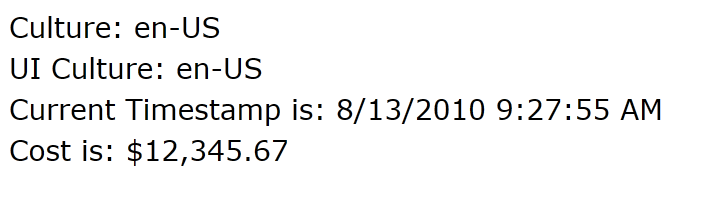
Now, let me tell my Silverlight app that I have a different culture information. I can do this without having to force a language pack installation of sorts and completely change my machine. Adding the culture/uiculture params to the <object> tag does the trick. I’ll change it to “de-de” for German. Here is the new output:
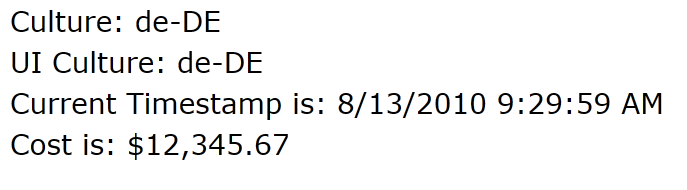
What?! Even thought the settings recognize a different culture, StringFormat is not doing what I expect. I would have expected a different date display for German settings (d.m.yyyy) and a different currency display instead of dollars.
Unfortunately this is an issue in StringFormat right now, but there is a simple workaround that if you are creating a localized app you can add to your code that shouldn’t affect your default language settings either. In my constructor I add this line of code:
1: this.Language = XmlLanguage.GetLanguage(Thread.CurrentThread.CurrentCulture.Name);
This tells the markup system to use the current culture settings as the UI language. XmlLanguage is a part of the System.Windows.Markup namespace, so ensure you call that out explicitly or add a using statement. Now refreshing my German settings sample I get:
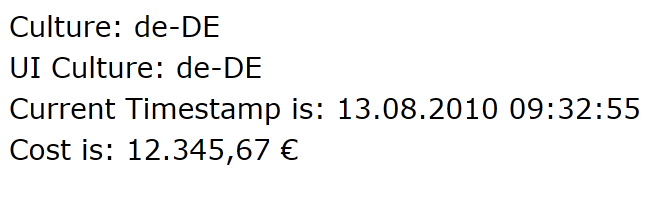
as expected. Changing (or removing the explicit setting of culture in my <object> tag) back to my default culture settings results in my US-English preferences being used and no need for me to change the XAML.
Hope this helps!
August 1st is here (well okay, so I'm a little late)…time for an updated Windows 7 Smashing Magazine theme pack!

The August themes seem to be continuing the focus on 'summer' things. So here is your August 2010 Windows 7 Theme Packs for wallpapers – unfiltered and uncensored – about 35 wallpapers in all.
For details on these and to see past ones, visit the Smashing Magazine Windows 7 Theme information for the specifications I used for the theme pack as well as previous themes. Want to participate and submit yours? Join in!
So it appears we’ll be having a Professional Developer’s Conference after all this year. Today we announced the PDC10.
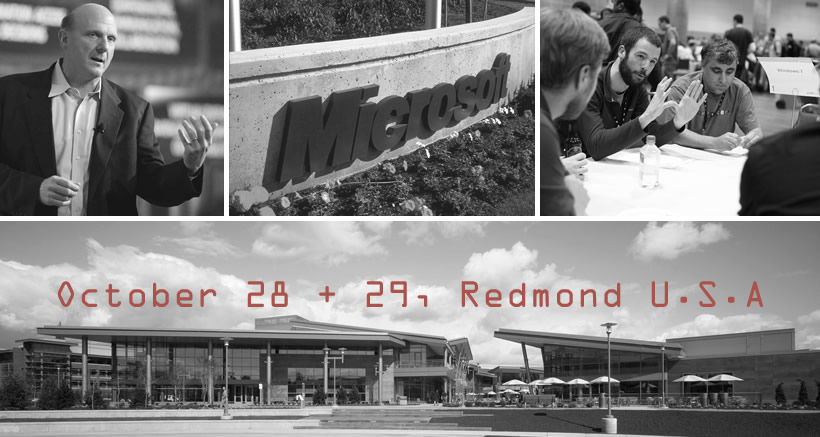
Unlike previous ones in ‘conference cities’ this one will be held at the source of the information, on Microsoft’s campus in Redmond, Washington. The price looks to be less than previous as well, so check out the details at the Microsoft PDC event site.
If you’ve never been to Redmond before, or if you have, allow me to give you some friendly advice. If you think you might be coming, book a hotel room now. Redmond isn’t a conference city like LA, Atlanta, New Orleans, etc. That means there isn’t massive amounts of 50-floor hotels sprawling all over the place. Here’s my tips (as a former frequent traveler TO Redmond) on where to stay. This is my own personal advice based on experience.
NOTE: While some addresses may be in Bellevue, if you aren’t familiar with the area, know that Microsoft’s main campus in some areas spans the two cities (Bellevue/Redmond).
Here’s some hotel options for you:
- Homestead Suites – this is THE closest hotel to the main campus. I’ve stayed here once. And frankly I haven’t stayed since. My experience is just one, but it wasn’t a positive one. I know others who have stayed here with no issues though and enjoyed the stay. These are suite-style rooms with a kitchenette usually and don’t have daily maid service. It is relatively inexpensive though and good for a budget. If you want to be CLOSE to main campus (i.e., you could walk to conference center), this is the place. That being said, there is no night life :-).
- Fairfield Inn, Courtyard by Mariott, Residence Inn Bellevue – these places are literally in the same parking lot. It isn’t right on campus, but will be the next closest ones. If you wanted to walk to campus you could, but it would be a healthy walk. I almost always stay at either the Courtyard or the Fairfield. They are clean, roomy, and have the amenities I desired. I don’t think you can go wrong with any of these choices. The Residence Inn provides rooms that are more suite-like for sharing with groups of folks. These are all reasonably priced in the area. Not a ton of nightlife around here either.
- Redmond Mariott Town Center, Residence Inn Redmond – these are right next to each other as well and in the Redmond Town Center area – which is closer to downtown Redmond. Town Center is like an outdoor retail mall/shopping center with restaurants, shopping, movie theater, etc. It’s a good place if you need something around you. Not everything is open always after hours, but better chances here walkable than other places. This is not a walkable location to campus though.
- Redmond Inn and Silver Cloud Inn – these are two other off-brand hotels that are in Redmond that a lot of business visitors use. They are economical and generally no issues. I’ve stayed at the Silver Cloud before and have had no issues with it. The Redmond Inn is close to campus and you could walk if needed to. These are more budget hotels.
- The Heathman Hotel Kirkland – my favorite place to stay if you don’t mind not being in Redmond. This place defines service. Kirkland is a town just west of Redmond and would be a drive to campus (about 10 mins with no traffic). The hotel is in downtown Kirkland which has a pretty decent local nightlife (weather permitting). They have a courtesy driver that will take you places as needed (not sure if they will drive you daily to the conference center, but you might ask if you have a group). It’s a modern, more contemporary hotel. When my family comes to visit, if I don’t have room, I’m telling them to stay here.
There are others, of course, but I don’t have experience in them. My guess is these will fill up fast. Then you will be looking at downtown Bellevue (a drive) for a place or – worse – Seattle, which would not be ideal for a conference goer (but if you want nightlife, then stay in Seattle). My guess is that the conference may be providing shuttles from certain hotels but I haven’t heard anything myself. UPDATE: I just heard no shuttles on this one, so my recommendation is pick close to campus or find a MSFT buddy who can pick you up :-). Seattle metro area has great mass transit as well though!
I would recommend booking early if you want to be close to campus. I’m sure these will sell out VERY quickly. Redmond/Bellevue/Kirkland is a very diverse area with lots of multi-cultural eating locations and natural/organic food options as well (if you want Pho, check out Saigon City on Bel-Red Rd).
Hope this helps and see you at PDC10!